San's IL2 Fov Changer

Discussions about getting games to run in a Multi-Mon setup.
San
Posts: 26
Joined: 08 May 2009, 23:42

San's IL2 Fov Changer

Post by San »

[UPDATE 31/05/2009]
I just have upload the new version (v.1.0.5.6 Beta)
The best innovation is the high speed activation/reactivation time (less than one second, some cockpits with only 200ms).

Download from:
http://il2fovchanger.byethost7.com/

For those who want to help. If you observe visual anomalies send me or post a debug tab screenshot and tell me the plane you were using
Hello:
I recently have done a program which enables change the maximum fov to IL2 so users with normal, wide and softTH/triple head monitors can play with this great game as they always have wanted to play.
You can watch the progress on my web:

[Update 09/05/2009]
San's IL2 Fov Changer Version 1.0 with english manual released!!
Visit my web to download
Updates:
- Autoactivate (no need to press ctrl+z)
- Autoreactivate
- Maximum/Minimum Fov limits
- And many more, read the manual before use it.

Regards

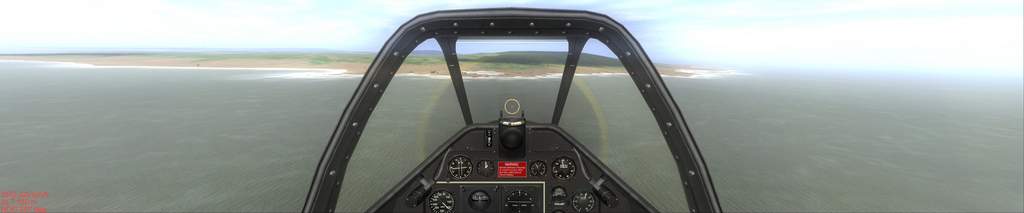
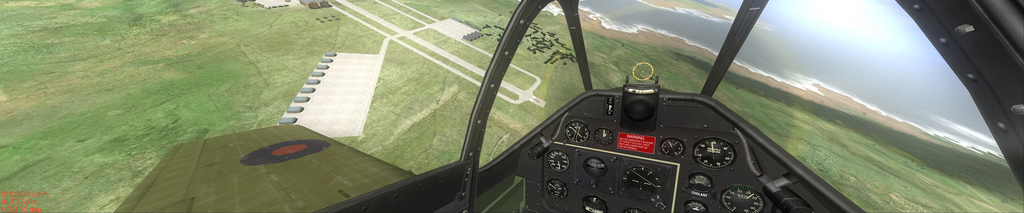
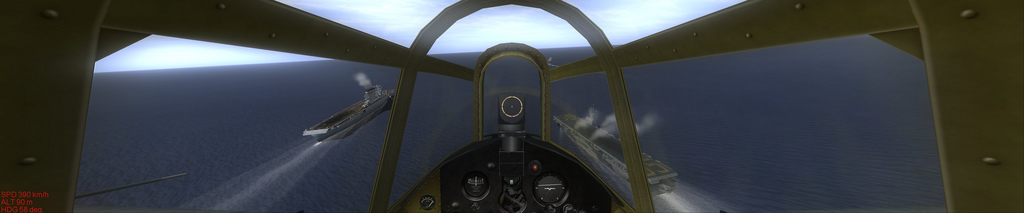
Triple monitor examples with 135 Fov


Single monitor examples with 101 Fov


The web has the version 0.98 Beta but this weekend I'll try to post version 1.0 Beta which is easier to use with the english manual.

Please test it and feed back.

Regards
San
garcol
Posts: 59
Joined: 24 Dec 2006, 23:51

San's IL2 Fov Changer

Post by garcol »

Finally. Iam going to have to check this out. Ugggh I have to find some time to get back into gaming...
Thank you San!!!!!!
San
Posts: 26
Joined: 08 May 2009, 23:42

San's IL2 Fov Changer

Post by San »

I need your feedback, because some users are having troubles with the autoreactivate option (for others and for me everything works ok)
User avatar
skipclarke
Founder
Founder
Posts: 7358
Joined: 13 Oct 2003, 05:00

San's IL2 Fov Changer

Post by skipclarke »

I posted this as a news post on our front page and twitter.
neosin
Posts: 186
Joined: 28 Oct 2008, 09:35

San's IL2 Fov Changer

Post by neosin »

check this out

http://www.youtube.com/watch?v=U3SpB16qnK4

can not wait!!!!
PeterP
Posts: 3
Joined: 10 May 2009, 10:43

San's IL2 Fov Changer

Post by PeterP »

check this out
http://www.youtube.com/watch?v=U3SpB16qnK4
can not wait!!!!


^^^^ "Birds of Prey" will be a console only adaption of IL2.

A more on-topic video of the FOV Canger on a triple head setup:

http://www.youtube.com/watch?v=Bk3ixRVwNkA
neosin
Posts: 186
Joined: 28 Oct 2008, 09:35

San's IL2 Fov Changer

Post by neosin »

[quote]check this out
http://www.youtube.com/watch?v=U3SpB16qnK4
can not wait!!!!


^^^^ "Birds of Prey" will be a console only adaption of IL2.

A more on-topic video of the FOV Canger on a triple head setup:

http://www.youtube.com/watch?v=Bk3ixRVwNkA

I've seen alot of places saying it will also be released for pc? I don't c why they won't
PeterP
Posts: 3
Joined: 10 May 2009, 10:43

San's IL2 Fov Changer

Post by PeterP »


I've seen alot of places saying it will also be released for pc? I don't c why they won't


Sorry neosin,

but I didn't saw that this thread is named something like:
"will 'Birds of Pray' work with San's FOV Changer and will "Birds of Pray" released for PC?" - feel free to open your own thread...;)

Back to topic:


Please test it and feed back.

Regards
San


Tested it with IL2 1946 (4.08,AAA-Unifiedv1.1)in OpenGL / TH2GO digital@3840x1024 / Windows XP - .Net Framework 2.0/TrackIR4-6DOF

Works flawless without bugs for me.

Autoactivate and quicksearch option on (switched off the autozoom of the 6DOF mod)

Happily enjoying IL2 on a TH the first time!
Thank you San! :D
baff
Posts: 16
Joined: 30 Jul 2008, 19:35

San's IL2 Fov Changer

Post by baff »

Sorry San, but it does not work for me. Neither version 1.0 nor .98.

Here is my error log from 1.0 on aVista 32bit system with Il2 1946.


See the end of this message for details on invoking
just-in-time (JIT) debugging instead of this dialog box.

************** Exception Text **************
System.Net.Sockets.SocketException: The requested address is not valid in its context
at System.Net.Sockets.Socket.setMulticastOption(SocketOptionName optionName, MulticastOption MR)
at System.Net.Sockets.Socket.SetSocketOption(SocketOptionLevel optionLevel, SocketOptionName optionName, Object optionValue)
at System.Net.Sockets.UdpClient.JoinMulticastGroup(IPAddress multicastAddr)
at System.Net.Sockets.UdpClient.JoinMulticastGroup(IPAddress multicastAddr, Int32 timeToLive)
at FovChanger.fMain.recibirUDP()
at FovChanger.fMain.activateFOV(Single fov, Boolean primeraVez)
at FovChanger.fMain.btStart_Click_1(Object sender, EventArgs e)
at System.Windows.Forms.Control.OnClick(EventArgs e)
at System.Windows.Forms.Button.OnClick(EventArgs e)
at System.Windows.Forms.Button.OnMouseUp(MouseEventArgs mevent)
at System.Windows.Forms.Control.WmMouseUp(Message& m, MouseButtons button, Int32 clicks)
at System.Windows.Forms.Control.WndProc(Message& m)
at System.Windows.Forms.ButtonBase.WndProc(Message& m)
at System.Windows.Forms.Button.WndProc(Message& m)
at System.Windows.Forms.Control.ControlNativeWindow.OnMessage(Message& m)
at System.Windows.Forms.Control.ControlNativeWindow.WndProc(Message& m)
at System.Windows.Forms.NativeWindow.Callback(IntPtr hWnd, Int32 msg, IntPtr wparam, IntPtr lparam)


************** Loaded Assemblies **************
mscorlib
Assembly Version: 2.0.0.0
Win32 Version: 2.0.50727.3074 (QFE.050727-3000)
CodeBase: file:///C:/Windows/Microsoft.NET/Framework/v2.0.50727/mscorlib.dll
----------------------------------------
FovChanger
Assembly Version: 1.0.0.0
Win32 Version: 1.0.0.0
CodeBase: file:///C:/Users/fatty/Desktop/San%20IL2FOVChanger_1_0/San%20IL2FOVChanger_1_0.exe
----------------------------------------
System.Windows.Forms
Assembly Version: 2.0.0.0
Win32 Version: 2.0.50727.3053 (netfxsp.050727-3000)
CodeBase: file:///C:/Windows/assembly/GAC_MSIL/System.Windows.Forms/2.0.0.0__b77a5c561934e089/System.Windows.Forms.dll
----------------------------------------
System
Assembly Version: 2.0.0.0
Win32 Version: 2.0.50727.3053 (netfxsp.050727-3000)
CodeBase: file:///C:/Windows/assembly/GAC_MSIL/System/2.0.0.0__b77a5c561934e089/System.dll
----------------------------------------
System.Drawing
Assembly Version: 2.0.0.0
Win32 Version: 2.0.50727.3053 (netfxsp.050727-3000)
CodeBase: file:///C:/Windows/assembly/GAC_MSIL/System.Drawing/2.0.0.0__b03f5f7f11d50a3a/System.Drawing.dll
----------------------------------------
System.Configuration
Assembly Version: 2.0.0.0
Win32 Version: 2.0.50727.3053 (netfxsp.050727-3000)
CodeBase: file:///C:/Windows/assembly/GAC_MSIL/System.Configuration/2.0.0.0__b03f5f7f11d50a3a/System.Configuration.dll
----------------------------------------
System.Xml
Assembly Version: 2.0.0.0
Win32 Version: 2.0.50727.3074 (QFE.050727-3000)
CodeBase: file:///C:/Windows/assembly/GAC_MSIL/System.Xml/2.0.0.0__b77a5c561934e089/System.Xml.dll
----------------------------------------

************** JIT Debugging **************
To enable just-in-time (JIT) debugging, the .config file for this
application or computer (machine.config) must have the
jitDebugging value set in the system.windows.forms section.
The application must also be compiled with debugging
enabled.

For example:


When JIT debugging is enabled, any unhandled exception
will be sent to the JIT debugger registered on the computer
rather than be handled by this dialog box.

Thanks for your efforts.
San
Posts: 26
Joined: 08 May 2009, 23:42

San's IL2 Fov Changer

Post by San »

I have seen a strange bug in Windows Vista. It seens that my program can´t detect the primary ip. The new version I will upload after some more tests, in theory, fix it
But now you can do this easy process:

Open the fov changer pref.ini with notepad and write your local ip in the line between 1 and 1711 (in the example is 192.168.0.1). Save and test
110
Z
Q
B
N
1
192.168.0.1
1711
20
135
11
S
101
D
120
F
150
G
20
If not works, send me more detailed information
baff
Posts: 16
Joined: 30 Jul 2008, 19:35

San's IL2 Fov Changer

Post by baff »

My IP address was already written there.
So no change. Sorry sir.

135
Z
Q
B
N
1
192.168.0.33
1711
20
135
3
S
101
D
120
F
150
G
20


This is the error mesage from version 0.98

See the end of this message for details on invoking
just-in-time (JIT) debugging instead of this dialog box.

************** Exception Text **************
System.FormatException: Input string was not in a correct format.
at System.Number.StringToNumber(String str, NumberStyles options, NumberBuffer& number, NumberFormatInfo info, Boolean parseDecimal)
at System.Number.ParseSingle(String value, NumberStyles options, NumberFormatInfo numfmt)
at System.Single.Parse(String s, NumberStyles style, NumberFormatInfo info)
at System.Convert.ToSingle(String value)
at FovChanger.fMain.bt135_Click_1(Object sender, EventArgs e)
at System.Windows.Forms.Control.OnClick(EventArgs e)
at System.Windows.Forms.Button.OnClick(EventArgs e)
at System.Windows.Forms.Button.OnMouseUp(MouseEventArgs mevent)
at System.Windows.Forms.Control.WmMouseUp(Message& m, MouseButtons button, Int32 clicks)
at System.Windows.Forms.Control.WndProc(Message& m)
at System.Windows.Forms.ButtonBase.WndProc(Message& m)
at System.Windows.Forms.Button.WndProc(Message& m)
at System.Windows.Forms.Control.ControlNativeWindow.OnMessage(Message& m)
at System.Windows.Forms.Control.ControlNativeWindow.WndProc(Message& m)
at System.Windows.Forms.NativeWindow.Callback(IntPtr hWnd, Int32 msg, IntPtr wparam, IntPtr lparam)


************** Loaded Assemblies **************
mscorlib
Assembly Version: 2.0.0.0
Win32 Version: 2.0.50727.3074 (QFE.050727-3000)
CodeBase: file:///C:/Windows/Microsoft.NET/Framework/v2.0.50727/mscorlib.dll
----------------------------------------
FovChanger
Assembly Version: 1.0.0.0
Win32 Version: 1.0.0.0
CodeBase: file:///C:/Users/fatty/Desktop/IL2FovChanger_0_98B/IL2FOVChanger%200.9.8.exe
----------------------------------------
System.Windows.Forms
Assembly Version: 2.0.0.0
Win32 Version: 2.0.50727.3053 (netfxsp.050727-3000)
CodeBase: file:///C:/Windows/assembly/GAC_MSIL/System.Windows.Forms/2.0.0.0__b77a5c561934e089/System.Windows.Forms.dll
----------------------------------------
System
Assembly Version: 2.0.0.0
Win32 Version: 2.0.50727.3053 (netfxsp.050727-3000)
CodeBase: file:///C:/Windows/assembly/GAC_MSIL/System/2.0.0.0__b77a5c561934e089/System.dll
----------------------------------------
System.Drawing
Assembly Version: 2.0.0.0
Win32 Version: 2.0.50727.3053 (netfxsp.050727-3000)
CodeBase: file:///C:/Windows/assembly/GAC_MSIL/System.Drawing/2.0.0.0__b03f5f7f11d50a3a/System.Drawing.dll
----------------------------------------
Microsoft.VisualBasic
Assembly Version: 8.0.0.0
Win32 Version: 8.0.50727.3053 (netfxsp.050727-3000)
CodeBase: file:///C:/Windows/assembly/GAC_MSIL/Microsoft.VisualBasic/8.0.0.0__b03f5f7f11d50a3a/Microsoft.VisualBasic.dll
----------------------------------------

************** JIT Debugging **************
To enable just-in-time (JIT) debugging, the .config file for this
application or computer (machine.config) must have the
jitDebugging value set in the system.windows.forms section.
The application must also be compiled with debugging
enabled.

For example:


When JIT debugging is enabled, any unhandled exception
will be sent to the JIT debugger registered on the computer
rather than be handled by this dialog box.
San
Posts: 26
Joined: 08 May 2009, 23:42

San's IL2 Fov Changer

Post by San »

Ok
The problem is that I got not Vista, so it is very difficult for me to fix an error that I don´t have. I have your feedback and other beta testers and this helps. When I get a Vista I try to fix the error

In v0.98 try to activate with the keys instead the buttons
(TNT)BW
Posts: 25
Joined: 10 Apr 2009, 20:27

San's IL2 Fov Changer

Post by (TNT)BW »

I've got Vista 32, and Triplehead2go. Version 1.0 would not execute for me at all so I tried .98. The program opened fine, in game the setup and start seemed to work, but nothing happens when I use the increase or decrease fov keys. :(
baff
Posts: 16
Joined: 30 Jul 2008, 19:35

San's IL2 Fov Changer

Post by baff »

Ok
The problem is that I got not Vista, so it is very difficult for me to fix an error that I don´t have. I have your feedback and other beta testers and this helps. When I get a Vista I try to fix the error

In v0.98 try to activate with the keys instead the buttons

Thanks San, no worries. I appreciate the efforts you have made.

In version .98, when I activate with the keys it makes the "beep" noise. But nothing else happens.
San
Posts: 26
Joined: 08 May 2009, 23:42

New version Windows Vista Compatible

Post by San »

Hello!
Good news for everyone!

San's IL2 Fov Changer Version 1.0.2 Beta released.
Updates:
- Windows Vista compatible.
- Configurable Increase/Decrease Fov Angle for smooth zoom.
- Maximum and minimun Fov configurable

Visit my web to download

http://webs.ono.com/il2fovchanger/
Regards
baff
Posts: 16
Joined: 30 Jul 2008, 19:35

San's IL2 Fov Changer

Post by baff »

You beauty!
Works a treat.

Thanks very much San.
You are a genius.
PokerCrow
Posts: 3
Joined: 20 May 2009, 11:47

Last beta crashes for me

Post by PokerCrow »

Hello San, I was very excited to learn about this FOV changer, however it doesn't work for me. I'm running IL2 Sturmovik 1946 on WinXP SP3 Professional and got .NET Framework 3.5 installed. I tried your latest v1.0.2 beta and when I attempt to run the .exe it crashes right away displaying the generic windows crash message (the one that asks whether you want to send the crash report to Microsoft or not). Does anybody around here has experimented a similar problem? I don't think it has anything to do with my hardware but just in case this is my rig: Intel Core 2 Duo 2.66GHz cpu, 3.24GB RAM & NVidia 9800GTX+ 512MB video card.
baff
Posts: 16
Joined: 30 Jul 2008, 19:35

San's IL2 Fov Changer

Post by baff »

Next is a mod to move the HUD altitude and speed information etc out of the bezel and into the centre!

I'll post here if I find one.
metalnwood
Posts: 75
Joined: 02 Dec 2008, 11:55

San's IL2 Fov Changer

Post by metalnwood »

This is fantastic. IL2 is one of the only games I usually play but I havent been able to use it on my th2go so I havent played it much lately.

It worked with no problems at all.

There is an issue but not related to your program. It seems when I get these large FOV's on my 3x24" I get problems when using trackir. It seems that parts of the engine dont move when you look around so it effectively blocks your view sometimes...

I guess this is a IL2 issue. I dont think it is on all planes though because my first go with a quick mission didnt have the problem. When I went on line and the plane choices were limited then I got the problem.

Thanks for the program though. I never thought of doing this back when I was sending commands to IL2 using devicelink for a cockpit.
San
Posts: 26
Joined: 08 May 2009, 23:42

San's IL2 Fov Changer

Post by San »

PowerCrow:
I need more information about the error, It is before startup?
metalnwood
Devicelink helps il2 fov changer to do its work but the process is more complicated.
Regards
Post Reply

Who is online

Users browsing this forum: No registered users and 4 guests

