
No H-SPAN in Vista - only soultion: return to XP?

Video cards, monitors, CPUs and the like
Post Reply
ThrottleUp
Posts: 12
Joined: 28 Feb 2009, 13:47

No H-SPAN in Vista - only soultion: return to XP?

Post by ThrottleUp »

Hallo everyone :D

Good people please could you help or offer me some advice? Sorry for the rambling post but Im so rudely shocked after spending money on this new machine that this forum seemed the best place to ask.

My favorite gaming activity is Flight Simulator (Microsoft FS9 & FSX Acceleration). My old computer was a Dell Dimension - XP Home, Pentium 4 with nVidia 7600GT video card.

(1.) I have two monitors both are identical in size and brand - they are Philips 20" LCDs (DVI) 1680 X 1050.
(2.) With my old Dell the nVidia card had an option called Horizontal Span (H-Span). This was brilliant for playing the flight sims because essentially I was using a 3360 X 1050 display (2 X 1680s).
(3.) Last Christmas I treated myself to a new machine (see my sig). As you can see I now have an ATI card.
(4.) I spent days wondering why I could not find an H-Span option until I discovered with a shock that Vista does not support it and if Im not mistaken neither does ATI :(

I spent months carefully researching the specs of my new machine and now I feel so gutted because I could span across both screens with my creaky old Dell but cannot do the same with this Core i7 machine and its "high end" HD4870! Ridiculous situation!! :?

I have been pointed towards Matrox TH2G and Ultramon but these do not offer "true" spanning where the OS core itself "thinks" your multiple monitors are *ONE* big one. Is there anything tweakable in Vista to "trick" it into H-Span? Or does ATI not have it all?

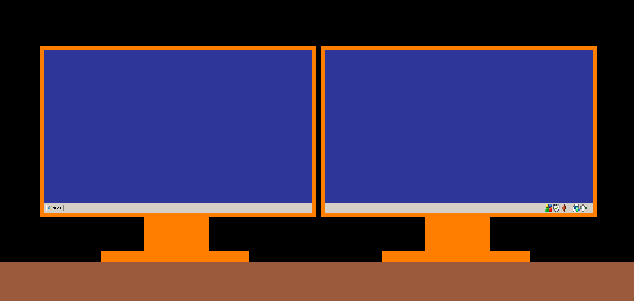
As you all know H-SPAN is *not* Dual View or Extended Desktop. With H-SPAN Windows treats two (or more) monitors as *one* big display. So if you have two monitors each of which is 1680 X 1050 if you enable H-SPAN you will have a 3360 X 1050 display. So your start button will be on the bottom left of the left monitor and the clock/system tray on the bottom right of the right monitor as my drawing shows:

True H-Spanning that I had in XP Home & nVidia 7600GT

If none of the above work then I plan get rid of Vista and go back to XP and dear old H-Span. However I have never used an ATI card under XP.

Therefore I wanted to ask two main questions:

1. Is there a way to fool the flight simulators into using a 3360 X 1050 resolution?

2. Those of you on here who use ATI cards under Windows XP Home/Professional - is there a Horizontal Span option available in your Catalyst/Hydravision?
(Im asking this because Im afraid that even under XP my HD4870 1GB will not have H-SPAN!) If this is case then I will have to sell of the 4870 and buy a nVidia GTX280.

Thanks for reading and I do look forward to your advice. Having to fly around using one screen feels so silly with this high-power machine![/img]

anthonylei
Posts: 33
Joined: 03 Feb 2006, 15:31

No H-SPAN in Vista - only soultion: return to XP?

Post by anthonylei »

first of all... why do you want a 3360 X 1050 display ???

I dont really see a difference in using 2 x 22"
User avatar
Mergatroid
Posts: 185
Joined: 27 Feb 2007, 00:20

No H-SPAN in Vista - only soultion: return to XP?

Post by Mergatroid »

No, you cannot horizontally span your desktop in Vista. The new way Vista handles driver access to the os will not allow it. At least, that's MS's story and they are sticking to it.

You have 2 options:

1. Revert to XP.
2. Use SoftTH to force it. There are people who have been able to get it to work for just 2 monitors (myself included, even though I don't use it anymore), but it can be a pain.

Google will help you find softth.
ThrottleUp
Posts: 12
Joined: 28 Feb 2009, 13:47

No H-SPAN in Vista - only soultion: return to XP?

Post by ThrottleUp »

Thanks Mergatroid I will check out SoftTH - at first glance it seems I need 2 graphics cards to get it to work? Will definetly have a look although I can sense that I will probably end up binning Vista and going back to XP.

Will my ATI card give H-SPAN in XP? :)
User avatar
Tamlin
Editors
Editors
Posts: 1371
Joined: 10 Jun 2005, 21:24

No H-SPAN in Vista - only soultion: return to XP?

Post by Tamlin »

Yes it can. Its done through displays manager in CCC. Press f1 for help on the different modes when you have selected displays manager. Your choices will be "stretch horizontally" and "stretch vertically". :)

Not available in Vista, as mentioned above.
ThrottleUp
Posts: 12
Joined: 28 Feb 2009, 13:47

No H-SPAN in Vista - only soultion: return to XP?

Post by ThrottleUp »

Yes it can. Its done through displays manager in CCC. Press f1 for help on the different modes when you have selected displays manager. Your choices will be "stretch horizontally" and "stretch vertically".


Thanks Tamlin
User avatar
Tamlin
Editors
Editors
Posts: 1371
Joined: 10 Jun 2005, 21:24

No H-SPAN in Vista - only soultion: return to XP?

Post by Tamlin »


Thanks Tamlin


You're welcome :cheers
ThrottleUp
Posts: 12
Joined: 28 Feb 2009, 13:47

No H-SPAN in Vista - only soultion: return to XP?

Post by ThrottleUp »

Tamlin - just wanted to confirm something if you dont mind!! :D

Your choices will be "stretch horizontally"


Is this a span or just a stretch? I was wondering if this was a "true" span or just a stretch of the window.

Does the taskbar run across the bottoms of both screens (Start button will be on the bottom left of the left monitor and the clock/system tray on the bottom right of the right monitor)

Thanks :D
Mesh
Posts: 845
Joined: 28 May 2007, 03:10

No H-SPAN in Vista - only soultion: return to XP?

Post by Mesh »

I thought flight sims and especially the ms ones were the few games that natively supported multiple monitors, or perhaps only fsx or something does.

I remember seeing a setup with like 9 crts for a flight sim so I'm sure there are options for it, either that or I misread something somewhere.
User avatar
Mergatroid
Posts: 185
Joined: 27 Feb 2007, 00:20

No H-SPAN in Vista - only soultion: return to XP?

Post by Mergatroid »

at first glance it seems I need 2 graphics cards to get it to work


It will work with one card as long as it has 2 outputs.
User avatar
Tamlin
Editors
Editors
Posts: 1371
Joined: 10 Jun 2005, 21:24

No H-SPAN in Vista - only soultion: return to XP?

Post by Tamlin »

Tamlin - just wanted to confirm something if you dont mind!! :D

Your choices will be "stretch horizontally"


Is this a span or just a stretch? I was wondering if this was a "true" span or just a stretch of the window.

Does the taskbar run across the bottoms of both screens (Start button will be on the bottom left of the left monitor and the clock/system tray on the bottom right of the right monitor)

Thanks :D


It gives a combined resolution (as oposed to two resolutions), so its a span, not a stretch. :)

1600x1200 x2 becomes 3200X2400 in windows.
User avatar
P-Storm
Posts: 764
Joined: 24 Dec 2006, 18:56

No H-SPAN in Vista - only soultion: return to XP?

Post by P-Storm »

[quote]Tamlin - just wanted to confirm something if you dont mind!! :D

Your choices will be "stretch horizontally"


Is this a span or just a stretch? I was wondering if this was a "true" span or just a stretch of the window.

Does the taskbar run across the bottoms of both screens (Start button will be on the bottom left of the left monitor and the clock/system tray on the bottom right of the right monitor)

Thanks :D


It gives a combined resolution (as oposed to two resolutions), so its a span, not a stretch. :)

1600x1200 x2 becomes 3200X2400 in windows.

Tamlin, with 2 monitors it is either 1600x2400 (Vertical span) or 3200x1200 (Horizontal span). I know you could do it in xp with old drivers, but dunno if you can do it with the newer.
User avatar
Tamlin
Editors
Editors
Posts: 1371
Joined: 10 Jun 2005, 21:24

No H-SPAN in Vista - only soultion: return to XP?

Post by Tamlin »

Calculation error :P

You can do it with newer drivers on xp. I dont know if its broken in 9.2, but its advertised there at least in help section as available on xp.
ThrottleUp
Posts: 12
Joined: 28 Feb 2009, 13:47

No H-SPAN in Vista - only soultion: return to XP?

Post by ThrottleUp »

Tamlin - thank you again for confirming that! :D

I used to game regularly spanned across my 2 20" monintors on XP but like I mentioned that option has vanished with Vista...something to do with "architectural differences" or something like that!!

I thank you all for your replies - I have deiced to be rid of Vista altogether. First I have to buy a copy of XP Home. What a nuisance...if ONLY I had know about this H-SPAN issue *before* I bought my new computer I would have so got it with XP installed. Oh well no point crying anymore :(

Of course the OTHER spanner in the works could be Windows 7. It actually looks like its shaping up to be a great OS but....will it have H-SPAN?! :?

Im gonna hurl if I discover (after installing XP) that WIndows 7 supports H-SPAN :o
Post Reply

Who is online

Users browsing this forum: No registered users and 2 guests


