Page 1 of 1
Planescape: Torment
Posted: 21 Dec 2007, 21:11
by The_cranky_hermit
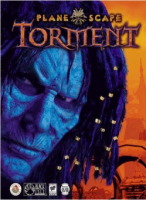 Widescreen Grade: CMulti-monitor Grade: UnsupportedRead Full Detailed Report - Planescape: TormentPlanescape: Torment is a top-down RPG made by Black Isle Studios (closed in 2003) and released in 1999. This game focuses more on the story telling (the 'role playing' part of RPG) than fighting. It has some really nice and funny dialogs delivered in both voice and text. You can avoid many combat situation by talking your way out of it. Which is pretty nice. The game received very high review scores but didn't sell too well. I was hoping for a sequel after I played through it the first time on my old junky computer way back when. Alas, I remember reading an interview where Black Isle said they don't want to spend time making a sequel of the same game but instead work on new game. But PT is so good. It desperately needs a modern day sequel. If not, then maybe a spiritual successor ala Bioshock to System Shock?
Planescape Torment: Detailed Report
Posted: 26 Jan 2008, 09:06
by DreamShake
dude......how u change the resolution??
Planescape Torment: Detailed Report
Posted: 26 Jan 2008, 20:28
by The_cranky_hermit
Use the MGL. It will reveal everything.
Planescape Torment: Detailed Report
Posted: 27 Jan 2008, 03:42
by DreamShake
what does MGL stand for?
Planescape Torment: Detailed Report
Posted: 27 Jan 2008, 03:43
by The_cranky_hermit
Go here and then leave me alone.
http://www.widescreengamingforum.com/wiki/index.php/Master_Games_List_-_P
Planescape Torment: Detailed Report
Posted: 05 Oct 2008, 23:52
by august
Thought I'd post this here instead of making a new thread: 1280x800 UI mod for Planescape: Torment -
http://www.rpgcodex.net/phpBB/viewtopic.php?t=26591
super awesome.
Planescape Torment: Detailed Report
Posted: 31 Dec 2008, 04:23
by dental
Planescape Torment: Detailed Report
Posted: 31 Dec 2008, 04:51
by skipclarke
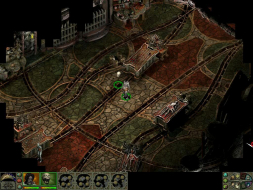
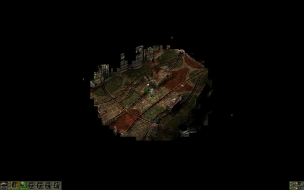
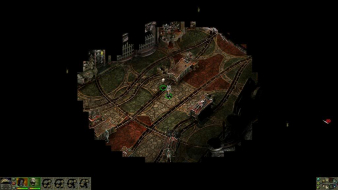
If you walk around and explore, does it ever fill the screen?
Planescape Torment: Detailed Report
Posted: 31 Dec 2008, 05:21
by Tanuki
If you walk around and explore, does it ever fill the screen?
Yes. But only if there is enough data. Some of the smaller maps will not cover higher resolutions.
Planescape Torment: Detailed Report
Posted: 31 Dec 2008, 05:31
by The_cranky_hermit
I can confirm that 1440x900 and 1920x1200 work.
Grade: D+
CCE: 99.5%
Hack solution is a damaging flaw
Re: Planescape Torment: Detailed Report
Posted: 28 May 2010, 11:38
by idoru2099
Ghostdog's UI now supports all resolutions.
Re: Planescape Torment: Detailed Report
Posted: 05 Jun 2010, 19:31
by skipclarke
Very nice update. I really need to play PS:T.
Re: Planescape Torment: Detailed Report
Posted: 07 Jun 2010, 20:15
by UK_John
I registered here just to ask why, if Fallout 1/2 was made with the same engine, and the widescreen/hi-res mods for those games give you full screen cutscenes, why do none of the PS:T widescreen/hi-res mods give us full screen PS:T cutscenes?
The moment you even go to just 800x600 you get the cutscenes as a window 1/3 the size of the screen!
Why can't I have a 1024x768 game screen with stretched cutscenes, or whatever method is used in the Fallout 1/2 widescreen/hi-res mods? Because that's what I get when I play fallout 1/2!
Just bought this game, again
Posted: 30 Dec 2011, 23:59
by CrackerJackMack
Do at least 1 thorough 4 here: http://www.gog.com/en/news/mod_spotlight_planescape_torment_mods_guide/0/?pp=a2e33d344f272e100d4a8efeabc7ae8a60a8ba7a
Then apply this to fix DDraw issues: http://www.shsforums.net/topic/48732-ddraw-fix/
Re: Planescape: Torment
Posted: 11 Jul 2013, 21:20
by akaine
For those ATI users who have problems with getting real fullscreen with native aspect rate resultions lower than monitor's maximum (i.e. for ex. your monitor's native resolution is 1920x1080 and you want 1280x720) instead of getting large black borders around the centered picture:
1. Using CCC v13+ go to "My Digital Flat Panels", select the Properties (Digital Flat-Panel) menu and in the appeared screen tick the "Enable GPU scaling" checkbox under the "Image Scaling" section:

Btw, this applies for all Infinity Engine full screen mods.