
Dell says in his website it can only display 60Hz at 1680x1050, but I want to know if there are any workaround, trick, or whatever to force my monitors to use 57Hz...
In display propierties I can't see it, nor in nvidia panel...
Please any advice will be very appreciated...
Dell 2005FPW at 57Hz?
Dell 2005FPW at 57Hz?
Just follow the instuctions for adding the custom 5040x1050 resolution (several threads on this) but set the width to 1680 instead of 5040. The refresh rate is also set in the custom res setup.
[GTX1080 - 4.48GHz 4690k - planning projector mayhem]
Dell 2005FPW at 57Hz?
Do you mean the CUDA driver to make a custom res?
Dell 2005FPW at 57Hz?
Let me clarify:
I have ONE Dell 2005fpw installed in my system (Vista64) no drivers for it, I don't have the TH2Go installed nor any matrox drivers.
I want to TEST if my monitor can handle 57Hz. ¿HOW CAN I DO THIS?
I have read the posts but it's not clear to me what "custom resolution" is exactly and where is located... in nvidia control panel? (it only let me select 60Hz)... in matrox software?
I guess it is a part of Matrox software but I don't know why can't you test your monitor without Matrox soft and hard...
What if you have only one widescreen and you want to test it at 57Hz to see if you can use the new modes? Do you must buy a TH2Go and then test???? it makes no sense to me!
Sorry but I'm very frustrated with this... poor documentation, Matrox support a little wierd... bah I don't understand this kind of things....
I have ONE Dell 2005fpw installed in my system (Vista64) no drivers for it, I don't have the TH2Go installed nor any matrox drivers.
I want to TEST if my monitor can handle 57Hz. ¿HOW CAN I DO THIS?
I have read the posts but it's not clear to me what "custom resolution" is exactly and where is located... in nvidia control panel? (it only let me select 60Hz)... in matrox software?
I guess it is a part of Matrox software but I don't know why can't you test your monitor without Matrox soft and hard...
What if you have only one widescreen and you want to test it at 57Hz to see if you can use the new modes? Do you must buy a TH2Go and then test???? it makes no sense to me!
Sorry but I'm very frustrated with this... poor documentation, Matrox support a little wierd... bah I don't understand this kind of things....
Dell 2005FPW at 57Hz?
Its in the nVidia Control panel. Its all a lot easier than I think you suspect.
None of this has anything to do with Matrox yet as you dont have a TH2G.
To test 1680x1050 57hz (ie to see if your monitor will work in 5040x1050 triplehead 57hz) simply do the following:
Right Click on Desktop and select NVidia Control Panel.
Under the Display drop down mention on the Left select "Manage Custom Resolutions".
Put in 1680 (Horizontal value) and 1050 (Vertical), change GDI refresh to 57. Click on "Test".
Thats it.
To actually Setup 5040x1050 57hz, do the following:
Right Click on Desktop and select NVidia Control Panel.
Under the Display drop down mention on the Left select "Manage Custom Resolutions".
Select Create, put in 5040 (on the Horizontal value) and 1050 (Vertical).
GDR Refresh set to 57, bits per pixel 32.
Then click on "Advanced"
In the Back-end Parameters, Timing Standard section change it to CVT Reduced Blank first, then select "Manual".
Setup the Manual timing as per this image:
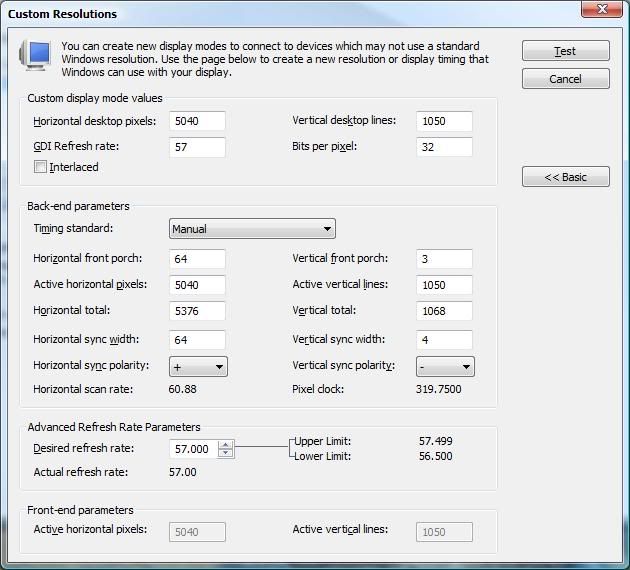
None of this has anything to do with Matrox yet as you dont have a TH2G.
To test 1680x1050 57hz (ie to see if your monitor will work in 5040x1050 triplehead 57hz) simply do the following:
Right Click on Desktop and select NVidia Control Panel.
Under the Display drop down mention on the Left select "Manage Custom Resolutions".
Put in 1680 (Horizontal value) and 1050 (Vertical), change GDI refresh to 57. Click on "Test".
Thats it.
To actually Setup 5040x1050 57hz, do the following:
Right Click on Desktop and select NVidia Control Panel.
Under the Display drop down mention on the Left select "Manage Custom Resolutions".
Select Create, put in 5040 (on the Horizontal value) and 1050 (Vertical).
GDR Refresh set to 57, bits per pixel 32.
Then click on "Advanced"
In the Back-end Parameters, Timing Standard section change it to CVT Reduced Blank first, then select "Manual".
Setup the Manual timing as per this image:
[GTX1080 - 4.48GHz 4690k - planning projector mayhem]
Dell 2005FPW at 57Hz?
Ok, thank you very much sir!
I have tested it in my job right now, and yes the "manage custom resolution" appears BUT in my system don't! I think it must be because my screen is listed a s generic monitor...
For my Dell 2005fpw there isn't Vista64 drivers... I tried to use an .inf file from XP, and although I pointed to the .inf file, Vista doesn't recognize it!
Is there any way to use XP monitor drivers in Vista? or manually editing the generic driver to include those 57Hz?
What a mess
BTW I have posted in dell support site requesting the vista drivers. The 20085fpw is 4 years old... I think it's not so old.
Thanks again
I have tested it in my job right now, and yes the "manage custom resolution" appears BUT in my system don't! I think it must be because my screen is listed a s generic monitor...
For my Dell 2005fpw there isn't Vista64 drivers... I tried to use an .inf file from XP, and although I pointed to the .inf file, Vista doesn't recognize it!
Is there any way to use XP monitor drivers in Vista? or manually editing the generic driver to include those 57Hz?
What a mess
BTW I have posted in dell support site requesting the vista drivers. The 20085fpw is 4 years old... I think it's not so old.
Thanks again
Dell 2005FPW at 57Hz?
Its not appearing as you likely selected Basic Views when you started it originally. There is an "Advanced Settings" view too.
Exactly what drivers do you have loaded and what appears under the Display drop down menu, can you post a screenshot?
It isnt a Monitor driver issue nor can you use XP drivers in Vista Im afraid!
Exactly what drivers do you have loaded and what appears under the Display drop down menu, can you post a screenshot?
It isnt a Monitor driver issue nor can you use XP drivers in Vista Im afraid!
[GTX1080 - 4.48GHz 4690k - planning projector mayhem]
Dell 2005FPW at 57Hz?
Now I can not do it, I am at work. When I arrive at home I will post a screenshot and try what you are saying...
I was with the beta drivers 180.43, but Yesterday I installed the 174.xx CUDA drivers... But nothing...
I think I must clean all existing drivers and try with new ones.. BTW what drivers do you think are the best?
I was with the beta drivers 180.43, but Yesterday I installed the 174.xx CUDA drivers... But nothing...
I think I must clean all existing drivers and try with new ones.. BTW what drivers do you think are the best?
Who is online
Users browsing this forum: No registered users and 3 guests