Dead Space is a third-person survival horror-action video game, developed by EA Redwood Shores for PlayStation 3, Xbox 360, and Microsoft Windows. The player takes on the role of an engineer named Isaac Clarke, who battles a polymorphic, virus-like, alien infestation called the 'Corruption', which turns humans into grotesque alien monsters called 'Necromorphs',on board a stricken interstellar mining ship.
One question - in the "cut-scenes" is it possible to move your head around?
The only "cut-scene" I have encountered so far is the intro, and in the intro you can move the camera; but the movement is limited, you can't look behind you.
EVGA GeForce GTX 970 SC ACX 2.0 3.5GB | 3 X LG Flatron 24EA53VQ in Nvidia Surround | Optoma HD20
You can actually rotate the camera around in a complete circle during certain parts of the introduction. It uses the in-game engine and scales horizontally like the rest of the game.
IIRC the part when you can look behind you with the camera and actually see Isaac's face is only after your ride crashes at the landing dock.
The intro sequence doesn't show the black bars on the top and bottom that usually earmark what we call cutscenes, but this doesn't and that's what I have been saying all along; it mimics the behavior of the gameplay because it essentially is gameplay. The only reason I refer to this as a "cutscene" is because you can't move and the camera movement is also restricted for most of it.
EVGA GeForce GTX 970 SC ACX 2.0 3.5GB | 3 X LG Flatron 24EA53VQ in Nvidia Surround | Optoma HD20
I have finished the game. There are no pre-rendered cutscenes in the game - even the opening EA logo is just a 2D graphic from the game's menu system and not a Bink as with most games. There are only few moments in-game where both control of your character and the camera are locked, but the camera only pans around, the FOV doesn't change and it's hor+ like the rest of the game.
I can confirm 1680x1050, 1920x1080, and 1920x1200 are functional.
Certified EA game folks!
As an aside, I found Dead Space to be a fantastic game and very nice break from typical PC shooters. I strongly encourage anyone who doesn't get too upset by a little gore to pick the game game.
My favorite part of the game is that there's no HUD. Your health is represented by that segmented bar on the back of the suit, all weapons use laser sights for aiming, and the inventory and map are displayed as 3D holograms in the game world.
There are only few moments in-game where both control of your character and the camera are locked, but the camera only pans around, the FOV doesn't change and it's hor+ like the rest of the game.
I don't suppose you could provide two comparison screenshots for completeness sake?
I don't suppose you could provide two comparison screenshots for completeness sake?
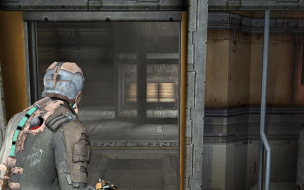
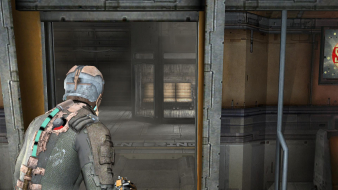
Based on where my only save is (just before the end of the game), the only screenshots I could provide from a point where the camera isn't at the over the shoulder position would constitute a massive spoiler. Plus, because they're panning shots, I wouldn't be able to get the screens at the exact same position anyway, making direct comparison difficult.
Don't get too picky on this one; it's the gameplay cam, it just momentarily pans away on vary rare occasions, there's no cutaway or anything like that. The gameplay shots above demonstrate it's behavior suitably.
I have just realized that there are moments that we can call cutscenes with certainty. The transition is just so seamless that I forgot all about them. I'm editing the first post to include screenshots of the one nearest to the beginning.
EVGA GeForce GTX 970 SC ACX 2.0 3.5GB | 3 X LG Flatron 24EA53VQ in Nvidia Surround | Optoma HD20
I apologize for bumping an old thread, but has anyone been able to run this game at 5040 x 1050? I believe the maximum resolution allowed was 4000 x 900 or something like that.
5040x1050 is a no-go with TripleHead2Go DE. The game appears to detect and use strict 60/75Hz resolutions only.
http://www.widescreengamingforum.com/forum/viewtopic.php?f=57&t=14745&start=11
I have the game now and 5040x1050 isn't showing up in the options ... my guess is because it is 57Hz
4320x900 is showing up so I guess I'll have to play it like that.
I did find a config file here ... C:Documents and SettingsAdministratorLocal SettingsApplication DataElectronic ArtsDead Space ... but changing the res and refresh rate in there just resulted in it dropping down to 1680x1050 ... even if I made it read only.
can anyone of you guys confirm if this program still works with dead space 1? dead space 2 had no problems, but DS 1 is being stubborn and refusing the widescreenfixer
I know it's late. But i think i found a solution for MM setup with refresh rate below 60Hz.
I don't have MM setup, but i can force my monitor to display 5760x1080 at 22Hz. It's just for testing...
As you know Dead Space does not allow to set resolution with low refresh rates.
But i managed to fool the game with GeDoSaTo tool.
I enabled 5760x1080 @ 60Hz, and instead of downscaling to 1920x1200, i told gedosato to output at 5760x1080 @ 22Hz. And Bam! Dead Space can now see the resolution 5760x1080 @ 60Hz
screenshot taken with msi afterburner, not with gedosatos! rendered on C2Qq9300@3GHz and GF GT 640, fps seems to be limited by 22Hz. At 3840x2160 in this small scene im getting 26fps (max settings). I thought framerate would be much lower