Page 1 of 2
Fallout 2
Posted: 21 Oct 2008, 11:59
by XAN_
 Widescreen Grade: CUltra-Widescreen Grade: IncompleteMulti-monitor Grade: Unsupported4k Grade: IncompleteRead Full Detailed Report - Fallout 2Fallout 2 is a computer role-playing game published by Interplay in 1998. The second game takes place in 2241, 80 years after the first Fallout. It tells the story of the original hero's descendant and his or her quest to save their primitive tribe from starvation by finding an ancient environmental restoration machine known as the "Garden of Eden Creation Kit", or GECK. Although featuring an almost completely new game world, stories, and adventures that are several times larger than its predecessor, the game mechanics from Fallout remain mostly unchanged, with the majority of changes to fix interface issues.
Fallout 2
Posted: 21 Oct 2008, 13:34
by P-Storm
Nice report, some small things,
Your game information, can you edit out those [3] (yeah i know you'd copy-paste it)
And with not tester resolution, you mean 1920x1080 and 1920x1200
Fallout 2
Posted: 21 Oct 2008, 15:26
by XAN_
Nice report, some small things,
Your game information, can you edit out those [3] (yeah i know you'd copy-paste it)
And with not tester resolution, you mean 1920x1080 and 1920x1200
Ok, fixed.
------
Can someone test 1280x800? It seems that my monitor (Samsung 226CW) can't handle it...
Fallout 2
Posted: 21 Oct 2008, 21:40
by yogibbear
Couple of questions:
a) I can't seem to get the hack to work (Vista 64-bit). How do i know if i'm using 1.02d? Otherwise i could test the resolutions for you.
Edit: i checked, and the main menu screen has Fallout II 1.02 in the bottom right corner, but no "d". What's the "d" for?
b) Will the hack be compatible with the soon to be released http://www.gog.com fallout 2 release?
Fallout 2
Posted: 22 Oct 2008, 00:28
by The_cranky_hermit
==Screen change==
Can you add two more shots here? One at the default 640x480 resolution, and one at 1680x1050 (the highest 16:10 that you know works).
==Supported resolutions==
You said 1280x800 fails. Are you able to set your Windows desktop resolution to 1280x800?
==Cut-scenes==
Can you include comparison screenshots here?
Finally, you're missing the "singleplayer anomalies" section. Since Fallout 2 has several "screens" available, the behavior of these screens should be snapshotted, documented, and analyzed in this section.
Fallout 2
Posted: 22 Oct 2008, 06:23
by XAN_
Couple of questions:
a) I can't seem to get the hack to work (Vista 64-bit). How do i know if i'm using 1.02d? Otherwise i could test the resolutions for you.
Edit: i checked, and the main menu screen has Fallout II 1.02 in the bottom right corner, but no "d". What's the "d" for?
b) Will the hack be compatible with the soon to be released http://www.gog.com fallout 2 release?
a)Look at low right corner of loading screen. i use Vista 32 and all is ok. Any aerrors during patching?
That's is ok, first there where 1.02a, themn 1.02b, but it show 1.02 omly...
b)We will see. The hack is still updated... But you cant know, before you try...
Fallout 2
Posted: 22 Oct 2008, 06:31
by XAN_
==Screen change==
Can you add two more shots here? One at the default 640x480 resolution, and one at 1680x1050 (the highest 16:10 that you know works).
==Supported resolutions==
You said 1280x800 fails. Are you able to set your Windows desktop resolution to 1280x800?
==Cut-scenes==
Can you include comparison screenshots here?
Finally, you're missing the "singleplayer anomalies" section. Since Fallout 2 has several "screens" available, the behavior of these screens should be snapshotted, documented, and analyzed in this section.
1. Ok.
2. No, I cant
3. Ok, but all gui screens so far keep their original resolution and show a bit of gameplay area...
Fallout 2
Posted: 22 Oct 2008, 06:38
by yogibbear
[quote]Couple of questions:
a) I can't seem to get the hack to work (Vista 64-bit). How do i know if i'm using 1.02d? Otherwise i could test the resolutions for you.
Edit: i checked, and the main menu screen has Fallout II 1.02 in the bottom right corner, but no "d". What's the "d" for?
b) Will the hack be compatible with the soon to be released http://www.gog.com fallout 2 release?
a)Look at low right corner of loading screen. i use Vista 32 and all is ok. Any aerrors during patching?
That's is ok, first there where 1.02a, themn 1.02b, but it show 1.02 omly...
b)We will see. The hack is still updated... But you cant know, before you try...
Okay... i'm stupid. Got it working. I forgot to run the .exe once extracted in the fallout 2 folder. Works well so far...
Whereabouts would i go about putting your save files to generate the missing resolution for you? As i can't seem to find my own saved games... not in the fallout 2 installation directory, /Program Files/BlackIsle/Fallout2/, nor in users/
/My Games/
Edit: found it at:
C:UsersAppDataLocalVirtualStoreProgram FilesBlackIsleFallout2DATASAVEGAME
I love UAC sometimes...
Edit: here's your other resolution: 1280x800

Final edit: i just noticed your in-game shots are in russian?
Fallout 2
Posted: 22 Oct 2008, 15:46
by XAN_
Edit: here's your other resolution: 1280x800
Final edit: i just noticed your in-game shots are in russian?
Thx! :wink:
Yes, its in Russian.
Update: Suddenly I discovered, that FMV are anamorphic
Fallout 2
Posted: 22 Oct 2008, 17:08
by yogibbear
Just for a bit of discussion regarding the hack:
Is it really "fixing" the widescreen in FO2, or is it just zooming you further and further out as you increase the resolution, or is that how widescreen is meant to be implemented in this game due to it being isometric....
I'll drum up some shots to show what i mean.
Here we go:
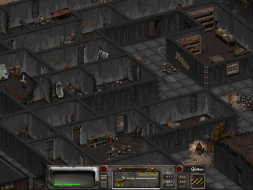
1280x800 (16:10):
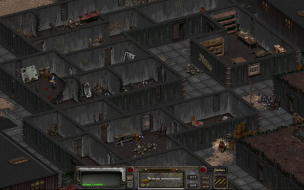
1680x1050 (16:10):

I guess what it means is it puts the ball in your court... if you want the zoomed out view then put in your native resolution. If you want to keep it zoomed in and tight then put in a lower resolution at the same aspect ratio. Personally i am liking it at my native 1680x1050 with the "zoomed out" feel.
Re: Fallout 2: detailed report
Posted: 23 Oct 2008, 05:53
by The_cranky_hermit
3. Ok, but all gui screens so far keep their original resolution and show a bit of gameplay area...
Then we would appreciate screenshots that demonstrate this.
Also, how about the character creation screen? What happens on those screens at higher resolutions?
Is it really "fixing" the widescreen in FO2, or is it just zooming you further and further out as you increase the resolution, or is that how widescreen is meant to be implemented in this game due to it being isometric....
What you're witnessing is
pixel-based behavior. It's considered acceptable behavior for 2D games.
In the meantime, here's the grading section:
Calculated grade: D+
Hack solution is a damaging flaw.
CCE: 98%
Fallout 2
Posted: 23 Oct 2008, 07:02
by Tanuki
Also, how about the character creation screen? What happens on those screens at higher resolutions?
Like a true pixel-based game everything is fixed resolution of 640x480. Windowboxed.
1920x1080 & 1920x1200 confirmed.
Fallout 2
Posted: 24 Oct 2008, 03:34
by The_cranky_hermit
I'd still like to see screenshot comparisons of this behavior.
Fallout 2
Posted: 24 Oct 2008, 04:11
by Tanuki
I'd still like to see screenshot comparisons of this behavior.
So would I.

FRAPS won't take. This is PrintScreen and friends.
Fallout 2
Posted: 24 Oct 2008, 11:25
by yogibbear
Bah i'll do it... moapy moap moap. :twisted:
Okay here we go:
Menu screen:
1024x768 (4:3)

1280x720 (16:9)

1280x800 (16:10)

In-game menus:
1024x768 (4:3)

1280x720 (16:9)

1280x800 (16:10)

Character Creation Screen:
1024x768 (4:3)

1280x720 (16:9)

1280x800 (16:10)

Fallout 2
Posted: 24 Oct 2008, 16:57
by XAN_
yogibbear, thx. I just was afk last 24 hours. :oops:
Fallout 2
Posted: 25 Oct 2008, 00:08
by The_cranky_hermit
Thanks! Just one more thing - any chance you could do the dialog screens? Preferably one with a 3D talking head.
Fallout 2
Posted: 25 Oct 2008, 08:09
by yogibbear
yogibbear, thx. I just was afk last 24 hours. :oops:
No worries :wink: I'm enjoying the hack.
Fallout 2
Posted: 25 Oct 2008, 14:26
by XAN_
Thanks! Just one more thing - any chance you could do the dialog screens? Preferably one with a 3D talking head.
:wink:

Fallout 2
Posted: 25 Oct 2008, 19:26
by The_cranky_hermit
Thanks. Since the talking heads were meant to fill the screen vertically, I think being reduced to a window should be regarded as a blemish.
Coverage is now 100%.