Devil May Cry 4 is the fourth installment of the Devil May Cry series. Chronologically, the game's events are third in the series, between Devil May Cry and Devil May Cry 2. In the game, the player controls Nero, the game's protagonist, and Dante, the series' title character, and fights enemies in close combat using firearms, swords, and other weapons. The characters Lady and Trish from previous games in the series make appearances, along with new characters Kyrie, Credo, Gloria, and Agnus.
Devil May Cry 4 also supports a feature that will allow you to use widescreen resolutions in a letterboxed format as long as they are the same width as a standard resolution. (1280x720 letterboxed on a 1280x1024 monitor). There is no special setting for this feature. Simply select the resolution and your good to go!
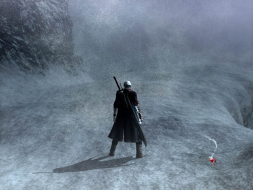
Can you elaborate here? What did you have to do to get this screenshot:
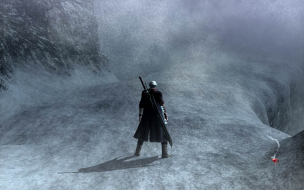
that was different compared to what you had to do in order to get this screenshot?
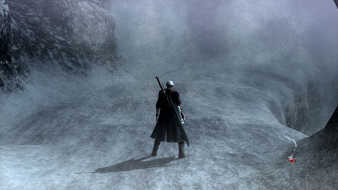
You couldn't have gotten *both* of these screenshots simply by selecting 1280x720 resolution and leaving all other settings identical.
Anyway, all we need in order to certify this is to confirm 1920x1080 resolution.
Cranky, in order to get the 1280x720 screenshot I had to enable that mode in the DTH2GO and set it as my desktop resolution. Then I just set 1280x720 and it looked like you see there.
But the 1280x1024 screenshot with the lettterboxed 16:9 aspect ratio was taken by having my desktop res at 1280x1024 (which is what it is supposed to be cuz its my native res) and selecting 1280x720.
My best guess is that the game detects your desktop res and just letterboxes the resolution if it is the same width as your desktop resolution but is shorter.
Nope DaFox there is no aspect ratio setting. Its pretty much automatic.
EVGA GeForce GTX 970 SC ACX 2.0 3.5GB | 3 X LG Flatron 24EA53VQ in Nvidia Surround | Optoma HD20
I aplogize if this is a dumb question, but I am not getting the "letterboxing" behaviour, as described above. Perhaps I am missing something in the settings or hardware, don't know.
I have a CRT monitor at desktop res of 1280x960 @ 85Hz, and when I do 1280x720 in DMC4, it changes the whole screen to that res and does not add black bars.
I have an Nvidia 8800GTS 640MB, WinXP SP3, etc.
I'm not using any additional hardware or software or anything. Or have I misunderstood the situation completely, and the letterboxing effect is actually from the TH2Go somehow?
Anyways, I don't suppose that maybe the game only does this when hooked up with DVI? Or maybe your monitor itself was doing a 1-to-1 or aspect scaling?
I don't have a 5:4 monitor to try on, only a 1080p LCD TV, which doesn't help because of course it's already that shape. So I'd help more but I can't really.
Thanks for the detailed report though, the Hor+ is the important thing.