
Centered HUD for Team Fortress 2

Discussions about getting games to run in a Multi-Mon setup.
Post Reply
Fudgemaker17
Posts: 8
Joined: 28 Jan 2008, 21:55

Centered HUD for Team Fortress 2

Post by Fudgemaker17 »

Hello everyone, I've been reading these forums and getting information from them well over a year now and sadly, this is my first post. I've had my triplehead2go for about a year and I first want to say thank you to all those that have provided solutions to make games better in triplehead2go resolutions.

I've always felt a little bad that I couldn't help contribute with making games better with FOV's and Centered Huds, because I'm not a programmer or script writer, but browsing around the forums this week, I saw an area I can help contribute too!

Mobster007 posted his CS: S centered HUD in this topic here.
http://www.widescreengamingforum.com/node/8579

I took a a look at the changes in the script and figured, hey I can do that! So a friend and I sat down and started working on the changes and we've got the hud cenetered in TF2. This fix only works for 3840X1024
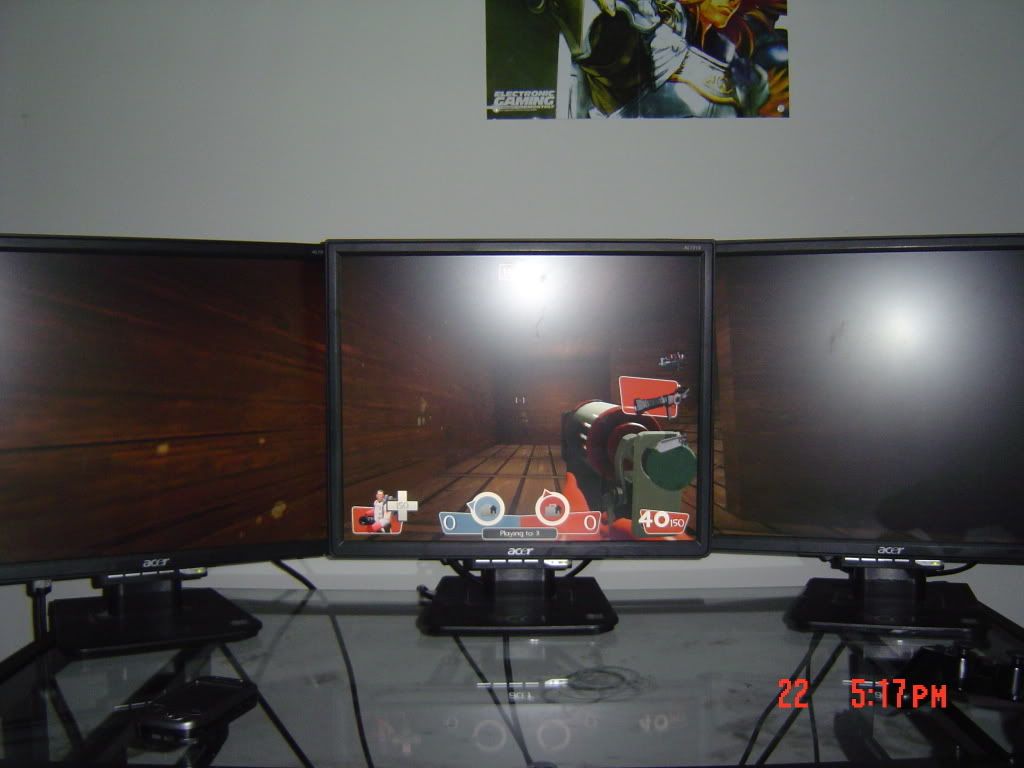
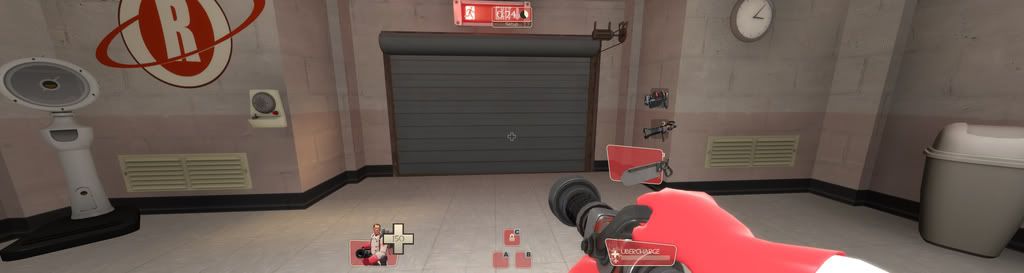


http://files.filefront.com/Teamfortress+2+UI+Tweak/;9684253;/fileinfo.html

Place the script file in your Steamsteamappsteam fortress 2tfscripts if you don't have a script folder, create one.

I'm currently working on changes for Half-life 2, episode 1 and 2. I don't own DoD: S to be able to work on that right now. But I hope everyone enjoys the TF2 script.

User avatar
Paddy the Wak
Editors
Editors
Posts: 3436
Joined: 27 Jul 2004, 17:42

Centered HUD for Team Fortress 2

Post by Paddy the Wak »

Great stuff ! ... 8)
Welcome to the forum ... :D
Mark B
Posts: 104
Joined: 28 Feb 2007, 15:34

Centered HUD for Team Fortress 2

Post by Mark B »

Awesome Stuff! I'll let Valve know to take a look at this.

Cheers!
Mark
User avatar
MobsterOO7
Insiders
Insiders
Posts: 1055
Joined: 19 Sep 2006, 16:25
Location: Ruckersville, Virginia

Centered HUD for Team Fortress 2

Post by MobsterOO7 »

Does this file also work with the mini-hud enabled?

BTW great job, I took a crack at it and didn't get nearly this far. I miss the hud script for CSS... it was so much simpler. :(

Are there any hud elements that this file does not move to the center screen?

EDIT
wow im so stupid. I could've done this months ago. I had tried going about it by editing the file for each individual hud element. Only got as far as getting the health numbers to move :evil:

EDIT AGAIN
Minimode has an issue with the ammo element. I'll leave fixing it up to you though since your the author Fudgemaker.

The red area of course being the center screen.
EVGA GeForce GTX 970 SC ACX 2.0 3.5GB | 3 X LG Flatron 24EA53VQ in Nvidia Surround | Optoma HD20
User avatar
Downtown1
Insiders
Insiders
Posts: 647
Joined: 22 Aug 2007, 19:00

Centered HUD for Team Fortress 2

Post by Downtown1 »

This is awesome. I've been waiting for this one for a while. Keep up the good work Fudgemaker17!

EDIT: I suggest people make the file read-only after they put it into their scripts folder, since my file got deleted by itself one time for some reason.
Tucson
Posts: 191
Joined: 06 Mar 2006, 06:55

Centered HUD for Team Fortress 2

Post by Tucson »

You're going to be real popular around here if you keep it up. Thx.
User avatar
Downtown1
Insiders
Insiders
Posts: 647
Joined: 22 Aug 2007, 19:00

Centered HUD for Team Fortress 2

Post by Downtown1 »

Ok, this inspired me to try to make my own Pirates Vikings Knight II (2.0) fixed HUD.

This is what I've figured out so far..

X,Y coordinates are mapped to a 640x480 rectangle and stretched to any other resolution. "r" and "c" may be prepended to a coordinate to make it justify to the right or center accordingly. (I assume r just adds 640 to the coordinate, c just adds 320 to the coordinate when it comes to horizontals).

"wide" and "tall" attributes do not seem to matter.

So are my thoughts correct so far? All one would need is to do is to add 213 pixels (1/3 of 640) to the "xpos" "x" values and subtract 213 pixels to the "xpos" "-x" values to make it work on 3 monitors.

Would it always map the coordinates to 640x480? Or is there some values in the HudLayout.res that can be changed to make it map to some arbitrary resolution?

Also is there any way I can get the default HudLayout.res? For mods it is in the scripts folder, but for Valve games it is not.

-------

EDIT: After playing around with the HudLayout.res of PVK2 I see that the mapping thing for 640x480 doesn't really hold up. I had to add ~600 pixels to items to move them to the right, and add ~600 to rX items to move them to the left. I wish there was a way to know this in advance instead of just experimenting.


Is it is supposed to be possible to move the chat to the side? The TF2 hud does not do do that (but it moves almost everything else to the middle).

Anyway, I've moved the health bar/armor bar/charge bar to the middle, the ammo count to the middle, and the score/timer to the middle. The only problem is the score/timer is 3 icons but they're really far apart so the pirate icon overlaps with the charge bar. Is there a way to control distance between icons for HUD items that consist of more than 1 icon?
User avatar
MobsterOO7
Insiders
Insiders
Posts: 1055
Joined: 19 Sep 2006, 16:25
Location: Ruckersville, Virginia

Centered HUD for Team Fortress 2

Post by MobsterOO7 »

To fix minimode with this file go to the ammo hud element near the top and modify this line

Code: Select all


   "xpos_minmode"   "c210"   [$WIN32]


The 210 is the new value. 235 has it cut off by the bezels.

Happy triplehead!
EVGA GeForce GTX 970 SC ACX 2.0 3.5GB | 3 X LG Flatron 24EA53VQ in Nvidia Surround | Optoma HD20
User avatar
Downtown1
Insiders
Insiders
Posts: 647
Joined: 22 Aug 2007, 19:00

Centered HUD for Team Fortress 2

Post by Downtown1 »

Hi,

With new goldrush update it seems using this script makes the metal count for Engineers disappear.

Also in tournament mode (mp_tournament 1) you can press F4 to start the tournament, but the window that pops up when you hit F4 is invisible.
User avatar
Downtown1
Insiders
Insiders
Posts: 647
Joined: 22 Aug 2007, 19:00

Centered HUD for Team Fortress 2

Post by Downtown1 »

Hi all,

I updated the HUD for 3840x1024... works with latest version, works with tournament mode, arena mode, etc. Basically I'm pretty sure everything works for TF2 as of today.

Let me know if something doesn't!

(scroll down for the latest url)
CyberCrist
Posts: 49
Joined: 12 Aug 2008, 19:38

Centered HUD for Team Fortress 2

Post by CyberCrist »

Wow! Awesome. I'll have to do this tonight when I get home.
User avatar
Downtown1
Insiders
Insiders
Posts: 647
Joined: 22 Aug 2007, 19:00

Centered HUD for Team Fortress 2

Post by Downtown1 »

There was an update yesterday (engineer got level 3 dispenser, teleporter, etc).

Here is the updated HUD that works with the patch:

http://rapidshare.com/files/172777291/tf2-hud-3840x1024.zip
Tucson
Posts: 191
Joined: 06 Mar 2006, 06:55

Centered HUD for Team Fortress 2

Post by Tucson »

thx, mate.
User avatar
Mach1.9pants
Insiders
Insiders
Posts: 1512
Joined: 29 Jul 2007, 05:24
Location: NZ

Centered HUD for Team Fortress 2

Post by Mach1.9pants »

thanks for the update :)
A Small White Box
Posts: 77
Joined: 10 Jan 2009, 16:41

Centered HUD for Team Fortress 2

Post by A Small White Box »

I am trying to get this working on 5040x1050 but I am wondering exactly what the process is for modifying the HUD elements. Are you simply guessing at the numbers, saving the .res, and then loading the game to see how close you are? Or is there some mathematical way to do it. Or are you using some other tool such as: http://developer.valvesoftware.com/wiki/VGUI_Documentation#Build_mode
User avatar
Downtown1
Insiders
Insiders
Posts: 647
Joined: 22 Aug 2007, 19:00

Centered HUD for Team Fortress 2

Post by Downtown1 »

I am trying to get this working on 5040x1050 but I am wondering exactly what the process is for modifying the HUD elements. Are you simply guessing at the numbers, saving the .res, and then loading the game to see how close you are? Or is there some mathematical way to do it. Or are you using some other tool such as: http://developer.valvesoftware.com/wiki/VGUI_Documentation#Build_mode


Hi, I outlined how to do it in the L4D thread...
http://www.widescreengamingforum.com/node/9708

You start out with the original HudLayout.res that you extract with GCFScape and edit the same fields that my HudLayout.res on the last page edits, use diff to figure out which fields got changed I guess. Sorry I didn't do as good a job of documenting it as the L4D HudLayout.res since people don't really seem to care about TF2 anymore.

I know it says it just's a hypothesis in that post but if you read on, mattsimis was able to produce the 3x1680x1050 HUD for L4D on the next page just by editing the HudLayout.res in the recommended fashion (adding 768 to xpos).

Before I figured out how to edit the HUD unfortunately all the numbers were just guess work. The only guess work now are which HUD fields to edit, since about half of them don't do anything.

If you figure out how to move the chat box (when you press Y to talk) then please let me know since editing BaseChat.res didn't seem to do it!

Surprised no admins mirrored my HUD to WSGF yet :shock:.
User avatar
P-Storm
Posts: 764
Joined: 24 Dec 2006, 18:56

Centered HUD for Team Fortress 2

Post by P-Storm »

Downtown, you missed the one I mirrored on the forum

Or do you have a new version of that one?
A Small White Box
Posts: 77
Joined: 10 Jan 2009, 16:41

Centered HUD for Team Fortress 2

Post by A Small White Box »

Well, I updated most of it to work with 5040x1050. http://files.filefront.com/tf2+hud+5040x10507z/;12963760;/fileinfo.html

Your 768 hypothesis seemed to work for the most part. Some of the elements of the HUD were aligned from the center instead of a side, so I simply changed them and added multiples of 768 to get them where needed. Most of the important stuff is in the right spot with the exception of the weapon selection panel, perhaps someone can look at it and see why it's not moving for me.

Bugs:
Chat box
Weapon selection panel
Server messages are off-center
Arena Mode - I didn't test it at all, no idea if the arena elements are in the right place.
User avatar
P-Storm
Posts: 764
Joined: 24 Dec 2006, 18:56

Centered HUD for Team Fortress 2

Post by P-Storm »

@A Small White Box: If you want I could mirror it on the WSGF if you want. :)
A Small White Box
Posts: 77
Joined: 10 Jan 2009, 16:41

Centered HUD for Team Fortress 2

Post by A Small White Box »

Go for it, although I will probably be updating it a few times in the coming days to fix some of the bugs.
Post Reply

Who is online

Users browsing this forum: No registered users and 4 guests




