Star Wars: Knights of the Old Republic II: The Sith Lords

Detailed breakdowns of how games react to widescreen, ultra-wide, 4k and multi-mon
Tanuki
Posts: 2866
Joined: 07 Jul 2007, 23:55

Star Wars: Knights of the Old Republic II: The Sith Lords

Post by Tanuki »


Widescreen Grade: A
Ultra-Widescreen Grade: Incomplete
Multi-monitor Grade: Unsupported
4k Grade: Incomplete

Read Full Detailed Report - Star Wars: Knights of the Old Republic II: The Sith Lords

Players control a party of characters using a third-person perspective. Battles are fought using a real-time/turn-based hybrid system. Players can recruit different characters into their party depending on decisions they make during the game. Additional character customization options can also be unlocked based on player decisions. Gameplay is the same as the previous KOTOR game spiced with additional content such as new Force powers. There is no Prime Directive in this universe. Bend worlds to your will!


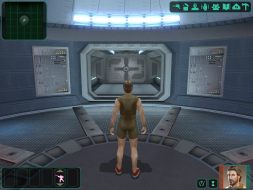
4:3


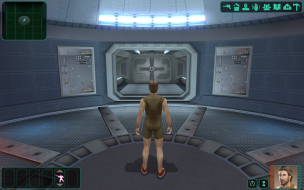
16:10


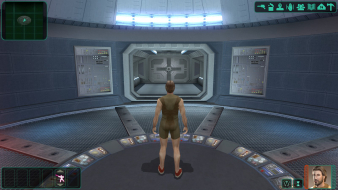
16:9


3x1

Last edited by Tanuki on 13 Jul 2017, 06:47, edited 12 times in total.
Reason: Edit
Tanuki
Posts: 2866
Joined: 07 Jul 2007, 23:55

Knights of the Old Republic II

Post by Tanuki »

I am using the HQ music and movie patches. The movies may not look the same if you are not using the patch.

They have the same ratio so the behavior is the same.
The_cranky_hermit
Insiders
Insiders
Posts: 3010
Joined: 07 Nov 2005, 04:16

Knights of the Old Republic II

Post by The_cranky_hermit »

==Supported resolutions==

If 1280x720 renders the game unplayable, then it should be under "unsupported resolutions."


==Singleplayer anomalies==

According to arcus, UniWS renders the game's minimap useless. Now, I've noticed that your solution is more complicated than the current one. Does this fix the minimap problem?


Grade: D+

Coverage: 98.5%
Tanuki
Posts: 2866
Joined: 07 Jul 2007, 23:55

Knights of the Old Republic II

Post by Tanuki »

According to arcus, UniWS renders the game's minimap useless.


I need more info than that. I have no idea what you are talking about. The Force is cloudy on this one.
The_cranky_hermit
Insiders
Insiders
Posts: 3010
Joined: 07 Nov 2005, 04:16

Knights of the Old Republic II

Post by The_cranky_hermit »

This is the current solution thread:
http://www.widescreengamingforum.com/node/

Arcus says:
The only catch – which is kind of big – is that the mini map is useless…


That's all I know. There's something wrong with the minimap in Arcus's solution. So I wanted to know if your solution fixes the minimap problem, whatever it is.
Tanuki
Posts: 2866
Joined: 07 Jul 2007, 23:55

Knights of the Old Republic II

Post by Tanuki »

I got it. Updated.


In the "Options"/"Feedback" menu select the "Mini Map" toggle to remove the map and free up the screen space.


Should I add this to the method Cranky?
The_cranky_hermit
Insiders
Insiders
Posts: 3010
Joined: 07 Nov 2005, 04:16

Knights of the Old Republic II

Post by The_cranky_hermit »

Should I add this to the method Cranky?

Sure, but I would also explain why users should do this.

One other question: What's the purpose of step #2?
Tanuki
Posts: 2866
Joined: 07 Jul 2007, 23:55

Knights of the Old Republic II

Post by Tanuki »

What's the purpose of step #2?


FMVs from 640x480 fixed res to anamorphic.
The_cranky_hermit
Insiders
Insiders
Posts: 3010
Joined: 07 Nov 2005, 04:16

Knights of the Old Republic II

Post by The_cranky_hermit »

*seal of approval*

D+, 100%
Tanuki
Posts: 2866
Joined: 07 Jul 2007, 23:55

Knights of the Old Republic II

Post by Tanuki »

*seal of approval*


That is why we named it after you. 8)
blunden
Posts: 12
Joined: 20 Sep 2007, 21:03

Knights of the Old Republic II

Post by blunden »

So there is still no solution for the mini-map? That's too bad since it worked fine in KOTOR. Seems they have taken a different approach to the rendering of the HUD in this game.

Btw. it would be interesting to know what the three steps does (like in the KOTOR 1 guide). Are each step doing the same as in the KOTOR guide?
Tanuki
Posts: 2866
Joined: 07 Jul 2007, 23:55

Knights of the Old Republic II

Post by Tanuki »

So there is still no solution for the mini-map? That's too bad since it worked fine in KOTOR. Seems they have taken a different approach to the rendering of the HUD in this game.

Btw. it would be interesting to know what the three steps does (like in the KOTOR 1 guide). Are each step doing the same as in the KOTOR guide?


The HUD is scaled dynamically based on the resolution. The scalar does not account for the widescreen aspect ratios so they get stretched. It is my guess that the stretching is what misaglins the player cursor on the map. The original KOTOR had fixed HUD sizes and positions so it aviods that problem.


KOTOR
1-Resolution
2-HUD size
3-Movies

KOTOR 2
1-Resolution
2-Movies
3-Resolution
4-Mini map

The game does not jump into the right resolution when you select it from the menu alone. You have the use a multi step approach with changing the HEX values(Step 1), and the ini values(Step 3).
blunden
Posts: 12
Joined: 20 Sep 2007, 21:03

Knights of the Old Republic II

Post by blunden »

The HUD is scaled dynamically based on the resolution. The scalar does not account for the widescreen aspect ratios so they get stretched. It is my guess that the stretching is what misaglins the player cursor on the map. The original KOTOR had fixed HUD sizes and positions so it aviods that problem.


KOTOR
1-Resolution
2-HUD size
3-Movies

KOTOR 2
1-Resolution
2-Movies
3-Resolution
4-Mini map

The game does not jump into the right resolution when you select it from the menu alone. You have the use a multi step approach with changing the HEX values(Step 1), and the ini values(Step 3).
Yes, that seems to be the case. It's really too bad since it's a great game and proper widescreen would be nice together with Team Gizka's mod.
Qshad
Posts: 1
Joined: 20 Mar 2008, 18:02

Knights of the Old Republic II

Post by Qshad »

I dont get it. Can someone upload swkotor2.exe (with 1440x900 resolution) on rapidshare? thx
User avatar
skipclarke
Founder
Founder
Posts: 7358
Joined: 13 Oct 2003, 05:00

Knights of the Old Republic II

Post by skipclarke »

I dont get it. Can someone upload swkotor2.exe (with 1440x900 resolution) on rapidshare? thx

Download the UniWS, and you should be good.

Stevedroid, any chance of looking at fixing the mini map on KOTOR2?
Sweetz
Posts: 287
Joined: 03 Mar 2007, 06:34

Knights of the Old Republic II

Post by Sweetz »


Stevedroid, any chance of looking at fixing the mini map on KOTOR2?

I do not own, and have never played, KOTOR 2 :(
User avatar
skipclarke
Founder
Founder
Posts: 7358
Joined: 13 Oct 2003, 05:00

Knights of the Old Republic II

Post by skipclarke »

[quote]
Stevedroid, any chance of looking at fixing the mini map on KOTOR2?

I do not own, and have never played, KOTOR 2 :(
Would you like a copy? If so, PM me your address.
7thSin
Posts: 2
Joined: 06 May 2008, 01:19

1440 x 900

Post by 7thSin »

I just purchased Star Wars Knights of the Old Republic II: The Sith Lords today for $20.00, got my game all updated nice and shiny-like to version 1.0b, then found a unprotected crack for it--the one made by Carbon, to be specific--then applied the wonderful tool that is the UNIWS, setting it to patch my game to my monitors native display of 1440 x 900 and proceeded to then take care fo the final step of editing the .ini file where specified.

The game crack worked fine before the patching it with the UNIWS program, but now everytime I click the .exe to run it, the game does not load, instead displaying a notice by Windows that the game has stopped working and will now close.

I have tried manually editing the .exe per the instructions provided in this topic, but even then I still yield the same results from my endevours.

Does anyone have a solution to my dilemnia? I have tried running the game in and out of Windows XP compatibility mode. Does anyone know of a version 1.0b crack that will work with UNIWS or will have to reinstall the game and essentially downgrade to the inital version to enjoy the widescreen experience that is the wonder of this game?

Any and all help would be greatly appreciated, thank you for your time and consideration.

Edit: The problem has been resolved! :) For any others encountering this problem, the solution to is to replace the Mss32.dll file in the game folder with the one that can downloaded at this link: http://files.filefront.com/Mss32dll/;6695046;/fileinfo.html

Additional Eddit/Question: Okay, I know I'm probably doing something to cause this--most likely being a "duh" issue in its nature, I'm sure--but the option to select 1280 x 960 resolution does not show up when I go into the game, only 800 x 600, 1024 x 768, and 1280 x 1024. Does anyone know what I'm doing wrong? :? and I am at version 1.0b. Barring that it is an issue with my video card (a Radeon x850 with the latest driver for Vista 32), is there any way for me to be able to select 800x600, 1280 x 1024, or 1280 x768 and use the patched 1440 x 900 resolution instead as opposed to selecting 1280x960?

Sweetz
Posts: 287
Joined: 03 Mar 2007, 06:34

Knights of the Old Republic II

Post by Sweetz »

Just a little update here. Ibrin was very, very nice to send me a copy of KOTOR 2.

At some point, I will be taking a look at the GUI files (all the KOTOR editing tools should work on KOTOR 2) and seeing if I can do anything about the stretched hud - no promises though since the hud works differently vs KOTOR 1.

I'm fairly busy with work and personal stuff right now, but I've got some time off coming up in August (week of the 11th specifically) and I plan to work on it then.
o0zink0o
Posts: 3
Joined: 24 Jul 2008, 09:58

Knights of the Old Republic II

Post by o0zink0o »

Hello everyone I seem to be unable to find "80 02 00 00 75 15 81 3D E8 C1 80 00 E0 01" in my hex editor and it is driving me crazy >,<

The only thing i can find even close is only the "80 02 00 00" and then the very end of it "E0 01" but they are on differrnt lines i am really new to all this and was wondering if you could give some tips? I messed with this for over an hour with no luck =(

Also is this right?
1680 "90 06"
1050 "1A 04"

for my rez replacement which is 1680x1050.
Post Reply

Who is online

Users browsing this forum: No registered users and 8 guests