Page 1 of 2
The Sims
Posted: 04 Nov 2007, 01:14
by Tanuki
 Widescreen Grade: CUltra-Widescreen Grade: IncompleteMulti-monitor Grade: Unsupported4k Grade: IncompleteRead Full Detailed Report - The SimsDeveloped by Maxis, The Sims is a simulator of everyday life. The brainchild of Will Wright, this game allows you to create families of virtual persons and let them run wild. The virtual persons, or Sims, can be controlled directly by the player or allowed to make decisions on their own. Different personality traits determine how each Sim behaves and interacts with their environment. Players can create and furnish environments for their Sims or download user-created content online. Create your little-thug Sim, and let him breed with and bully all the Sims he wants.
The Sims: Detailed Report
Posted: 04 Nov 2007, 01:17
by Tanuki
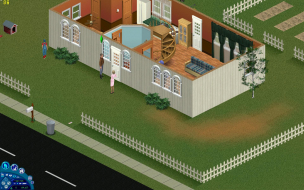
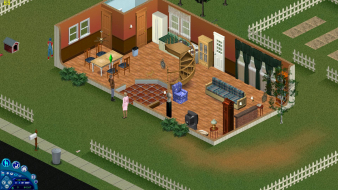
The initial camera position is moved based on Vert res width which is why the 1920x1080 screenshots are not aligned with the rest.
The Sims: Detailed Report
Posted: 04 Nov 2007, 05:06
by skipclarke
What is the native max res in the game? Funny that 1600x1200 shows the same anomalies.
The Sims: Detailed Report
Posted: 04 Nov 2007, 05:14
by Tanuki
Only 800x600 and 1024x768 are native.
The Sims: Detailed Report
Posted: 04 Nov 2007, 20:04
by The_cranky_hermit
What is, in your opinion, the worst anomaly experienced? And would you call it major (as bad as having a significant portion of the game be vert - when the rest of the game is hor +) or minor (as bad as having a stretched HUD)?
==Grading==
Calculated grade: D+
Major unresolved issues:
None
Minor unresolved issues:
What's the overall severity of anomalies?
Summary of widescreen-related flaws:
Hack solution
Cranky's coverage estimate: 99.5%
The Sims: Detailed Report
Posted: 04 Nov 2007, 21:04
by Tanuki
Cosmetic problems.
Becuase it is pixel-based everything is a little smaller on screen so the closer zooms are going to be used 99% of the time.
The worst problem would be the main select screen (neighborhood select) which you can judge from the screenies.
Minor stuff IMHO.
The Sims: Detailed Report
Posted: 05 Jan 2008, 04:38
by Tanuki
Method updated.
I was a bad monkey. :(
The Sims: Detailed Report
Posted: 11 Jul 2008, 17:06
by maxi_rocker
==Game Information==
The Sims Complete Collection
So if I wanted to change the 1024x768 resolution to display 1920x1200 I would change the HEX values to look like this...
20 03 00 00 C7 45 E0 58 02 00 00 6A 01 6A 00 68 20 AD 6C 00 8B 4D EC E8 9F 1C 0E 00 0F B6 C0 85 C0 74 0E C7 45 F0 80 0700 00 C7 45 E0 B0 04
When you start up the game with the proper resolution shortcut you will be in your widescreen resolution.
------------------------
can you give me codes for resollotion for
1680x1050 like this, please??? I'm waiting for your answers...
problem with the code
Posted: 15 Dec 2008, 20:57
by ccjumana
Please forgive me for my bad english and my ignorance, but I'm quite desperate. I'm a huge sims 1 fan since 2001 I've all original game CD and since I bought my new wide screen the game appears stretched. Following your instructions, I've downloaded a not protected version of the game, installed an hex editor HxD, opended the .exe file with it and I just cant find the secuence you are talking about in this post:
http://www.widescreengamingforum.com/node/8355
20 03 00 00 C7 45 E0 58 02 00 00 6A 01 6A 00 68 20 AD 6C 00 8B 4D EC E8 9F 1C 0E 00 0F B6 C0 85 C0 74 0E C7 45 F0 00 04 00 00 C7 45 E0 00 03
First I've tried looking for 20 03, since it appears many times I've been looking also that 58 02 appears close to 20 03 with no success. I have no idea of Hex editors, so I'm just following my intuition. Could you please tell me how to look for the secuence and replace the numbers?
Thank you in advance!!!
Cristina
The Sims: Detailed Report
Posted: 16 Dec 2008, 02:22
by Tanuki
I've downloaded a not protected version of the game
Just use a no-cd executable with your original cds.
Search Google if you need help finding one.
I you have one and are still unable to find the values post back.
The Sims: Detailed Report
Posted: 16 Dec 2008, 23:37
by ccjumana
Hi,
I've downloaded a nocd executable sims 1 file, opened with HdX and I'm still having that problem. I copy and paste the code into the find tool and the editor can't find the secuence. I've never used an hex editor before so I'm not sure if I'm doing something wrong... Please help!
Thanks again.
Cristina
Different byte sequence
Posted: 30 Jan 2009, 14:34
by sys2061
I think the byte sequence is different for the different executables you get with each expansion pack. But I found a similar sequence at position 000ed21fh in the Superstars exe.
20030000C745E4580200006A016A0068A0316B008B4DECE86F510D000FB6C085C0740EC745F000040000C745E40003
I wanted the resolution 1680x1050:
[list][*]decimal 1680= hex 0690[/*:m]
[*]decimal 1050= hex 041a[/*:m][/list:u]so I changed
[list][*]0004 to 9006, and[/*:m]
[*]0003 to 1a04. [/*:m][/list:u]
This is giving me the screen resolution I wanted.
However, I'm finding the damaged options menu to be unusable at that resolution, and for some The Sims runs at about 3 fps on my machine (regardless of resolution). So YMMV.
EDIT: My copy of Makin' Magic arrived today, and the original patch is working fine at 1680x1050. MM even fixed my framerate issue. Otherwise, I was going to have to live with 1024x768 in a window, which also fixed the framerate issue, but isn't exactly widescreen.
Re: The Sims: Detailed Report
Posted: 15 Aug 2010, 05:44
by jona
is ther possible to play whit 1024x576
Re: The Sims: Detailed Report
Posted: 16 Aug 2010, 19:07
by jona
How to find the right hexadecimals, i don't undarstand please help me!!!!!
Re: The Sims: Detailed Report
Posted: 23 Aug 2010, 07:11
by jona
Is it nobody thats read's tis topic anymore,PLZ! read i need some help :(
Re: The Sims: Detailed Report
Posted: 23 Aug 2010, 16:45
by Tanuki
The Sims lowest default resolution is 800x600. I have no idea what will happen with a lower vertical resolution.
The hex values are in the second post.
http://www.widescreengamingforum.com/forum/viewtopic.php?f=31&t=18809
I don't have this installed but it has been so long since I did this I wonder if I ever checked the old Sim City resolution shortcut method? Maybe someone could try that if they have this game.
Re: The Sims
Posted: 03 May 2013, 08:07
by Screamhurt
Hello.
I downloaded no-cd exe for The Sims Complete Collection, then downloaded HEX editor. When I try to find the numbers, it always finds nothing. "A pattern was not found." This sentence really drives me crazy.
Thank you for any reply.
Re: The Sims
Posted: 19 Apr 2015, 09:08
by clatter411
Is there any way to fix the HUD and menu after I have converted the game to 1920x1080? It's almost impossible to read any information the way it is.
Re: The Sims
Posted: 09 Sep 2015, 16:44
by Chag4
It doesn't seem like anyone is here to help anymore, but I'd like to report a problem.
I got the res to work and it was stunning, way better experience than with native res, and window mode doesn't work, so I really wanted to play like this, but I encountered one issue that I couldn't live with.
The items and information in the hud don't go away, they just overlap eachother as I go from build, buy and live mode, and in there moods relationships and so on.
I can barely read or see anything and don't feel like it's playable that way.

I'm on Windows 10. I don't have any issues with native res other than that it forces me to do fullscreen adn looks ugly and stretched. I've tried changing and running both 800x600 and 1024x768 changed to 1920x1080, don't know if that makes a difference, but saw slight differences when I ran them, mainly some white squares flickering in and out in the loading screen.
I used the hex values 8007 for 1920 and 3804 for 1080 found on another forum, and followed the instructions from here very carefully.
Hope somebody who knows something shows up. I'll be checking back.
Re: The Sims
Posted: 06 Apr 2016, 02:25
by MrMisterMaster
Hi!

I fixed the graphical bugs! I managed to modify the game files to make it all work in 1920x1080. Both the HUD and menus work as they should. This is how to do it (at your own risk):
1) Get a program which is capable of editing .FAR-files. I used
FarOut which can be found here:
http://www.paladins-place.org/FarOut156.zip2) If you are using
FarOut, you also need
Visual Basic 6.0 Runtime Plus which is required for
FarOut to work. Can be found here:
https://sourceforge.net/projects/vb6extendedruntime/files/latest/download3) Download
3_images.rar attached in this post and unpack it. These images are modified to fit 1920x1080.
(Sidenote: You can modify these images to work for other resolutions aswell. Make sure
PanelBack.bmp is 220px shorter than your custom resolution width. I used
GIMP because it preserves the .BMP-format needed. Make sure you check
'Run-Length Encoded' and
'Do not write color space information' while exporting your modified images.)
4) Locate this folder:
C:\Program Files (x86)\Maxis\The Sims\UIGraphics5) Make a backup of the following 3 files. Then move the 3 original files to a temporary place (I used the desktop):
- UIGraphics.far
- Res_CPanel.RT
- Res_Nbhd.RT
6) Start
FarOut.exe and open the file
UIGraphics.far. Press
'Add entry' and add the 3 images (one by one) you downloaded earlier:
- PanelBack.bmp
- largeback.bmp
- dlgframe_1024x768.bmp
Press
'Save' and save the file.
7) Now open
Res_CPanel.RT using
Notepad. Locate the following line:
Code: Select all
{BITMAP,kUniversalCPBkg,"CPanel/Backgrounds/PanelBack.BMP"}
and replace it with
Code: Select all
{BITMAP,kUniversalCPBkg,"PanelBack.BMP"}
Save the file.
8) Now open
Res_Nbhd.RT using
Notepad. Locate the following lines:
Code: Select all
{RLEBMP,kLargeMask,"Downtown/LargeBack.bmp"}
{RLEBMP,kLargeMaskSS,"Studiotown/dlgframe_1024x768.bmp"}
and replace them with
Code: Select all
{RLEBMP,kLargeMask,"LargeBack.bmp"}
{RLEBMP,kLargeMaskSS,"dlgframe_1024x768.bmp"}
Save the file.
9) Move the 3 modified files back to
C:\Program Files (x86)\Maxis\The Sims\UIGraphics. Done! This should fix the graphical bugs on the HUD and in the menus.
I must say, it was not an easy task but I was determined to fix this. Practically no information on the web, lots of trial and error, compatibility issues etc.. But in the end I did it and I'm proud

Hope this help!