Page 1 of 3
Vampire: The Masquerade - Bloodlines
Posted: 06 Sep 2007, 08:54
by Tanuki
 Widescreen Grade: CUltra-Widescreen Grade: CMulti-monitor Grade: Unsupported4k Grade: IncompleteRead Full Detailed Report - Vampire: The Masquerade - BloodlinesStarting out as a recently sired vamp-baby, you get to make your way around the LA area looking for some meaning to your now pointless existence. While you are dragging your undead behind throughout the city you may also get lucky and avert the vampire Apocalypse. Or not. It's your call bloodsucker. Lead your character in first or third-person perspectives as you stalk the streets, feed on some hookers, and chat up the normals. You have several vampire clans to choose from which will determine your characters abilities and tendencies. Skill points can be assigned for character development allowing you to become such wonderful things as a gun-toting psychopath or a perky chatterbox. Or both. Just remember that you have to retain some shred of your tattered beliefs in humanity or you won't amount to undead crap. Will you be the nice hero that can sleep at day? Or give in to the voracious beast that festers within your dead flesh? Remember to floss.
Vampire Bloodlines
Posted: 06 Sep 2007, 21:00
by The_cranky_hermit
The "screen change" section is *way* overcomplicated. Please reduce it, and by a lot. The sole purpose of this section is to instruct widescreen users who own the game on how to best run the game in widescreen. You can briefly explain what the purpose of each step is, but don't digress by posting tons of screenshots that illustrate what happens before and after intermediate steps.
If I understand it correctly, there are three steps. Step one, hack engine.dll to enable your resolution. Step two, add the console and anamorphic switches to the shortcut. Step three, reduce the FOV to 69. Please keep the method section focused on explaining how to perform these three things. Thanks.
Vampire Bloodlines
Posted: 06 Sep 2007, 21:03
by P-Storm
If you look, you can see that the hud strech a bit ingame, look to the Blood meter blood heal round thing :wink:
Vampire Bloodlines
Posted: 06 Sep 2007, 22:17
by Tanuki
I think you meant the "Method" section Cranky.
I posted the HUD stretching in the HUD section.
Vampire Bloodlines
Posted: 06 Sep 2007, 22:19
by Tanuki
We can fix these problems.
Roof

No Roof

Toilet

No Toilet

Do this when you have control of your character so you can see what is happening. Press the tilde key to bring up the console. We are going to type "r_anamorphic 1" to enable anamorphic display mode.
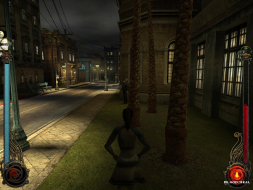
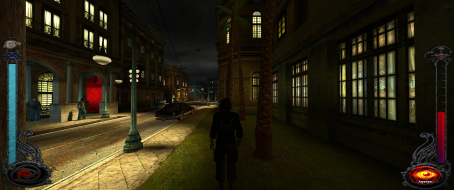
You should see that everything is no longer stretched in a 16:9 aspect ratio. In a 16:10 aspect ratio you should see no horizontal stretching but some slight vertical stretching. This cannot be fixed in 16:10 but is much better than the original stretching. The transparent texture problem is now gone from both aspect ratios.
We now have another problem. The camera position has been pushed back. We are going to lessen the change as much as possible. Go back into the console and type "FOV 69". This will bring the view closer in to offset the anamorphic zoom.
Default FOV 75 with Anamorphic

FOV 69 with Anamorphic

The anamorphic switch is global and needs to be changed only once. The FOV switch needs to be changed with every new game. Once you have saved a game with the FOV switch you can load it up and the FOV will remained changed. Congrats.
Original 4:3

16:9

16:9 with Anamorphic

16:9 with Anamorphic and FOV 69

Vampire Bloodlines
Posted: 06 Sep 2007, 22:31
by P-Storm
I think you meant the "Method" section Cranky.
I posted the HUD stretching in the HUD section.
whoops did miss that section, sorry about that :?
Vampire Bloodlines
Posted: 06 Sep 2007, 22:38
by Tanuki
Hey with a screen name like that I am not going to mess with you. :D
Vampire Bloodlines
Posted: 07 Sep 2007, 01:18
by Sweetz
Note that by the looks of this hex edit, it should be something the UniWS patcher can handle merely by adding a new entry to the patches.ini file.
I finally figured out Wogg's syntax the other week. In fact I'd write the entry myself, but I don't have the game to test with (bought it, played it, and traded it in a long time ago).
However, if someone sends me a copy of just the engine.dll file I should be able to do it and make sure it's right just be inspecting the file.
Vampire Bloodlines
Posted: 07 Sep 2007, 03:13
by The_cranky_hermit
==Screen change==
I have two questions.
The in game fixed camera position is not as close as the 4:3 aspect ratio fixed camera position.
Were the screens of the laptop taken at a "fixed camera position"?
Also, is it possible to decrease the FOV when the camera is "fixed?"
==Singleplayer anomalies==
I'd take the 2D screens and bring them up here instead of putting them under HUD stretch.
==Aspect ratio support==
It's incorrect to say that all three aspect ratios are supported, because 16:10 is not supported. A 16:10 resolution just uses the 16:9 aspect ratio.
==Grading==
Calculated grade: D+
Major unresolved issues: None
Minor unresolved issues: None
Summary of widescreen-related flaws:
Complicated solution.
16:10 is not supported properly.
2D screens stretch.
HUD stretches.
Cranky's coverage estimate: 100%
Vampire Bloodlines
Posted: 07 Sep 2007, 04:30
by Tanuki
The laptop camera is fixed and does not change with FOV adjustments. Anamorphic mode does move the camera back which is what is posted.
Stuff moved around and reworded 16:10 ratio. Thanks.
Vampire Bloodlines
Posted: 07 Sep 2007, 04:33
by Tanuki
Note that by the looks of this hex edit, it should be something the UniWS patcher can handle merely by adding a new entry to the patches.ini file.
I finally figured out Wogg's syntax the other week. In fact I'd write the entry myself, but I don't have the game to test with (bought it, played it, and traded it in a long time ago).
However, if someone sends me a copy of just the engine.dll file I should be able to do it and make sure it's right just be inspecting the file.
How? Or do I not have those rights?
Vampire Bloodlines
Posted: 07 Sep 2007, 04:34
by The_cranky_hermit
FYI, the camera is "zoomed out," which is actually not the same thing as being moved back.
Vampire Bloodlines
Posted: 07 Sep 2007, 04:55
by Tanuki
Fixed boss.
Vampire Bloodlines
Posted: 07 Sep 2007, 22:56
by Sweetz
Note that by the looks of this hex edit, it should be something the UniWS patcher can handle merely by adding a new entry to the patches.ini file.
I finally figured out Wogg's syntax the other week. In fact I'd write the entry myself, but I don't have the game to test with (bought it, played it, and traded it in a long time ago).
However, if someone sends me a copy of just the engine.dll file I should be able to do it and make sure it's right just be inspecting the file.
How? Or do I not have those rights?
You wouldn't update it directly. You'd make the changes locally and then ask one of the site mods to add the entry to the patches.ini file in the official download.
At the moment I'm not up for explaining the UniWS syntax, I will do a write up for it one day though, it's not complex, it's just not immediately obvious what the settings are.
In any case, offer still stands to try my hand at the patch myself. If anyone wants to send me the file, please PM me.
Vampire Bloodlines
Posted: 07 Sep 2007, 23:01
by Tanuki
I meant how do I send you the file. 8)
Vampire Bloodlines
Posted: 09 Sep 2007, 01:52
by khula
Er wouldn't it be easier to use the vampire respatcher? I mean instead of a hex editor.. It works perfectly. You just enter your chosen resolution(s) and hey presto! Done. No fiddling about... Just a thought.
Vampire Bloodlines
Posted: 09 Sep 2007, 01:58
by Tanuki
I try to give the actual changes in case of differences in the file. Sometimes a game is upgraded and the locatioin of the values in the file changes making the current patcher worthless.
Hey, whatever works go with it. :)
Vampire Bloodlines
Posted: 09 Sep 2007, 18:20
by The_cranky_hermit
Er wouldn't it be easier to use the vampire respatcher? I mean instead of a hex editor.. It works perfectly. You just enter your chosen resolution(s) and hey presto! Done. No fiddling about... Just a thought.
Can you post a link to the vampire respatcher?
Vampire Bloodlines
Posted: 09 Sep 2007, 18:33
by khula
Er wouldn't it be easier to use the vampire respatcher? I mean instead of a hex editor.. It works perfectly. You just enter your chosen resolution(s) and hey presto! Done. No fiddling about... Just a thought.
Can you post a link to the vampire respatcher?
No probs!
http://www.fileplanet.com/156598/150000/fileinfo/Vampire-The-Masquerade:-Bloodlines---Resolution-Patcher
If only surround gaming was supported!
Copy the respatcher into the 'bin' folder of the game.
Run it and choose your resolution. Click 'patch it'....
You need MS net version 1.1 or above. Currently at V3.0
edit: This works fine with the official 1.2 patch and the latest v4.1 unofficial patch also.
Vampire Bloodlines
Posted: 09 Sep 2007, 18:36
by The_cranky_hermit
Thanks. I've added this to the solution thread, and I recommend the same for the solution section of the DR.