Civilization

Detailed breakdowns of how games react to widescreen, ultra-wide, 4k and multi-mon
Post Reply
The_cranky_hermit
Insiders
Insiders
Posts: 3010
Joined: 07 Nov 2005, 04:16

Civilization

Post by The_cranky_hermit »


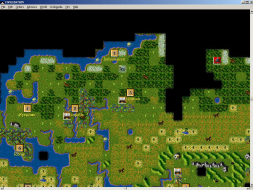
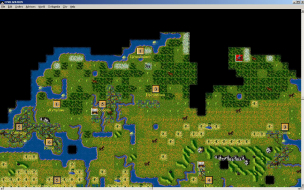
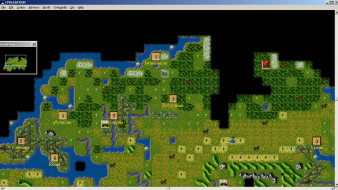
Widescreen Grade: A
Multi-monitor Grade: A

Read Full Detailed Report - Civilization

Civilization is a legendary strategy game by the legendary game designer Sid Meier. You must guide a small tribe to grow and become a great empire in competition with as many as six other tribes. You must make decision that affect exploration, war, diplomacy, city growth, and the discovery of new technologies, the results of which will ultimately define your empire and what it is capable of achieving. The Windows incarnation of this game supports widescreen.


Last edited by The_cranky_hermit on 27 Mar 2013, 13:12, edited 1 time in total.
Reason: Edit
User avatar
DaFox
Posts: 2356
Joined: 14 Nov 2006, 15:48

Civilization: Detailed report

Post by DaFox »

Does anyone else find it sad that a game from god knows when has better widescreen support then most games released in the past few years?
NightBlade
Posts: 43
Joined: 31 May 2007, 09:43

Civilization: Detailed report

Post by NightBlade »

Does anyone else find it sad that a game from god knows when has better widescreen support then most games released in the past few years?


In this case, I think it's more of a nice by-product of how Windows handles window scaling. I doubt that Sid Meier designed the game with widescreen in mind :P

FYI cranky, you can take a screenshot of just the current window in focus by pressing Alt+Print Screen. Much easier than trying to crop the window by hand.
The_cranky_hermit
Insiders
Insiders
Posts: 3010
Joined: 07 Nov 2005, 04:16

Civilization: Detailed report

Post by The_cranky_hermit »

FYI cranky, you can take a screenshot of just the current window in focus by pressing Alt+Print Screen. Much easier than trying to crop the window by hand.

I know. I did exactly that with all of the screenshots except the cut-scene one. The windows open up to the size of your desktop, and in each case, I set my desktop resolution to the desired game resolution before launching the game. That's probably why part of the scroll bars are missing.
sys2061
Posts: 5
Joined: 28 Aug 2007, 14:49

Widescreen CivNet

Post by sys2061 »

I've managed to hack my CivNet to support widescreen.

My civnet.exe is version 1.02, size 2,073,600 bytes. My hack changes the maximum window size from 1300x1048 to 32000x32000. I've tested the width to 32000 by resizing the window offscreen, but I only tested the height to about 5800 pixels.

The hack: I changed the hex bytes at position 0x147cff (EDIT: corrected position) from 18 04 68 14 05 to 00 7d 68 00 7d.

I can probably come up with something to patch civnet.exe automatically if someone is interested. Anyone know if PatchWise Free is any good?


Technical details and limitations:

The two bytes at 0x147d02 (1,342,722 in decimal) control the maximum width of the window. Likewise, the bytes at 0x147cff control the maximum height.

The map window seems to have a maximum width of about 2500 pixels. That was more than enough to cover my largest monitor, so I didn't investigate further for the moment.

I expect it to be much more difficult, since Window's spying tools won't understand CivNet's MDI windows. Thus finding the exact numbers to search for in the executable will be much more difficult. (Hint: try searching for the minimum size too. The minimum size is probably stored near the maximum size. That's how I found the window sizes for the overall window.)
sys2061
Posts: 5
Joined: 28 Aug 2007, 14:49

More on widescreen CivNet

Post by sys2061 »

I decided to investigate the map window size, so I measured the maximum map width as 2570 pixels (or less, depending on how much of the window decoration you include). Diligent hex-editor searching and hacking didn't find anything though.

Eventually, I realised that the maximum map size is calculated dynamically, depending on the zoom level. At the default zoom level, the maximum map width is 2570 pixels. By strange coincidence, this is just wide enough to show the world all the way around from west to east. In other words, there wouldn't be any real point in stretching the window further, since there is nothing else to display.

I did notice one very minor bug though: if you stretch the map all the way to 2570 pixels, the currently active military unit (the blinking one) disappears. If you watch the minimap as you resize the main map, you can see a yellow rectangle, telling you how much of the world your main map is showing. When this rectangle disappears, you have gone too far; just take it back a few pixels until the yellow rectangle reappears in the minimap and your active unit reappears.

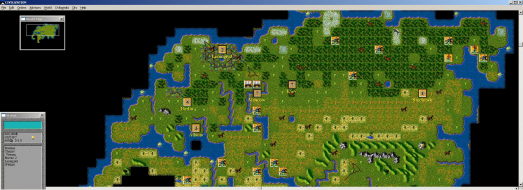
Here's a screenshot of CivNet stretched across three monitors:

I've used PatchWise Free to create an automatic patcher. What's a good way to make it available?

User avatar
skipclarke
Founder
Founder
Posts: 7358
Joined: 13 Oct 2003, 05:00

Civilization: Detailed report

Post by skipclarke »

Finally got this posted here:

http://www.widescreengamingforum.com/wiki/index.php/CivNet_Widescreen_Patch
The_cranky_hermit
Insiders
Insiders
Posts: 3010
Joined: 07 Nov 2005, 04:16

Re: Civilization: Detailed report

Post by The_cranky_hermit »

Surround:

Native, pixel based.


Post Reply

Who is online

Users browsing this forum: Bing [Bot] and 7 guests