Page 1 of 2
Beyond Good & Evil
Posted: 17 Aug 2007, 05:32
by czarman
 Widescreen Grade: CUltra-Widescreen Grade: CMulti-monitor Grade: C4k Grade: CRead Full Detailed Report - Beyond Good & EvilBeyond Good and Evil was developed by Ubisoft and contains more atmosphere than you could slop into a bucket.
Take control of the ever-fashionable Jade as she seeks to save her planet Hillys from the deadly DomZ.
Jade will use her wits, stealth, camera, and a big stick to uncover the plotting of the manipulative Alpha Section and their connection to the alien DomZ. Using a third-person perspective, guide Jade as she leaps, crawls, climbs, and sneaks her way to the truth. When all else fails call upon your sidekicks and their special abilities to overcome obstacles and defeat enemies.
This hot female needs you to guide her in saving the world and to be respectful while doing it.
Beyond Good and Evil: Detailed Report
Posted: 17 Aug 2007, 06:14
by The_cranky_hermit
==Screen change==
I would recommend simply saying it's stretched, and if you like, mentioning the letterboxing afterwards. The important point here is that widescreen makes the game stretch, so this section should start by just saying it.
As for grading, the game's widescreen support is exactly the same as Breath of Fire IV. Therefore:
==Grading==
Calculated grade: D+
Major unresolved issues: None
Minor unresolved issues: None
Summary of widescreen-related flaws:
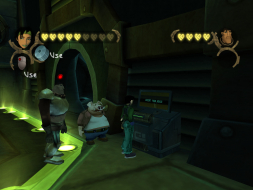
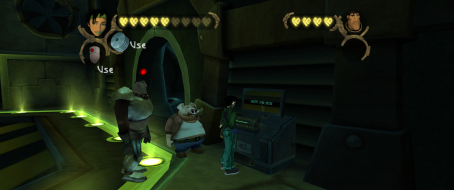
Stretched gameplay
Stretched HUD
Stretched cut-scenes
Cranky's coverage estimate: 100%
Beyond Good and Evil: Detailed Report
Posted: 17 Aug 2007, 06:40
by Tanuki
Done. :D
Beyond Good and Evil: Detailed Report
Posted: 13 Oct 2007, 02:36
by Tanuki
Updated for issues. Added pics of vehicle screens.
Beyond Good and Evil: Detailed Report
Posted: 13 Oct 2007, 03:54
by Ascii_Aficionado
This is an excellent game, it's one of those that is good to curl up with a controller with for a day or 2.
Beyond Good and Evil: Detailed Report
Posted: 17 Oct 2007, 20:57
by djsolidsnake86
there is a way for have on a 16:10 resolution an image not deformed and without the black bars?
Beyond Good and Evil: Detailed Report
Posted: 17 Oct 2007, 21:02
by Tanuki
At this time. No and no.
Beyond Good and Evil: Detailed Report
Posted: 24 Oct 2007, 09:34
by djsolidsnake86
squ1zzy please help us with this great game (maybe it's my favourite adventure game!)
Beyond Good and Evil: Detailed Report
Posted: 10 Jan 2009, 20:32
by djsolidsnake86
no news?
Beyond Good and Evil: Detailed Report
Posted: 06 Feb 2009, 16:33
by EddyB43
I figured out a "solution" to getting a nice 16:9 AR correct image on a widescreen monitor. This will still letterbox on a 16:10 display, but bar someone hacking the game open and changing how the game renders this will always be true.
The game (as stated earlier) assumes every resolution is 4:3 AR, so setting 1920x1200 just does a horrible horizontal stretch. The "solution" is to tell the game to play in a 4:3 resolution with the same horizontal resolution as your monitor. In this case, that's 1920x1440.
On my nVidia GeForce 6800GT using 162.18 ForceWare drivers, this would render the screen too low - 180 pixels down for the top black bar, 1080 pixels for the image is 1260. Fortunately, by moving my mouse downwards the screen will push up and show the full 1080p image. Positioning the image could also be possible with your display, but my monitor (BenQ G2400W) disabled those settings in the OSD because I was using DVI and not VGA.
The SettingsApplication.exe configuration app for BG&E pulls it's list of resolutions from the driver, so if you don't have the appropriate resolution you can add custom resolutions using your graphics card driver configuration.
Oh yes, and for GeForce 6 and beyond users the water transparency effect will cause huge slowdowns, you can either install an older driver which behaves (66.93) or set the water detail under SettingsApplication.exe's Advanced Settings tab to low which removes water transparency out in the world but the game runs smoothly again.
Beyond Good and Evil: Detailed Report
Posted: 29 Apr 2009, 22:36
by scavvenjahh
== Supported resolutions ==
2560x1600 confirmed to work.
== Surround Gaming Support ==
Native, stretch. The letterboxing remains unchanged.
(5040x1050 not supported : 57 Hz is not available in the config tool.)
1024x768

1360x768

3840x1024

Beyond Good and Evil: Detailed Report
Posted: 06 Jun 2009, 10:15
by djsolidsnake86
I figured out a "solution" to getting a nice 16:9 AR correct image on a widescreen monitor. This will still letterbox on a 16:10 display, but bar someone hacking the game open and changing how the game renders this will always be true.
The game (as stated earlier) assumes every resolution is 4:3 AR, so setting 1920x1200 just does a horrible horizontal stretch. The "solution" is to tell the game to play in a 4:3 resolution with the same horizontal resolution as your monitor. In this case, that's 1920x1440.
On my nVidia GeForce 6800GT using 162.18 ForceWare drivers, this would render the screen too low - 180 pixels down for the top black bar, 1080 pixels for the image is 1260. Fortunately, by moving my mouse downwards the screen will push up and show the full 1080p image. Positioning the image could also be possible with your display, but my monitor (BenQ G2400W) disabled those settings in the OSD because I was using DVI and not VGA.
The SettingsApplication.exe configuration app for BG&E pulls it's list of resolutions from the driver, so if you don't have the appropriate resolution you can add custom resolutions using your graphics card driver configuration.
Oh yes, and for GeForce 6 and beyond users the water transparency effect will cause huge slowdowns, you can either install an older driver which behaves (66.93) or set the water detail under SettingsApplication.exe's Advanced Settings tab to low which removes water transparency out in the world but the game runs smoothly again.
please can you explain me how get widescreen resolution without black cars with my hd4850?
no one can do a patch for fix this problem?
Re: Beyond Good and Evil: Detailed Report
Posted: 29 Jul 2010, 17:38
by M-u-ddy
Taken from the gog forum:
Im still trying to fix the game for widescreen aswell as the aspect-ratio is off, but it doesnt look like Ill be able to finish this.
Something that improves the game for widescreen users is to add this registrykey:
key = "HKEY_CURRENT_USERSoftwareUbisoftBeyond Good & EvilSettingsApplication.INIBasic videoNoBands", type = DWORD, value = 1
Re: Beyond Good and Evil: Detailed Report
Posted: 29 Jul 2010, 20:53
by The_cranky_hermit
What does that actually do? Do you have any comparison screenshots?
Re: Beyond Good and Evil: Detailed Report
Posted: 29 Jul 2010, 23:00
by Tanuki
I am guessing it removes the letterboxing.
Re: Beyond Good and Evil: Detailed Report
Posted: 30 Jul 2010, 14:57
by M-u-ddy
It removes the borders. The image will stay stretched from 4:3 but it's still an improvement.
Re: Beyond Good and Evil: Detailed Report
Posted: 30 Jul 2010, 16:07
by Tanuki
It removes the borders. The image will stay stretched from 4:3 but it's still an improvement.
That gives three main options.
1. It stretches vertically.
2. It adds more vertical viewing area.
3. It crops the sides and behaves like anamorphism.
Re: Beyond Good and Evil: Detailed Report
Posted: 30 Jul 2010, 18:11
by M-u-ddy
It adds more vertical viewing area.
Before you had letterboxed 4:3 which would be rendered in 16:9, making the image stretched and letterboxed.
After adding the entry to the registry you have 4:3 rendered in 16:9, so the image is still stretched but at least the full screen is used now by adding vertical viewing area.
Re: Beyond Good and Evil: Detailed Report
Posted: 30 Jul 2010, 18:59
by The_cranky_hermit
That doesn't particularly help widescreen users, unfortunately.
Re: Beyond Good and Evil: Detailed Report
Posted: 30 Jul 2010, 21:33
by Tanuki
Vertical stretching would have been best. Especially if anyone ever finds a way to alter the aspect ratio.