Page 1 of 2
Lost Planet: Extreme Condition
Posted: 09 Aug 2007, 19:06
by Black.Arrow
 Widescreen Grade: IncompleteUltra-Widescreen Grade: IncompleteMulti-monitor Grade: Incomplete4k Grade: IncompleteRead Full Detailed Report - Lost Planet: Extreme ConditionRescued from a veil of ice with only fragments of memory, Wayne Holden struggles to recover his past on a blizzard-ridden world swarming with deadly aliens. With only treacherous Snow Pirates and the mysterious NEVEC Corporation remaining, can anyone be trusted or is everything lost?
Lost Planet - Extreme Condition (Retail): Detailed Report
Posted: 09 Aug 2007, 19:40
by The_cranky_hermit
==Method==
Of the resolutions that you tested, which ones were supported natively, and which ones required the .ini hack?
==Supported resolutions==
Your 16:10 screenshots are 1680x1050, but you didn't list them in the list of successfully tested resolutions.
== Grading ==
* waiting for your response *
Lost Planet - Extreme Condition (Retail): Detailed Report
Posted: 09 Aug 2007, 20:27
by Black.Arrow
the 16:10 (only 1680x1050) resolution needed an .ini hack for me, but I guess its because my screen doesn't natively use that resolution.
The rest is available in the options menu.
1680x950 was a typo, sorry - it should have been 1680x1050. corrected.
Lost Planet - Extreme Condition (Retail): Detailed Report
Posted: 09 Aug 2007, 20:57
by The_cranky_hermit
the 16:10 (only 1680x1050) resolution needed an .ini hack for me, but I guess its because my screen doesn't natively use that resolution.
That doesn't make any sense. If your screen doesn't support it, it shouldn't work in a game no matter what kind of game-specific hack you use. Let me ask you another question: Can you set your desktop resolution to 1680x1050? Also, what is your native res?
Lost Planet - Extreme Condition (Retail): Detailed Report
Posted: 09 Aug 2007, 21:53
by Black.Arrow
My native resolution is 1920x1080.
What I meant was, that 1680x1050 isn't usually in my resolution settings, I can however put it in through custom resolutions in XP.
But since I didn't do that yet, I just forced that resolution through the .ini
Since I'm using a HDTV, some games don't recognize all available resolutions.
Neverwinter Nights 2, for example only gives me 800x600, 960x600 and 1280x720 in the options menu.
When I manually type 1920x1080 in the .ini its no problem.
Lost Planet - Extreme Condition (Retail): Detailed Report
Posted: 09 Aug 2007, 22:03
by The_cranky_hermit
But since I didn't do that yet, I just forced that resolution through the .ini
Something's not adding up. If 1680x1050 is not one of the resolutions available to you in Windows, then it shouldn't work in any game either. Games don't switch your screen's resolution - Windows does. Games just tell Windows what resolution to switch to, and if Windows doesn't know how, it's not going to work in the game. Can you double-check your desktop resolution slider, to see if 1680x1050 is there or not? Also, when you tested 1680x1050 in the game, was it by any chance in windowed mode?
Neverwinter Nights 2, for example only gives me 640x480, 800x600, 1024x768 in the options menu.
When I manually type 1920x1080 in the .ini its no problem.
This also confuses me. Neverwinter Nights 2 should support widescreen resolutions natively. The game doesn't care what your display is - it gets the list of available resolutions from Windows.
Lost Planet - Extreme Condition (Retail): Detailed Report
Posted: 10 Aug 2007, 04:00
by Black.Arrow
I guess I shouldn't blame you for not believing me like that.
So to back up my words...
http://home.arcor.de/shizuku/WSGF/windows.jpg
http://home.arcor.de/shizuku/WSGF/nwn2.jpg
Don't ask me "why" its this way, nVidias HD support is still pretty screwed.
So I always have to rely on manually editing resolutions.
Lost Planet - Extreme Condition (Retail): Detailed Report
Posted: 10 Aug 2007, 04:33
by The_cranky_hermit
I didn't say I don't believe you. I'm just saying that there's some piece of information that's missing. I don't know what it is, and I'm not accusing you of withholding information or lying. I'm just asking a lot of questions in case it helps us figure out why this is happening. The detailed report system is supposed to take into account every widescreen setup that is feasible to take into account, and your situation is one that seems to contradict certain "known knowns" that have been established through months of testing and detailed report-writing.
If you don't mind bearing with me, would you tell me what kind of TV you have (brand and model number), and what sort of cable your PC is connected to it with?
In the meantime, the grading:
== Grading ==
Calculated grade: C+
Potential grade: Certified
Major unresolved issues:
Is 1280x768 supported?
Minor unresolved issues:
Is 1680x1050 supported natively (on a setup that conforms to widescreen gaming logic as we understand it)?
Are 1280x800, 1440x900, and 1920x1200 supported?
Cranky's coverage estimate: 77.5%
Lost Planet - Extreme Condition (Retail): Detailed Report
Posted: 10 Aug 2007, 19:12
by Black.Arrow
Sure, its a "Toshiba 32 WL 66 Z" connected trough HDMI-DVI cable.
Its marked as "HD-Ready" so that would be native 720p, which looks wolly.
So I'm using 1080i all the time.
I would say its because of the graphics drivers, because changing the drivers also changed how it behaved, I think.
There was a time, about 4 months ago, where I had to manually set resolutions to 1840x1028 to get an uncut picture.
Moreover there are differences between XP and Vista.
XP: 16:10 not natively available, so forced through custom resolution and all resolutions up to 1920x1080 selectable in games.
Vista: 16:10 natively available, but no custom resolutions. Not all resolutions selectable in
some games. (Rainbow Six - Vegas for example lets me set 1920x1080 in the options menu)
I have also a lot of problems with HD Scaling in XP:
Sometimes after closing a game the whole picture gets cut again. That also happens whenever I turn off/on the TV. (only restarting the pc fixes that)
EDIT: - I tried everything in Vista this time. And 1680x1050/1280x800/1280x768 is available in the options menu.
http://home.arcor.de/shizuku/WSGF/Lost%20Planet/1280x768.jpg
http://home.arcor.de/shizuku/WSGF/Lost%20Planet/1280x800.jpg
http://home.arcor.de/shizuku/WSGF/Lost%20Planet/1680x1050.jpg
I've updated the screens and the report.
Lost Planet - Extreme Condition (Retail): Detailed Report
Posted: 10 Aug 2007, 22:04
by Tanuki
Do we need info about the Steam version?
Lost Planet - Extreme Condition (Retail): Detailed Report
Posted: 10 Aug 2007, 22:34
by Sweetz
Do we need info about the Steam version?
The retail version and Steam versions are identical, in fact the retail version installs and validates through Steam and requires Steam to run.
It's just like Half-Life 2; the Steam version of the game is the only version of the game, the retail discs just prevent you from having to download the game data.
Black.Arrow: you have 1280x768 in the list of resolutions you said you ran the game successfully at, but then you list it as a major unresolved issue.
Lost Planet - Extreme Condition (Retail): Detailed Report
Posted: 10 Aug 2007, 23:23
by The_cranky_hermit
Sure, its a "Toshiba 32 WL 66 Z" connected trough HDMI-DVI cable.
Thanks. I looked it up, and it looks like it's an LCD TV with a native res of 1366x768. I have a guess of what's going on, and it's a little complicated (and may be total nonsense), but it's that vertical resolutions above 768 may behave unpredictably on your system. For example, when you launch Neverwinter Nights 2, Windows may or may not tell the game that your monitor has a native vertical resolution of 768, therefore causing the game to assume that anything higher than that won't work, so anything above 768 (ranging from 1280x800 to 1920x1080) gets removed from the list. Can you do another experiment to test this? Now that you've gotten 1280x768 and some other res's working natively in Vista, can you launch NWN2 in Vista and tell me which resolutions now work natively? I'm mostly interested in whether or not 1280x768 gets kept in the list or not, but the rest would be good to know too.
And a grading update.
== Grading ==
Calculated grade: B+
Potential grade: Certified
Major unresolved issues:
Are 1440x900 and 1920x1200 supported?
Minor unresolved issues:
None
Cranky's coverage estimate: 89.5%
Lost Planet - Extreme Condition (Retail): Detailed Report
Posted: 10 Aug 2007, 23:53
by Tanuki
1440x900 and 1920x1200 confirmed.
Lost Planet - Extreme Condition (Retail): Detailed Report
Posted: 10 Aug 2007, 23:56
by Black.Arrow
The screen I posted above for nwn2 is from vista so I only get these 3 resolutions:
800x600, 960x600 and 1280x720 in Vista.
I didn't use Vista for Lost Planet before, because you can't do screens for DX10 games (only black screens) and I didn't thought that DX10 was the issue.
Also, I only wrote "(Retail)" so it would look different from the Demo Report. Should I change it?
Lost Planet - Extreme Condition (Retail): Detailed Report
Posted: 11 Aug 2007, 00:06
by The_cranky_hermit
The screen I posted above for nwn2 is from vista so I only get these 3 resolutions:
800x600, 960x600 and 1280x720 in Vista.
That was previously. I thought you did something special in Vista since you took that screenshot that caused more resolutions to be available in Lost Planet. So I want to know if it also caused more resolutions to be available in NWN2 too.
I didn't use Vista for Lost Planet before, because you can't do screens for DX10 games (only black screens) and I didn't thought that DX10 was the issue.
How did you take those last three screenshots?
Also, I only wrote "(Retail)" so it would look different from the Demo Report. Should I change it?
I don't think so. The retail version is known to be different from the demo, so I'd say keep "retail" in the title.
== Grading ==
Calculated grade: Certified
Major unresolved issues: None
Minor unresolved issues: None
Cranky's coverage estimate: 100%
Lost Planet - Extreme Condition (Retail): Detailed Report
Posted: 11 Aug 2007, 00:38
by Black.Arrow
I didn't use Vista for Lost Planet before, because you can't do screens for DX10 games (only black screens) and I didn't thought that DX10 was the issue.
How did you take those last three screenshots?
I just used the DX9 Version of the game.
FRAPS got me on that lead, because only the newest version of FRAPS is able to do screens for DX10 games.
Lost Planet - Extreme Condition (Retail): Detailed Report
Posted: 05 Sep 2007, 15:42
by Gabbo
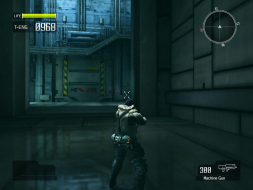
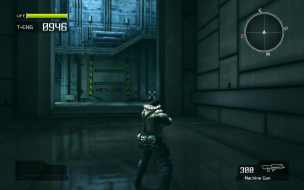
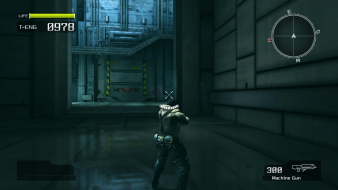
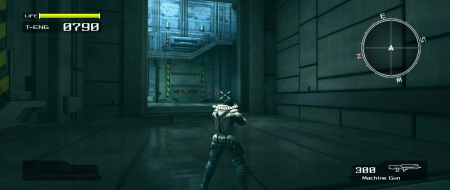
Those screenshots look weird. They are stretched vertically the more "fullscreen" it becomes. The only resolution that has correct aspect ratio in your screenies is the 16:9 ratio. That is not how it is in the game. You may have to redo your screenshots.
Lost Planet - Extreme Condition (Retail): Detailed Report
Posted: 05 Sep 2007, 23:07
by The_cranky_hermit
The only resolution that has correct aspect ratio in your screenies is the 16:9 ratio. That is not how it is in the game. You may have to redo your screenshots.
I've only played the demo, but that is how it is in the game. Are you certain the full version is different?
Lost Planet - Extreme Condition (Retail): Detailed Report
Posted: 08 Sep 2007, 02:14
by Tanuki
Removed by poster
Lost Planet - Extreme Condition (Retail): Detailed Report
Posted: 08 Sep 2007, 02:33
by The_cranky_hermit
Uh, why is the HUD perfect in 4:3 and stretched in widescreen? That's exactly the opposite of what the detailed report has.