
Hi.
I've been trawling through old threads trying to find a solution for getting a decent solution for Far Cry, particularly for TH2Go. I found this hack:
I've also tried Far Cry's dev mode, with a console hack of "fov 180". This works fine, but as mentioned in this post [url=http://www.widescreengamingforum.com/node/5461]here:">http://www.widescreengamingforum.com/node/6385]
I tried this hack. It's pretty staight forward, and involves modifying a file within Far Cry's SCRIPTS.pak file. But, no matter what value I insert in this file, it doesn't make a blind bit of difference. So I can only conclude that I must be doing something wrong. I'm loading the same "checkpoint" each time to test the new value I've inserted within this file within the SCRIPTS .pak file. Is that the right thing to do or do I need to start a new game each time?
I've also tried Far Cry's dev mode, with a console hack of "fov 180". This works fine, but as mentioned in this post [url=http://www.widescreengamingforum.com/node/5461]here: from 2004 everytime I zoom my weapon, use binoculars etc the FOV reverts and the console hack must be re-employed. Frankly, I'd rather play a 4:3 than put up with bringing the console down every few seconds. Paddy gave a link to a file within that post that may well have a permanent solution to this problem. The link takes me to ToCA EDIT but I can't find that file Paddy refers to anywhere there.
It's been years and years literally since Far Cry was released, so surely there is a TH2Go solution for the great game somewhere.
Can anybody help this poor despearte soul please?
Regards,
Mr Pibb.
Far Cry for TH2Go

Far Cry for TH2Go
the correct syntax for the URL link (remove the II)
[IIurl=http://www.widescreengamingforum.com]TEXT OF THE LINK[/url]
It's BBC code by the way.
I'm positive there's a solution out there, i've seen screenshots of FarCry in TH2Go
[IIurl=http://www.widescreengamingforum.com]TEXT OF THE LINK[/url]
It's BBC code by the way.
I'm positive there's a solution out there, i've seen screenshots of FarCry in TH2Go
Far Cry for TH2Go
I'm positive there's a solution out there, i've seen screenshots of FarCry in TH2Go
Thanks Dem.
Speaking of screenshots, here's a couple i made showing the difference I mean. They are both taken from exactly the same point.
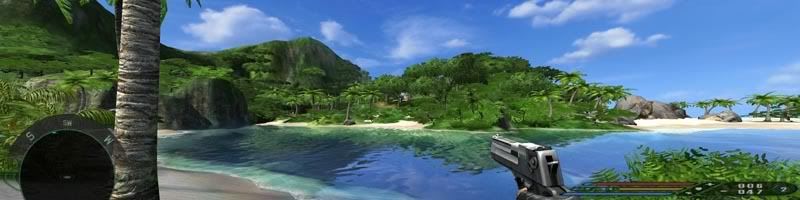
The one above is with the "fov 180" console hack. It's fine:
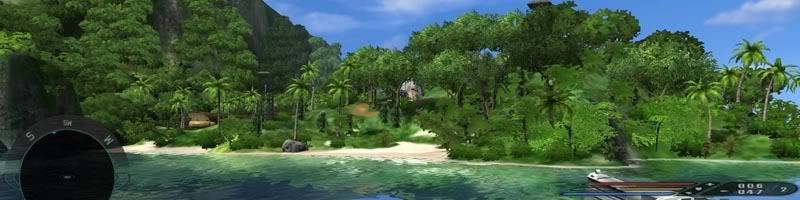
The one above is with the supposed "hack" to the SCRIPTS.pak file.
I want the game to it stay like the first screenshot, but it reverts to looking like the 2nd screen shot every time I zoom my gun or use binoculars etc. I don't want to have to constantly be inputting the console hack in manually after everytime I zoom to get it back to how it looks in the first screenshot.
Any one know the answer?
Regards,
Mr Pibb.
-
Paddy the Wak

- Editors

- Posts: 3436
- Joined: 27 Jul 2004, 17:42
Re: Far Cry for TH2Go
Paddy gave a link to a file within that post that may well have a permanent solution to this problem. The link takes me to ToCA EDIT but I can't find that file Paddy refers to anywhere there.Racer updated his site ... but you can't have looked too far ... :wink:
http://www.tocaedit.com/forum/dload.php?action=file&file_id=61
Anyway ... I hope that helps ... 8)
Far Cry for TH2Go
Thanks Paddy. You're a star! :D :D
I can only search the forums on that site and Far Cry gave no results. I can't see any download section there - I guess I need to be a member. I have tried joining the site but never get sent an account activation email. I tried contacting the administration via the email link they give, but it just bounces back.
Regards,
Mr Pibb.
I can only search the forums on that site and Far Cry gave no results. I can't see any download section there - I guess I need to be a member. I have tried joining the site but never get sent an account activation email. I tried contacting the administration via the email link they give, but it just bounces back.
Regards,
Mr Pibb.
-
Paddy the Wak
- Editors
- Posts: 3436
- Joined: 27 Jul 2004, 17:42
Far Cry for TH2Go
On the main page .... Files (a link on the left hand side) ... takes you to a list of files for download ...
Maybe you were trying too hard ... :lol:
Maybe you were trying too hard ... :lol:
Far Cry for TH2Go
How did I miss that? I feel like a right plonker now... :oops: :oops: :oops:
That hack works a treat! Sadly, it's just for v1.0 of Far Cry. I need at least v1.1 to resolve the shader bugs in v1.0.
Shame really. I guess it's back to 1280x1024. :cry:
Thanks for your help Paddy.
Regards,
Mr Pibb.
That hack works a treat! Sadly, it's just for v1.0 of Far Cry. I need at least v1.1 to resolve the shader bugs in v1.0.
Shame really. I guess it's back to 1280x1024. :cry:
Thanks for your help Paddy.
Regards,
Mr Pibb.
-
Paddy the Wak
- Editors
- Posts: 3436
- Joined: 27 Jul 2004, 17:42
Far Cry for TH2Go
Well the other fix should work ... it did for me ...
I don't know what you are doing wrong but if you really want to play this widescreen try going through all the steps again ... you never know you may have missed something.
All the best with it ... :D
I don't know what you are doing wrong but if you really want to play this widescreen try going through all the steps again ... you never know you may have missed something.
All the best with it ... :D
Far Cry for TH2Go
Thanks for the encouragement Paddy. It works for you huh?
Here's what I did. Could you kindly tell me if I've done anything wrong...
1. In ..Far CryFCData folder I renamed Scripts.pak to Scripts.rar
2. Within scripts.rar I navigated to ..DefaultHud and located a file named ZoomView.lua
3. Extracted this file, removed it's read-only attribute and modified the line: NoZoom = 90 * 3.1415962 / 180, to: NoZoom = 179 * 3.1415962 / 180,. I have tried many other values between 90 and 179 too. 179 was mentioned as a good value for 3840x1024 in another thread.
4. Saved the ZoomView.lua file, reset its read-only attribute back to read-only and reinserted it back into the Scripts.rar file, and then renamed the rar file back to Scripts.pak
I then run the game, zoomed in and found no difference.
I also tried leaving a fully extracted scripts folder structure in my Far Cry root directory (with the modified ZoomView.lua file in it) and that didn't work either.
Have I missed anything?
Thanks heaps Paddy.
Regards,
Mr Pibb.
Here's what I did. Could you kindly tell me if I've done anything wrong...
1. In ..Far CryFCData folder I renamed Scripts.pak to Scripts.rar
2. Within scripts.rar I navigated to ..DefaultHud and located a file named ZoomView.lua
3. Extracted this file, removed it's read-only attribute and modified the line: NoZoom = 90 * 3.1415962 / 180, to: NoZoom = 179 * 3.1415962 / 180,. I have tried many other values between 90 and 179 too. 179 was mentioned as a good value for 3840x1024 in another thread.
4. Saved the ZoomView.lua file, reset its read-only attribute back to read-only and reinserted it back into the Scripts.rar file, and then renamed the rar file back to Scripts.pak
I then run the game, zoomed in and found no difference.
I also tried leaving a fully extracted scripts folder structure in my Far Cry root directory (with the modified ZoomView.lua file in it) and that didn't work either.
Have I missed anything?
Thanks heaps Paddy.
Regards,
Mr Pibb.
-
Paddy the Wak
- Editors
- Posts: 3436
- Joined: 27 Jul 2004, 17:42
Far Cry for TH2Go
Ah ... yeah ... I think you are maybe doing it wrong ... I know the instructions are not clear in that link I gave you ...
Here is what you should do ...
1. In ..Far CryFCData folder rename the Scripts.pak to Scripts.rar
2. Within scripts.rar navigate to ..DefaultHud and located a file named ZoomView.lua
3. Extracted this file, remove it's read-only attribute and modified the line: NoZoom = 90 * 3.1415962 / 180, to: NoZoom = 179 * 3.1415962 / 180,
4. Saved just the ZoomView.lua file ... and put it into a folder with this directory structure ... you will need to create it ...
C:Program FilesUbisoftCrytekFar CryScriptsDefaultHud
5. Make it a read only file again.
5. Leave the original .pak file the way it was ... change it's name back to .pak
6. Now when you enter the game you will have to zoom in once and when you come out of the zoom, the FOV should be set the the above value.
Let me know if that works for you ... 8)
Here is what you should do ...
1. In ..Far CryFCData folder rename the Scripts.pak to Scripts.rar
2. Within scripts.rar navigate to ..DefaultHud and located a file named ZoomView.lua
3. Extracted this file, remove it's read-only attribute and modified the line: NoZoom = 90 * 3.1415962 / 180, to: NoZoom = 179 * 3.1415962 / 180,
4. Saved just the ZoomView.lua file ... and put it into a folder with this directory structure ... you will need to create it ...
C:Program FilesUbisoftCrytekFar CryScriptsDefaultHud
5. Make it a read only file again.
5. Leave the original .pak file the way it was ... change it's name back to .pak
6. Now when you enter the game you will have to zoom in once and when you come out of the zoom, the FOV should be set the the above value.
Let me know if that works for you ... 8)
Far Cry for TH2Go
Wahoo! It works!!! :D :D :D :D
Thanks so so so much Paddy!!
Regards,
Mr Pibb.
Thanks so so so much Paddy!!
Regards,
Mr Pibb.
-
Paddy the Wak
- Editors
- Posts: 3436
- Joined: 27 Jul 2004, 17:42
Far Cry for TH2Go
Hey ... cool ... glad we got there in the end ... :mrgreen:
Far Cry for TH2Go
Wonder if a similar hack will work with a game using the same engine... eg Aion Online...
Who is online
Users browsing this forum: No registered users and 7 guests