Gothic 3

Detailed breakdowns of how games react to widescreen, ultra-wide, 4k and multi-mon
Post Reply
emanuel.en
Posts: 185
Joined: 31 Aug 2006, 19:00

Gothic 3

Post by emanuel.en »


Widescreen Grade: A
Ultra-Widescreen Grade: A
Multi-monitor Grade: B
4k Grade: Incomplete

Read Full Detailed Report - Gothic 3

Gothic 3 is a fantasy-themed role-playing game for Windows from the German game developer Piranha Bytes. It is the sequel to Gothic II. Although widely available in English, the native release of the game is German.
The player must complete quests and slay wild animals and monsters to earn experience and improve skills. The game is reputation centric allowing the player to side with a faction. While there are six factions in the game, only three are joinable: the Rebels, the Orc mercenaries and the Hashishin. The remaining factions are the Rangers, the Nomads and the people of Nordmar. The player is able to take advantage of missons to allow either side to take over towns. Dialog changes according to in-game actions and behavior. The game places a special focus on the interactivity of the environment.


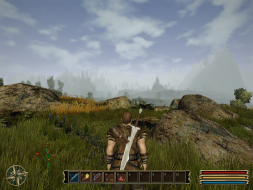
4:3


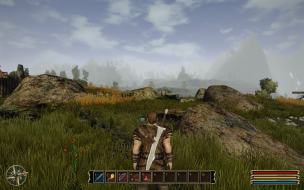
16:10


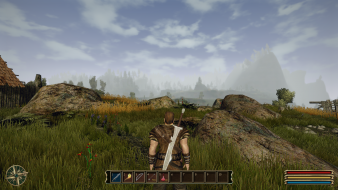
16:9


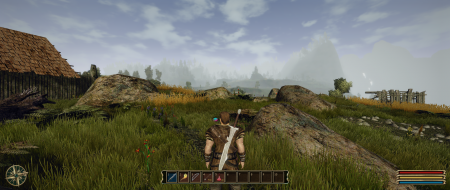
21:9


3x1

Last edited by emanuel.en on 11 Sep 2015, 03:19, edited 6 times in total.
Reason: Edit
User avatar
skipclarke
Founder
Founder
Posts: 7358
Joined: 13 Oct 2003, 05:00

Gothic 3: Detailed Report

Post by skipclarke »

The FMVs are anamorphic, not pillarboxed. Great report.
emanuel.en
Posts: 185
Joined: 31 Aug 2006, 19:00

Gothic 3: Detailed Report

Post by emanuel.en »

The FMVs are anamorphic, not pillarboxed. Great report.


Fixed and thanks. :D
The_cranky_hermit
Insiders
Insiders
Posts: 3010
Joined: 07 Nov 2005, 04:16

Gothic 3: Detailed Report

Post by The_cranky_hermit »

==Supported resolutions==

What about 1280x768? Were you able to test this?


==Singleplayer anomalies==

Are there any stretched 2D elements that hurt the gameplay? For example, are there any "to scale" maps where being able to accurately judge distances is important? Or are there any stretched 2D screens that are used for gameplay events?


==Cut-scenes==

You said the cut-scenes are "rendered." Do you mean rendered within the game's 3D engine, or pre-rendered (AKA FMV)? I'm guessing they're FMVs - the water looks a little too good to be rendered ingame.
emanuel.en
Posts: 185
Joined: 31 Aug 2006, 19:00

Gothic 3: Detailed Report

Post by emanuel.en »

==Supported resolutions==

What about 1280x768? Were you able to test this?


Isn't working for me.

==Singleplayer anomalies==

Are there any stretched 2D elements that hurt the gameplay? For example, are there any "to scale" maps where being able to accurately judge distances is important? Or are there any stretched 2D screens that are used for gameplay events?


No, it has no effect on the gameplay.

==Cut-scenes==

You said the cut-scenes are "rendered." Do you mean rendered within the game's 3D engine, or pre-rendered (AKA FMV)? I'm guessing they're FMVs - the water looks a little too good to be rendered ingame.


Pre-rendered.
The_cranky_hermit
Insiders
Insiders
Posts: 3010
Joined: 07 Nov 2005, 04:16

Gothic 3: Detailed Report

Post by The_cranky_hermit »

Isn't working for me.

Can you select this resolution in Windows?" If so, 1280x768 should be listed as "unsupported." If not, it should be listed as "untested."
emanuel.en
Posts: 185
Joined: 31 Aug 2006, 19:00

Gothic 3: Detailed Report

Post by emanuel.en »

Isn't working for me.

Can you select this resolution in Windows?" If so, 1280x768 should be listed as "unsupported." If not, it should be listed as "untested."


I added a custom resolution just like 1920x1080 or 1280x800, but those are working and 1280x768 not. Yes I can choose it in Windows.
The_cranky_hermit
Insiders
Insiders
Posts: 3010
Joined: 07 Nov 2005, 04:16

Gothic 3: Detailed Report

Post by The_cranky_hermit »

Then 1280x768 is unsupported.

Calculated grade: C+

Summary of widescreen related flaws:
No 1280x768 support.
Stretched HUD.
Stretched 2D screens.

Cranky's coverage estimate: 100%
Xtreme_Rampage
Posts: 13
Joined: 12 Jan 2007, 01:34

Gothic 3: Detailed Report

Post by Xtreme_Rampage »

Are you sure you can't get certain resolution like '1280 x 768'? What about editing the g3.ini file from C:Program FilesGothic IIIIni? If I wasn't wrong, I read thread about modifying the game in other forum.
emanuel.en
Posts: 185
Joined: 31 Aug 2006, 19:00

Gothic 3: Detailed Report

Post by emanuel.en »

Are you sure you can't get certain resolution like '1280 x 768'? What about editing the g3.ini file from C:Program FilesGothic IIIIni? If I wasn't wrong, I read thread about modifying the game in other forum.


Thanks it works, but the file is somewhere else.

C:Document and SettingsUserPersonal Data (could somebody tell me the correct designation?)gothic3UserOptions.ini

So 1280x768 is working! with an ini-hack.

Xtreme_Rampage
Posts: 13
Joined: 12 Jan 2007, 01:34

Deserve higher grade?

Post by Xtreme_Rampage »

Yeah, then I guess Gothic 3 deserves higher grade, B- or perhaps B ? No?
emanuel.en
Posts: 185
Joined: 31 Aug 2006, 19:00

Re: Deserve higher grade?

Post by emanuel.en »

Yeah, then I guess Gothic 3 deserves higher grade, B- or perhaps B ? No?


Yes. In my opinion B, but we'll have to see what cranky or Ibrin is saying. :P
User avatar
skipclarke
Founder
Founder
Posts: 7358
Joined: 13 Oct 2003, 05:00

Gothic 3: Detailed Report

Post by skipclarke »

One more flaw: .ini solution needed for 1280x768
The_cranky_hermit
Insiders
Insiders
Posts: 3010
Joined: 07 Nov 2005, 04:16

Gothic 3: Detailed Report

Post by The_cranky_hermit »

C:Document and SettingsUserPersonal Data (could somebody tell me the correct designation?)gothic3UserOptions.ini

Simply "My Documents" should work. By default, "My Documents" maps to "C:Documents and SettingsMy Documents."

And Gothic 3 has been upgraded to a B.
Tanuki
Posts: 2866
Joined: 07 Jul 2007, 23:55

http://forum.nordicgames.at/s

Post by Tanuki »

http://forum.nordicgames.at/showthread.php?176850-Gothic-3-Patch-1-75-release

Compared to the previous patch (1.74), CP 1.75 offers widescreen support for the menus, new graphics options (like color grading and FXAA), and decreasing of stuttering by using a shader cache.


Menu backgrounds are still stretched.
User avatar
Garrett
Insiders
Insiders
Posts: 366
Joined: 12 Mar 2013, 23:18

Re: Gothic 3

Post by Garrett »

I've updated the widescreen details for Patch 1.75. Widescreen resolution detection seems to be greatly improved with this version, e.g. 1280x768 is now listed in-game and doesn't need the previous workaround.

Could someone with a multi-monitor setup test whether multi-monitor resolutions still need the ge3.ini workaround?
User avatar
simroz
Posts: 76
Joined: 06 May 2013, 15:36

Re: Gothic 3

Post by simroz »

The final community patch seems to fix alot of issues. I run 4000x1800 on 15 monitors using softh and it works perfectly, just had to select the resolution from in-game. Menus and FOV are perfect.

Post Reply

Who is online

Users browsing this forum: No registered users and 5 guests