Page 1 of 3
Warcraft III: Reign of Chaos
Posted: 26 Dec 2006, 02:38
by skipclarke
Warcraft III: Detailed Report
Posted: 26 Dec 2006, 02:59
by The_cranky_hermit
D+.
Warcraft III: Detailed Report
Posted: 26 Dec 2006, 03:02
by skipclarke
Thx. Fxd.
Warcraft III: Detailed Report
Posted: 20 Jun 2007, 00:33
by dognose
Hello,
ive bought 2 19" Widescreen Monitors a few weeks ago. I usually play
WC3 in a window, cause then i can swtich to other tasks.
now i found the report, to set the game on "widescreen" mode...
i tried it, but i dont understand....
If i set the res in the reg to 1440*900 (my native resolution)
the game (fullscreened) just looks like if i choose 1024*768
What is the "sence" of changing the registry resolution - it
causes the same strech like choosing another resolution...
btw: if u change the res, and look into the graphic options, game changes
them back to 640*480 ...
regards,
dognose
Warcraft III: Detailed Report
Posted: 20 Jun 2007, 20:56
by P-Storm
Your monitor or drivers are scaling them, or the game itselfs scaling them. If you let do the game the scaling i think you get sharper pictures and stuff like that.
Warcraft III: Detailed Report
Posted: 02 Jul 2007, 05:02
by Silvers24
Ummm, how do I edit the stuff I need for the 1680 x 1050 res setting?
All is given is this hex code stuff....more info?
Warcraft III: Detailed Report
Posted: 02 Jul 2007, 10:10
by P-Storm
You need to go in start->run
enter here regedit
Then search HKEY_CURRENT_USERSoftwareBlizzard EntertainmentWarcraft IIIVideo
And edit the height and width :wink:
Warcraft III: Detailed Report
Posted: 02 Jul 2007, 12:29
by skipclarke
There should be a radio button to switch between hex and decimal values. Check the option for decimal.
Warcraft III: Detailed Report
Posted: 02 Jul 2007, 12:32
by P-Storm
yeah, i almost forgot that Ibrin, thanks :)
Warcraft III: Detailed Report
Posted: 02 Jul 2007, 22:13
by Silvers24
Yes! Thank you guys, got it ^_^
Warcraft III: Detailed Report
Posted: 31 Aug 2007, 08:19
by FatHuntresS
hey.. im using 22 inch 1680x
i want back the 1024x screen and i dont mind the black bars..
i really hate stretch screen.
i can do it through the registry?
Warcraft III: Detailed Report
Posted: 31 Aug 2007, 22:06
by P-Storm
hey.. im using 22 inch 1680x
i want back the 1024x screen and i dont mind the black bars..
i really hate stretch screen.
i can do it through the registry?
The resolution, yeah easy. The black bars, it is a bit difficult, you may search here on the forum for power strip, and someone mentioned that the new drivers (if you have an nvidia videocard) with some fix.
Warcraft III: Detailed Report
Posted: 06 Nov 2007, 02:09
by derHolger
Hello,
I got a question. I just bought my first Wide screen Display and... wow! :-)
Now I changed the resolution and It works fine.
But is there a possibility to change the range of the MaxCameraHeight like in C&C Generals/Zero Hour?
See this
thread.
Cu,
Holger
Warcraft III: Detailed Report
Posted: 06 Nov 2007, 09:32
by P-Storm
Not that i know.
Warcraft III: Detailed Report
Posted: 06 Nov 2007, 17:02
by derHolger
Mh... think ill write Blizzard a Email to ask them. If I still think, that an enthusiast or a coder got a sollution, the guys from Blizzard should know it too.
But if they share theirs knowledge with me is a different part :twisted:
*edit*
If I could register myself on their HP, it would be easier to get in contact with them.
But I'll keep on working.
Yesterday I thought, even if it is possible to change the camerahight, I dont think they would share the possibility.
Cause it has something of "hardwarecheating". Guys with a huge resolution and a max camheight would just see more then guys with a 17" CRT or whatever.
You see enemies much earlier and stuff like that.
*edit*
Warcraft III: Detailed Report
Posted: 15 Jan 2008, 20:36
by annie
Hmm, is there a way to force this game display in fullscreen instead of widescreen? I have a widescreen monitor and it auto-stretches the image when I start the game. I would much rather play in fullscreen than stretched widescreen (best would be if blizzard released a widescreen patch <3).
So is there any way? Thanks guys :)
FOV fix
Posted: 01 Feb 2008, 05:50
by Jopon
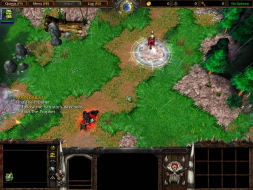
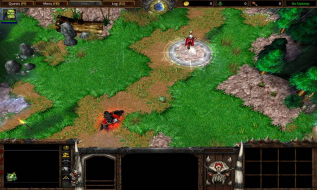
Cool shit right here. I was looking for this for years and it was under my nose the whole time. It lets you fix the fov of war3. You can zoom out further so your not cramped rightup close and you don't miss all the action. This is a hack, and you will get banned if you try to play ladder online with it.
Download shadowfrench maphack -
http://securegamers.com/shadowfrench/W3XMapHack12102.exe

open it up and you will see this. I unselect EVERYTHING so that nothing is checked. I don't want to see the map hack i just want the FOV fix.
As you can see nothing except the camara is un-checked. There are 6 spots, and they are the 6 different camara views you have when you scroll your mouse wheel, or use the page up and page down keys. It is automatically set to the warcraft default.
Distace
=====
The distance is how high the camara is. The further back you are the more you can see. For me i like 2500.
AoA
===
The AOA is the angle of the view. Somthing around 280 is looking stright down. I like mine around 295.
Rotation
=====
I just leave this alone, its the horizontal angel.
So just start up the game first, leave it on the load screen, turn on the hack and fix the settings, click the on button, and you are good to go. Enjoy, i know i sure as hell am.
Now all we need is a non-streached wide screen option and we are set.
Before

After

ignore the water marks i had to convert war3 screen shots to jpg and the program left a mark behind :)
Warcraft III: Detailed Report
Posted: 01 Feb 2008, 09:04
by squ1zzy
Still no proper FOV tho.. :cry:
Warcraft III: Detailed Report
Posted: 01 Feb 2008, 16:57
by Mergatroid
Great. Do you have a tool for World of Warcraft? I know it's a completely different engine, but I thought I'd take the opportunity.
Warcraft III: Detailed Report
Posted: 01 Feb 2008, 18:14
by DaFox
Good find Jopon, I'm trying to get the sourcecode for that from shadowfrench, I'll try to make a stand alone version of it.
@Squ1zzy, Agreed its just zoomed out but its far far far better then stretched.
Great. Do you have a tool for World of Warcraft? I know it's a completely different engine, but I thought I'd take the opportunity.
I doubt you will see one, the world of warcraft anti cheat (codenamed Warden) is highly agressive, you wont be seeing any FOV fixer for WoW.
Note that this method will most likely get you banned if you use it in a ladder game, Using it in singleplayer and custom games is fine though.