
Fable: The Lost Chapters

Detailed breakdowns of how games react to widescreen, ultra-wide, 4k and multi-mon
Post Reply
kotmfu
Posts: 25
Joined: 01 Nov 2006, 13:42

Fable: The Lost Chapters

Post by kotmfu »


Widescreen Grade: A
Multi-monitor Grade: B

Read Full Detailed Report - Fable: The Lost Chapters

RPG from the mind of Peter Molyneux. In Fable, the players' every action determines their character's skills, appearances and moralities. Life stories are created from childhood through adulthood and on to old age. Players may choose the paths of righteousness or dedicate their characters' lives to evil; observing as they transform into reflections of their actions and decisions. As players' characters develop, the world reacts to them and their actions. People comment on their successes, failures, appearances and behaviors. Their many opinions are expressed through applause, mockery, trepidation, panic and even flirtation. With each person characters aid and every creature they slay, the world is changed forever. In Fable, gamers decide: "Who will I be?
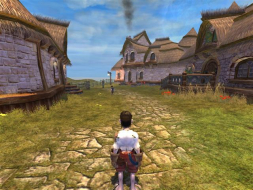
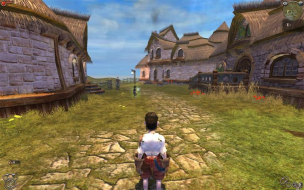
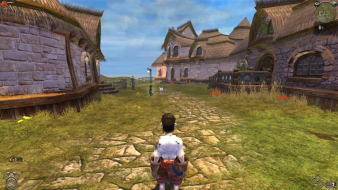


Last edited by kotmfu on 26 May 2013, 22:13, edited 2 times in total.
Reason: Edit
The_cranky_hermit
Insiders
Insiders
Posts: 3010
Joined: 07 Nov 2005, 04:16

Fable: The Lost Chapters - Detailed Report

Post by The_cranky_hermit »

I did a comparison of the pictures. Some horizontal FOV is gained, but some vertical FOV is lost. In these comparison pictures, I've put the 4:3 picture on top of the widescreen one so that they share the same common area, and another one where I put a 16:10 picture on top of the 16:10 one. Details to the left and right of the yellow lines represent FOV gained, and details above and below the red lines represent FOV lost.


It appears that more FOV is gained than lost, so this is graded as if it were hor + (certified).

Also, the cut-scene (both FMV and rendered) effect is called "anamorphism." You can read up on it here.
The_cranky_hermit
Insiders
Insiders
Posts: 3010
Joined: 07 Nov 2005, 04:16

Fable: The Lost Chapters - Detailed Report

Post by The_cranky_hermit »

New grading, to reflect new rules:

Calculated grade: B+
Potential grade: Certified

Major oustanding DR omissions:
Need TH information
User avatar
Dem Pyros
Posts: 1060
Joined: 08 Dec 2006, 06:01

Re: Fable: The Lost Chapters - Detailed Report

Post by Dem Pyros »

Quick Triplehead Comparison.

4:3 (1024x768)


16:10 (1440x900)


12:3 (4:3 Triplehead @ 3072x768)
The_cranky_hermit
Insiders
Insiders
Posts: 3010
Joined: 07 Nov 2005, 04:16

Re: Fable: The Lost Chapters - Detailed Report

Post by The_cranky_hermit »

Here's a composite shot:


Think this is hor + enough to warrant certification?
User avatar
Dem Pyros
Posts: 1060
Joined: 08 Dec 2006, 06:01

Re: Fable: The Lost Chapters - Detailed Report

Post by Dem Pyros »

Think this is hor + enough to warrant certification?

Personally, no. Far too much vertical space is removed. It feels too narrow playing it.
Tanuki
Posts: 2866
Joined: 07 Jul 2007, 23:55

Re: Fable: The Lost Chapters - Detailed Report

Post by Tanuki »

I think Fable Explorer can fix this. Anyone used it before?

EDIT - Under CAMERA MODE. They have all the different camarea values and their fovs. I think you can just change them and have Explorer make a mod.
User avatar
Dem Pyros
Posts: 1060
Joined: 08 Dec 2006, 06:01

Re: Fable: The Lost Chapters - Detailed Report

Post by Dem Pyros »

I think Fable Explorer can fix this. Anyone used it before?

EDIT - Under CAMERA MODE. They have all the different camarea values and their fovs. I think you can just change them and have Explorer make a mod.

Fantastic job picking up on that Tanuki!

I gave it a whirl, although this is my first time ever using the program so please excuse any discrepancies.

This is what I did:
1.) Extracted the program into the Fable installation folder.
2.) Opened up Fable Explorer and under the CAMERA_MODE subset, selected "CAMERA_PC_NORMAL" and increased the FOV from 90.

3.) "Appl[ied] Changes" and then saved the mod and launched the game from the toolbar menu.

Fable Explorer has an alternate DirectX9 dll, so it didn't get along too well with SoftTH. Without SoftTH it worked well, and when SoftTH was initialized after Fable Explorer everything worked fine.

I tried out four FOVs for the main camera. 110, 120, 130, and 150. 150 was the result I got from an online FOV calculator for a 4.8 AR, 110 was a conservative estimate, 130 a good midpoint, and 120 seemed to be the best. Looking at the shots now compared to the original 4:3, I think that somewhere between 110-115 would probably be correct.

110


120


130


150


A note: Adjusting the FOV through only the "CAMERA_PC_NORMAL" variable only changed the field of view for (obviously) the main camera. In order for this to be a usable hack, all of the other camera variables would have to be changed. In the brief time that I messed around with this, all of the cutscenes still had a very restricted field of view.
Tanuki
Posts: 2866
Joined: 07 Jul 2007, 23:55

Re: Fable: The Lost Chapters - Detailed Report

Post by Tanuki »

Fantastic job picking up on that Tanuki!


I couldn't even get it to work.

I was thinking if you take the 4:3 and then get the exact fov for 16:10 and 16:9 you might be able to get the formula to calculate the fov for any aspect ratio. If I can get it working I will try and do up the pics.
Deusfaux
Posts: 156
Joined: 30 Mar 2006, 09:16

Re: Fable: The Lost Chapters - Detailed Report

Post by Deusfaux »

Why do some games have Hor+ and Vert- listed in the WGL where this one does not?
spysmily1
Posts: 1
Joined: 22 Mar 2010, 03:00

Re: Fable: The Lost Chapters - Detailed Report

Post by spysmily1 »

I agree with an earlier post. Does this deserve certification? I have been visiting this website for a while now. I look for the great info on wide screen gaming. I believe this game does not warrant the certified grade. At most it deserves near an A. For myself, and hopefully others who are wide screen aficionados, you must only increase the view from full screen aspect without any loss in picture.
Davros
Posts: 176
Joined: 06 Feb 2011, 10:22

Re: Fable: The Lost Chapters - Detailed Report

Post by Davros »

can i just add i have eyefinity 3x 1680x1050 (5276 bezel compensated)
and the max res this game will give me is 4040x800
User avatar
scavvenjahh
Editors
Editors
Posts: 3424
Joined: 06 Mar 2008, 17:20

Re: Fable: The Lost Chapters - Detailed Report

Post by scavvenjahh »

Hmm, would this be one of these games that have a 4096-pixel limit ? :(
User avatar
skipclarke
Founder
Founder
Posts: 7358
Joined: 13 Oct 2003, 05:00

Re: Fable: The Lost Chapters - Detailed Report

Post by skipclarke »

Seems this certainly shouldn't be Certified.
Post Reply

Who is online

Users browsing this forum: No registered users and 5 guests



