X-Men: The Official Game

Detailed breakdowns of how games react to widescreen, ultra-wide, 4k and multi-mon
Post Reply
User avatar
czarman
Insiders
Insiders
Posts: 685
Joined: 11 Dec 2008, 23:51
Location: Germany

X-Men: The Official Game

Post by czarman »


Widescreen Grade: B
Ultra-Widescreen Grade: B
Multi-monitor Grade: B
4k Grade: B

Read Full Detailed Report - X-Men: The Official Game

This is a 3D action/fighting game based off of the Hollywood movies. Console-centric gaming (Dual-analog gamepad highly suggested)


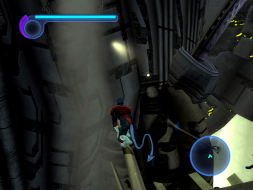
4:3


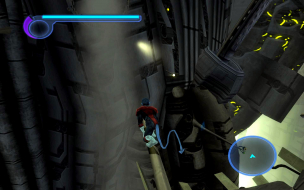
16:10


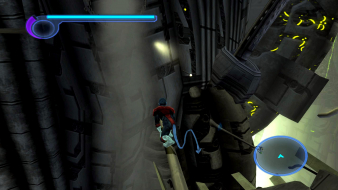
16:9


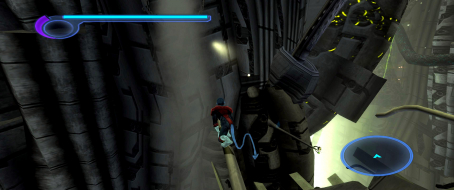
21:9


3x1

Last edited by czarman on 10 Jan 2018, 10:14, edited 5 times in total.
Reason: Edit
CZARMAN aka 彼得爸爸
The_cranky_hermit
Insiders
Insiders
Posts: 3010
Joined: 07 Nov 2005, 04:16

X-Men The Official Game: Detailed Report

Post by The_cranky_hermit »

My analysis:

==Supported resolutions==

You forgot to list 1280x768 as untested.


==Menus==

If you were to start the game from the beginning, and play it to the end without taking a break, would you be seeing any of these stretching menus after the game starts? For example, is there a "select mission" screen in between each level? Or is the case that once you start the game proper, you won't see a single stretching menu until the game is over?


==Multiplayer support==

When you say "none," I assume you mean "This game is single-player only," as opposed to "this game has no widescreen support in multiplayer mode." You might want to clarify this.

None of these above issues really matter as far as the grade is concerned, which, under the current grading curve, is as follows:

==Grading==

Grade: C+
The limiting factor is the solution, which requires registry editting.
User avatar
Paddy the Wak
Editors
Editors
Posts: 3436
Joined: 27 Jul 2004, 17:42

Solution: X-Men The Official Game Demo [Edit]

Post by Paddy the Wak »

I was only offered the usual 4:3 resolutions in the game ... :roll:
I couldn't find any config file ... it might be there but there are lots of them ...

I did find that I could get the game to run in Widescreen or TripleHead by editing the registry like so ...

Back up your registry first ! ... and if your not comfortable with this don't try it !

1. Click on Start then go to Run.
2. Type in regedit and click OK.
3. Left-Click once on the plus sign next to HKEY_CURRENT_USER.
4. Left-Click once on the plus sign next to a folder labelled Software.
5. Left-Click once on the plus sign next to a folder labelled Activision.
6. Left-Click once on the plus sign next to a folder labelled X-Men The Official Game Demo
7. Left-Click once on the plus sign next to a folder labelled Profile0
8. First double click on height and change the value to your desired height ... i.e. 1920 ... using Decimal under Base ... then click ok.
9. Second double click on width and change the value to your desired width ... i.e. 1200 ... using Decimal under Base ... then click ok.
10. Now you can close the registry editor.

Start the game up it should be running with your chosen resolution ... :D ... the FOV is automatically adjusted ... :D

Some screenshots ...

4:3 ...


Widescreen ...


TripleHead ...
User avatar
skipclarke
Founder
Founder
Posts: 7358
Joined: 13 Oct 2003, 05:00

X-Men The Official Game: Detailed Report

Post by skipclarke »

Any chance of getting a Detailed Report?
paiva.daniel
Posts: 10
Joined: 25 Oct 2006, 03:14

Registry

Post by paiva.daniel »

Do we need to change resolution on registry, EVERY time we play the game??? :( Is there a way to SAVE this configuration forever?

Thanks!

Daniel
Gabbo
Posts: 381
Joined: 24 Dec 2005, 11:13

Re: Registry

Post by Gabbo »

Do we need to change resolution on registry, EVERY time we play the game??? :( Is there a way to SAVE this configuration forever?

Thanks!

Daniel


No.

Once you change it in the registry, it should stay. This might get negated if you tinker around with the in-game video options. (I can't confirm this now as I don't have the game installed right now).
WidescreenWallaby
Posts: 32
Joined: 21 Oct 2006, 19:47

X-Men fails at 2560x1600

Post by WidescreenWallaby »

Tried to change the resolution in the registry to 2560x1600 and then found out the game will not start.

It gives an error... i can't even see what it is... it's invisible and alt-tabbing doesn't make it show up.

I then changed the resolution to 1920x1200 and the game starts just fine.

A pity, i'd like to play this at my native res.
Mesh
Posts: 845
Joined: 28 May 2007, 03:10

X-Men The Official Game: Detailed Report

Post by Mesh »

might try pressing alt-printscreen when youre at the point the error shows
then open something like ms paint and press ctrl-v or paste.

it might let you see what the error is
Post Reply

Who is online

Users browsing this forum: No registered users and 11 guests