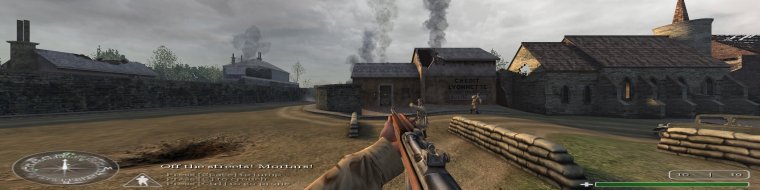
Call of Duty is a WW2 themed FPS from Infinity Ward and Activision. The game is played over three campaigns; American, British, and Russian, and most of the missions emphasize fighting as a company over lone wolf tactics.
Call of Duty is a WW2 themed FPS from Infinity Ward and Activision. The game is played over three campaigns; American, British, and Russian, and most of the missions emphasize fighting as a company over lone wolf tactics.
==Version==
This information is based on version 1.5.
==Method==
Go to Main. Edit config.cfg (preferably with textpad and edit these lines:
seta cg_fov "xx"
Set this according to your preference. I recommend 90 for 16:10 resolutions and 95 for 16:9 resolutions.
seta r_customheight "xxx"
seta r_customwidth "xxxx"
Set this to your favorite widescreen resolution. Be careful not to confuse the 'height' and 'width'.
seta r_mode "x"
Set this to -1.
Do the same for config_mp.cfg, but skip the cg_fov part.
==Screen change==
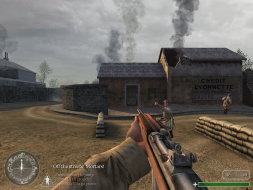
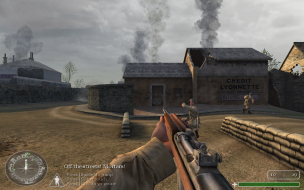
This game is Hor+, dependant on your cg_fov setting.
1024x768, cg_fov "80"
1280x800, cg_fov "90"
==Supported resolutions==
I have successfully run this game at all of the common widescreen resolutions, including 1280x720, 1280x768, 1280x800, 1440x900, 1680x1050, 1920x1080, and 1920x1200.
==Singleplayer anomalies==
Every single gameplay element is from the first person 3D perspective. I am unaware of any parts of the game where the cg_fov var does not apply.
==Multiplayer support==
Multiplayer is Vert-. The cg_fov var is disabled as a cheat.
==Aspect ratio support==
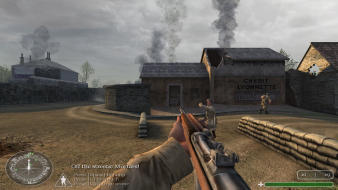
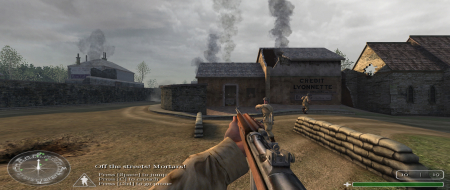
The game's aspect ratio automatically matches your resolution. But the wider your aspect ratio, the higher the cg_fov needs to be to maintain Hor+.
1280x720, cg_fov "95"
1280x800, cg_fov "90"
==HUD stretch==
The HUD stretches. This is most obvious by looking at the oval compass.
==Cut-scenes==
Using a widescreen resolution breaks the FMV cut-scenes (the intro and outro IIRC). They can be heard, but not seen. They can also be skipped with the Esc key.
On a related note, the pre-mission briefings are stretched.
1024x768
1280x800
==Grading==
Calculated grade: C+
Lack of hor + widescreen support in multiplayer and broken FMVs hurt this game.
Major unresolved issues:
None.
Minor unresolved issues:
None.
Summary of widescreen-related flaws:
Vert- in multiplayer.
Broken FMVs.
.ini solution.
Stretched HUD.
I propose the following as the best widescreen solution for Call of Duty. It contains precise FOV recommendations plus a new method to avoid the Activision and Infinity Ward intros that do not display anyway.
This applies to Single Player only. Make all changes in the following file using WordPad or Notepad. Be sure to do a File>Save when you're finished.
C:Program FilesCall of DutyMainconfig.cfg
For a 16:9 Aspect Ratio Resolution:
seta cg_fov "96.4183" (Changes FOV from default of 80.)
seta r_mode "-1" (Allows custom resolutions to work.)
seta r_customheight "720" (Enter your own "Y Axis" resolution.)
seta r_customwidth "1280" (Enter your own "X Axis" resolution.)
seta com_introplayed "1" (Skips the Activision and Infinity Ward intros. Otherwise, you'll hear sound only.)
For a 16:10 Aspect Ratio Resolution:
seta cg_fov "90.3951" (Changes FOV from default of 80.)
seta r_mode "-1" (Allows custom resolutions to work.)
seta r_customheight "1200" (Enter your own "Y Axis" resolution.)
seta r_customwidth "1920" (Enter your own "X Axis" resolution.)
seta com_introplayed "1" (Skips the Activision and Infinity Ward intros. Otherwise, you'll hear sound only.)
In Multiplayer you can force custom resolutions using the same settings, but it is impossible to increase the default FOV. It will always revert to 80. For this reason, I suggest playing multiplayer at a "normal" 4:3 resolution. 8)
Sure, why not ?
I think The_cranky_hermit cannot get 1360 or 1366x768 to work on his system, that's the only reason why these resolutions were not tested/confirmed; note that they weren't confirmed not to work, either ;)
You should be able to apply the method above to ANY 16:9 resolution.
Still cant play CoD in widescreen. I would like to play it in 16:9 (1366x768). I have CoD 1 Game of the year edition and my config file is different and i cant find "seta cg_fov" and if i try to change "seta r-mode" into -1 the game doesnt start at all. Help would be welcome.
Still cant play CoD in widescreen. I would like to play it in 16:9 (1366x768). I have CoD 1 Game of the year edition and my config file is different and i cant find "seta cg_fov" and if i try to change "seta r-mode" into -1 the game doesnt start at all. Help would be welcome.
Yeah, I had the similar problem. I solved it quite untypical way, I asked somebody to send me his config (that could be modified well) and it was OK.
This game drives me crazy again. The highest resolution I can set is 1366×768. If I set any higher (including the original resolutions like 1600×1200), the game is zoomed. I just don't see the whole image, it's zoomed and cropped.
Of course, I had to use downloaded config file because the original from CD didn't include the FOV settings line.