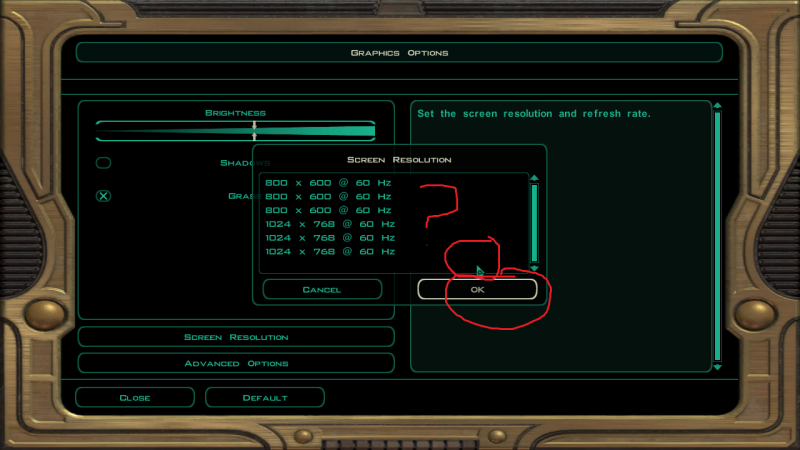
I just ran UniWS and followed the INI editing instructions and the game runs in 1280x960 instead of my chosen resolution of 1920x1200. I tried exiting out and re-opening the kotor2.ini but it still says width=1920 height=1200 so I don't see what I could be doing wrong.
I skipped the Step Two in the OP because I don't want to change the movie res since that gave me trouble in KotOR 1.
I did notice that the in-game resolution list shows 3 entries for 1280x960x60hz which is weird because the other resolutions have 3 entries but with *different* refresh rates.
I guess I'll have to try manual hex editing to see if UniWS screwed it up somehow.
I get the same thing (3 duplicate entries for 1280x960x60Hz), HunterZ, with no luck.
I just ran UniWS and followed the INI editing instructions and the game runs in 1280x960 instead of my chosen resolution of 1920x1200. I tried exiting out and re-opening the kotor2.ini but it still says width=1920 height=1200 so I don't see what I could be doing wrong.
I skipped the Step Two in the OP because I don't want to change the movie res since that gave me trouble in KotOR 1.
I did notice that the in-game resolution list shows 3 entries for 1280x960x60hz which is weird because the other resolutions have 3 entries but with *different* refresh rates.
I guess I'll have to try manual hex editing to see if UniWS screwed it up somehow.
Update: I figured it out, it was Windows 7's stupid masking of stuff in Program Files.
did you manage to get the widescreen hack working under windows 7?
So I noticed that with the HQ movies pack installed, the movies look terrible (didn't try the game before installing them to compare). According to Bink the HQ movies are 1600x680, but according to my monitor the game is still trying to play them at 640x480.
I tried the Step Two widescreen movies hack:
- as with my attempts at movie hacking KotOR 1 I could hear the movies but not see them
- I could, however, see the intro logo movies properly and at the hacked resolution (???)
I tried hacking to a 4:3 resolution instead (1600x1200, 1280x960):
- I could see the movies this time, but again only at 640x480 (???)
- The intro logo movies played properly at the hacked resolution rather than at 640x480 like the rest of the in-game movies (???)
It seems that either this wasn't tested extensively by the OP, or the OP left out another step, or else there is some kind of hardware issue on my system.
Managed to get the game working at 1440x 900! I did it by right clicking the swkotor2.exe in the game folder, checking the run in compatability mode for windows xp sp3 and run in 640x480 boxes and then applying uniws =D
However i now have this exact problem:
The only problem is with the pre-rendered movie scenes. When I go to the movie option on the main menu, the screen will freeze at the menu where I select a movie, but I can hear the sound. I have to alt tab, then go back to the movie to actually see it. This happens too when I'm playing the game. The movie itself has a resolution of 1280x800, but it doesn't fully load properly
and am in the exact position as hunterz is. I've used hex method step 2 to change movie resolution to 1440x900. the sound of the movies play but i see no video unless i alt+tab every time
If i hex to other resolutions the movies play in 640x480. Also tried the HD movie patch hunterz is correct in that the movies actually play worse than the originals because they are laggy and jumpy.
Ok, so unlike the rest of you guys, i didn`t even manage to edit the .exe properly with the hex editor...
The problem is, despite I`m using the correct crack, and patched to the right version, I STILL can`t find these values: 80 02 00 00 75 15 81 3D E8 C1 80 00 E0 01
The .exe is 4.36 MB right ?
Also, if it helps,
I`m running Windows 7 and Hex editor Neo 4.94
Edit: OK, nevermind, i managed to find the values, but i edited them to 56 05 00 00 75 15 81 3D E8 C1 80 00 00 03 and the movies still show in that small resolution...
(And in case you`re going to reply to me that i must edit another section of values as well, i feel like i must inform u that i edited those accordingly too)
Now, I know the game doesn`t work properly on 1366x768, because of the subtitles thing, but i`m trying to run the game in 1024x768 with the movies running in 1366x768.
I`ve downloaded the HQ movies and sounds packs too if that matters at all.
I have also tried setting the movies` resolution to 1024x768 and after i did that, i ran into the same problem the other people have in that I can only hear the sound of the movies and I have to tab to the desktop and back to the game in order to actually watch the movie.
This is an old game. Some things may go to shit with age.
With that being said, I have fooled around with 1920x1080 and found that the in-game movies will default to 640x480 (even though they are actually 1280x720 for me) when the in-game resolution is different from the movie resolution. So they need to be the same resolution.
I was unable to get the start up movies to take the right resolution in 1920x1080 but I was able to get them in 1920x1200. Don't know why but they are just 4:3 logos stretched.
As for the black screen and lagging problem, I don't have them. It might be a system or codec problem on your end or maybe the game is trying to output at an unsupported resolution or refresh rate for your display. Or maybe it is a problem inherent with your game version. I would check in the movies folder to make sure they play properly on your desktop. They are just Bink videos.
I have only one question. Will the game work properly on a resolution of 1366x768? I managed to make the game run on this resolution but I can not see the texts.
I have only one question. Will the game work properly on a resolution of 1366x768? I managed to make the game run on this resolution but I can not see the texts.
No, it won`t work properly unless you force it into another 16:9 resolution or something like that, i don`t know exactly how to do that(there was some post around here that explained it), i`m running it in 1024x768 even if it`s rather ugly, since i have really no clue how to force a higher 16:9 res
I'm having a strange problem with the UK version of the game. When I use v. 1.0 and 1.0a, the hack works. But when I update the game to v. 1.0b, I can't find the lines I need to edit. Does anybody know the lines I need to edit in the patched version?
Just installed Kotor II couple of hours ago, patched it to 1.0b got the carbon crack, downloaded uniws patched the game with 1280x720 also changed the lines within swkotor2.cfg
ran the game and everything looked ok but i quickly noticed that my mouse is way off, if i tried clicking on lets say Options then i had to hoover my mouse above the actual button.
I tried changing resolutions but still the same problem its annoying as hell and it seems im the only one with this issue.... im running win 7 64bit with an ati mobility radeon 4200 HD with 1366x768 Native Res
No, it won`t work properly unless you force it into another 16:9 resolution or something like that
amyone managed to do that? i tried setting 1530x864 in unisp and swkotor.ini, i also set 'nvidia scalling' option in nvidia contol panel but it doesn't work for me, my screen is cut at top and right.
my graphic card is geforce 130m, i use 195.62 drivers.
edit: ok, i managed to run it in 1280x768 but if anyone can help me with setting 1530x864 i would be grateful.
Alright, I've been trying to do this for the last hour, but no, it won't work.
I have cracked exe, it's patched to 1.1b or whatever it was, and I used manual way (hex-editing) to do it.
The resolution I am trying to get is 1920x1080 (8007 3804 in hex, correct?), and it works, partially. The intro videos are widescreen, until the game gets to the main menu, where it resets the resolution. From the ini, from the .exe file itself. It undoes the hexediting. If I try to start the game up again, intro videos are again in the 800x600.
I am using Ati Radeon 5750, updated to latest drivers.
In addition to these problems, the game's menu blacks out options to antialiasing and soft shadows, however, if I edit the ini to support them, the game will change the options and it does work ingame.
This stuff really baffles me, does KOTOR 2 have some anti-Ati programming? Because the widescreen fixes work fine on my brother's computer which has GeForce 9800.
I've been trying to use the new UI files to get the map to work properly and the weird thing is the 16:9 version works fine if I set the game to 1920*1080, but when I use the 16:10 version with 2560*1600 the map is still screwed up. I've transferred the correct file into the override folder, but somehow it just won't stick.
Alright, I've been trying to do this for the last hour, but no, it won't work.
I have cracked exe, it's patched to 1.1b or whatever it was, and I used manual way (hex-editing) to do it.
The resolution I am trying to get is 1920x1080 (8007 3804 in hex, correct?), and it works, partially. The intro videos are widescreen, until the game gets to the main menu, where it resets the resolution. From the ini, from the .exe file itself. It undoes the hexediting. If I try to start the game up again, intro videos are again in the 800x600.
I am using Ati Radeon 5750, updated to latest drivers.
In addition to these problems, the game's menu blacks out options to antialiasing and soft shadows, however, if I edit the ini to support them, the game will change the options and it does work ingame.
This stuff really baffles me, does KOTOR 2 have some anti-Ati programming? Because the widescreen fixes work fine on my brother's computer which has GeForce 9800.
This might be way off but this is a mistake I made a couple of times.
But height and width are used in a different order in "display options" and "graphic options"
Display options has first width then height and graphic options has first height then width. I apparently have a tendency to enter width then height and have tried to run Kotor II in 1600*2560, which messes the game up and it reverts to 800*600.
I'm trying to run the game in 1600x900 and otherwise it works fine except prerendered movies won't play. I first tried with uniws and this same problem came up. Had to reinstall the game to fix it. Now i tried editing the hex values manually but the problem is still there. The prerendered movies won't play ingame or when i try to play them from main menu. I also had this problem in kotor 1 and couldn't fix it so i just watched all the movies from youtube but i really wouldn't want to have to do the same. Any solutions?