[-noun] Web community dedicated to ensuring PC games run properly on your tablet, netbook, personal computer, HDTV and multi-monitor gaming rig. https://www.wsgf.org/phpBB3/
New file sets with all the previously talked mods.
Made with dopefishs TF2Hud utility.
Also included set of unedited files for making your own set more easily.
Remember that currently you need to edit the XML if you don't have 1920x1080 monitors, search for "854" and change the two entries.
(I really need to do proper documentation of all the edited entries, but not today.)
Hey guys, I'm new to the
Posted: 24 Aug 2012, 22:30
by kompis
Hey guys, I'm new to the whole triple monitor gaming thing and so far its been great. But I'm having issues centering the hud for tf2, I'm sorry if this is stupid but I couldn't for the life of me figure out how to use that tool or how to edit any of those files :( I'm using a bezel corrected res of 5990x1200 and using dopefish's earlier post I did the math and came up with the number 814. I just have no idea how to work it into those files so if anyone could do that for me or help in person to do it I would GREATLY appreciate it.
814 is right, and the value
Posted: 25 Aug 2012, 00:53
by dopefish
814 is right, and the value for the centered loading screens is 768.
Thanks man! that worked
Posted: 25 Aug 2012, 01:13
by kompis
Thanks man! that worked flawlessly. My experience in tinkering with files is mostly editing .ini's and using files others already made so I was kind of stumped as to how to get your tool working :P never actually had to make my own custom files for anything but I guess I better get used to it since quite a few games take tinkering to work right in Surround/Eyefinity.
Now to get L4D2 sorted out, any reason why the FOV calc page keeps giving me an error when I try to upload a file there?
When I put together a GUI for
Posted: 25 Aug 2012, 02:39
by dopefish
When I put together a GUI for the application it would just be a matter of extracting the HUD files with GCFscape and then pointing this tool to that directory.
I'll probably make it so you can choose which XML file to load so that there can be one for TF2, L4D, or any other Source game that might need it.
The only reason I even started playing TF2 again is because of MvM.
I'm sure many newbs like
Posted: 25 Aug 2012, 04:03
by kompis
I'm sure many newbs like myself would appreciate a simple GUI. And hell, I don't even really play either TF2 or L4D except on a rare occasion but I want all my games in perfect working order with Surround for when that time I do decide to play comes :D
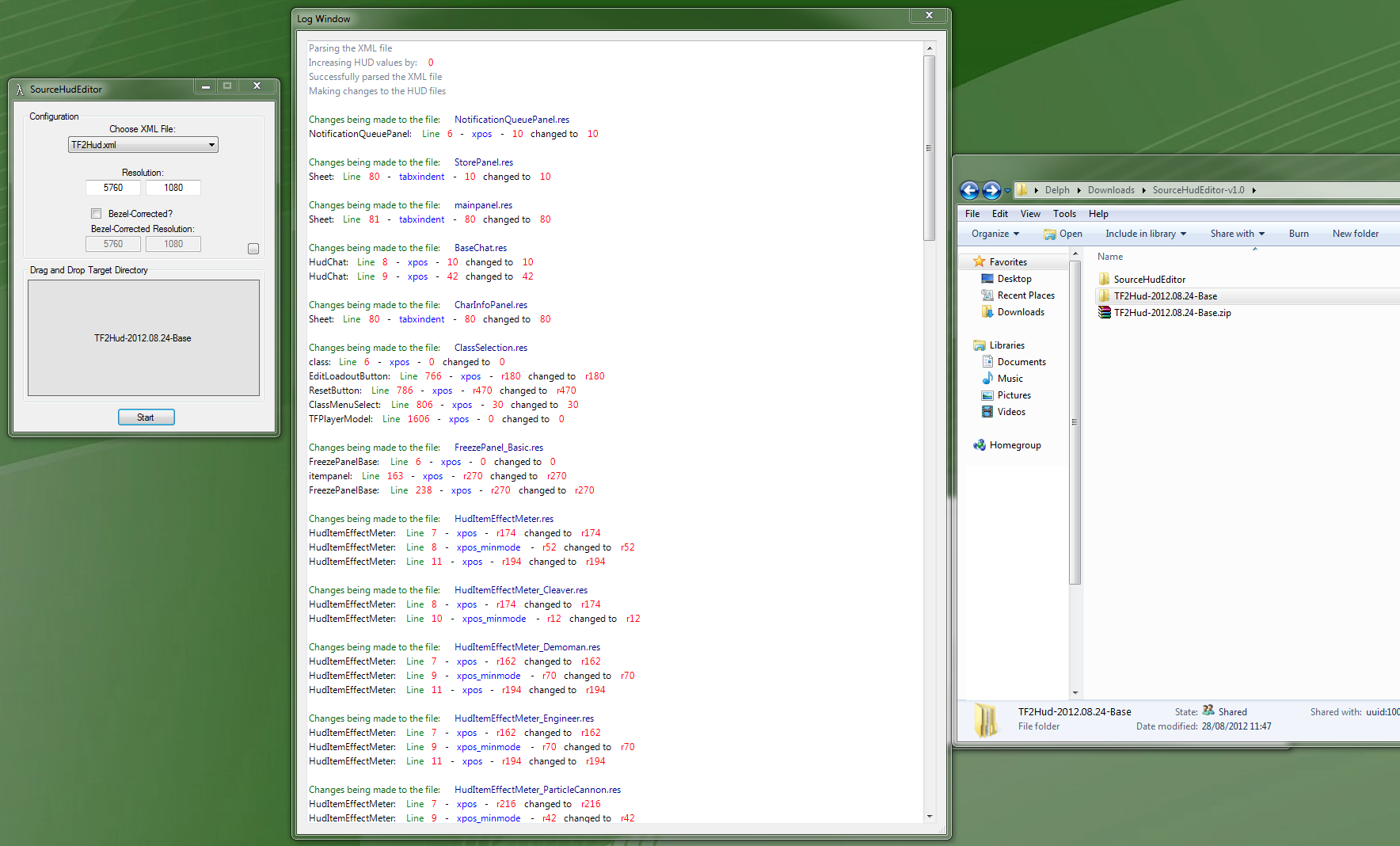
Here's a screenshot of what I
Posted: 25 Aug 2012, 10:17
by dopefish
Here's a screenshot of what I have so far:
It's nearly complete. I just need to create a simple log window that displays the status of the modifications.
I'm using my DetectDisplays library that I use with Widescreen Fixer so it should automatically detect your settings as long as you have AMD or NVIDIA.
dopefish wrote:Here's a
Posted: 25 Aug 2012, 23:57
by Delphium
Here's a screenshot of what I have so far:
It's nearly complete. I just need to create a simple log window that displays the status of the modifications.
I'm using my DetectDisplays library that I use with Widescreen Fixer so it should automatically detect your settings as long as you have AMD or NVIDIA.
Nice work, this is a must have tool and much closer to what I wanted to achieve but could not.
It hopefully will detect your display settings automatically (and not crash during startup).
If there are any errors or issues let me know.
The only thing not working at the moment that I can think of is the ability to copy text from the log window; it doesn't work.
Instructions on use:
Extract all of the necessary .res files with GCFscape to some directory
Start up SourceHudEditor
Select the XML file for the game you're modifying
Drag and drop the directory with the extracted .res files to the grey area in the window
Press start
THIS WILL OVERWRITE THE FILES
Let me know how this works for you.
When running it on my system,
Posted: 28 Aug 2012, 11:51
by Delphium
When running it on my system, i drag the folder with all the extracted .res files from baldur's base pack and the tool says that it is shifting by 0 and makes no changes to any of the files...
EDIT: OK it seems that when I run it while my desktop is in eyefinity/spanned mode the tool will make the correct changes, however when running the tool while the desktop is in extended mode, it uses the value of 0, even tho the resolution of 5760x1080 has been manually entered in.
That makes sense. I wasn't
Posted: 28 Aug 2012, 23:31
by dopefish
That makes sense. I wasn't aware people switched between Eyefinity and extended mode.
I'll add a setting that lets you manually set the display count.
Dopefish, might you be
Posted: 30 Aug 2012, 13:10
by Delphium
Dopefish, might you be interested in integrating Nem's HLExtract tool, it is a command line based version of GCF Scape.
It would be neat if your tool integrated with HLExtract/HLLib to extract the required files and put them in the correct folder for the user.
I was toying with this once before when trying to create a simple 1 click does it all tool, syntax below...
I'll look into it. The tool is actually open-source so I might just port it over to a managed C# library.
Edit:
Nevermind, he includes a C# wrapper.
I'll see what I can do.
dopefish wrote:I'll see what
Posted: 31 Aug 2012, 08:19
by Delphium
I'll see what I can do.
<3
I've fixed all of the display
Posted: 01 Sep 2012, 06:08
by dopefish
I've fixed all of the display options. There were more issues than just non-Eyefinity/Surround being detected.
Unfortunately I've started implementing HLLib before fixing those issues. This means that I won't be able to release it until HLLib is fully integrated.
There's some good news and bad news related to HLLib.
Bad:
I have to rewrite and restructure many things related to the XML parsing.
This will delay the next version release.
Good:
The XML file has more options now. You now have to specify the directory for the game (i.e. "team fortress 2") and there's now a element that describes which .gcf file you're using.
Steam's directory is now read from the registry and it will automatically use the right directory for the game.
No more dragging and dropping. It will extract the files, modify them, and then place them in the game's directory.
It should automatically determine your Steam and Team Fortress 2 directory.
When you push Start, it will extract the .res files to the TF2 directory and then modify them. If the files already exist it will overwrite them.
This should make it nice and easy whenever TF2 is patched since you can just open the app, press start, and be done.
The only thing I'm unsure of is that due to how the XML file is set up currently, the files that get extracted from multiplayer ob binaries.gcf will end up within the hl2 directory in the TF2 directory. I'm unsure of whether TF2 will still load these files from that directory or whether they have to reside in the tf directory.
Take screenshots and let me know how this version works for you.
Thanks.
Oh, and feel free to try and create XML files for other Source-based games.
Awesome program! It worked at
Posted: 09 Sep 2012, 03:24
by c1em3ntchua
Awesome program! It worked at first, but after reinstalling Steam and Team Fortress 2, I'm getting this error.
I uploaded a version that
Posted: 09 Sep 2012, 10:57
by dopefish
I uploaded a version that shows the stack traces so I can figure out what's wrong.