
Multi-Game Widescreen Fixer
-
g00seberry

- Editors

- Posts: 1317
- Joined: 24 Sep 2006, 16:57
Multi-Game Widescreen Fixer
I've made this a sticky...I'm not sure why it wasn't before, I thought it already was! 8)
Multi-Game Widescreen Fixer
Dopefish is on TV :)
http://www.pcper.com/article.php?aid=820
(somewhere at the end of the video)
http://www.pcper.com/article.php?aid=820
(somewhere at the end of the video)
Multi-Game Widescreen Fixer
What i really need to do is get my FOV setting at 80. Default is 65 in MW2. How do i do this? The Fixer just seems to "stretch" the default image to fit my 16:10 22" LCD monitor...this actually results in my seeing LESS of the game....which isnt what i need...i need to see MORE....any suggestions?

Multi-Game Widescreen Fixer
What i really need to do is get my FOV setting at 80. Default is 65 in MW2. How do i do this? The Fixer just seems to "stretch" the default image to fit my 16:10 22" LCD monitor...this actually results in my seeing LESS of the game....which isnt what i need...i need to see MORE....any suggestions?
You don't need the Widescreen Fixer. It only helps for non 4:3, 16:10 and 16:9 monitors in MW2. http://www.widescreengamingforum.com/node/11504#comment-199019 That is what you want.
Multi-Game Widescreen Fixer
Hello Dopefish,
It's been a while since we last spoke, I'm glad to see you are working on new games.
I have one question about MW2. What combination of keys do I use to initiate the fixer? With COD4, it was ctrl + :, but this doesn't work with my MW2. Any suggestions?
It's been a while since we last spoke, I'm glad to see you are working on new games.
I have one question about MW2. What combination of keys do I use to initiate the fixer? With COD4, it was ctrl + :, but this doesn't work with my MW2. Any suggestions?

Multi-Game Widescreen Fixer
The default is semi-colon.
You can change the key by editing the .ini file that Widescreen Fixer creates. The readme has some more detail on how to do this.
You can change the key by editing the .ini file that Widescreen Fixer creates. The readme has some more detail on how to do this.
Widescreen Fixer - https://www.widescreenfixer.org/
Widescreen Fixer Twitter - https://twitter.com/widescreenfixer
Personal Twitter - https://twitter.com/davidrudie
Widescreen Fixer Twitter - https://twitter.com/widescreenfixer
Personal Twitter - https://twitter.com/davidrudie
-
scavvenjahh

- Editors
- Posts: 3424
- Joined: 06 Mar 2008, 17:20
Multi-Game Widescreen Fixer
Any update for Wolfenstein 1.11 in sight ?
Multi-Game Widescreen Fixer
Any update for Wolfenstein 1.11 in sight ?
How 'bout Mirror's Edge? I still haven't finished that game and it would be nice to play it in a proper FOV.
Multi-Game Widescreen Fixer
Any update for Wolfenstein 1.11 in sight ?
I didn't know there was a new version. I'll update and work on that tonight.
How 'bout Mirror's Edge? I still haven't finished that game and it would be nice to play it in a proper FOV.
I thought Mirror's Edge worked fine? I don't remember. Either way, it's a UE3-based game, which I tend to have difficulty with.
Widescreen Fixer - https://www.widescreenfixer.org/
Widescreen Fixer Twitter - https://twitter.com/widescreenfixer
Personal Twitter - https://twitter.com/davidrudie
Widescreen Fixer Twitter - https://twitter.com/widescreenfixer
Personal Twitter - https://twitter.com/davidrudie
Multi-Game Widescreen Fixer
v1.65.0 is live
[list]
[*]I have not had EB or whatever Infinity Ward uses to test this version. Use at your own risk.[/*:m]
[*]Added support for Wolfenstein v1.11[/*:m]
[*]Added support for Call of Duty: Modern Warfare 2 v1.0.168 (I'm just going to use the reported version in the game since there's no actual point releases)[/*:m][/list:u]
It can be downloaded here as usual:
http://imk.cx/pc/widescreenfixer/
Enjoy.
[list]
[*]I have not had EB or whatever Infinity Ward uses to test this version. Use at your own risk.[/*:m]
[*]Added support for Wolfenstein v1.11[/*:m]
[*]Added support for Call of Duty: Modern Warfare 2 v1.0.168 (I'm just going to use the reported version in the game since there's no actual point releases)[/*:m][/list:u]
It can be downloaded here as usual:
http://imk.cx/pc/widescreenfixer/
Enjoy.
Widescreen Fixer - https://www.widescreenfixer.org/
Widescreen Fixer Twitter - https://twitter.com/widescreenfixer
Personal Twitter - https://twitter.com/davidrudie
Widescreen Fixer Twitter - https://twitter.com/widescreenfixer
Personal Twitter - https://twitter.com/davidrudie
-
scavvenjahh
- Editors
- Posts: 3424
- Joined: 06 Mar 2008, 17:20
Multi-Game Widescreen Fixer
Great ! Thanks. Now I just have to figure out why Firefox crashes each time I attempt donation :P
Multi-Game Widescreen Fixer
Great ! Thanks. Now I just have to figure out why Firefox crashes each time I attempt donation :P
:shock:
Well, you could always try updating to the latest beta of Firefox, complete with Aero Peek and other Windows 7 integrations. :P
Widescreen Fixer - https://www.widescreenfixer.org/
Widescreen Fixer Twitter - https://twitter.com/widescreenfixer
Personal Twitter - https://twitter.com/davidrudie
Widescreen Fixer Twitter - https://twitter.com/widescreenfixer
Personal Twitter - https://twitter.com/davidrudie
Multi-Game Widescreen Fixer
I downloaded the widescreen fixer.
i followed the instruction and its not working
is it possible to run Dual screen Dell 2408wfp and ATI Radeon 4890 for COD:MW2 ?
i open up widescreenfixer and selected 2x 16:10
and loaded COD:MW2 sp, and its just running on ONE screen
how to make it run 2x?
sorry for a newbie question, but some help is much appreciated :)
i followed the instruction and its not working
is it possible to run Dual screen Dell 2408wfp and ATI Radeon 4890 for COD:MW2 ?
i open up widescreenfixer and selected 2x 16:10
and loaded COD:MW2 sp, and its just running on ONE screen
how to make it run 2x?
sorry for a newbie question, but some help is much appreciated :)
-
Mach1.9pants

- Insiders

- Posts: 1512
- Joined: 29 Jul 2007, 05:24
- Location: NZ
Multi-Game Widescreen Fixer
I guess it is because the game has been patched again. As the patches generally change the memory values the fixer has to be redone for each patch, hint hint DopeFish ;)
-
TexasTango
- Posts: 30
- Joined: 24 Nov 2009, 19:08
Multi-Game Widescreen Fixer
I guess it is because the game has been patched again. As the patches generally change the memory values the fixer has to be redone for each patch, hint hint DopeFish ;)
1.65 still works on the COD MW2 update (v1.0.169).
I ran it today (Multi-Player) about 4 hours ago.
-
TexasTango
- Posts: 30
- Joined: 24 Nov 2009, 19:08
Multi-Game Widescreen Fixer
I downloaded the widescreen fixer.
i followed the instruction and its not working
is it possible to run Dual screen Dell 2408wfp and ATI Radeon 4890 for COD:MW2 ?
i open up widescreenfixer and selected 2x 16:10
and loaded COD:MW2 sp, and its just running on ONE screen
how to make it run 2x?
sorry for a newbie question, but some help is much appreciated :)
It sounds like you thought that Widescreen Fixer can expand your display for you across your two monitors.
I think you have to do that first before applying the fixer.
I'm sorry, I can't help you with how-to for your setup - maybe someone else can.
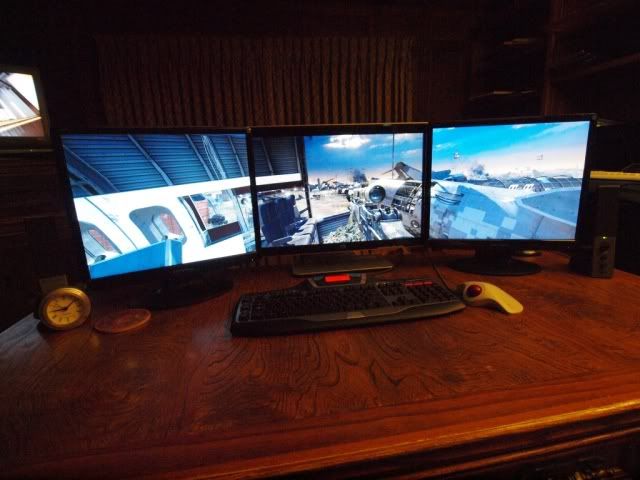
Also, I don't think you would want to play a first person shooter stretched across only two monitors,
because the crosshair will be right on the bezel and block your view of where to shoot!
You really need three monitors, like this (my setup on COD MW2):
-
Mach1.9pants
- Insiders
- Posts: 1512
- Joined: 29 Jul 2007, 05:24
- Location: NZ
Multi-Game Widescreen Fixer
OK you have to start the fixer, select the correct game and whether it is SP or MP, set the right monitor setting.
Then start the game and select the correct resolution.
Then hit ; to enable the fixer.
Then start the game and select the correct resolution.
Then hit ; to enable the fixer.
Multi-Game Widescreen Fixer
A small update on the future of Widescreen Fixer.
Because of the added games, aspect-ratios, versions, etc., I am rewriting the application entirely.
Currently it is written in straight assembly.
The new version is written in C#. It is larger and slightly slower, but it comes with some nice benefits:
[list]
[*]Games are separate DLLs - You can add or remove them and they will appear on the menu. Because of this, if a game version is updated, I can simply supply a new DLL that you drop in the directory, rather than update the entire application.[/*:m]
[*]Version-checking - Upon launch, the application will automatically check for new versions and ask if you wish to download them.[/*:m]
[*]Easier to maintain - Because everything is in Visual Studio now, I can maintain the main application and the individual games easier.[/*:m][/list:u]
And here are some planned features, but may not make it into the application:
[list]
[*]x64 version - This isn't a high priority since there are hardly any 64-bit games, but it will still be nice to have a native 64-bit application for those with 64-bit Windows.[/*:m]
[*]Settable hotkey in interface - Currently you have to edit the .ini file if you wish to change the default hotkey. I'm hoping to add in a way to set the hotkey via the interface.[/*:m]
[*]API - Once I finish up the interface for the DLLs, I may eventually release the APIs for creating your own DLLs for use with the application.[/*:m][/list:u]
These are just lists off the top of my head. There are certainly more things that will come up and change along the way.
I have no ETA on when this new version will be complete. I'm going to restructure the Widescreen Fixer webpage itself to make it cleaner, easier to read, easier to understand, less cluttered, etc. So I expect that it will take at least a month or so before I can start releasing some beta builds.
I'll post here again when things progress more.
Because of the added games, aspect-ratios, versions, etc., I am rewriting the application entirely.
Currently it is written in straight assembly.
The new version is written in C#. It is larger and slightly slower, but it comes with some nice benefits:
[list]
[*]Games are separate DLLs - You can add or remove them and they will appear on the menu. Because of this, if a game version is updated, I can simply supply a new DLL that you drop in the directory, rather than update the entire application.[/*:m]
[*]Version-checking - Upon launch, the application will automatically check for new versions and ask if you wish to download them.[/*:m]
[*]Easier to maintain - Because everything is in Visual Studio now, I can maintain the main application and the individual games easier.[/*:m][/list:u]
And here are some planned features, but may not make it into the application:
[list]
[*]x64 version - This isn't a high priority since there are hardly any 64-bit games, but it will still be nice to have a native 64-bit application for those with 64-bit Windows.[/*:m]
[*]Settable hotkey in interface - Currently you have to edit the .ini file if you wish to change the default hotkey. I'm hoping to add in a way to set the hotkey via the interface.[/*:m]
[*]API - Once I finish up the interface for the DLLs, I may eventually release the APIs for creating your own DLLs for use with the application.[/*:m][/list:u]
These are just lists off the top of my head. There are certainly more things that will come up and change along the way.
I have no ETA on when this new version will be complete. I'm going to restructure the Widescreen Fixer webpage itself to make it cleaner, easier to read, easier to understand, less cluttered, etc. So I expect that it will take at least a month or so before I can start releasing some beta builds.
I'll post here again when things progress more.
Widescreen Fixer - https://www.widescreenfixer.org/
Widescreen Fixer Twitter - https://twitter.com/widescreenfixer
Personal Twitter - https://twitter.com/davidrudie
Widescreen Fixer Twitter - https://twitter.com/widescreenfixer
Personal Twitter - https://twitter.com/davidrudie
-
Mach1.9pants
- Insiders
- Posts: 1512
- Joined: 29 Jul 2007, 05:24
- Location: NZ
Multi-Game Widescreen Fixer
Awesome DopeFish, shall be interesting to see :)
Who is online
Users browsing this forum: No registered users and 3 guests