Page 12 of 16
Far Cry 2
Posted: 07 Nov 2008, 04:06
by Abram
Also.. what settings should I be using for 1680x1050?
I run game and desktop at 1680x1050 and I use x-1.32 & y-1.18 and it seems fine. I haven't compared it to 4:3 resolutions. It gives a very slight fisheye effect while on foot, but that's how I prefer it for this particular game.
But once again, jsut set it to what feels and looks right to
you.
Far Cry 2
Posted: 07 Nov 2008, 04:08
by Tumdace
I just dont want that annoying shoulder.. its distracting
Far Cry 2
Posted: 07 Nov 2008, 05:59
by twistedjester
Works fine except for what has already been noted:
1) No shadows
2) Can't disable it
Far Cry 2
Posted: 07 Nov 2008, 09:48
by Eol_Ruin
Works fine except for what has already been noted:
1) No shadows
2) Can't disable it
The same on my PC :oops:
Far Cry 2
Posted: 07 Nov 2008, 12:28
by wilbur.walsh
same problem here.
Btw. is
X FOV: 1.31
Y FOV: 1.253 as written in this post http://www.widescreengamingforum.com/node/#comment- really the right aspect ratio?
Far Cry 2
Posted: 07 Nov 2008, 13:17
by Paddy the Wak
same problem here.
Btw. is
X FOV: 1.31
Y FOV: 1.253 as written in this post http://www.widescreengamingforum.com/node/#comment- really the right aspect ratio?
No ... that was an approximate value
as it says in that post ... :wink:
All I did was align things up comparing the view with 1280x1024.
It is a case of adjusting it to your liking but just a thought ... 16:10 ... 1.6 - 1.0 ... may well be the correct setting so give it a try ...
X FOV: 1.6
Y FOV: 1.0
Far Cry 2
Posted: 07 Nov 2008, 14:23
by rmcclelland
When I use different x and y FOV, the image gets distorted, ie a square object is no longer square. I use FOV 1.2 for both x AND y. That keeps things from getting stretched and allows me to see more on both the top and bottom and sides. I don't see how you can use different x and y values and not have distortion.
Thanks,
Ryan
Far Cry 2
Posted: 07 Nov 2008, 14:57
by Racer_S
OK guys thanks for testing that, I think I found the problem and fixed it here:
(link removed)
can anyone confirm this one is working now?
Thanks!
Far Cry 2
Posted: 07 Nov 2008, 15:30
by Abram
Man, do i have impeccible timing today!
All is well, Mr. _S.
I played through two missions with no problems. Shadows are back and not blurred at screen edges, including on water. Auto-enable works, can also enable/disable without issue.
Thank you, once again.
...one postitve side to this is that it gave me a chance to kill of a few more Dead Space levels. But now I'm back to FC2 until (if) they release another patch and "f*dge" it up again.
Far Cry 2
Posted: 07 Nov 2008, 16:08
by Racer_S
Thanks for that mikeh!
Its now up on my site too...
- What's new in v4.0 on 11/6/08?
* Added support for v1.01 patch
* Added Auto Enable option
* Possible DEP workaround
http://tocaedit.com/forum/dload.php?action=file&file_id=123
Far Cry 2
Posted: 07 Nov 2008, 16:39
by AdamK47
Thanks for getting a fixed version to us so soon!
One thing I liked about the other utility that was posted here was the ability of it to set the FOV perfectly if you used 1.00. I don't like having to guess by moving Y and X up and down. This utility took the guess work out of it. It is nice to set you own though, but it would be nice to have the utility to determine the setting for you. Plus it would help for the people who always ask "I use such and such resolution, what settings should I use?"
Far Cry 2
Posted: 07 Nov 2008, 17:47
by twistedjester
Thanks Racer_S, I can't wait to get home and try this out!
Far Cry 2
Posted: 07 Nov 2008, 17:48
by Covak
If you just want to go hor+ with the default vertical FOV (from 4:3, anyway), this is what does it for me:
X = 1.2 for 16:10
X = 1.333 for 16:9
(and Y always the default 1.333)
EDIT: You're awesome, Racer_S :)
Far Cry 2
Posted: 07 Nov 2008, 18:50
by Tumdace
Even with x= 1.2... using the silenced mp5 shows off the shoulder part that UBI didnt bother to fix because apparantly they did design the game for the vert-.
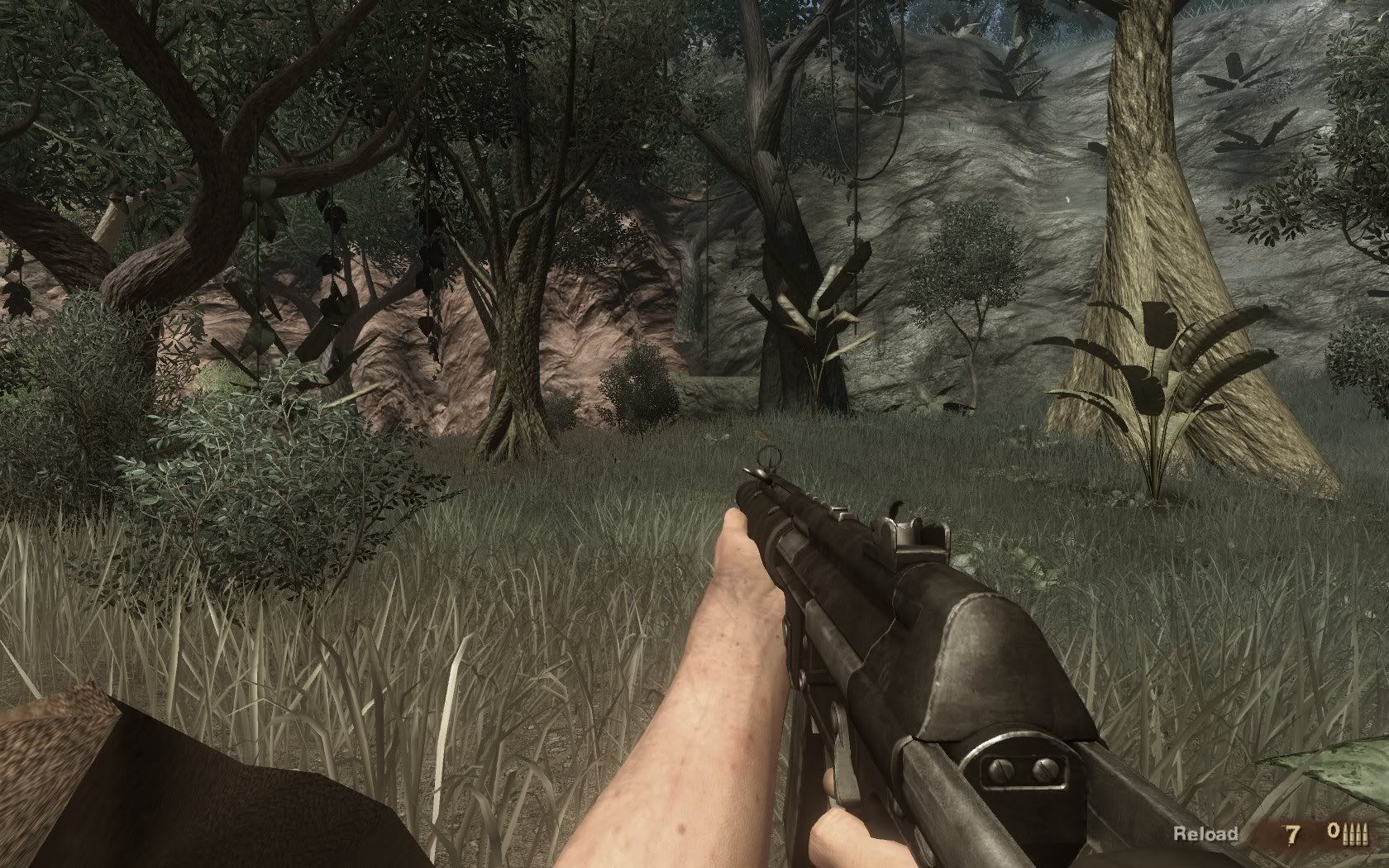
I cant play with that annoying thing.. i have to adjust the xfov so that its not visible or else use a different gun until ubi fixes it properly..
Far Cry 2
Posted: 07 Nov 2008, 19:07
by Tumdace
Ok so playing around a bit... your program made my FC2 CTD racer... might still be an issue with it..
Far Cry 2
Posted: 07 Nov 2008, 19:38
by twistedjester
I had the same problem with V3 of the fix. V2 worked fine though. Hopefully this won't cause CTDs for me.
Far Cry 2
Posted: 07 Nov 2008, 20:55
by Navid
Even with x= 1.2... using the silenced mp5 shows off the shoulder part that UBI didnt bother to fix because apparantly they did design the game for the vert-.
I cant play with that annoying thing.. i have to adjust the xfov so that its not visible or else use a different gun until ubi fixes it properly..
I am no expert by any means.
But, does that not mean you are seeing more content than you should be?
Can you not adjust X and Y using the tool so that you don't see the shoulder?
And adjust them to keep the aspect ratio correct so that circles remain circles and not turn into ovals?
Far Cry 2
Posted: 07 Nov 2008, 23:15
by Tumdace
How do u adjust to keep aspect ratio the same?
Far Cry 2
Posted: 08 Nov 2008, 06:37
by Elvin Presler
Proper 16:10 on my rig:
X FOV: 1.2
Y FOV: 1.333
I put my desktop in 1280x960, then ran the game at that resolution for a screenshot of "proper" 4:3. Then I ran it in 1680x1050 over and over fine tuning the settings then sizing the image to 1536x960 for a quick compare/toggle view in an image browser. I did this until The image was exact vertically and not stretched or squished horizontally.
Here it is with 4:3 no hack and 16:10 with FOV fix (resized images, of course)

Far Cry 2
Posted: 08 Nov 2008, 06:52
by Navid
How do u adjust to keep aspect ratio the same?
I moved as close as I could to a game save box. You can find them in gun shops and headquarters and ...
There is a circle printed on the box around the picture of a floppy.
Without the tool running, the circle diameter measured on my screen as 22cm horizontal and 22.1cm vertical or something like that. So, it is not a perfect circle. This is on a 21" at 1680 x 1050.
I adjust X and Y using the tool until I see the amount I like to see. Then, I adjust only one (X or Y) until the circle measures about the same horizontally and vertically. Then, I know that I have not changed the aspect ratio.
So, if I were you,
1- I would run the game without the tool and measure an object Y and X using a ruler. Pick an object that is a circle or a square to simplify and a large object to improve your measurement accuracy. Let's say you measure X=20cm and Y=20cm.
2- Then, quit and run the tool and start the game again. Use the tool to reduce what you can see vertically until you do not see the shoulder that bothers you.
3- Then, measure the same object you measured in 1 again. Let's say you now measure Y = 18cm. So, you must adjust X until you also measure 18cm horizontally. That means you have not distorted the aspect ratio.
Edit:
You adjust X by pressing numpad + and -, while tool is active.
You adjust Y by pressing Shift numpad + and -.