Page 2 of 7
Re: Middle-earth: Shadow of Mordor
Posted: 30 Sep 2014, 19:16
by Toothless Spoon
valcan_s wrote:Funkengreuven wrote:No SLI support? No wonder I was getting such crappy frame rates. You're right, Its hard to believe a game with the "Nvidia" logo on the opening title has no SLI support. Not to mention how graphically intensive it is. At least it looks like its fixable. Il wait patiently for the fix. Thanks for the heads up!
To enable SLI use the app nvidia Inspector and force it to AFR2 and it will enable SLI no prob works great.
Make sure in the reg Nvidia cntrl panel you add the game first so you can see the profile in nvidia Inspector.
Beat me to it

EDIT: Also for those that don't know - you can bypass the intro vids by renaming the appropriate files inside the install directory.
Re: Middle-earth: Shadow of Mordor
Posted: 30 Sep 2014, 19:23
by milkcoma
ok i think i fixed it.
open your render.cfg file its located in c:\users|%username%\documents\wbgames\shadow of mordor.
change"Render.Setting.AspectRatioLock" "1.000000" to "Render.Setting.AspectRatioLock" "0.000000" then i marked the file as read me.
so far i can get into game every is wokring but when i move it crashes again. maybe this will help some help fixe the issue.
Re: Middle-earth: Shadow of Mordor
Posted: 30 Sep 2014, 19:24
by Funkengreuven
valcan_s wrote:Funkengreuven wrote:No SLI support? No wonder I was getting such crappy frame rates. You're right, Its hard to believe a game with the "Nvidia" logo on the opening title has no SLI support. Not to mention how graphically intensive it is. At least it looks like its fixable. Il wait patiently for the fix. Thanks for the heads up!
To enable SLI use the app nvidia Inspector and force it to AFR2 and it will enable SLI no prob works great.
Make sure in the reg Nvidia cntrl panel you add the game first so you can see the profile in nvidia Inspector.
Okay, I don't use NI very much in the past, so I want to make sure I followed your directions correctly:
1. I went into Nvidia Control Panel and added the Shadows of Mordor.exe in program settings.
2. I found where you click on home button and I saw the shadows of mordor.exe I added in Nvidia Control Panel and made it the active profile.
3. I went down to Nvidia Predefined SLI Mode and selected AFR2, then clicked apply changes.
However, I'm not seeing any improvement in the game. I think maybe I'm missing something. I left everything else at Global Default and only changed AFR2. Is this right? I'm getting like 20 FPS on all high settings. Dos this sound right based on your results?
Also, once I've done the above, do I have to keep the Nvidia Inspector program open, or can I close it and the settings hold?
Re: Middle-earth: Shadow of Mordor
Posted: 30 Sep 2014, 19:33
by milkcoma
ok per my other post its working at 5760x1080 with my fix above minus teh read only part. the menu's are still messed up. i have no idea how to fix those so i hope others can.
Re: Middle-earth: Shadow of Mordor
Posted: 30 Sep 2014, 20:00
by Toothless Spoon
Funkengreuven wrote:valcan_s wrote:Funkengreuven wrote:No SLI support? No wonder I was getting such crappy frame rates. You're right, Its hard to believe a game with the "Nvidia" logo on the opening title has no SLI support. Not to mention how graphically intensive it is. At least it looks like its fixable. Il wait patiently for the fix. Thanks for the heads up!
To enable SLI use the app nvidia Inspector and force it to AFR2 and it will enable SLI no prob works great.
Make sure in the reg Nvidia cntrl panel you add the game first so you can see the profile in nvidia Inspector.
Okay, I don't use NI very much in the past, so I want to make sure I followed your directions correctly:
1. I went into Nvidia Control Panel and added the Shadows of Mordor.exe in program settings.
2. I downloaded & installed latest version of NI and clicked on "Nvidia predefined SLI mode" and selected AFR2 and clicked apply.
Do I have to do anything else? Do I have to make Shadows of Mordor selectable in NI in the "Profiles" list with all the other games and select it there? If so, how do I do that? Or will it work with the Global Profile as long as I added the Shadows of Mordor.exe in Nvidia Control Panel and have it selected there? I don't know how to make the .exe show up in the Profiles list in Nvidia Inspector...(if necessary)
Also, once I've done the above, do I have to keep the Nvidia Inspector program open, or can I close it and the settings hold?
When you open NI and search the profiles you will find Middle-earth: Shadow of Mordor already exists.
1. Select that and add the .exe like you did before, but this time it will be to the appropriate profile.
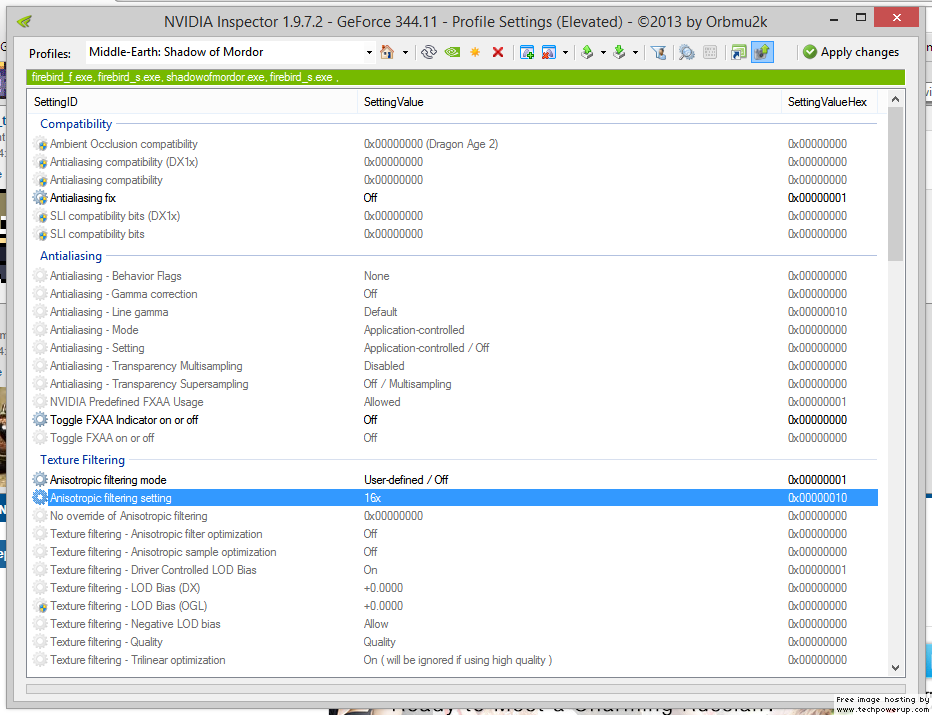
- nvidia_20141001_045758.png (98.21 KiB) Viewed 4445 times
2. Scroll down and under Sli, change - Sli rendering mode to Force_AFR2.
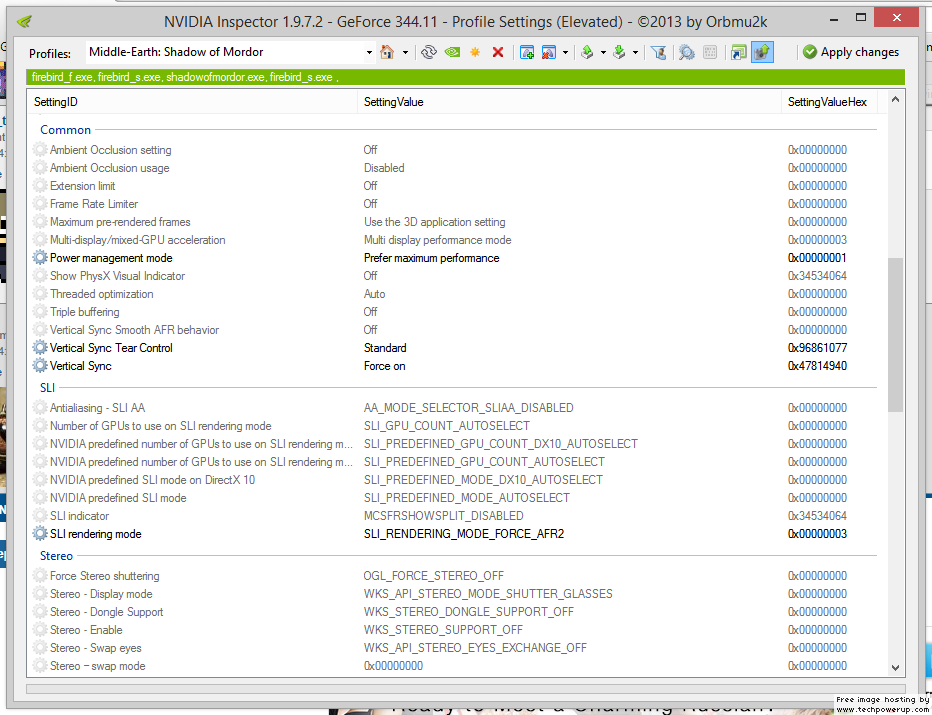
- nvidia_20141001_045817.png (103.58 KiB) Viewed 4436 times
hope that helps.
Re: Middle-earth: Shadow of Mordor
Posted: 30 Sep 2014, 20:03
by Funkengreuven
Thanks for the help. I was editing my reply while I was tinkering with it. I'm going to go over your settings in the post and duplicate exactly and try again.
When I go into NV CNTRL PNL and add a new program in Program Settings, I see Shadows of Mordor (SoM) and I select it and click add. However, it doesn't add it nice and neat like your picture shows, it lists it as C:\programfiles\steam\steamapps\common\shadowsofmordor\x64\shadowsofmordor.exe. Then, when I go into NI and try to find it, I have to search for the path/profile above. It doesn't show up as "Middle Earth - Shadows of Mordor" like yours does. I don't know why? However, I can select it as a profile and make the changes like you pics show. Am I doing the same thing even though its not making for a nice & neat profile name? Maybe I'm doing something wrong...
Re: Middle-earth: Shadow of Mordor
Posted: 30 Sep 2014, 20:58
by Toothless Spoon
Funkengreuven wrote:Thanks for the help. I was editing my reply while I was tinkering with it. I'm going to go over your settings in the post and duplicate exactly and try again.
When I go into NV CNTRL PNL and add a new program in Program Settings, I see Shadows of Mordor (SoM) and I select it and click add. However, it doesn't add it nice and neat like your picture shows, it lists it as C:\programfiles\steam\steamapps\common\shadowsofmordor\x64\shadowsofmordor.exe. Then, when I go into NI and try to find it, I have to search for the path/profile above. It doesn't show up as "Middle Earth - Shadows of Mordor" like yours does. I don't know why? However, I can select it as a profile and make the changes like you pics show. Am I doing the same thing even though its not making for a nice & neat profile name? Maybe I'm doing something wrong...
You really don't have to go into NV control panel to add the program. If you just did it all through NV inspector it will be the same as what I showed you. Ultimately though, you just need to add Sli rendering mode AFR2 to whatever profile you created with the shadowsofmordor.exe.
Re: Middle-earth: Shadow of Mordor
Posted: 01 Oct 2014, 02:05
by skipclarke
If we can get a solution to this, I'd like to use this for my first performance analysis.
Re: Middle-earth: Shadow of Mordor
Posted: 01 Oct 2014, 03:00
by milkcoma
skipclarke wrote:If we can get a solution to this, I'd like to use this for my first performance analysis.
out side the some menu issues i have it working. see my fix above.
Re: Middle-earth: Shadow of Mordor
Posted: 01 Oct 2014, 03:09
by skipclarke
milkcoma wrote:skipclarke wrote:If we can get a solution to this, I'd like to use this for my first performance analysis.
out side the some menu issues i have it working. see my fix above.
That may work for the benchmark. But, I'd hate to promote a game that we couldn't actually get fixed.
Re: Middle-earth: Shadow of Mordor
Posted: 01 Oct 2014, 08:32
by Funkengreuven
milkcoma wrote:skipclarke wrote:If we can get a solution to this, I'd like to use this for my first performance analysis.
out side the some menu issues i have it working. see my fix above.
I implemented the fixes you listed and while some of the menus are off and/or zoomed in too far (weapons & Saurons Army), overall the rest seems to work okay. Reminds me of how Watchdogs is right now. The map is zoomed in too far, but its still serviceable. Thanks for the heads-up. The more I play this game the better it gets. A complete fix will make it perfect.
Re: Middle-earth: Shadow of Mordor
Posted: 01 Oct 2014, 08:48
by HaYDeN

Was not a easy fix this one.
Re: Middle-earth: Shadow of Mordor
Posted: 01 Oct 2014, 09:16
by X1XNobleX1X
HaYDeN wrote:Was not a easy fix this one.
Well done!
When will it be available?
Re: Middle-earth: Shadow of Mordor
Posted: 01 Oct 2014, 09:18
by b0uncyfr0
Looks Good HayDen. Does it have a fov fix as well? Playing this on a PC monitor is giving me headaches and I'm sure I'm not the only one. Talions body is just too close to the camera.
Re: Middle-earth: Shadow of Mordor
Posted: 01 Oct 2014, 11:15
by Amon Amarth
Nice! Can't wait to try it out.
Re: Middle-earth: Shadow of Mordor
Posted: 01 Oct 2014, 12:48
by Amon Amarth
Toothless Spoon wrote:
To enable SLI use the app nvidia Inspector and force it to AFR2 and it will enable SLI no prob works great.
Make sure in the reg Nvidia cntrl panel you add the game first so you can see the profile in nvidia Inspector.
Okay, I don't use NI very much in the past, so I want to make sure I followed your directions correctly:
1. I went into Nvidia Control Panel and added the Shadows of Mordor.exe in program settings.
2. I downloaded & installed latest version of NI and clicked on "Nvidia predefined SLI mode" and selected AFR2 and clicked apply.
Do I have to do anything else? Do I have to make Shadows of Mordor selectable in NI in the "Profiles" list with all the other games and select it there? If so, how do I do that? Or will it work with the Global Profile as long as I added the Shadows of Mordor.exe in Nvidia Control Panel and have it selected there? I don't know how to make the .exe show up in the Profiles list in Nvidia Inspector...(if necessary)
When you open NI and search the profiles you will find Middle-earth: Shadow of Mordor already exists.
1. Select that and add the .exe like you did before, but this time it will be to the appropriate profile.
2. Scroll down and under Sli, change - Sli rendering mode to Force_AFR2.
hope that helps.
It looks like when I use this solution, the game stops displaying everything in the middle screen. Any ideas?
Re: Middle-earth: Shadow of Mordor
Posted: 01 Oct 2014, 12:54
by helifax
Amon Amarth wrote:Toothless Spoon wrote:
To enable SLI use the app nvidia Inspector and force it to AFR2 and it will enable SLI no prob works great.
Make sure in the reg Nvidia cntrl panel you add the game first so you can see the profile in nvidia Inspector.
Okay, I don't use NI very much in the past, so I want to make sure I followed your directions correctly:
1. I went into Nvidia Control Panel and added the Shadows of Mordor.exe in program settings.
2. I downloaded & installed latest version of NI and clicked on "Nvidia predefined SLI mode" and selected AFR2 and clicked apply.
Do I have to do anything else? Do I have to make Shadows of Mordor selectable in NI in the "Profiles" list with all the other games and select it there? If so, how do I do that? Or will it work with the Global Profile as long as I added the Shadows of Mordor.exe in Nvidia Control Panel and have it selected there? I don't know how to make the .exe show up in the Profiles list in Nvidia Inspector...(if necessary)
When you open NI and search the profiles you will find Middle-earth: Shadow of Mordor already exists.
1. Select that and add the .exe like you did before, but this time it will be to the appropriate profile.
2. Scroll down and under Sli, change - Sli rendering mode to Force_AFR2.
hope that helps.
It looks like when I use this solution, the game stops displaying everything in the middle screen. Any ideas?
Try this:
https://forums.geforce.com/default/topi ... 8/#4324368 for SLI.
Re: Middle-earth: Shadow of Mordor
Posted: 01 Oct 2014, 13:05
by Amon Amarth
It looks like the frame rate is way too inconsistent. Dropping on random scenes that don't exactly qualify as "eyecandy." I think I'll have to wait for NV to release a proper profile.
Re: Middle-earth: Shadow of Mordor
Posted: 01 Oct 2014, 14:38
by helifax
Amon Amarth wrote:It looks like the frame rate is way too inconsistent. Dropping on random scenes that don't exactly qualify as "eyecandy." I think I'll have to wait for NV to release a proper profile.
Have you tried it at least?
Re: Middle-earth: Shadow of Mordor
Posted: 01 Oct 2014, 19:49
by fuc847
thanks for the fix! will FOV adjustment be added?