The Elder Scrolls V: Skyrim

Detailed breakdowns of how games react to widescreen, ultra-wide, 4k and multi-mon
User avatar
scavvenjahh
Editors
Editors
Posts: 3424
Joined: 06 Mar 2008, 17:20

Re: The Elder Scrolls V: Skyrim

Post by scavvenjahh »

:welcome

The Ultrawide Fix is outdated ! Use Flawless Widescreen or Widescreen Fixer instead.

demigod89
Posts: 2
Joined: 04 Jan 2015, 12:21

Re: The Elder Scrolls V: Skyrim

Post by demigod89 »

hey guys i cant get skyrim to work with either of those on the version of skyrim...

im am trying to run 7680x1440
Suedenim
Posts: 61
Joined: 16 Jan 2007, 20:32

Re: The Elder Scrolls V: Skyrim

Post by Suedenim »

What steps do you take to run Skyrim?
mps96
Posts: 1
Joined: 11 Jan 2015, 11:54

Re: The Elder Scrolls V: Skyrim

Post by mps96 »

hello guys, I'm using mod organizer for skyrim and somehow the flawless widescreen fix doesnt work in combination with mod organizer. I think it has to do with mod organizer having its own skyrim ini files. does anybody know a way to get it to work with eachother? or is there an instruction somewhere on how to do it manually?

any help would be appreciated, can no longer stand the black bars on the side of my 21:9 monitor

thanks :cheers:
Suedenim
Posts: 61
Joined: 16 Jan 2007, 20:32

Re: The Elder Scrolls V: Skyrim

Post by Suedenim »

In your MO folder there is a profiles folder and in there will be a folder that matches the profile name shown in the top left of MO (drop down named "Profile").

In that folder will be the skyrimprefs.ini that you will edit with your custom resolution.
Update the values,
iSize H=
iSize W=

These should match the values that Widescreen Fixer will use.

The latest version of WF works with Skyrim, SKSE, MO with my ini set up as above.

Also as you are using MO you might want to take a look at this http://wiki.step-project.com/Main_Page. I did it for version 2.2.6 and have 260 mods running so I won't be updating anytime soon but Skyrim sure is pretty.

Let us know how you get on, especially if it works :)
Axel
Posts: 12
Joined: 07 Dec 2013, 04:04

Re: The Elder Scrolls V: Skyrim

Post by Axel »

Theres any way to run Legenday edition 1.9.32.0.8 in 21:9?
MT6Anime
Posts: 1
Joined: 01 May 2015, 02:49

Re: The Elder Scrolls V: Skyrim

Post by MT6Anime »

Hi I'm new to the triple monitor scene and I know this thread is old but does anybody here know how to run Skyrim on triple monitors? I've tried Haydens fix as well as felixs fix. Right now I'm trying to use Flawless Widescreen. I have an R9 290 btw.
User avatar
Peer_Review
Posts: 76
Joined: 11 Jun 2014, 02:54

Re: The Elder Scrolls V: Skyrim

Post by Peer_Review »

MT6Anime wrote:Hi I'm new to the triple monitor scene and I know this thread is old but does anybody here know how to run Skyrim on triple monitors? I've tried Haydens fix as well as felixs fix. Right now I'm trying to use Flawless Widescreen. I have an R9 290 btw.

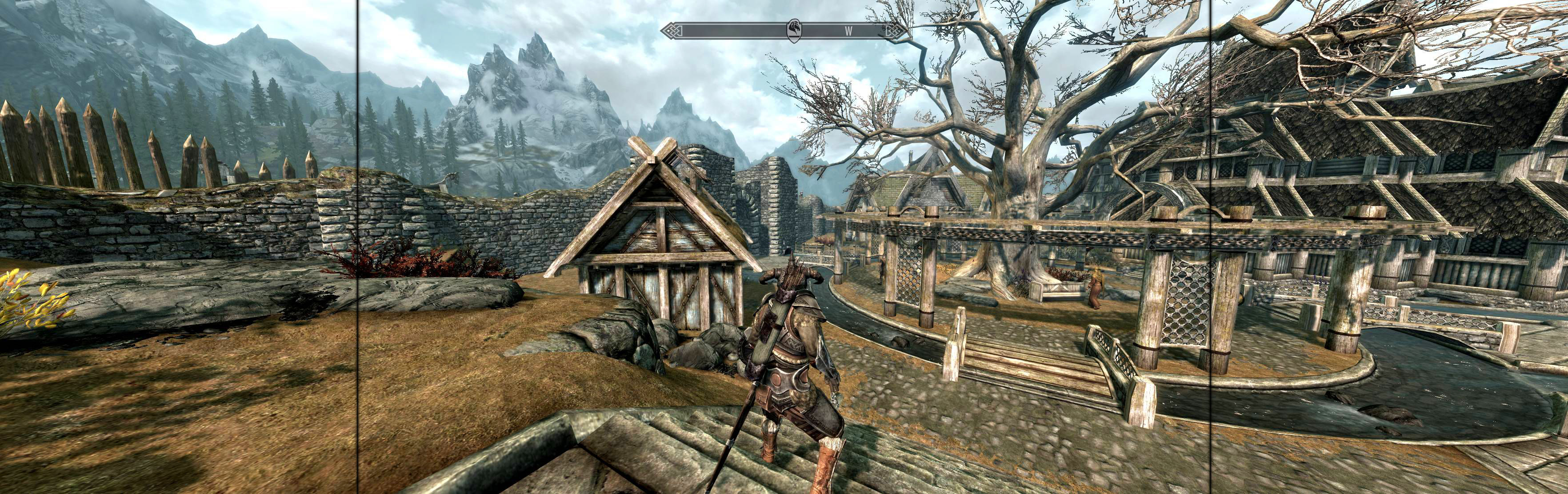
Use the launcher to set whatever quality level you want and save it. Then go to your Documents/My Games/Skyrim folder and find SkyrimPrefs.ini. Once you open that in Notepad go down a little until you see these lines. (It should be line 43,44 or right near it)

iSize H=
iSize W=
That is where you need to put in your resolution. It will have whatever resolution you have been playing at before or whatever you set in the launcher. You can't pick 5760x1080 in the launcher and anytime you use the launcher to change graphics settings it might mess your resolution up. So just change it in this file. Quite frankly, this file has all the detailed graphics settings in it and you have more control over what settings you want to use anyway.
So assuming you are playing at 5760x1080 it would look like this

iSize H=1080
iSize W=5760

Then make sure to hit save and you are good to go. Start up Flawless widescreen make sure the Skyrim plugin is active and start your game. I was just playing it with that plugin less than 10 minutes ago so it definitely works. Let me know if it doesn't work and I'll help you figure it out.
Sboyd2k
Posts: 1
Joined: 08 Jun 2015, 00:39

Re: The Elder Scrolls V: Skyrim

Post by Sboyd2k »

Using Flawless Widscreen plug-in, I am able to play in 5760x1080.
Only problem is the SkyUI menus are way too big and unplayable.
Anyone have a way to get those scaled correctly?

Thanks!

Edit - there is a checkbox in the plug-in. Select it and it is AWESOME!! :rockout:
Sokonomi
Posts: 3
Joined: 17 Aug 2015, 15:10

Re: The Elder Scrolls V: Skyrim

Post by Sokonomi »

Ive got softTH running to get it to focus on one of my two screens, but for some reason I cant get the UI/HUD to center and scale properly.
Ive tried giving the resolution to flawless widescreen manually, but it doesn't seem to give a damn. :')
imusrt
Insiders
Insiders
Posts: 291
Joined: 21 Oct 2014, 23:33

Re: The Elder Scrolls V: Skyrim

Post by imusrt »

Sokonomi, two ideas you could try:

1. Try borderless instead of SoftTH fullscreen. Use ShiftWindow to position & don't use FWS. Instructions
http://www.wsgf.org/blog/imusrt/2015/04/01/elder-scrolls-v-skyrim-2011-manual-plp-instructions

2. FWS
I did not test FWS well for this game; FWS plugin didn't work properly with Manual PLP. But there are two additional ways to adjust FWS which I neglected to test. Either of these adjustments may fix your problem:
a. insert resolution inside FWS's menu.
b. LUA script file is editable. It can be used to correct HUD etc issues, but you have to read its code first & understand what you are editing.
Hydralisk_X
Posts: 190
Joined: 26 Jan 2010, 00:20

Re: The Elder Scrolls V: Skyrim

Post by Hydralisk_X »

Revisiting this game... I played it just fine @ 5760x1080 at launch. I'm now having issues with 2560x1080... I'm using Flawless WS and WS Fixer. They both have the same issue - the game menus are completely gone/invisible/off screen. Without them, the HUD/menus are slightly too zoomed in and a few things get cut off (i.e. weight, vendor coin, etc.). Any ideas?

EDIT: Figured it out, I had to change the Display Detection Override Hud X value.
neep8
Posts: 1
Joined: 31 Dec 2015, 23:07

Re: The Elder Scrolls V: Skyrim

Post by neep8 »

https://dl.dropboxusercontent.com/u/107 ... _00001.jpg

Hi guys, I have come back to the game after a few months, if you check the picture at the bottom right, item details and my carry weight are off the screen. Is anyone else having this issue?

Edit: after more poking about and a reset I found the mod that seems to break even vanilla skyrim - No Snow Under the Roof. It got to a point that it started crashing the game on load. But I can read everything again and the main menu is back Phew!
Bigger And Scarier
Posts: 4
Joined: 06 Jan 2016, 23:12

Re: The Elder Scrolls V: Skyrim

Post by Bigger And Scarier »

Can someone help me?? I don't know how to make a new post about this. I bought skyrim for steam and I have a 2560x1080p monitor. I booted up the game fist time in 1080p 16:9 setting as there wasn't a 21:9 option. My monitor booted up a. Message saying "screen now set to 1080p 60hz not 2560x1080p 60hz, some computers don't support this resolution. So the game looks terrible and is stretching 1080p over 2560x1080 pixels. I tried flawless widescreen and it did absolutely nothing for me. I tried changing the United file size and that didn't work either. Finally I tried border less windowed gaming and it didn't work either. If anyone could help me or tell me how to make a new post I would must appreciate it.
imusrt
Insiders
Insiders
Posts: 291
Joined: 21 Oct 2014, 23:33

Re: The Elder Scrolls V: Skyrim

Post by imusrt »

For those with problem resolutions (21:9 etc), here are some updated ideas (improved from my previous post).

1. Manual spread has not changed (for PLP, adjust as needed):
Image
http://www.wsgf.org/blog/imusrt/2015/04/01/elder-scrolls-v-skyrim-2011-manual-plp-instructions

2. In FWS, try this (fake PLP, works pretty often).
Go to menu Settings, Configuration, Display Detection. Checkmark Enable Detection Override. Then make the numbers like this:
(for 2560x1080)
Width: 2560
Height: 1080
Hud Width: 1920 (16:9 fake center)
Hud Height: 1080 (16:9 fake center)
Horizontal Display Count: 3 (fake sides)
Vertical Display Count: 1
Hud X: 320 (which is 2560 minus 1920, then divided by 2 = width of fake side)
Hud Y: 0
Bigger And Scarier
Posts: 4
Joined: 06 Jan 2016, 23:12

Re: The Elder Scrolls V: Skyrim

Post by Bigger And Scarier »

Thanks, this worked well for me and im now enjoying this beautiful game in 21:9 goodness!!!
Bigger And Scarier
Posts: 4
Joined: 06 Jan 2016, 23:12

Re: The Elder Scrolls V: Skyrim

Post by Bigger And Scarier »

So new problem today nvidia made me optimize skyrim when I downloaded the new drivers. This then set a resolution and when ran with fws it makes the game appear way to long. (As in my curser is on like the 3rd quarter of the screen no longer centered along with the game) and it looks to be stretching. I can't seem to set any resolution in the launcher or in the inis to fix this please help. Btw I had ran that old comment for 78 hours of the game up until now flawlessly.
Bigger And Scarier
Posts: 4
Joined: 06 Jan 2016, 23:12

Re: The Elder Scrolls V: Skyrim

Post by Bigger And Scarier »

Nvm! I just needed read only ini files derp
User avatar
Haldi
Editors
Editors
Posts: 2286
Joined: 08 May 2011, 18:58

Re: The Elder Scrolls V: Skyrim

Post by Haldi »

The complete Overhaul Endereal is released today :)
Anyone tried it already and can say if there is any difference in MultiMonitor?
We gonna send it to outa space!
c69
Posts: 108
Joined: 04 Nov 2011, 07:13

Re: The Elder Scrolls V: Skyrim

Post by c69 »

Anyone still playing skyrim with eyefinity? FWS fails at startup on latest version.

Is there a way to obtain the last executable compatible with FWS? Any other suggestions?
Post Reply

Who is online

Users browsing this forum: No registered users and 6 guests


