


Update released -
Hopefully fixes the Windows XP issues.
More stable pointers for the witcher 2 hopefully, should stop some of the weird stuff people are seeing - if you do find the mouse trapped on one screen, try restarting it.
Added Resident Evil 5
Couple of other minor fixes.
Ninja rebuild.
Witcher 2 - letter box
Re: Witcher 2 - letter box
Resident Jester - Flawless Widescreen - Widescreen gaming the way it should be.
[Steam Profile]
Want to keep Flawless Widescreen alive? Donate Here
[Steam Profile]
Want to keep Flawless Widescreen alive? Donate Here
Re: Witcher 2 - letter box
Hi hayden,
It seems now there is no more pb. I have tried a couple of time to launch the game and nothing weird happened.
You definitely rock.
It's hard to believe that surround gaming has not been implemented yet by the developers and will not be in the forthcoming patch.
It took you several days to make it work fine without the knowledge of the code.
They definitely should fire every employee at the dev studio and hire you ... :surroundsmiley
It seems now there is no more pb. I have tried a couple of time to launch the game and nothing weird happened.
You definitely rock.
It's hard to believe that surround gaming has not been implemented yet by the developers and will not be in the forthcoming patch.
It took you several days to make it work fine without the knowledge of the code.
They definitely should fire every employee at the dev studio and hire you ... :surroundsmiley
Re: Witcher 2 - letter box
Hello Hayden,
good news and bad news. :)
1. it works under win xp. game is detected and got fullscreen resolution (3840x1024). :)
2. however everytime I speak to someone ingame and dialogue screen starts, the game crash to desktop. :(
good news and bad news. :)
1. it works under win xp. game is detected and got fullscreen resolution (3840x1024). :)
2. however everytime I speak to someone ingame and dialogue screen starts, the game crash to desktop. :(
Re: Witcher 2 - letter box
Hello Hayden,
good news and bad news. :)
1. it works under win xp. game is detected and got fullscreen resolution (3840x1024). :)
2. however everytime I speak to someone ingame and dialogue screen starts, the game crash to desktop. :(
Try turning off some of the individual options... I can't run it on XP but the way I was opening the process was not XP compatible, so I still havent actually tested it on XP.
Resident Jester - Flawless Widescreen - Widescreen gaming the way it should be.
[Steam Profile]
Want to keep Flawless Widescreen alive? Donate Here
[Steam Profile]
Want to keep Flawless Widescreen alive? Donate Here
Re: Witcher 2 - letter box
[quote]Hello Hayden,
good news and bad news. :)
1. it works under win xp. game is detected and got fullscreen resolution (3840x1024). :)
2. however everytime I speak to someone ingame and dialogue screen starts, the game crash to desktop. :(
Try turning off some of the individual options... I can't run it on XP but the way I was opening the process was not XP compatible, so I still havent actually tested it on XP.
I tried already turning off the option "stretched HUD" - but first of all, i couldnt regognize any change ingame. the text is stretched also with that option enabled. and game crash (in dialogues) either this option is enabled/disabled. The other two options (removing black bars) i will try today evening.
Re: Witcher 2 - letter box
Have to say that no matter if the HUD strecthed option is checked or not, it makes no change to my game experience.
Re: Witcher 2 - letter box
Have to say that no matter if the HUD strecthed option is checked or not, it makes no change to my game experience.
Stretch only takes place if the aspect is < 1.78 (aka, 16:10 or 4:3, 5:4) - 16:9 and above, it does not stretch
Resident Jester - Flawless Widescreen - Widescreen gaming the way it should be.
[Steam Profile]
Want to keep Flawless Widescreen alive? Donate Here
[Steam Profile]
Want to keep Flawless Widescreen alive? Donate Here

Re: Witcher 2 - letter box
I gave that Flawlesswidescreen program a try but I cannot seem to get it to work for me using Windows 7 64 bit.
When I looks at the process info it says:
Detected Resolution 160x27
but I do see 1920x1200 for a brief second when I alt tab back to the desktop and look at the program. Everything is enabled and I selected the GOG version which I am using from the drop down menu. Bummer I cannot seem to get this to work.
160x27 is what mine also shows, however this doesn't seem to affect anything. My game runs fullscreen 5916x1200 with only the white dots. I don't pay any attention to the "detected res". Its wrong but surround works. I am using Nvidia cards.
Are you on ATi, Owen?
Also, in the patch notes posted on the site...
"8. nVidia surround vision now works properly."
:w00t That CAN'T be right.... you think they fixed Nv Surround in the patch???
i7 sandy 4.4ghz with a snorkel
1080gtx
8gb RAM
Gigabyte P67-UD7 rev. B3
OS -Samsung 840pro 256GB ssd
Games -Samsung 840pro 500GB ssd
Pagefile -crucial 60GB ssd
Storage -2x 4TB WD
PWS -Seasonic Prime 1k Titanium
1080gtx
8gb RAM
Gigabyte P67-UD7 rev. B3
OS -Samsung 840pro 256GB ssd
Games -Samsung 840pro 500GB ssd
Pagefile -crucial 60GB ssd
Storage -2x 4TB WD
PWS -Seasonic Prime 1k Titanium
Re: Witcher 2 - letter box
I am running a Nvidia GTX 260 with the latest beta drivers.
Re: Witcher 2 - letter box
Oh, my bad. Thought you were trying to run 3x widescreen res. You're just trying to get rid of the black bars... my bad.
I can't help you on that as I'm not running that configuration. It may be fixed in the patch though.
I can't help you on that as I'm not running that configuration. It may be fixed in the patch though.
i7 sandy 4.4ghz with a snorkel
1080gtx
8gb RAM
Gigabyte P67-UD7 rev. B3
OS -Samsung 840pro 256GB ssd
Games -Samsung 840pro 500GB ssd
Pagefile -crucial 60GB ssd
Storage -2x 4TB WD
PWS -Seasonic Prime 1k Titanium
1080gtx
8gb RAM
Gigabyte P67-UD7 rev. B3
OS -Samsung 840pro 256GB ssd
Games -Samsung 840pro 500GB ssd
Pagefile -crucial 60GB ssd
Storage -2x 4TB WD
PWS -Seasonic Prime 1k Titanium
Re: Witcher 2 - letter box
So am I the only one seeing weird DOF/blur effect with this patch enabled? As soon as I move, everything but my character blurs immediately. This doesn't happen without the patch regardless of what blur settings I put into the launcher. Maybe the launcher does something to the executable that directly launching doesn't?
I'm using the GOG version and a GOG exe on a D2D installation.
I'm using the GOG version and a GOG exe on a D2D installation.
-
skipclarke

- Founder

- Posts: 7358
- Joined: 13 Oct 2003, 05:00
Re: Witcher 2 - letter box
nVidia surround vision now works properly.
Patch 1.1 notes
Re: Witcher 2 - letter box
Will this ever work with the retail DVD version of the game??????
Apparently one of the devs said if you use the GOG.exe hack then the game will be broken later on and quests will be unplayable so this fix realy needs to be implemented to work with retail version.
Suppose Hayden will need the exe version details from the retail game after it's been patched with the upcoming 1.1 patch????
Apparently one of the devs said if you use the GOG.exe hack then the game will be broken later on and quests will be unplayable so this fix realy needs to be implemented to work with retail version.
Suppose Hayden will need the exe version details from the retail game after it's been patched with the upcoming 1.1 patch????
Re: Witcher 2 - letter box
Dev's stated that performance for the Retail version (the one I own) will see the biggest performance gains. This is only because of the DRM protection that they'll either be removing the protection or fixing it properly so it doesn't interfere with game performance.
Just swap the original .exe back in to place and use the launcher to get the patch after it is released. I have mine in place now.
With the GoG .exe the game runs fine with flawless fix.
Of course HaYDeN will update the fix. He already said so.
I just hope against all hope that when the Devs stated in the release notes that, "Nvidia surround vision is fixed" er whatever, that this would include the simple edit of removing the white dots columns from the HUD overlay.
Follow this thread if you want feedback from the CDPR RED commnunity manager, Marcin360:
http://www.gog.com/en/forum/the_witcher_2/the_witcher_2_patch_1_1/page43
They're using it because of their own forums being down.
Just swap the original .exe back in to place and use the launcher to get the patch after it is released. I have mine in place now.
With the GoG .exe the game runs fine with flawless fix.
Of course HaYDeN will update the fix. He already said so.
I just hope against all hope that when the Devs stated in the release notes that, "Nvidia surround vision is fixed" er whatever, that this would include the simple edit of removing the white dots columns from the HUD overlay.
Follow this thread if you want feedback from the CDPR RED commnunity manager, Marcin360:
http://www.gog.com/en/forum/the_witcher_2/the_witcher_2_patch_1_1/page43
They're using it because of their own forums being down.
i7 sandy 4.4ghz with a snorkel
1080gtx
8gb RAM
Gigabyte P67-UD7 rev. B3
OS -Samsung 840pro 256GB ssd
Games -Samsung 840pro 500GB ssd
Pagefile -crucial 60GB ssd
Storage -2x 4TB WD
PWS -Seasonic Prime 1k Titanium
1080gtx
8gb RAM
Gigabyte P67-UD7 rev. B3
OS -Samsung 840pro 256GB ssd
Games -Samsung 840pro 500GB ssd
Pagefile -crucial 60GB ssd
Storage -2x 4TB WD
PWS -Seasonic Prime 1k Titanium

Re: Witcher 2 - letter box
So, now, what does the "Fix for 3D Vision Surround" mean!?
At least for Eyefinity it doesn't fix anything... Still black borders on Eyefinity resolutions.
At least for Eyefinity it doesn't fix anything... Still black borders on Eyefinity resolutions.
Re: Witcher 2 - letter box
Falcon1 I am running the gog version and after patching to version 1.1, the only difference I have seen so far is better framerates and the ability to run full screen, but in doing so it has broken HaYDeN's flawless fix (back to center monitor only but in full screen, lol). So now I am, waiting for HaYDeN to work his magic. :)
Re: Witcher 2 - letter box
::After the 1.1 patch::
Now I launch the game at 5916x1200 and it loads!
Triple head and all. Only issue is it loads at 57606x1080 with black bars top and bottom even though res is set to 5916x1200, also, bezel correction is not working.
The old Retail load time of 20-30 seconds is gone. Now it takes 5-6 seconds like it did with the GoG .exe replacement.
Performance in the city used to be 11-30fps with the Flawless fix. Now it never dips below 19 and never goes above 32, it usually sits right around 28fps. In the forest outside of Flotsam with the Flawless fix it used to be 28-49fps. Now with the 1.1 patch its the same usually hanging out around 37-38fps even in battle with 4-5 enemies at once.
I'm guessing the frame boost is only from the 5916x1080 new res vs. the old x1200 res. A difference per frame of 709,920 pixels... nearly 1MP. So from 7MP per frame to 6.4MP per frame is probably why the frame rate doesn't dip so low.
Overall gameplay is smooth and fluid when it needs to be... usually around 35-40fps which is great. When it dips to 19 its in the city where it really doesn't matter.
The New 1.1 patched .exe for Retail is:
Version 1.1.6157.43917
Size is 14.4MB (14,817KB) <----I think this is the size of the old GoG .exe?
So they fixed surround for Nvidia cards... except the put the black bars back in... and guess what, they left the 3 columns of white dots... what a bloody ommision.
Great job overall by the developers however leaving ATi out in the cold is kinda bum... anyone with ATi have the 1.1 patch yet?
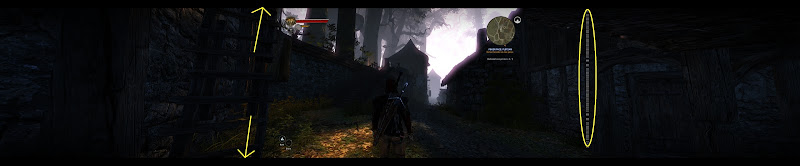
Now I launch the game at 5916x1200 and it loads!
Triple head and all. Only issue is it loads at 57606x1080 with black bars top and bottom even though res is set to 5916x1200, also, bezel correction is not working.
The old Retail load time of 20-30 seconds is gone. Now it takes 5-6 seconds like it did with the GoG .exe replacement.
Performance in the city used to be 11-30fps with the Flawless fix. Now it never dips below 19 and never goes above 32, it usually sits right around 28fps. In the forest outside of Flotsam with the Flawless fix it used to be 28-49fps. Now with the 1.1 patch its the same usually hanging out around 37-38fps even in battle with 4-5 enemies at once.
I'm guessing the frame boost is only from the 5916x1080 new res vs. the old x1200 res. A difference per frame of 709,920 pixels... nearly 1MP. So from 7MP per frame to 6.4MP per frame is probably why the frame rate doesn't dip so low.
Overall gameplay is smooth and fluid when it needs to be... usually around 35-40fps which is great. When it dips to 19 its in the city where it really doesn't matter.
The New 1.1 patched .exe for Retail is:
Version 1.1.6157.43917
Size is 14.4MB (14,817KB) <----I think this is the size of the old GoG .exe?
So they fixed surround for Nvidia cards... except the put the black bars back in... and guess what, they left the 3 columns of white dots... what a bloody ommision.
Great job overall by the developers however leaving ATi out in the cold is kinda bum... anyone with ATi have the 1.1 patch yet?
i7 sandy 4.4ghz with a snorkel
1080gtx
8gb RAM
Gigabyte P67-UD7 rev. B3
OS -Samsung 840pro 256GB ssd
Games -Samsung 840pro 500GB ssd
Pagefile -crucial 60GB ssd
Storage -2x 4TB WD
PWS -Seasonic Prime 1k Titanium
1080gtx
8gb RAM
Gigabyte P67-UD7 rev. B3
OS -Samsung 840pro 256GB ssd
Games -Samsung 840pro 500GB ssd
Pagefile -crucial 60GB ssd
Storage -2x 4TB WD
PWS -Seasonic Prime 1k Titanium
Re: Witcher 2 - letter box
If it is indeed Nvidia only then its very interesting that they made an active decision to block out ATI eyefinity, because there's no actual "code" difference between the two, clearly in this instance they actually have additional "code" to check if its Nvidia based, and if it then allow it - my update is truckin along very very slowly.
Resident Jester - Flawless Widescreen - Widescreen gaming the way it should be.
[Steam Profile]
Want to keep Flawless Widescreen alive? Donate Here
[Steam Profile]
Want to keep Flawless Widescreen alive? Donate Here
Re: Witcher 2 - letter box
Yeah, I'm curious to see if Eyefinity is fixed as well.
Though it does ignore the res and sets to 5760x1080 with no bezel correction and black bars.
The real suprise for me was that they did this and left in the white dots.... I'm sure they know right where that HUD grafic is and could have removed it...
Would you like the edited .exe so we can get rid of the black bars at least?
Though it does ignore the res and sets to 5760x1080 with no bezel correction and black bars.
The real suprise for me was that they did this and left in the white dots.... I'm sure they know right where that HUD grafic is and could have removed it...
Would you like the edited .exe so we can get rid of the black bars at least?
i7 sandy 4.4ghz with a snorkel
1080gtx
8gb RAM
Gigabyte P67-UD7 rev. B3
OS -Samsung 840pro 256GB ssd
Games -Samsung 840pro 500GB ssd
Pagefile -crucial 60GB ssd
Storage -2x 4TB WD
PWS -Seasonic Prime 1k Titanium
1080gtx
8gb RAM
Gigabyte P67-UD7 rev. B3
OS -Samsung 840pro 256GB ssd
Games -Samsung 840pro 500GB ssd
Pagefile -crucial 60GB ssd
Storage -2x 4TB WD
PWS -Seasonic Prime 1k Titanium
Re: Witcher 2 - letter box
Yes - supply the links [best to PM], I don't have time to do it now tho - have to goto work!
Remember to include paul.dll
They have successfully made it HOR+ for Nvidia tho by the look of it, still locked to 16:9 (but hor+)
Remember to include paul.dll
They have successfully made it HOR+ for Nvidia tho by the look of it, still locked to 16:9 (but hor+)
Resident Jester - Flawless Widescreen - Widescreen gaming the way it should be.
[Steam Profile]
Want to keep Flawless Widescreen alive? Donate Here
[Steam Profile]
Want to keep Flawless Widescreen alive? Donate Here
Who is online
Users browsing this forum: No registered users and 10 guests