Page 67 of 74
Re: Multi-Game Widescreen Fixer
Posted: 30 Apr 2013, 22:50
by helifax
omega13lives wrote:One thing I'm not clear on (since I haven't read every post here) is what settings you use if the 3 monitors are not the same size?
Thanks
I will respond for Dopefish. Unfortunately at the moment this option is not available and you cannot change anything in order to specify each monitor individual resolution. It assumes that all monitors use the exact same resolution.
Re: Multi-Game Widescreen Fixer
Posted: 01 May 2013, 01:43
by omega13lives
helifax wrote:omega13lives wrote:One thing I'm not clear on (since I haven't read every post here) is what settings you use if the 3 monitors are not the same size?
Thanks
I will respond for Dopefish. Unfortunately at the moment this option is not available and you cannot change anything in order to specify each monitor individual resolution. It assumes that all monitors use the exact same resolution.
Ok, does it calculate and display 3 separate windows side-by-side or is it one big space? That is, 3x 1024x768 would be 3072x768 but with my setup it is 3468x768 (including bezel space). So can I set it to one big 3468x768 or what would happen if I chose 1156x768 (3468 / 3)? And in either case does this software allow compensation for bezel? Thanks.
Re: Multi-Game Widescreen Fixer
Posted: 01 May 2013, 01:56
by teardropmina
omega13lives wrote:teardropmina wrote:helifax wrote:The fixes are made for the Steam version of the games ( I haven't tested them on other versions, but I imagine they might not work).
I will fix the TR Underworld plugin. Let me know about the others once you select the correct resolution:)
that might be the problem~ I bought the games when they just came out, and I think there's no steam version back in the days~
I do select the correct resolution, the game launches fine, wf indicates that game is running and fix is applied...but nothing happens in-game~
Hey, I have both Underworld and Anniversary (non-Steam) running in softTH. Try it out or gimme a holler if you need help setting it up. You need the FOV hack for Anniversary.
I have several posts in their forum.
thanks for the heads up, I've never tried softTH. however, as I checked, it will only work with WDDM drivers?? using WDDM driver for my 3D surround setup...that's not something I'll do for just two TR games~~"
also, how do you do FoV hack for TRA?
Re: Multi-Game Widescreen Fixer
Posted: 01 May 2013, 01:59
by dopefish
Actually, as long as you are using NVIDIA Surround or AMD Eyefinity, it should get HUD placement directly from the driver.
Re: Multi-Game Widescreen Fixer
Posted: 01 May 2013, 03:04
by omega13lives
teardropmina wrote:thanks for the heads up, I've never tried softTH. however, as I checked, it will only work with WDDM drivers?? using WDDM driver for my 3D surround setup...that's not something I'll do for just two TR games~~"
also, how do you do FoV hack for TRA?
I don't use any WDDM drivers, I just use the latest driver for my video cards. Works on both Win7 and XP. For the FOV hack I may just have to send it to you because I can't find a download link that is still active. PM me and I'll give you my email. Also, check out the "Air Walk" on my videos on You Tube by me (same user name) and others. Once I learned it, I tried to find everywhere I could use it. You can skip entire sections of levels which really helps for the time trials. (Now I'm going back and playing it without the Air Walk)
Re: Multi-Game Widescreen Fixer
Posted: 03 May 2013, 09:12
by teardropmina
omega13lives wrote:teardropmina wrote:thanks for the heads up, I've never tried softTH. however, as I checked, it will only work with WDDM drivers?? using WDDM driver for my 3D surround setup...that's not something I'll do for just two TR games~~"
also, how do you do FoV hack for TRA?
I don't use any WDDM drivers, I just use the latest driver for my video cards. Works on both Win7 and XP. For the FOV hack I may just have to send it to you because I can't find a download link that is still active. PM me and I'll give you my email. Also, check out the "Air Walk" on my videos on You Tube by me (same user name) and others. Once I learned it, I tried to find everywhere I could use it. You can skip entire sections of levels which really helps for the time trials. (Now I'm going back and playing it without the Air Walk)
just one quick question, do I have to disable Nvidia Surround (making three monitors as independent of each other) for SoftTH to work? I've tried the 208aplha, but no configuration file was created after I ran the game.
Re: Multi-Game Widescreen Fixer
Posted: 03 May 2013, 23:01
by omega13lives
teardropmina wrote:
just one quick question, do I have to disable Nvidia Surround (making three monitors as independent of each other) for SoftTH to work? I've tried the 208aplha, but no configuration file was created after I ran the game.
I'm not 100% certain, and it's probably like the answer I got to most of my questions: try it and find out. Did you put the .dll files in the same folder with the .exe? Do you have DirectX9 installed? Did you run the SoftTh Config Tool.exe? I will check it tonight. I don't recall ever installing DX9 on my Win7 but I do see a d3d9.dll in my Windows/System32 folder. SoftTH has been released for open source but not sure if someone is going to update it for DX10 or 11. I did see another topic here about someone else writing another multi-monitor software too.
Re: Multi-Game Widescreen Fixer
Posted: 04 May 2013, 03:05
by omega13lives
teardropmina wrote:just one quick question, do I have to disable Nvidia Surround (making three monitors as independent of each other) for SoftTH to work? I've tried the 208aplha, but no configuration file was created after I ran the game.
Part 2: I can get TRA working fine in 7, but TRU only shows me smoke and fire at the beginning and I can't remember what I did to fix it last time. I have ATI cards and do not use Eyefinity. If you can see the game on all 3 screens with Surround all you need to do is edit the registry for Aspect Ratio. If not, you may need to disable it temporarily to use SoftTH.
Since Steam is selling all 10 TR for a good price I may buy it but I'm not sure if I can use this Widescreen Fixer since I have 1 widescreen monitor and two 4:3, all same height.
Let me know if you get it working or how far you get.
Re: Multi-Game Widescreen Fixer
Posted: 13 May 2013, 19:08
by 13thmurder
I was trying to use this with FarCry 2, but got this error...

Retry does nothing except close and reopen the error window. Ignore crashes the game, and abort closes widescreen fixer.
This error happens as soon as i try to enable the fix ingame.
Any ideas as to what might be the issue?
Re: Multi-Game Widescreen Fixer
Posted: 03 Jun 2013, 01:56
by Antmound24
Getting same problem as 13thmurder, running farcry 2 v 1.03. Tried reinstalling .net framework 4, c++ ect. Seems this problem started with plugin version 2.4 r631. Tried using older farcry 2 plugin versions and widescreen fixer but they just crash the game when activated. Any help would be appreciated, thanks.
Re: Multi-Game Widescreen Fixer
Posted: 14 Jun 2013, 13:34
by Say
I have some issue with Remember Me game... Please, look at screens.
Default HUD size with YFOV

Edited HUD (by WSF) with YFOV

Default HUD size with YFOV

Edited HUD (by WSF) with YFOV

Default HUD size with YFOV

Edited HUD (by WSF) with YFOV

Both versions have bad positions. Maybe problem is in different versions (WSF support 1.0.1 ver of Remember Me and I have 1.0.2 version)?
Thanks for any suggestions.
Re: Multi-Game Widescreen Fixer
Posted: 27 Aug 2013, 15:40
by suiken_2mieu
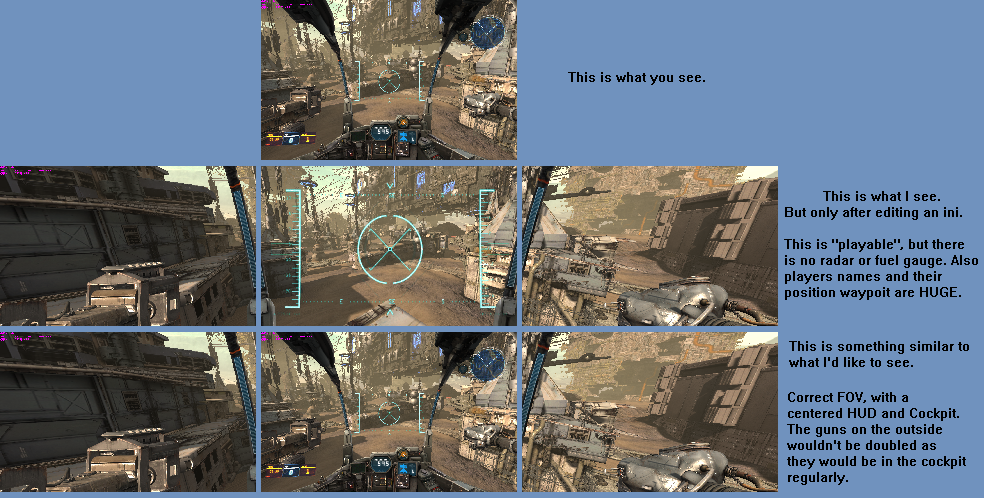
So I know there is a long list of UE3 based games that need to be fixed, but I wondering if you could look into Hawken (Which gets updated often unfortunately) and Chivalry. They both have setting to keep the Vertical FOV while extending the FOV Left and Right, but then HUB stays vert- and makes Hawken unplayable. On Chivalry, the hud gets cut off, although it's barely playable.
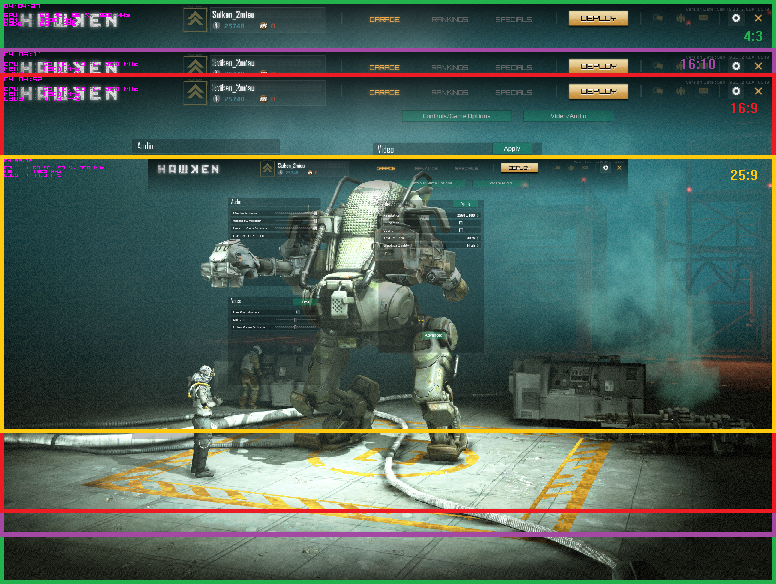
This is what I posted on the Hawken Forums and have gotten no response from Devs on the issue.
Re: Multi-Game Widescreen Fixer
Posted: 09 Sep 2013, 04:38
by scbesterman
Hi Folks!
First off...big thanks out to dopefish, Helifax and others for all the efforts and great work!
Next...apologies if this has already been covered. Having some mouse trouble with r662 and Skyrim. Widescreen fixer starts a few seconds after the game launches and looks fine but the mouse cursor only appears and is usable on the middle monitor. No mouse issues when not running fixer. Using 3x 4gb 680's and 3 vg278h monitors.
Any ideas?
tia!
Re: Multi-Game Widescreen Fixer
Posted: 09 Sep 2013, 14:10
by helifax
scbesterman wrote:Hi Folks!
First off...big thanks out to dopefish, Helifax and others for all the efforts and great work!
Next...apologies if this has already been covered. Having some mouse trouble with r662 and Skyrim. Widescreen fixer starts a few seconds after the game launches and looks fine but the mouse cursor only appears and is usable on the middle monitor. No mouse issues when not running fixer. Using 3x 4gb 680's and 3 vg278h monitors.
Any ideas?
tia!
Hey;)) I know the Skyrim plugin is kinda old and was among the first I created (and at the time I didn't had all this experience I now have). It suffers from mouse acceleration on width also and other minor little annoyances. If you encounter this problem you could try to put the Start delay time in the plugin to a higher value (from 7 seconds to 10 or so) and see if that fixes it for you as it should.
Re: Multi-Game Widescreen Fixer
Posted: 09 Sep 2013, 21:01
by scbesterman
helifax wrote:scbesterman wrote:Hi Folks!
First off...big thanks out to dopefish, Helifax and others for all the efforts and great work!
Next...apologies if this has already been covered. Having some mouse trouble with r662 and Skyrim. Widescreen fixer starts a few seconds after the game launches and looks fine but the mouse cursor only appears and is usable on the middle monitor. No mouse issues when not running fixer. Using 3x 4gb 680's and 3 vg278h monitors.
Any ideas?
tia!
Hey;)) I know the Skyrim plugin is kinda old and was among the first I created (and at the time I didn't had all this experience I now have). It suffers from mouse acceleration on width also and other minor little annoyances. If you encounter this problem you could try to put the Start delay time in the plugin to a higher value (from 7 seconds to 10 or so) and see if that fixes it for you as it should.
Hi helifax!!
Yeah...I realize that it's a bit older release. Tried at 10, 12 and 20 seconds...now have center and left monitors working, a step in the right direction (well actually a step left but you know what i mean). Now, though...the menu disappears and the thing in the center doesn't resize. :/
Any other ideas I should try?
Thanks again...do definitely appreciate your work. Just hoping to get this game working...any suggestions would be great.

Re: Multi-Game Widescreen Fixer
Posted: 10 Sep 2013, 00:15
by helifax
scbesterman wrote:helifax wrote:scbesterman wrote:Hi Folks!
First off...big thanks out to dopefish, Helifax and others for all the efforts and great work!
Next...apologies if this has already been covered. Having some mouse trouble with r662 and Skyrim. Widescreen fixer starts a few seconds after the game launches and looks fine but the mouse cursor only appears and is usable on the middle monitor. No mouse issues when not running fixer. Using 3x 4gb 680's and 3 vg278h monitors.
Any ideas?
tia!
Hey;)) I know the Skyrim plugin is kinda old and was among the first I created (and at the time I didn't had all this experience I now have). It suffers from mouse acceleration on width also and other minor little annoyances. If you encounter this problem you could try to put the Start delay time in the plugin to a higher value (from 7 seconds to 10 or so) and see if that fixes it for you as it should.
Hi helifax!!
Yeah...I realize that it's a bit older release. Tried at 10, 12 and 20 seconds...now have center and left monitors working, a step in the right direction (well actually a step left but you know what i mean). Now, though...the menu disappears and the thing in the center doesn't resize. :/
Any other ideas I should try?
Thanks again...do definitely appreciate your work. Just hoping to get this game working...any suggestions would be great.
Hmm have you tried using a lower than 7 seconds value? Are you using Eyefinity or Surround? I tried to replicate this but I cannot:(
Hmm
Re: Multi-Game Widescreen Fixer
Posted: 10 Sep 2013, 01:26
by scbesterman
Uhoh...not good that you can't replicate it

Only when I used the default (4 iirc). Nvidia 3d vision surround setup.
Re: Multi-Game Widescreen Fixer
Posted: 13 Sep 2013, 12:24
by helifax
scbesterman wrote:Uhoh...not good that you can't replicate it
Only when I used the default (4 iirc). Nvidia 3d vision surround setup.
I managed to see what the problem was. Yes indeed I see the mouse locked on the center and the right screen for all the menus, EXCEPT for the MAP where I was able to use it properly. Another small issue is in the skill tree, but honestly I never used the mouse there to select anything:)) just the keyboard.
Does this problem prevent you to play? I tried it and I saw that everything was working and the game was fully playable.. I am also on 3D Surround.
Re: Multi-Game Widescreen Fixer
Posted: 19 Sep 2013, 01:47
by scbesterman
Sorry for the delay. Yep...works fine it seems! Just had to go past the first screen to find out :/
Thanks helifax!
Re: Multi-Game Widescreen Fixer
Posted: 20 Sep 2013, 15:22
by helifax
scbesterman wrote:Sorry for the delay. Yep...works fine it seems! Just had to go past the first screen to find out :/
Thanks helifax!
Hehe;)) No problem;))

