
My lockpicking was never tiny... strange.
I found that if you enter the console while computer terminals or the pip boy is up, the font becomes slightly clearer.
Fallout New Vegas: Problems
Re: Fallout New Vegas: Problems
just so people know what we're talking about :wink:
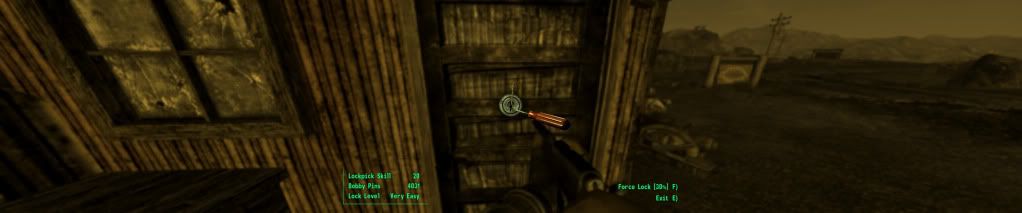
EDIT: excuse the resolution, photobucket must scale down my pictures unless im a premium member or something
EDIT: excuse the resolution, photobucket must scale down my pictures unless im a premium member or something
Re: Fallout New Vegas: Problems
Good Day
Signed just to let you guys know how I got FO3:NV working. I am using Eyefinity with 2 5870's in crossfire + NV GT 9600 for hybrid Physics on 3 Samsung BX2440 LED's in Portrait. My res is 3534x1920. Follow the steps as listed by CrashAegis, but change the following.
1) iSafeZoneXWide from 15 to 9
2) iSafeZoneYWide from 15 to 9
3) fDefaultFov from 75 to 180
With this I do not have a single problem running everything on ultra. No blur or issues. Don't use the launcher and if you want to reduce your AA and AF use CCC. Game now runs like a dream and everything is exactly in place. No overlapping menus or stuff cramped in the middle of the screen.
Cheers
Signed just to let you guys know how I got FO3:NV working. I am using Eyefinity with 2 5870's in crossfire + NV GT 9600 for hybrid Physics on 3 Samsung BX2440 LED's in Portrait. My res is 3534x1920. Follow the steps as listed by CrashAegis, but change the following.
1) iSafeZoneXWide from 15 to 9
2) iSafeZoneYWide from 15 to 9
3) fDefaultFov from 75 to 180
With this I do not have a single problem running everything on ultra. No blur or issues. Don't use the launcher and if you want to reduce your AA and AF use CCC. Game now runs like a dream and everything is exactly in place. No overlapping menus or stuff cramped in the middle of the screen.
Cheers
-
AussieTimmeh

- Editors

- Posts: 1441
- Joined: 14 Oct 2009, 03:11
Re: Fallout New Vegas: Problems
Yeah mine was the same the whole game through. Tried a few things to fix it and none worked so I left it and it never bothered me much during the game.
i5-2500K @ 4Ghz ° Asus P8Z68 ° GTX670 Windforce OC ° 8GB DDR3 RipjawsX ° 4x Viewsonic VA2703 ° Logitech G15 / G5 / G27 ° Razer Vespula ° TrackIR 5 ° Thrustmaster Warthog HOTAS
Re: Fallout New Vegas: Problems
I was checking out the newvegasnexus forums and found this for getting a picture back on the scoped view:
EARVH42: Edit your ini file and add the following to the display section:
fScopeScissorAmount 0
This will eliminate the masking the game engine automatically applies.
I'm not far in enough to try it out, but the responses on that forum have been positive.

It worked for me and I don't have the bits on the end showing like in your shot. For me they are blacked out. Working with rifle scopes and binoculars.
Did you add the " = " in? Like so: fScopeScissorAmount=0
And for whatever strange reason, my terimals are okay again. Don't know why they messed up that one time. I did nothing and they went from good to bad and then next time I played they were good again. Been fine ever since.

Re: Fallout New Vegas: Problems
[snip]
FIRST: Start the launcher. Everytime I start the Fallout launcher it actually overwrites these two files with some sort of default file, even if Fallout.ini is set to Read Only. The FalloutPrefs.ini file seems to maintain all of the correct settings, but the Fallout.ini file appears to be the one actually setting values like iSafeX and bEnableEyefinity, and this file is being overwritten with the default values.
After the launcher is started, I complete all of the changes to the two files described in my previous post.
Once this is done, I COPY both files, and paste them somewhere that can be accessed easily.
Then I can play Fallout NV with no problems, gamble, pillage, ignore that stupid Caravan card game, what have you.
Now when I quit, I see that the FalloutPrefs.ini file has been overwritten again, no big deal. However, the next time I start the launcher it will once again overwrite BOTH files. The idea here is to start the launcher, then overwrite the copies of FalloutPrefs.ini and Fallout.ini with the ones you previously copied. Every time. Lame. Functional, but lame.
I'm starting to think this is a combination of awful Bethesda errors and Steam acting insane, anyone with any insight into this would be highly appreciated.
Thanks for this post.. this FINALLY got things working properly for my STEAM version of FO3NV @ 5760x1080... my biggest hurdle was the terminals which I could never get out of... so annoying. whew. anyways.. happy friday!
Re: Fallout New Vegas: Problems
You don't have to do this. In the main fallout folder in Steam is the default fallout .ini file (forget it's exact name but default is part of it). You can change all the parameters within this file and it will overwrite the others when you start the launcher.
Re: Fallout New Vegas: Problems
Surfacing an old topic here but can someone point me to where I might be able to fix the gambling screens? For isntance, the slots screen is zoomed to where only the bottom of the moving wheel can be viewed. I cant see the symbols.


Re: Fallout New Vegas: Problems
Surfacing an old topic here but can someone point me to where I might be able to fix the gambling screens? For isntance, the slots screen is zoomed to where only the bottom of the moving wheel can be viewed. I cant see the symbols.
How your lockpicking and terminal screens look? I would assume that the gambling screens would use teh terminal zoom/fov values. I've never used any gambling in the game, so I have no personal experience.
Re: Fallout New Vegas: Problems
My lockpicking is a little blown up but still useable. The terminal is blurry of course but a good size.
Could the slots graphics be tied in to a lockpick setting?
Could the slots graphics be tied in to a lockpick setting?
Re: Fallout New Vegas: Problems
Hello.
I have been fiddling with my ini files for about 1 hour now and have managed to get the layout and view decent enough. (Terminal text is somewhat blurry but readable)
Running Nvidia surround on 3x 24" screens with SLI GTX580 @ 5760x1080
1. I start the launcher
2. I replace the ini files in ..DocumentsMy GamesFalloutNV
3. I make theese ini files write protected
4. I choose Play from the launcher menu.
(every time i play the game, I do these above steps)
To download my ini files, please use theese links.
Link Fallout.ini
http://www.casinomiljonar.se/stuff/Fallout.ini
Link FalloutPrefs.ini
http://www.casinomiljonar.se/stuff/FalloutPrefs.ini
I hope this helps for anyone.
I have been fiddling with my ini files for about 1 hour now and have managed to get the layout and view decent enough. (Terminal text is somewhat blurry but readable)
Running Nvidia surround on 3x 24" screens with SLI GTX580 @ 5760x1080
1. I start the launcher
2. I replace the ini files in ..DocumentsMy GamesFalloutNV
3. I make theese ini files write protected
4. I choose Play from the launcher menu.
(every time i play the game, I do these above steps)
To download my ini files, please use theese links.
Link Fallout.ini
http://www.casinomiljonar.se/stuff/Fallout.ini
Link FalloutPrefs.ini
http://www.casinomiljonar.se/stuff/FalloutPrefs.ini
I hope this helps for anyone.
-
EvilEngineer
- Posts: 115
- Joined: 22 Oct 2010, 04:23
Re: Fallout New Vegas: Problems
Well, bought the new DLC : dead money. Now I can't get the game to play at all. :doh
The game now CtD right after launching. I've disabled all add-ons, even reinstalled... nada.
Anyone else had this happen?
edit:
Ok... got it working finally. Had to totally wipe it from the computer, and clean out any old registry keys laying around. Oddly it creates a ton of "Oblivion" folders and registry keys. 2 Reinstalls later it's working again, kinda...
The game now CtD right after launching. I've disabled all add-ons, even reinstalled... nada.
Anyone else had this happen?
edit:
Ok... got it working finally. Had to totally wipe it from the computer, and clean out any old registry keys laying around. Oddly it creates a ton of "Oblivion" folders and registry keys. 2 Reinstalls later it's working again, kinda...
Re: Fallout New Vegas: Problems
And is it working with that new DLC?
-
EvilEngineer
- Posts: 115
- Joined: 22 Oct 2010, 04:23
Re: Fallout New Vegas: Problems
And is it working with that new DLC?
Dunno yet, all my saves are gone =/ So I get to start over and try and find the trigger event for the DLC.
-
latexyankee
- Posts: 32
- Joined: 05 Mar 2011, 02:03
New Vegas Help
Hello all this is my first post so forgive me if this is in the wrong area. I desperately need help with FNV in eyefinity. I've followed all the steps in every post I could find (including the one on this site that worked for everyone else) and my HUD simply will not move. I've edited all my ini files changed the values of isafezone etc..from 75 to 900 and everywhere in between and nothing ever changes. I also understand that the "primary file is fallout_default in the game dir. The thing is, my settings do not reset by themselves, they remain the value I've set, but nothing in game ever changes. I've tried launching from the app directly (although it also produces the launcher) with and without mods enabled..nothing. Again my ini modifications stick so I'm not sure what the problem is. Also the only option for res under ati eyefinity in the launcher is 6004x1080 when i cleary have the res set to 5760x1080 in the fallout_prefs.ini
Any help would be greatly appriciated, pulling my hair out for 2 days now lol
Any help would be greatly appriciated, pulling my hair out for 2 days now
Re: Fallout New Vegas: Problems
Help i added the fScopeScissorAmmount=0 to fallout ini and prefs but my scope is all red on dead money. what should I do?
Re: Fallout New Vegas: Problems
I got Dead Money and everything seemed fine with the settings I was using for New Vegas (completed btw), lockpicking was fine:

but when I went to do my first hack...

which is a BIG problem as you can see. Not sure what is causing this to be so different than when I'm just playing New Vegas.
Any ideas on what settings I should be looking at?
TYIA
but when I went to do my first hack...
which is a BIG problem as you can see. Not sure what is causing this to be so different than when I'm just playing New Vegas.
Any ideas on what settings I should be looking at?
TYIA
Re: New Vegas Help
Hello all this is my first post so forgive me if this is in the wrong area. I desperately need help with FNV in eyefinity. I've followed all the steps in every post I could find (including the one on this site that worked for everyone else) and my HUD simply will not move. I've edited all my ini files changed the values of isafezone etc..from 75 to 900 and everywhere in between and nothing ever changes. I also understand that the "primary file is fallout_default in the game dir. The thing is, my settings do not reset by themselves, they remain the value I've set, but nothing in game ever changes. I've tried launching from the app directly (although it also produces the launcher) with and without mods enabled..nothing. Again my ini modifications stick so I'm not sure what the problem is. Also the only option for res under ati eyefinity in the launcher is 6004x1080 when i cleary have the res set to 5760x1080 in the fallout_prefs.ini
Any help would be greatly appriciated, pulling my hair out for 2 days nowlol
Sorry for the late reply. If you haven't figured it out yet, most likely the problem is you didn't change it in the .ini found in Your Name > Documents > My Games > FalloutNV > Fallout.ini. It must be changed as well as the one in the games main folder.
Example:
[Interface]
iSafeZoneXWide=770
iSafeZoneYWide=15
iSafeZoneX=770
iSafeZoneY=15
Re: Fallout New Vegas: Problems
but when I went to do my first hack...
Check your .ini to make sure the value for terminal is like this:
[RenderedTerminal]
fRenderedTerminalZoom=72
Good luck, hope it helps.
Re: Fallout New Vegas: Problems
Is there a post in here that will tell me everything I need to do in one place? This thread is pretty huge and daunting :) :hide
Who is online
Users browsing this forum: No registered users and 14 guests