


They have been put up for sale online in Norway, with a confirmed date of 15th of december 2009:
http://www.komplett.no/k/ki.aspx?sku=575163
Where to get DP-DVI Active Adaptors (& what to look for)
Re: Where to get DP-DVI Active Adaptors (& what to look for)
Kabeltje.com has got them back in stock, ships within 24 hours :)
Re: Where to get DP-DVI Active Adaptors (& what to look for)
Went to Dell.ca and found em for $89.99 instead of $99.99 on Dell.com!
Re: Where to get DP-DVI Active Adaptors (& what to look for)
Took me a while to get this -
Accell B087B-002B Active DP to DVI adapter
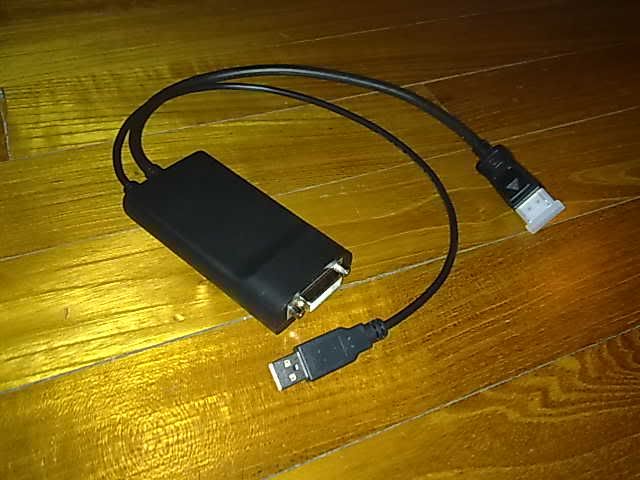
I'm from Asia, and this piece of hardware isn't even available in online stores here and in tech malls....heck, some have not even heard of this! :doh Ordered this from Amazon, had to wait patiently for stock to arrive before it was shipped to an address in Cali before it was shipped all the way to me. It was an ordeal but well worth it for EyeFinity! :rockout
Accell B087B-002B Active DP to DVI adapter
I'm from Asia, and this piece of hardware isn't even available in online stores here and in tech malls....heck, some have not even heard of this! :doh Ordered this from Amazon, had to wait patiently for stock to arrive before it was shipped to an address in Cali before it was shipped all the way to me. It was an ordeal but well worth it for EyeFinity! :rockout
Re: Where to get DP-DVI Active Adaptors (& what to look for)
I have an extra Accell DP to DVI adapter, so if anyone wants to buy one, we can arrange something.
I would prefer people from Europe as I don't want to mess with customs :)
I would prefer people from Europe as I don't want to mess with customs :)
-
Phoenixdancer
- Posts: 122
- Joined: 13 Jan 2010, 14:25
Re: Where to get DP-DVI Active Adaptors (& what to look for)
Hello people.
My first post here.
At the moment i have 3 x YURAKU 24" LCD monitors with DVI-D connections ready for when my Sapphire HD5970 gets here, i'm using 2 monitors on my Crossfire 4870x2's atm.
I have been reading up about this issue for awhile that i need an "Active power" Mini Display port to DVI-D?
I have just placed an order for one of these from amazon for £59.99 : http://store.apple.com/uk/product/MB571Z/A
I'm slightly confused though as someone o this thread pointed out you need an adapter from MiniDP to DP to make it work? Why is this so?
the Adapter is a Mini-DP to DVI-D Active adapter so should just plug into the card in problems? why would someone need to plug a Mini-DP to DP in first? it just wouldn't fit.
I cant find any of the Bizlink or DELL or sapphire versions of this type of adapter anywhere for sale in the UK at the moment so that's why i went for the Apple (plus the apple was cheaper)
if anyone can shed some light on the situation then please PM me or Post after me as im sure others would like to know the same information that i do.
I'm glad i found this forum as i will be a 3x 24" windscreen user and will fit in well here :D
My first post here.
At the moment i have 3 x YURAKU 24" LCD monitors with DVI-D connections ready for when my Sapphire HD5970 gets here, i'm using 2 monitors on my Crossfire 4870x2's atm.
I have been reading up about this issue for awhile that i need an "Active power" Mini Display port to DVI-D?
I have just placed an order for one of these from amazon for £59.99 : http://store.apple.com/uk/product/MB571Z/A
I'm slightly confused though as someone o this thread pointed out you need an adapter from MiniDP to DP to make it work? Why is this so?
the Adapter is a Mini-DP to DVI-D Active adapter so should just plug into the card in problems? why would someone need to plug a Mini-DP to DP in first? it just wouldn't fit.
I cant find any of the Bizlink or DELL or sapphire versions of this type of adapter anywhere for sale in the UK at the moment so that's why i went for the Apple (plus the apple was cheaper)
if anyone can shed some light on the situation then please PM me or Post after me as im sure others would like to know the same information that i do.
I'm glad i found this forum as i will be a 3x 24" windscreen user and will fit in well here :D
-
Mach1.9pants

- Insiders

- Posts: 1512
- Joined: 29 Jul 2007, 05:24
- Location: NZ
Re: Where to get DP-DVI Active Adaptors (& what to look for)
The 5970 uses mini-DP but the 5870 uses DP so if you have a 5870 and want to use the Apple adapter you need a DP to mini-DP converter, if (like me) you have a 5970 you just plug the Apple straight in. Make sense?
-
KryptoNyte
- Posts: 108
- Joined: 15 Sep 2006, 22:58
Re: Where to get DP-DVI Active Adaptors (& what to look for)
As Mach mentioned, with the 5970, you should not need any extra cables or adapters. I would, however, suggest that it you have instability/flashing screen problems that you consider picking up and external USB power adapter. Something like this:
http://www.amazon.com/Apple-Power-Adapter-iPod-iPhone/dp/B001GQ3DP6/ref=sr_1_1?ie=UTF8&s=electronics&qid=1263422441&sr=8-1
http://www.amazon.com/Apple-Power-Adapter-iPod-iPhone/dp/B001GQ3DP6/ref=sr_1_1?ie=UTF8&s=electronics&qid=1263422441&sr=8-1
-
Phoenixdancer
- Posts: 122
- Joined: 13 Jan 2010, 14:25
Re: Where to get DP-DVI Active Adaptors (& what to look for)
Thanks peeps
I have a belkin USB wall plug that has an output of : 1a 5-9v will this do?
The card turned up and worked out the box.
I'm just installing a waterblock and will update wen I'm done.
:)
I have a belkin USB wall plug that has an output of : 1a 5-9v will this do?
The card turned up and worked out the box.
I'm just installing a waterblock and will update wen I'm done.
:)
-
MadMax2009
- Posts: 19
- Joined: 23 Dec 2009, 03:21
Re: Where to get DP-DVI Active Adaptors (& what to look for)
Anyone Know of Canadian retailers selling them or is it just Dell and Apple
-
KryptoNyte
- Posts: 108
- Joined: 15 Sep 2006, 22:58
Re: Where to get DP-DVI Active Adaptors (& what to look for)
Anyone Know of Canadian retailers selling them or is it just Dell and Apple
To my surprise, I see that Newegg (Canada) actually has them. In stock.
http://www.newegg.ca/Product/Product.aspx?Item=N82E16814999025&cm_re=DisplayPort_to_DVI-D-_-14-999-025-_-Product
As does the US Newegg Site:
http://www.newegg.com/Product/Product.aspx?Item=N82E16814999025&Tpk=displayport%20to%20dvi
-
Phoenixdancer
- Posts: 122
- Joined: 13 Jan 2010, 14:25
Re: Where to get DP-DVI Active Adaptors (& what to look for)
i would suggest that you buy the APPLE one.
Mines working perfect with YURAKU 24" DVI-D monitors...
Mines working perfect with YURAKU 24" DVI-D monitors...
-
Azurewraith
- Posts: 1
- Joined: 12 Apr 2010, 14:33
Re: Where to get DP-DVI Active Adaptors (& what to look for)
Ok gents good news for aussies.
If you can read the awful formatting below. I bought 4 G2410 Monitors at $299 Each inc gst (I got a $100 discount per monitor) but thats not the amazing thing.
Take note of the accessory i ordered for gold coast qld australia delivery.
KO-760V - Cus Kits for Dell OptiPlex 760
1
92.19
92.19
Video Cable
-Kit - DisplayPort to DVI (Dual Link) Dongle
So dell will for $92.19 inc gst sell you there own working DP to DVI cable that works.
Thought i post this up for info.
Azurewraith.
: 09/04/2010
For Delivery and Order Progress enquires,
Estimated Delivery
: 10 Business Days from Order Date
please contact Dell Customer Service
at 1800 819 339.
No.
Part Code
Description
Quantity
Price AUD
Total AUD
1
Non Tie
T14G2410WAU - Dell(TM) G2410 24 Widescreen Flat Pa
4
272.00
1,088.00
nel Monitor
System Hardware Warranty -3 Years Advanced Exchange (Next Business Day)
4
Display
-Dell (TM) 24 " G2410 Wide Screen Flat Panel LCD M
4
onitor (VGA & DVI-D)
Discounting Code
-Limited time promotion. No further discounts appl
-
y.
Limited Time Offer for Sn
-Disc Code : $100 Cash Off
-
P
2
Non Tie
KO-760V - Cus Kits for Dell OptiPlex 760
1
92.19
92.19
Video Cable
-Kit - DisplayPort to DVI (Dual Link) Dongle
1
We are pleased to provide this confirmation of your recent order placed with Dell. As Stated in Dell's Quotation, This transaction is subject to Dell's Terms
and Conditions of Sale, Service and Technical Support and if referenced by a bid number quoted above, supply of services is also subject to the terms and
conditions of the Dell Professional Services Standard Terms and Conditions and the relevant statement of work provided to the customer (“Dell’s Terms
and Conditions”). Copies of Dell’s Terms and Conditions are available on http://www.dell.comap or on request. Warranty extension does not cover 3rd party
parts shipped with Dell systems. By signing this Quotation and/or submitting a purchase order pursuant to this Quotation, you acknowledge that you have
read and agree to be bound by Dell's Terms and Conditions and any referenced statement of work (“Agreement”). This Agreement is the final agreement
between the parties in connection with this transaction, replacing any preprinted or other terms in any purchase order, invoice or other document issued by
either party. We would like to take this opportunity to thank you for your order and look forward to your continued business.
If you can read the awful formatting below. I bought 4 G2410 Monitors at $299 Each inc gst (I got a $100 discount per monitor) but thats not the amazing thing.
Take note of the accessory i ordered for gold coast qld australia delivery.
KO-760V - Cus Kits for Dell OptiPlex 760
1
92.19
92.19
Video Cable
-Kit - DisplayPort to DVI (Dual Link) Dongle
So dell will for $92.19 inc gst sell you there own working DP to DVI cable that works.
Thought i post this up for info.
Azurewraith.
: 09/04/2010
For Delivery and Order Progress enquires,
Estimated Delivery
: 10 Business Days from Order Date
please contact Dell Customer Service
at 1800 819 339.
No.
Part Code
Description
Quantity
Price AUD
Total AUD
1
Non Tie
T14G2410WAU - Dell(TM) G2410 24 Widescreen Flat Pa
4
272.00
1,088.00
nel Monitor
System Hardware Warranty -3 Years Advanced Exchange (Next Business Day)
4
Display
-Dell (TM) 24 " G2410 Wide Screen Flat Panel LCD M
4
onitor (VGA & DVI-D)
Discounting Code
-Limited time promotion. No further discounts appl
-
y.
Limited Time Offer for Sn
-Disc Code : $100 Cash Off
-
P
2
Non Tie
KO-760V - Cus Kits for Dell OptiPlex 760
1
92.19
92.19
Video Cable
-Kit - DisplayPort to DVI (Dual Link) Dongle
1
We are pleased to provide this confirmation of your recent order placed with Dell. As Stated in Dell's Quotation, This transaction is subject to Dell's Terms
and Conditions of Sale, Service and Technical Support and if referenced by a bid number quoted above, supply of services is also subject to the terms and
conditions of the Dell Professional Services Standard Terms and Conditions and the relevant statement of work provided to the customer (“Dell’s Terms
and Conditions”). Copies of Dell’s Terms and Conditions are available on http://www.dell.comap or on request. Warranty extension does not cover 3rd party
parts shipped with Dell systems. By signing this Quotation and/or submitting a purchase order pursuant to this Quotation, you acknowledge that you have
read and agree to be bound by Dell's Terms and Conditions and any referenced statement of work (“Agreement”). This Agreement is the final agreement
between the parties in connection with this transaction, replacing any preprinted or other terms in any purchase order, invoice or other document issued by
either party. We would like to take this opportunity to thank you for your order and look forward to your continued business.
Re: Where to get DP-DVI Active Adaptors (& what to look for)
So is Dell the only place left to have active DP-DVI adapters in stock? Can't seem to find any other sellers in the US to have them.
-
Dyre Straits
- Posts: 210
- Joined: 06 May 2010, 05:52
Re: Where to get DP-DVI Active Adaptors (& what to look for)
So is Dell the only place left to have active DP-DVI adapters in stock? Can't seem to find any other sellers in the US to have them.
The thing about the Dell's is that, after reading the user reviews, they are just as prone to the flickering/blank screens as the ACCELL is that I'm returning to Fry's today.
~Windows 7 x64 Professional~MSI X58A-GD45~Intel I7-950~6x2 GB DDR3 1600 RAM (Triple Channel)~RealTek Onboard~XFX HD 6950 2 GB GDDR5~3 ViewSonic 24 inch LCDs in Eyefinity~SATA Dual Layer DVD RW~1000 W PSU~And a Whole Lot More!~Done with Vista~XP Pro on the way out, too!~AND....250 GB XBOX 360~
Re: Where to get DP-DVI Active Adaptors (& what to look for)
I've got a Dell/Bizlink adapter available as I'm moving overseas. In Australia(now) and San Francisco(July/Aug)
If anyone wants drop me a line.
If anyone wants drop me a line.
Re: Where to get DP-DVI Active Adaptors (& what to look for)
Hi
I know there hasn't been a post here in abit, but I found this thread and it had some good info but I am not sure if this would work for me.
I have a Regular 9800GT with 2 DVI out, and I have an LCD (HP ZR24W) that has a DVI in which is in use, and a Displayport. Every post that I saw is saying this active device from dell would convert the display port output on a card to DVI for input into an LCD. I need it the other way around. I need my DVI output from my card to be converted into a displayport signal to put into my LCD.
The dell device doesn't work both ways does it? If i put the display port connector into the lcd, and ran the dvi cable from the device to my computer?
I know there hasn't been a post here in abit, but I found this thread and it had some good info but I am not sure if this would work for me.
I have a Regular 9800GT with 2 DVI out, and I have an LCD (HP ZR24W) that has a DVI in which is in use, and a Displayport. Every post that I saw is saying this active device from dell would convert the display port output on a card to DVI for input into an LCD. I need it the other way around. I need my DVI output from my card to be converted into a displayport signal to put into my LCD.
The dell device doesn't work both ways does it? If i put the display port connector into the lcd, and ran the dvi cable from the device to my computer?
-
Clem Snide
- Posts: 10
- Joined: 29 Nov 2010, 05:49
Re: Where to get DP-DVI Active Adaptors (& what to look for)
This seems to be the right place to ask, though some of the 2009 info seems a trifle stale.
Many people here seem to be setting up 3x1 landscape displays, and I'm no different. My card at the moment is an Asus EAH5850 Top; this has one each DVI, HDMI, and DisplayPort. I have three monitors all at 1680x1050. It appears that any two can work at once, but the third (while Catalyst Control recognizes it) can't be added to a group.
My cable situation: One DVI, one HDMI, and a non-powered DP to DVI cable. I should mention that, for two monitors, the unpowered DP cable works fine-- I've tried DVI and HDMI as well as DVI and DP. But, three at once is the goal.
Now, many people here have had success with the powered Accell:
http://www.amazon.com/Accell-UltraAV-B087B-002B-DisplayPort-Dual-Link/dp/B002ISVI3U/ref=sr_1_1?ie=UTF8&qid=1291010291&sr=8-1 (US$86.32)
But the ATi and Eyefinity marks are all over some unpowered ones:
http://www.amazon.com/gp/product/B004071ZX0/ref=ord_cart_shr?ie=UTF8&m=ATVPDKIKX0DER (US$29.99)
http://www.newegg.com/Product/Product.aspx?Item=N82E16814999030&cm_re=displayport_to_DVI-_-14-999-030-_-Product (US$26.99)
...and I'd much rather spend $30 than $87. The adapters say they support up to 1920x1200, so my 1680x1050 monitor should be compatible. Right?
My goal is to get a 5040x1050 display. Any help in this direction would be much appreciated.
Many people here seem to be setting up 3x1 landscape displays, and I'm no different. My card at the moment is an Asus EAH5850 Top; this has one each DVI, HDMI, and DisplayPort. I have three monitors all at 1680x1050. It appears that any two can work at once, but the third (while Catalyst Control recognizes it) can't be added to a group.
My cable situation: One DVI, one HDMI, and a non-powered DP to DVI cable. I should mention that, for two monitors, the unpowered DP cable works fine-- I've tried DVI and HDMI as well as DVI and DP. But, three at once is the goal.
Now, many people here have had success with the powered Accell:
http://www.amazon.com/Accell-UltraAV-B087B-002B-DisplayPort-Dual-Link/dp/B002ISVI3U/ref=sr_1_1?ie=UTF8&qid=1291010291&sr=8-1 (US$86.32)
But the ATi and Eyefinity marks are all over some unpowered ones:
http://www.amazon.com/gp/product/B004071ZX0/ref=ord_cart_shr?ie=UTF8&m=ATVPDKIKX0DER (US$29.99)
http://www.newegg.com/Product/Product.aspx?Item=N82E16814999030&cm_re=displayport_to_DVI-_-14-999-030-_-Product (US$26.99)
...and I'd much rather spend $30 than $87. The adapters say they support up to 1920x1200, so my 1680x1050 monitor should be compatible. Right?
My goal is to get a 5040x1050 display. Any help in this direction would be much appreciated.
Who is online
Users browsing this forum: No registered users and 4 guests