Page 6 of 6
matrices wrote:Jori
Posted: 07 Nov 2011, 17:54
by Jori
I hope by "Eyefinity" they mean both that and Surround.
Yes, they said actually that they are looking for a solution on both systems. ATI and Nvidia.
[quote]I've found a better solution for playing at 3 monitors and the player overhead tags active. Instead of playing at windowed mode (wich it works) i've found that is much better to play in full screen but setting the resolution to 3840x720 . In that resolution the player tags are shown correctly. I know, is a bit low resolution, but it works. In the other hand, you can set the video performance to ultra and so and the game will look better than playing on windowed mode and all the settings to low. (at least in my case (GTX 590) )
The resolution 3840x720 has the same aspect ratio of the 5760x1080 but at lower resolution, so the enviroment is not deformed or something.
Playing this mode will be the best solution while we wait for a patch ;)
This solution would be OK if you could actually run 1:1 AR scaling, which you can't do in Surround mode. So in practice this solution is terrible because everything onscreen looks like smeared crap in non-native res.
Well, in fact, i'm playing at 4800x900 now, and all the HUD elements and enemy markers are showed ok.
The 4800x900 resolution has the same aspect ratio that 5760x1080. And 3840x720 too. So, the game looks quite well at 4800x900. Nothing deformed or messed.
In fact, when a patch is released, I will see if I play at 5760x1080 or if it's better to keep playing at 4800x900, because in that lower resolution I can set the graphics to HIGH, while in 5760x1080 I have to drop the graphics quality to MEDIUM to run so smooth as I play with 4800x900. So... at this moment i'm not waiting for any patch. I prefer to play at 4800x900 right now, and the gam looks amazing for me :)
What FOV would people suggest
Posted: 07 Nov 2011, 18:07
by Terrace
What FOV would people suggest setting the game to with 5760x1080 thats bezel adjusted to 6048x1080 side monitors about a 30 degree angle from the center one, also if someone could link me some information about FOV and how its worked out and should it be the same for all my other games that would be a big bonus, i have zero idea what i'm doing other than its feild of veiw :P
Well I tired all these HUD
Posted: 07 Nov 2011, 20:53
by IronWarrior
Well I tired all these HUD fixes and nothing works. Going to have to stick with one monitor till they fix this.
IronWarrior wrote:Well I
Posted: 07 Nov 2011, 21:01
by Terrace
Well I tired all these HUD fixes and nothing works. Going to have to stick with one monitor till they fix this.
one of the steps some of the guides to fixing it so far have said is that it doesnt matter which is your preffered display and that you can set it later, but for me i found that if the correct monitor isnt the preffered one when you create some of the groups in display and the eyefinity setup then it doesnt work, even if you set the prefered later to the correct one, i can't explain why but if it doesnt work but it looks like you are following every step then try to finish the guides without needing to set the prefered display even if it means going back to step one for a few attempts while all your monitors are duplicates which is where you should be starting, for instance my monitors when i defaultly make a group are 2-1-3
Jori wrote:matrices wrote:I
Posted: 08 Nov 2011, 03:12
by numanoid
[quote]I hope by "Eyefinity" they mean both that and Surround.
Yes, they said actually that they are looking for a solution on both systems. ATI and Nvidia.
[quote]I've found a better solution for playing at 3 monitors and the player overhead tags active. Instead of playing at windowed mode (wich it works) i've found that is much better to play in full screen but setting the resolution to 3840x720 . In that resolution the player tags are shown correctly. I know, is a bit low resolution, but it works. In the other hand, you can set the video performance to ultra and so and the game will look better than playing on windowed mode and all the settings to low. (at least in my case (GTX 590) )
The resolution 3840x720 has the same aspect ratio of the 5760x1080 but at lower resolution, so the enviroment is not deformed or something.
Playing this mode will be the best solution while we wait for a patch ;)
This solution would be OK if you could actually run 1:1 AR scaling, which you can't do in Surround mode. So in practice this solution is terrible because everything onscreen looks like smeared crap in non-native res.
Well, in fact, i'm playing at 4800x900 now, and all the HUD elements and enemy markers are showed ok.
The 4800x900 resolution has the same aspect ratio that 5760x1080. And 3840x720 too. So, the game looks quite well at 4800x900. Nothing deformed or messed.
In fact, when a patch is released, I will see if I play at 5760x1080 or if it's better to keep playing at 4800x900, because in that lower resolution I can set the graphics to HIGH, while in 5760x1080 I have to drop the graphics quality to MEDIUM to run so smooth as I play with 4800x900. So... at this moment i'm not waiting for any patch. I prefer to play at 4800x900 right now, and the gam looks amazing for me :)
I just bought a GTX590 and have 3 monitors on the way. Can you tell me specific settings you were using for the various resolutions? I'm thinking you (and I) are Vram limited. If we turn down AA can we turn up the other settings? I've never done widescreen gaming before and there is a huge learning curve as I am seeing reading these forums.
numanoid wrote:I've never
Posted: 08 Nov 2011, 12:44
by salsoul
I've never done widescreen gaming before and there is a huge learning curve as I am seeing reading these forums.
Welcome to the forum ! once you go 3 monitors you will never go back to 1 :triplewide
Ive been eyefinity gaming for 7 months or so now. I was just like you unsure about it, this forum is excellent and everyone will help you if they can.
The learning curve isnt as steep as it may seem for the rewards far outway the effort.
good luck ! :welcome
Well I tired all these HUD fixes and nothing works. Going to have to stick with one monitor till they fix this.
Hi
I managed to get it working using this link
Get satisfaction BF3 support forums nvidia_surround_and_eyefinity_issues
Still cant get it to work @ 5760x1080 but @ 4800x900 all player markers are lined up. there is however a small cavaet to this. my minimap is now on the left monitor instead of the middle/ left
It seems in order to get the player markers lined up with the players the minimap & ammo move to the outside monitors.
they still seem to be working on it though.
regards
sal
I had no problems with enemy
Posted: 21 Nov 2011, 11:02
by ChainSOV
I had no problems with enemy markers because I have a native resolution of 4320*900, but thanks to this thread I was able to configure my hud to my likings.
I actually prefer my minimap on the outer monitor because this way I can run it maximized, so i set GstRender.ScreenSafeAreaWidth to about 0.660000
too bad the minimap minimizes after some time and doesn't remember its setting, so I have to maximize it and set the zoom level after each death again
But the stupidly bright lensflares are still a problem on the smaller resolution and are the reason I stay in tanks with nightvision most of the time :-/
As of the patch today. my
Posted: 22 Nov 2011, 12:29
by BeasturR
As of the patch today. my steup went from not working at all to working perfectly. Running 2 x 6950 in crossfire, with 3 monitor setup. No issues at all, and excellent percieved framerate. 100% playable. Happy bunny now, jets in particular are now a lot of fun.
Yes, the new patch solves the
Posted: 24 Nov 2011, 15:31
by Jori
Yes, the new patch solves the enemy markers at wider resolutions. Very good news for us widescreen players :)
But well, nothing changed for me. Before the patch i was playing at 4800x900 because in that res, the enemy markers were ok. But after the patch I keep playing that resolution. I've tested the 5760x1080 and works well, but i have to low some graphics to get decent FPS and it doesnt look so well. As i was suposing, my best solution is keep playing at 4800x900 with graphics at high and a decent antialiasing.
I just bought a GTX590 and have 3 monitors on the way. Can you tell me specific settings you were using for the various resolutions? I'm thinking you (and I) are Vram limited. If we turn down AA can we turn up the other settings? I've never done widescreen gaming before and there is a huge learning curve as I am seeing reading these forums.
VRam limited? Why you say that? mmmm....
It's curious you say that, because i had troubles with a game because it was crashing and saying that "DirectX bla bla bla bla... You dont have enough VRAM bla bla bla".
I solved my crashes, but it has nothing to do with Wide resolutions or the same GTX 590. I had that crashes because i didnt have Pagefile setted on Windows. I have an SSD and 8GB of RAM and in some forums sayid that was a good idea to disable pagefile. But some days ago, i realized that my game crashes claiming about the VRam was about the missing pagefile. So i setted a pagefile in my system and i've never seen that message again and i dont have any kind of game crash now.
I play at 4800x900, witha graphics at HIGH except for the EFFECTS and SHADOWS that i have setted to medium. Then the AA is 2X, and POSTAA to MEDIUM. Ambien oclusion is DISABLED, ANISOTROPIC is set to 2X and BLUR DISABLED also.
With that config i have between 50 - 60 FPS
If i set to 5760x1080, with graphics at MEDIUM except for the EFFECTS and SHADOWS at LOW. Then the AA is 2X, POSTAA is disabled. Ambien Oclusiond DIABLED, ANISOTROPIC to 2X and BLUR DISABLED.
With that config i have between 30 - 40 FPS
So i preffer playing at 4800x900 config. The lower resolution is messing a bit, I know. But in general, the game looks better and i have more FPS, so i prefer it.
Mmmmm, after testing the new
Posted: 24 Nov 2011, 20:58
by Jori
Mmmmm, after testing the new patch, I've encountered some new bugs.
When playing at 5760x1080, the menu its kind of buggy with mouse. The mouse pointer and the mouse location doesnt match. If i point to a button with the mouse, the point seems to be missplaced. It's not a great missplace, something like 1 centimeter or like, but it is. Also.... when playing, when you look at the base markers on the HUD (not the map ones), if you look at any other direction, the markers doesnt go to other screens, they are stucked on the middle screen. I understand that that is not a bug, but well, I would say that it is, because if you look to the right of the base you are looking at (looking at left doesnt happen), the base marker doesnt stop at the left side of the monitor (logically it should do). The marker stops at 2 o 3 centimeters inside on the left of the middle monitor, so.... definitively its a bug. (sorry for this last explanation, its a little hard to tell with my english :S)
The other bug i've encountered is when playing at 4800x900 (my native res is 5760x1080 but). If i initialize the game at 4800x900, the HUD, MAP and the ingame MENU is super missplaced to the right screen. To fix that i have to enter the video settings (without quiting obviously) and change to a different resolution (doesnt matter wich i pick up), apply that, and change again to 4800x900. When i do this, the HUD, MAP and MENU is showed OK now, and the mouse pointer location match the buttons (not like the above bug when playing at 5760).
I'm playing at 4800x900 (i prefer), so every time i want to play the game, i have to do this thing change resolution to properly view the HUD.
Damm patches!. At this point i dont know what is worse, the cure or the illness.
BF3 CENTER HUD HELP PLZ!
Posted: 25 Nov 2011, 08:24
by Big_Badf
Hey, i've tried the safeareaheight thing set from 0.95 to 0.33 but its still way of to the left can somehelp me please? Running 6990 with 3x22inch monitors at 5760x1080 rez, many thanks in advance!
In fact, the
Posted: 25 Nov 2011, 17:40
by Jori
In fact, the screenSafeAreaHeight and Width are for setting the distance between the HUD itself. Not for moving the HUD accross the screen. And in fact, you dont have to set these parameters manually cause you can play with them using the ingame menu, in the Video Options / Screen Adjust (or something). You can adjust in there in realtime and see how will look.
You play 5760x1080?... mmmmmmm... its weird, cause when i play at that resolution, the menu and the HUD is placed correctly (except for a little bug mentioned at the last post).
One thing you can try is to set another resolution (for example 4800x900), apply an then go back to 5760x1080 again (without closing the game). It might place your HUD correctly, or not. I say that because i have the same problem of you but in my case playing at 4800x900. I have to change to a new resolution and back it again to 4800x900 to see the HUD properlly.
thx 4 the tip, it works, just
Posted: 26 Nov 2011, 14:53
by Big_Badf
thx 4 the tip, it works, just cant Alt+TAB or u hav 2 do it again.
Yes, if i do ALT+TAB the HUD
Posted: 27 Nov 2011, 03:24
by Jori
Yes, if i do ALT+TAB the HUD is missplaced too.
For setting the resolution faster, I dont change the resolutiond and click YES to apply, and go back again to my res. Instead of that, I change the resolution, and when appears the question if i want to keep that resolution, I click NO and the game go back to the previous resolution. So, its faster than change, apply and change apply again
Waiting for a new patch :(
A bit late, but I added
Posted: 18 Apr 2012, 18:39
by dopefish
A bit late, but I added support for FOV adjustment to Widescreen Fixer for the SP part of the game.
Re: Battlefield 3
Posted: 10 Aug 2013, 15:06
by motherboard1
Hi, I've been playing bf3 on a 12" screen @ 1280x800 with 90 FOV. I recently tried switching to playing on a 40" @ 1920x1080. I'm finding it very difficult to adjust to the resolution because it makes everything smaller at distance and expands my peripheral view.
Now I'm fine on the 40" if I lower the res @ 1280x800 but not at 1080p. And adjusting the FOV is a non solution for me as it makes me feel drunk and strains my eyes.
Is there a way to play @1080p FOV 90 without everything looking smaller?
Re: Battlefield 3
Posted: 20 Dec 2016, 01:31
by Gungoose360
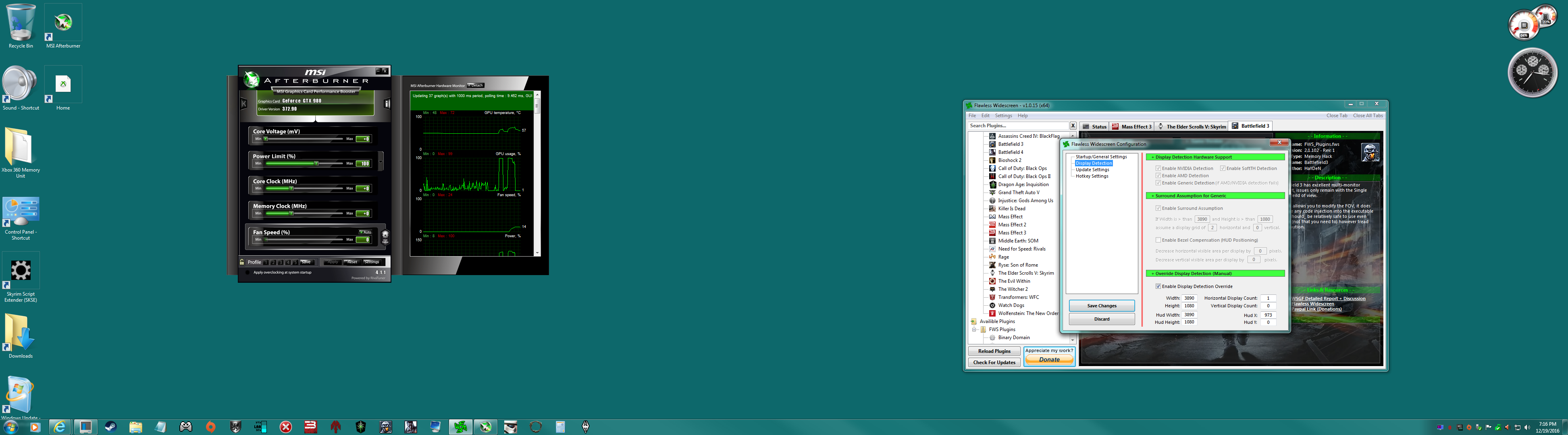
- Nvidia Surround w two 24 Inch monitors.png (923.87 KiB) Viewed 3399 times
I cant get this to work, any suggestions on how to manually config FWS for my 2 monitor Surround res?
HUD is waaaay off to the right, yet in windowed it is centered, albeit widescreen centered... I would like my HUD to display like the provided images in this discussion!
I am having trouble capturing a screenshot of the in game rendering but believe me, it's very much off center!
Would be grateful for any help guys!

-Gungoose