
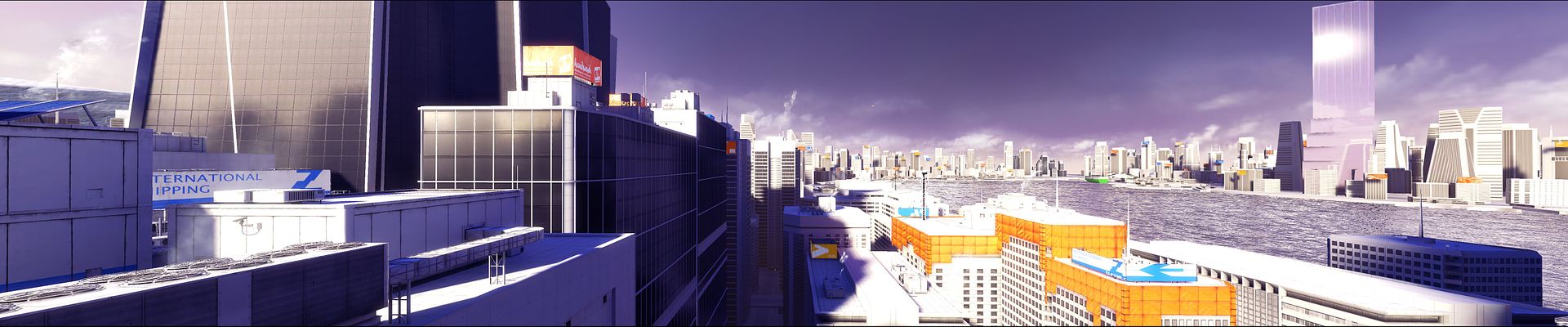
Hi i currently have an eyefinity setup (5850 with 3 23 inch screens at 1920x1080 each). When i launch mirrors edge i can change the resolution to the 5670x1080, however as soon as i do that the game starts to run at about a frame to a half a frame per second and the entire screen is cramped on the center monitor. is there any fix for this?
thanks
Mirrors Edge 1.01 in eyfinity
-
scavvenjahh

- Editors

- Posts: 3424
- Joined: 06 Mar 2008, 17:20
Re: Mirrors Edge 1.01 in eyfinity
Are you using the FOV hack as described in the Detailed Report ?
Re: Mirrors Edge 1.01 in eyfinity
Yes I am. I noticed when i was playing gears of war that if i had dx10 enabled it did the exact same thing that mirrors edge was doing and if I disabled dx10 gears worked perfectly. Do you know if there is a way to disable dx10 in mirrors edge.
Re: Mirrors Edge 1.01 in eyfinity
found the problem, it seems like when AA is enabled the system just crawls not sure why though.
-
skipclarke

- Founder

- Posts: 7358
- Joined: 13 Oct 2003, 05:00
Re: Mirrors Edge 1.01 in eyfinity
Because it's needing a crap-ton of video RAM.
-
suiken_2mieu

- Insiders

- Posts: 2351
- Joined: 20 Aug 2009, 04:20
- Location: Virginia
- Contact:
Re: Mirrors Edge 1.01 in eyfinity
this'll also happen when physx is enable on an ati card. I had major issues with Mirror's Edge, it's really a pain to get running right.
System Core: | Intel Core i5-2500K + ASUS P8Z68-V + 16GB Corsair XMS3 DDR3 1333 MHz | Win7 x64 | MSI R7970 Lightning 3GB [1105/1400] |
Display: | 3 x Dell Ultrasharp 3007WFP-HC @ 7680x1600 | Dell u3011 |
Display: | 3 x Dell Ultrasharp 3007WFP-HC @ 7680x1600 | Dell u3011 |
-
legoman666
- Posts: 28
- Joined: 31 Jan 2010, 01:58
Re: Mirrors Edge 1.01 in eyfinity
found the problem, it seems like when AA is enabled the system just crawls not sure why though.
I noticed the same thing. Perfect playable framerate with everything on max except AA. 2x or 4x AA absolutely kills the framerate.
Weeeeee

Re: Mirrors Edge 1.01 in eyfinity
Yep AA just destroys Mirrors Edge.

Re: Mirrors Edge 1.01 in eyfinity
Does Mirror's Edge even support DirectX 10? I don't have Mirror's Edge installed at the moment to verify or check.
I did a bunch of Google searches and found a bunch of people saying it does, but no real hard evidence. Some people ask where to find the option to enable DX10, others say it doesn't support it, etc.
If Mirror's Edge does not support DirectX 10, enabling anti-aliasing will use supersampling (FSAA). Supersampling is incredibly slow and requires huge amounts of memory and videomemory because it will render the game at a much higher resolution and downscale it. 2x will scale 2x in both directions, so the resolution is actually 4x as large. 4x will scale 4x in both direction, making the game resolution 16x as large. There are options to do 2x1, 1x2, etc. to cut back on some of resolution needed.
Using triplehead already is a nice size resolution, and throwing supersampling on top of that will make it even more extreme. :)
If the game does, however, support DirectX 10, then you should be able to enable multisampling (MSAA). This is true for all UE3-based games and other games that use deferred rendering. You may have to use nHancer to enable MSAA if the game itself doesn't provide an option.
For games like BioShock, BioShock 2, and a couple other UE2.5/3-based games that support DirectX 10, I use nHancer to enable MSAA and it makes a world of difference and barely touches my framerate, if at all because I use vsync.
Edit:
According to this page:
http://en.wikipedia.org/wiki/List_of_directx_10_games
Mirror's Edge does not support DX10, so if you do enable AA, it will be supersampling.
I did a bunch of Google searches and found a bunch of people saying it does, but no real hard evidence. Some people ask where to find the option to enable DX10, others say it doesn't support it, etc.
If Mirror's Edge does not support DirectX 10, enabling anti-aliasing will use supersampling (FSAA). Supersampling is incredibly slow and requires huge amounts of memory and videomemory because it will render the game at a much higher resolution and downscale it. 2x will scale 2x in both directions, so the resolution is actually 4x as large. 4x will scale 4x in both direction, making the game resolution 16x as large. There are options to do 2x1, 1x2, etc. to cut back on some of resolution needed.
Using triplehead already is a nice size resolution, and throwing supersampling on top of that will make it even more extreme. :)
If the game does, however, support DirectX 10, then you should be able to enable multisampling (MSAA). This is true for all UE3-based games and other games that use deferred rendering. You may have to use nHancer to enable MSAA if the game itself doesn't provide an option.
For games like BioShock, BioShock 2, and a couple other UE2.5/3-based games that support DirectX 10, I use nHancer to enable MSAA and it makes a world of difference and barely touches my framerate, if at all because I use vsync.
Edit:
According to this page:
http://en.wikipedia.org/wiki/List_of_directx_10_games
Mirror's Edge does not support DX10, so if you do enable AA, it will be supersampling.
Widescreen Fixer - https://www.widescreenfixer.org/
Widescreen Fixer Twitter - https://twitter.com/widescreenfixer
Personal Twitter - https://twitter.com/davidrudie
Widescreen Fixer Twitter - https://twitter.com/widescreenfixer
Personal Twitter - https://twitter.com/davidrudie

Re: Mirrors Edge 1.01 in eyfinity
Hm I don't think it does use DX10. And I certainly wouldn't use wikipedia for a source of information. That's the LAST place i go looking.
I recently installed Mirrors' Edge and it runs okay. But I cun't seem to get Vsync to work.
It sure is more fun with triple-scrren though. I think i may actually finish it, this time.
I recently installed Mirrors' Edge and it runs okay. But I cun't seem to get Vsync to work.
It sure is more fun with triple-scrren though. I think i may actually finish it, this time.
-
suiken_2mieu
- Insiders
- Posts: 2351
- Joined: 20 Aug 2009, 04:20
- Location: Virginia
- Contact:
Re: Mirrors Edge 1.01 in eyfinity
The game initially ran really terrible for me, but I was running the game at 4080x768, 0xAA and it was freezing a lot, Crapping out hard on me. But I lowered it to 3840x720, it ran magnificently, I increased the the setting to 2xAA, then 4xAA. 3840x720 8x is just as bad as 4080x768, 0xAA, 4xAA is very much playable, but for smooth frame rates I keep it at 2xAA.
System Core: | Intel Core i5-2500K + ASUS P8Z68-V + 16GB Corsair XMS3 DDR3 1333 MHz | Win7 x64 | MSI R7970 Lightning 3GB [1105/1400] |
Display: | 3 x Dell Ultrasharp 3007WFP-HC @ 7680x1600 | Dell u3011 |
Display: | 3 x Dell Ultrasharp 3007WFP-HC @ 7680x1600 | Dell u3011 |
-
scavvenjahh
- Editors
- Posts: 3424
- Joined: 06 Mar 2008, 17:20
Re: Mirrors Edge 1.01 in eyfinity
Using triplehead already is a nice size resolution, and throwing supersampling on top of that will make it even more extreme. :)Hey you're right, it must be SSAA.
That'd explain the huge fps drop in default, 16:9 anamorphic surround: at 5040x1050 the actual display area is only 1867x1050, but the game crawls like a dying slug with 4xAA - while it's perfectly smooth at 1680x1050 (i.e 1680x945)... The difference between the two "actually anti-aliased" areas can't justify the impact on gameplay, but raw resolutions upscaled by SS surely can.
-
StingingVelvet

- Posts: 1506
- Joined: 09 Aug 2006, 14:17
Re: Mirrors Edge 1.01 in eyfinity
I didn't notice AA being that intense in the game myself, but I'm on one monitor. The physx was a killer with one card though, I turned it off to keep 60fps locked.

Re: Mirrors Edge 1.01 in eyfinity
Racer's FOV patch works great for me.. a word advice for the Steam users, you will need to get a NoCD for Racer's FOV patch to work.
Re: Mirrors Edge 1.01 in eyfinity
Minor thread necro....
I'm getting absolutely lame performance using the FOV patch. Steam version, using a crack to make it work.
I'm using triple 1680*1050 on a 5850, processor is an E8200 at 3.2GHz, I should be blazing through this, right?
I've lowered settings to medium/low to make it playable, no AA. Without the hack it runs fine. Any ideas?
I'm getting absolutely lame performance using the FOV patch. Steam version, using a crack to make it work.
I'm using triple 1680*1050 on a 5850, processor is an E8200 at 3.2GHz, I should be blazing through this, right?
I've lowered settings to medium/low to make it playable, no AA. Without the hack it runs fine. Any ideas?
-
suiken_2mieu
- Insiders
- Posts: 2351
- Joined: 20 Aug 2009, 04:20
- Location: Virginia
- Contact:
Re: Mirrors Edge 1.01 in eyfinity
Minor thread necro....
I'm getting absolutely lame performance using the FOV patch. Steam version, using a crack to make it work.
I'm using triple 1680*1050 on a 5850, processor is an E8200 at 3.2GHz, I should be blazing through this, right?
I've lowered settings to medium/low to make it playable, no AA. Without the hack it runs fine. Any ideas?
With the hack, there's more to render, plus this is a nVidia game and you're using an ati card. Also this game just kicks video cards, dunno why, but it does. Try lowering resolution.
System Core: | Intel Core i5-2500K + ASUS P8Z68-V + 16GB Corsair XMS3 DDR3 1333 MHz | Win7 x64 | MSI R7970 Lightning 3GB [1105/1400] |
Display: | 3 x Dell Ultrasharp 3007WFP-HC @ 7680x1600 | Dell u3011 |
Display: | 3 x Dell Ultrasharp 3007WFP-HC @ 7680x1600 | Dell u3011 |
Who is online
Users browsing this forum: Google [Bot], Semrush [Bot] and 6 guests