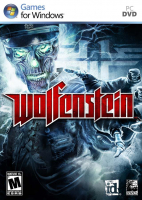
Wolfenstein

Detailed breakdowns of how games react to widescreen, ultra-wide, 4k and multi-mon
User avatar
scavvenjahh
Editors
Editors
Posts: 3424
Joined: 06 Mar 2008, 17:20

Wolfenstein

Post by scavvenjahh »


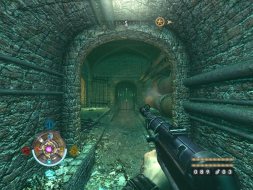
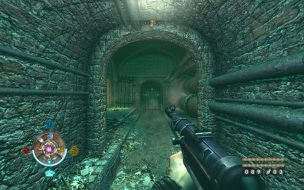
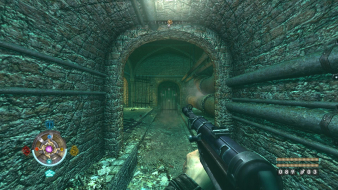
Widescreen Grade: B
Ultra-Widescreen Grade: Incomplete
Multi-monitor Grade: C
4k Grade: Incomplete

Read Full Detailed Report - Wolfenstein

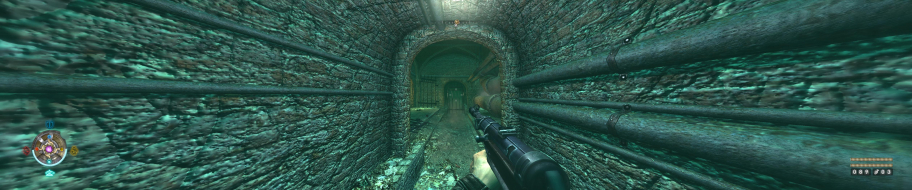
Wolfenstein is yet another "fantasy WW2" shooter pitting you against mad science, hubris-ridden nazis. You won't be forced to play through a series of levels back-to-back, as the streets of the town-hub are free to explore before you take on any unlocked mission or replay completed ones. Besides guns and explosives you will rely on the occult powers of The Veil, a distorted reality in which you can slow down time, block bullets and discover secret passages. Top that with lots of grisly dismemberment, intel searching and german accent, and it starts to feel a lot like 'Prey meets F.E.A.R.' with a touch of NecroVisioN and a drop of No One Lives Forever 2. How lovely is that ?


4:3


16:10


16:9


3x1

Last edited by scavvenjahh on 25 Apr 2014, 02:47, edited 3 times in total.
Reason: Edit
User avatar
StingingVelvet
Posts: 1506
Joined: 09 Aug 2006, 14:17

Wolfenstein

Post by StingingVelvet »

Amazingly fun game, very underrated.
The_cranky_hermit
Insiders
Insiders
Posts: 3010
Joined: 07 Nov 2005, 04:16

Wolfenstein

Post by The_cranky_hermit »

Grade: B

.ini solution for 1280x768 and required hack for TH are blemishes.

CCE: 100%
silhouette
Posts: 52
Joined: 28 Jun 2008, 01:17

Re: Wolfenstein

Post by silhouette »

Got a question about FOV in this game (I'm curious). Well, as the report shows, the game has good widescreen support (Hor+) and it works as it should for me at 1680X1050 (16:10 format), but what I can't seem to figure out, is what the FOV value is for 16:10 in this game, and is there a way for me play with that value.

It's just that the game was released for consoles, and we know that many multiplatform games have a very narrow fov since that fit's the console owners well since they usually are positioned a couple of meters from the screen as opposed to pc users. So I'm thinking that maybe the FOV in Wolfenstein may actually be lower than 85 degrees which as I understand is the proper fov for 16:10 resolutions. (Yes I'm aware that a developer can choose to have a very narrow Fov for artistic reasons, but I happen to find 85 most satisfying for my eyes).

So, can somebody clue me in?

Thx in advance :)

Ps. Anybody know of a universal way for me to examine the FOV of games in general? Maybe some kind of app or something?
User avatar
scavvenjahh
Editors
Editors
Posts: 3424
Joined: 06 Mar 2008, 17:20

Re: Wolfenstein

Post by scavvenjahh »

Nope, there is no universal way as every engine and every game handles FOV values differently. The FOV may be adjustable by editing the proper value(s) in a file, using editor console commands, or it may be buried in code.
Take a look at Racer_S hacks: each game requires a specific tool, and each tool needs to be updated as the game gets official patches.
As for Wolfenstein, I simply don't have a clue.
silhouette
Posts: 52
Joined: 28 Jun 2008, 01:17

Re: Wolfenstein

Post by silhouette »

Nope, there is no universal way as every engine and every game handles FOV values differently. The FOV may be adjustable by editing the proper value(s) in a file, using editor console commands, or it may be buried in code.
Take a look at Racer_S hacks: each game requires a specific tool, and each tool needs to be updated as the game gets official patches.
As for Wolfenstein, I simply don't have a clue.


Ok thx for the info. :)

But am I right in assuming that when a game is proper HOR+, the correct FOV for 16:10 resolutions have to be 85 degrees? From a Mathematical point of view.
User avatar
scavvenjahh
Editors
Editors
Posts: 3424
Joined: 06 Mar 2008, 17:20

Re: Wolfenstein

Post by scavvenjahh »

Just like there is no universal way of capturing the FOV value of every game, I don't think there can be a mathematically ideal angle. It all boils down to the engine used and how the camera/frustum is handled. In UT3, the default horizontal FOV for 4:3 is 90, so you can imagine how awful 85 would feel in 16:10... And this, my friend, is why FOVCalc rulez.

Anyway, if you got any more general questions not directly related to Wolfenstein and this DR, please head to the Request/Discuss forum instead !
B3NJ1
Posts: 56
Joined: 11 Apr 2010, 01:51

Re: Wolfenstein

Post by B3NJ1 »

for single player eyefinity @5760x1200@60Hz
i have the latest widescreen fixer beta v2.0.19.663 by Dopefish (works great on MW2 :))
Game is v1.2 (supported by WS Fixer v2.0)

I edited wolf.cfg

seta r_initialAspectRatio "4.8"
seta r_letterBoxedHeight "1200"
seta r_letterBoxedWidth "5760"
seta r_customHeight "1200"
seta r_customWidth "5760"
seta r_fullscreen "1"
seta r_displayRefresh "60"

The fixer says
Game Running: Yes
Fix Enabled: Yes

but it is all just stretched.... What am I doing wrong?
User avatar
skipclarke
Founder
Founder
Posts: 7358
Joined: 13 Oct 2003, 05:00

Re: Wolfenstein

Post by skipclarke »

See a few posts up:

For 5040x1050@57Hz, save the following settings into a new autoexec.cfg file in My Documentsid SoftwareWolfMPbase

set r_customAspectRatioV "10"
set r_customAspectRatioH "48"
seta r_aspectRatio "-1"
set r_customHeight "1050"
set r_customWidth "5040"
set r_mode "-1"
set r_displayRefresh "57"

Launch Wolf MP, you're all set.
B3NJ1
Posts: 56
Joined: 11 Apr 2010, 01:51

Re: Wolfenstein

Post by B3NJ1 »

See a few posts up:

For 5040x1050@57Hz, save the following settings into a new autoexec.cfg file in My Documentsid SoftwareWolfMPbase

set r_customAspectRatioV "10"
set r_customAspectRatioH "48"
seta r_aspectRatio "-1"
set r_customHeight "1050"
set r_customWidth "5040"
set r_mode "-1"
set r_displayRefresh "57"

Launch Wolf MP, you're all set.


So it doesnt work @5870x1200?
only @5040x1050?
User avatar
scavvenjahh
Editors
Editors
Posts: 3424
Joined: 06 Mar 2008, 17:20

Re: Wolfenstein

Post by scavvenjahh »

for single player eyefinity @5760x1200@60Hz
i have the latest widescreen fixer beta v2.0.19.663 by Dopefish (works great on MW2 :))
Game is v1.2 (supported by WS Fixer v2.0)

I edited wolf.cfg

seta r_initialAspectRatio "4.8"
seta r_letterBoxedHeight "1200"
seta r_letterBoxedWidth "5760"
seta r_customHeight "1200"
seta r_customWidth "5760"
seta r_fullscreen "1"
seta r_displayRefresh "60"

The fixer says
Game Running: Yes
Fix Enabled: Yes

but it is all just stretched.... What am I doing wrong?
seta r_mode "-1" ;)
Also make sure you selected 3x 16:10 in WSF.
User avatar
dopefish
Insiders
Insiders
Posts: 1514
Joined: 14 Apr 2007, 02:13

Re: Wolfenstein

Post by dopefish »

I used a retail version of this game. Perhaps the Steam version is different?

Let me know if you get it working. I'm going to try and work on some features for Widescreen Fixer soon that will help users provide me with detailed information. I'll let you know if I finish it soon and have you try it out.
Widescreen Fixer - https://www.widescreenfixer.org/

Widescreen Fixer Twitter - https://twitter.com/widescreenfixer
Personal Twitter - https://twitter.com/davidrudie
B3NJ1
Posts: 56
Joined: 11 Apr 2010, 01:51

Re: Wolfenstein

Post by B3NJ1 »

I used a retail version of this game. Perhaps the Steam version is different?

Let me know if you get it working. I'm going to try and work on some features for Widescreen Fixer soon that will help users provide me with detailed information. I'll let you know if I finish it soon and have you try it out.


Love ya work Dopefish :rockout
B3NJ1
Posts: 56
Joined: 11 Apr 2010, 01:51

Re: Wolfenstein

Post by B3NJ1 »

[quote]for single player eyefinity @5760x1200@60Hz
i have the latest widescreen fixer beta v2.0.19.663 by Dopefish (works great on MW2 :))
Game is v1.2 (supported by WS Fixer v2.0)

I edited wolf.cfg

seta r_initialAspectRatio "4.8"
seta r_letterBoxedHeight "1200"
seta r_letterBoxedWidth "5760"
seta r_customHeight "1200"
seta r_customWidth "5760"
seta r_fullscreen "1"
seta r_displayRefresh "60"

The fixer says
Game Running: Yes
Fix Enabled: Yes

but it is all just stretched.... What am I doing wrong?
seta r_mode "-1" ;)
Also make sure you selected 3x 16:10 in WSF.

Still not working :(
What ingame settings should i apply?
4:3?
16:9?
16:10?
5760x1200?
Im doing everything but it still wont work :(
User avatar
dopefish
Insiders
Insiders
Posts: 1514
Joined: 14 Apr 2007, 02:13

Re: Wolfenstein

Post by dopefish »

Just for testing, can you try the v1.11 executable of SP and let me know if it works?

v1.2 was only multiplayer changes, and since they are separate .exe files, you can keep v1.11 for SP and use v1.2 for MP.

If you can try that and let me know, that would help.

I have v1.11 and v1.2 as being the same offsets, but maybe they really are different.

I'll reinstall the game this weekend and go over it again.
Widescreen Fixer - https://www.widescreenfixer.org/

Widescreen Fixer Twitter - https://twitter.com/widescreenfixer
Personal Twitter - https://twitter.com/davidrudie
B3NJ1
Posts: 56
Joined: 11 Apr 2010, 01:51

Re: Wolfenstein

Post by B3NJ1 »

Just for testing, can you try the v1.11 executable of SP and let me know if it works?

v1.2 was only multiplayer changes, and since they are separate .exe files, you can keep v1.11 for SP and use v1.2 for MP.

If you can try that and let me know, that would help.

I have v1.11 and v1.2 as being the same offsets, but maybe they really are different.

I'll reinstall the game this weekend and go over it again.


Ill have to reinstall over the weekend also...
For now Im playing Medal of Honour :)
Native FTW!
User avatar
dopefish
Insiders
Insiders
Posts: 1514
Joined: 14 Apr 2007, 02:13

I know it's taken awhile but

Post by dopefish »

I know it's taken awhile but I just impulse-rebought this game on Steam today. The fix works now. :)

https://www.widescreenfixer.org/test.php
Widescreen Fixer - https://www.widescreenfixer.org/

Widescreen Fixer Twitter - https://twitter.com/widescreenfixer
Personal Twitter - https://twitter.com/davidrudie
MeMeMeMe
Posts: 2
Joined: 18 Feb 2012, 04:56

dopefish wrote:I know it's

Post by MeMeMeMe »

I know it's taken awhile but I just impulse-rebought this game on Steam today. The fix works now. :)

https://www.widescreenfixer.org/test.php


I'm using the latest widescreen fixer, and have just installed wolfenstein from the current steam sale.
With the fixer, It looks exactly like screenshot posted earlier in the thread - everying is squashed vertically and stretched horizontally.

I first tried with usual 6048x1200 (i entered 5.04 for aspect ratio here in the cfg, along with other values updated for this resoltution; I chose a custom aspect ratio in Widescreen Fixer)

Then I tried with 5760x1200, 4.8 aspect ration, 3x16x10 in widescreen fixer. Exactly the same.

Any ideas how to get it working properly?
User avatar
dopefish
Insiders
Insiders
Posts: 1514
Joined: 14 Apr 2007, 02:13

Can you please tell me what

Post by dopefish »

Can you please tell me what Widescreen Fixer says before you enable the fix?

For example, when I start Widescreen Fixer and then start Wolfenstein, Widescreen FIxer will show this:

X/Y: 16/9
Base Address: 0x10000000
Module Address: 0x46EB0000

The addresses will probably be different. As long as it doesn't say N/A for any of the values and it shows a valid X/Y, then the fix should work.

After I enable the fix, X/Y will update and show 757/135 (Since I play at 6056x1080).
Widescreen Fixer - https://www.widescreenfixer.org/

Widescreen Fixer Twitter - https://twitter.com/widescreenfixer
Personal Twitter - https://twitter.com/davidrudie
lowdog
Posts: 52
Joined: 23 Aug 2007, 05:41

Okay installed wolfenstein

Post by lowdog »

Okay installed wolfenstein retail from DVD, applied patch 1.11 and using Widescreen fixer 3.1 and it's not working, game only displays on middle monitor and is squashed horizontialy and streched vertically. Any fix???? Trying to play @ 6048x1200.

X/Y is showing 24/5 with the fix enabled and Automatically Detect aspect Ratio checkbox unchecked. With the checkbox checked it shows 126/25 so something wierd is happenning with it.

Post Reply

Who is online

Users browsing this forum: No registered users and 4 guests