
I just purchased my third Dell U2311h and setup my monitors in Portrait mode for Surround 2d but I am unable to select the bezel corrected resolutions.
When setting up surround, after entering all the correct info (setting up monitor positions and setting fliped portrait) in and setting up bezel correction (135 pixels) the display defaults to the 1024x768 resolution. I can set the monitors to the default resolution of 3240x1920 but when selecting any of the bezel corrected resolutions the screens go black and then go back to the previous setting with no 15 second monitor test box...
My specs are as follows:
3x Dell 2311h
[email protected]
EVGA X58 Classified E760
Corsair DDR3 1600 6 gigs TR3X6G1600C7D 7-7-7-20-56 1544Mhz
EVGA GTX480 SLI X2
2x 120gb OCZ Vertex 2 - Raid 0 (OS and apps)
4x 1TB WD Caviar Black
Creative X-Fi Extreme Gamer Fatality Pro pci-e
Coolermaster RealPower M1000
Win 7 Ultimate 64bit
nVidia 266.58 Driver
One thing I have noticed is that after entering bezel correction info of 135 pixels, the correct pixels are available in the bezel corrected resolutions 3510x1920, but after selecting it and applying (from the 1024x768 resolution it defaults too) the resolutions change to 3622x1920. However, I am still able to select annd apply the default 3240x1920 resolution.
Is this because I am running in flipped portrait mode? I can turn the monitors around but prefer them this way as the USB ports are on the lower edge.
Any help getting bezel correction working would be appreciated.
nVidia Surround 2D bezel correction not working on 3xU2311h
2D Surround - Bezel Corection issues 3x U2311h
I have got it to work, but there are a few bugs I would like to smooth out...

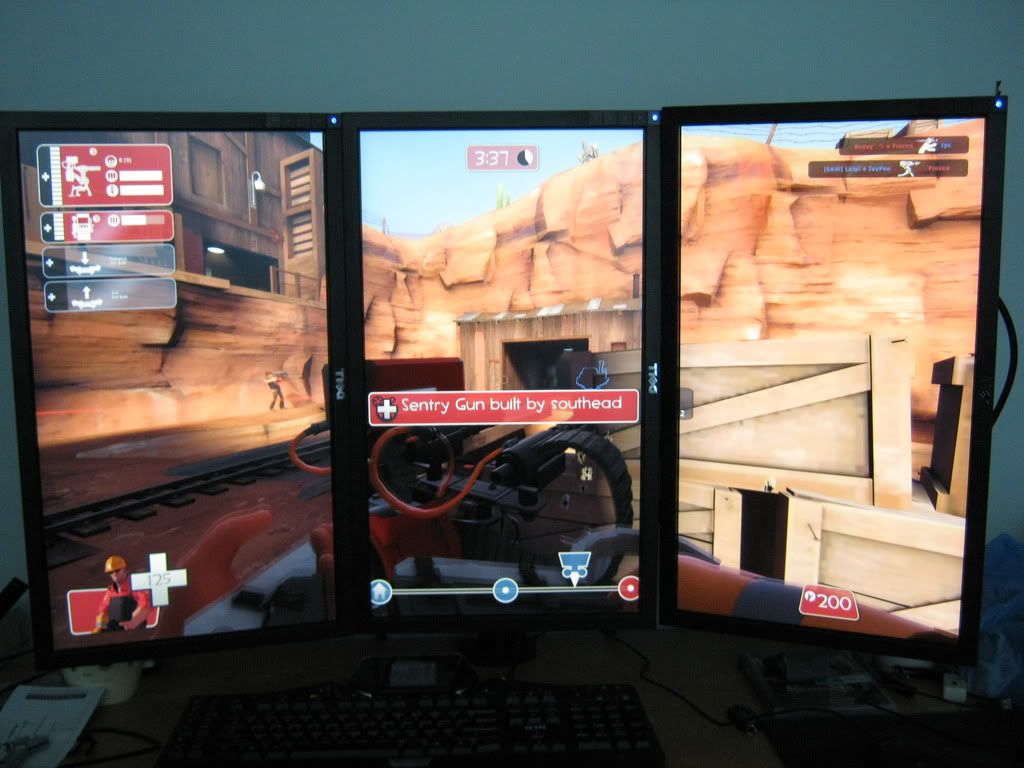
When setting up Bezel Correction I decided 135 pixels was the best for the bezel width. However once applying this setting, the nVidia control panel defaults to 1024x768 resolution. The correct Bezel Corrected resolution of 3510x1920 is available, along with the native res of 3240x1920 - but when selecting the native resolution for my desktop and applying, the Bezel Corrected resolution changes to 3664x1920.
The only way I could get bezel correction to work properly was to set it to 75 pixels and it would the change to the correct setting after changing from 1024x768 again...
How Do I get it to set it right and stay that way? And can I use the bezel corrected resolutions on my desktop? ATM selecting a bezel corrected res for desktop makes the screen go black for 3 seconds and revert to the previously selected res...
When setting up Bezel Correction I decided 135 pixels was the best for the bezel width. However once applying this setting, the nVidia control panel defaults to 1024x768 resolution. The correct Bezel Corrected resolution of 3510x1920 is available, along with the native res of 3240x1920 - but when selecting the native resolution for my desktop and applying, the Bezel Corrected resolution changes to 3664x1920.
The only way I could get bezel correction to work properly was to set it to 75 pixels and it would the change to the correct setting after changing from 1024x768 again...
How Do I get it to set it right and stay that way? And can I use the bezel corrected resolutions on my desktop? ATM selecting a bezel corrected res for desktop makes the screen go black for 3 seconds and revert to the previously selected res...
Who is online
Users browsing this forum: No registered users and 3 guests