
Greg, mine is *exactly* the same. I'm at least happy to hear that others are having the problem. I submitted an issue to Asus, not holding my breath.
I can't actually submit an issue to ATI, their support site times out! I'm incredibly frustrated, 3 monitor goodness and I can't use them.
Problematic Eyefinity setup
Problematic Eyefinity setup
I'm having a similar problem.
Create group, 3x1, Accept, and then it comes back to 3 clones, with the control panel looking like this. I can't even click ok, or apply, or cancel, or anything. Frustrating.
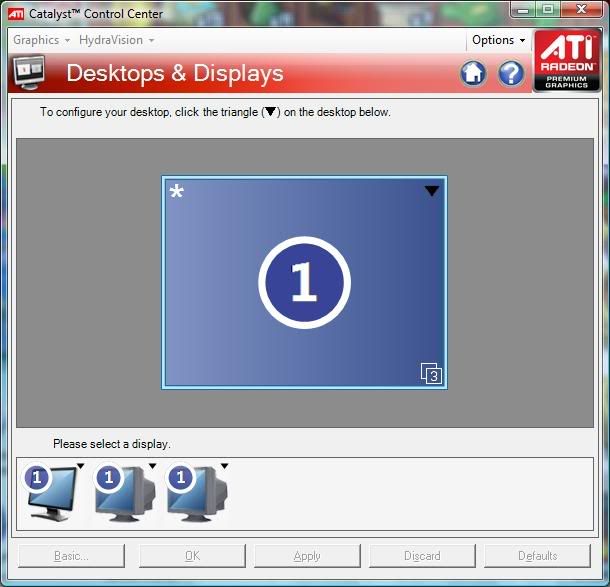
I had it working once last night, but not at all tonight. Don't know what's going on.
I had exactly this issue with my Sapphire 5850 installed in a Asus P6T Deluxe v 2 motherboard.
I uninstalled CCC, turned PC off, moved the graphics card from the blue PCI x 16 slot to the white PCI x 16 slot, re-started the computer and re-installed the drivers.
this cured the problem.
I then moved the card back to the original slot ( because the airflow was better) and it works fine!
No idea why this worked, but it did.
Hope this helps
Problematic Eyefinity setup
Haven't tried that much yet wardtuk, I'll give it a shot this weekend and let you know if it works for me.
EDIT:
Identical monitors are completely not required. So long as all three can output the same resolution Eyefinity seems happy. (I.E. 2x 19x12 panels and a 16x10 panel can all work together, provided they all work at 16x10).
EDIT:
Identical monitors are completely not required. So long as all three can output the same resolution Eyefinity seems happy. (I.E. 2x 19x12 panels and a 16x10 panel can all work together, provided they all work at 16x10).
Problematic Eyefinity setup
Woohoo! Thank you wardtuk, that worked.
So, my guess is, that since the CCC was not responding properly to an attempt to "arrange", there was some condition of registry values that was present and it just choked. I think switching it to a different slot allowed us to start with a fresh registry branch for settings, and I was able to set it up without causing the pre-existing condition to occur.
Thanks again, physically moving it and starting over solved the problem.
Greg, give it a shot!
So, my guess is, that since the CCC was not responding properly to an attempt to "arrange", there was some condition of registry values that was present and it just choked. I think switching it to a different slot allowed us to start with a fresh registry branch for settings, and I was able to set it up without causing the pre-existing condition to occur.
Thanks again, physically moving it and starting over solved the problem.
Greg, give it a shot!
Problematic Eyefinity setup
Woohoo! Thank you wardtuk, that worked.
So, my guess is, that since the CCC was not responding properly to an attempt to "arrange", there was some condition of registry values that was present and it just choked. I think switching it to a different slot allowed us to start with a fresh registry branch for settings, and I was able to set it up without causing the pre-existing condition to occur.
Thanks again, physically moving it and starting over solved the problem.
Greg, give it a shot!
Glad to be of help.
Problematic Eyefinity setup
Hi, i had-have teh same problem with a 5970,i can create a group, but nothing happens. Eventually, after numerous driner installations,frustrations and cigarettes,i rebooted,and 3 clones came up, i then took out the dp connector, and reconnected..... THERE it was, eyefinity!! A bit of a bummer is that after every reboot, i have to do this sh@t again, i think until infinity......
-
Greg Ellis
- Posts: 26
- Joined: 14 Nov 2009, 18:11
Problematic Eyefinity setup
Woohoo! Thank you wardtuk, that worked.
So, my guess is, that since the CCC was not responding properly to an attempt to "arrange", there was some condition of registry values that was present and it just choked. I think switching it to a different slot allowed us to start with a fresh registry branch for settings, and I was able to set it up without causing the pre-existing condition to occur.
Thanks again, physically moving it and starting over solved the problem.
Greg, give it a shot!
Glad to see you've cleaned it up.
I don't know what might be causing it to behave that way in the first place.
I've realized that my VISTA install is a mess - I'm getting failures on Windows Update, and the Catalyst Installer throws an error as well ("package failed" or something).
I think I might need to wipe the machine and start again from scratch. Just need to find the time.
For now, I'm back to single screen on this computer. I'm messing around with a different one at work, using 3 CRT's, and seeing similar problems. I think I'll try this "move the card to a different slot" idea there.
Re:
I'm having a similar problem.
Create group, 3x1, Accept, and then it comes back to 3 clones, with the control panel looking like this. I can't even click ok, or apply, or cancel, or anything. Frustrating.
I had it working once last night, but not at all tonight. Don't know what's going on.
Hi,
Has anybody been able to solve this one? Swaping the card around has not helped me. Cannot create a group at all. :( I either get the results above, or the monitors lose single all together.
9.12 + the patch installed
Gigabyte P55-UD3R, i5/266, 4gb
2x 5870
2x Samsung 2494
Win7 x64
Re: Problematic Eyefinity setup
I switched to DVI>VGA adapters/cables and everything is working. I think it may be a DVI cable issue, but will need to run to the store in the morning to verify (need dual link DVI cables).
Re: Problematic Eyefinity setup
Picked up two DVD-D cables today and also received my Accell DP>DVI adapter in from Fed-X.
Everything works perfect now.
Thanks everyone for the posts that I've read over the past weeks that made this fairly seemless once I pulled the trigger.
Gigabyte P55UD3R Motherboard
Intel i5 750, 2.66mhz
4x Corsair Dominator 2G DDR3, 1600mhz
2x Diamond 5870's
Samsung P2570HD + 2x Samsung 2494, 5760x1080.
Accell Display Port to DVI Active Adapter
2x Dual-link DVI Cables
Thanks again!
Everything works perfect now.
Thanks everyone for the posts that I've read over the past weeks that made this fairly seemless once I pulled the trigger.
Gigabyte P55UD3R Motherboard
Intel i5 750, 2.66mhz
4x Corsair Dominator 2G DDR3, 1600mhz
2x Diamond 5870's
Samsung P2570HD + 2x Samsung 2494, 5760x1080.
Accell Display Port to DVI Active Adapter
2x Dual-link DVI Cables
Thanks again!
Re: Problematic Eyefinity setup
I'm having the same problem that others are describing here and have been unable to resurrect it since it stopped working. I enabled eyefinity maybe a half dozen times since I got it. What a disappointment.
I'm rocking this exact arrangement http://www.ubergizmo.com/15/archives/2006/02/dell_3007wfp_on_dell_2001fp_action_8_megapixel_desktop.html. Which isn't supported so I have to run them all at 1600x1200 in landscape mode. Another disappointment--however not nearly as bad as it not working.
My impression of the CCC, since it's initial release, has always been a clunky application. But this bug is particularly egregious in my opinion.
Not to mention I dropped around $600 for the 5870, the active DP->DVI adapter, and cabling. (Not including the monitors).
Just for completeness on my particular setup: HD5870, 2001 Dell 20.1" 1600x1200 via HDMI v1.3 cable into the 5870 HDMI port, 3007 Dell 30" 2560x1600 via Dual DVI into the 5870 DVI port, and a second 2001 Dell 20.1" 1600x1200 via HDMI v1.3 cable into the Dell Active DP->HDMI then into the 5870 DisplayPort (active converter powered by motherboard USB directly). (ati driver v9.12)
I'm rocking this exact arrangement http://www.ubergizmo.com/15/archives/2006/02/dell_3007wfp_on_dell_2001fp_action_8_megapixel_desktop.html. Which isn't supported so I have to run them all at 1600x1200 in landscape mode. Another disappointment--however not nearly as bad as it not working.
My impression of the CCC, since it's initial release, has always been a clunky application. But this bug is particularly egregious in my opinion.
Not to mention I dropped around $600 for the 5870, the active DP->DVI adapter, and cabling. (Not including the monitors).
Just for completeness on my particular setup: HD5870, 2001 Dell 20.1" 1600x1200 via HDMI v1.3 cable into the 5870 HDMI port, 3007 Dell 30" 2560x1600 via Dual DVI into the 5870 DVI port, and a second 2001 Dell 20.1" 1600x1200 via HDMI v1.3 cable into the Dell Active DP->HDMI then into the 5870 DisplayPort (active converter powered by motherboard USB directly). (ati driver v9.12)
-
TexasTango
- Posts: 30
- Joined: 24 Nov 2009, 19:08
Re: Problematic Eyefinity setup
.... my particular setup:
Dell 20.1" 1600x1200 into the 5870 HDMI port
Dell 30" 2560x1600 into the 5870 DVI port
Dell 20.1" 1600x1200 into the Dell Active DP->HDMI then into the 5870 DisplayPort .....
Have you tried running your Dell 30" as your Displayport monitor?
That's what I had to do (use highest native resolution monitor for the Displayport) to get it to work.
Who is online
Users browsing this forum: No registered users and 10 guests