

I can now confirm that the Ergotron DS100 Triple-Monitor stand can mount three 24" monitors.
I initially got the Ergotron DS100 Dual-Monitor setup that handled my two 19" monitors then I added a 24" not to long ago. I still wanted to use the stand if I could and found out that I can buy extension arms for it and now can accommodate three monitors and for me it was 19"-24"-19".
From my understanding Ergotron have two options a 19" and I think a 24" extension kits. I got the 19" version if you happen to get the longer kit I think they will fit three 24" out of the box.
Witnessing the new ATI 5000 series cards in action running Eyefinity I couldn't help myself I ordered two more 24" monitors hence this confirmation post FYI. My 5870 card should be here tomorrow the sad thing is I don't have a DP-to-DVI adaptor yet. :cry:
I'll add some picture soon and I'll be happy to offer more details on the mod. You won't believe how easy it was to do. :wink:
Three 24" LCD/Ergotron DS100 Triple [Confirm]
-
thenjwaslike
- Posts: 173
- Joined: 07 Jul 2009, 20:14
Three 24" LCD/Ergotron DS100 Triple [Confirm]
niiice so ergo finally added support for 3x 24"
yeah scooby get them pictures up!!!
we'll be waiting =)
yeah scooby get them pictures up!!!
we'll be waiting =)
Three 24" LCD/Ergotron DS100 Triple [Confirm]
[Edited]
OK then, the adjustment I did was in fact very simple all you really need is a bolt that fits into the slots on the arm (1/2" ID) and a nut to tighten it all down, oh and a few large washers. I found some wing nuts that did the job well. Extend the arm as far as you need to and then screw it down. You can still use the screw and the large lock nut that come with the stand kit but I advise that you don't tighten these down to much you may damage it. Just make sure that the arms are aligned as straight as possible before you do your final bolt down. And remember these arms will be carrying the weight of that monitor so tighten those screws accordingly.
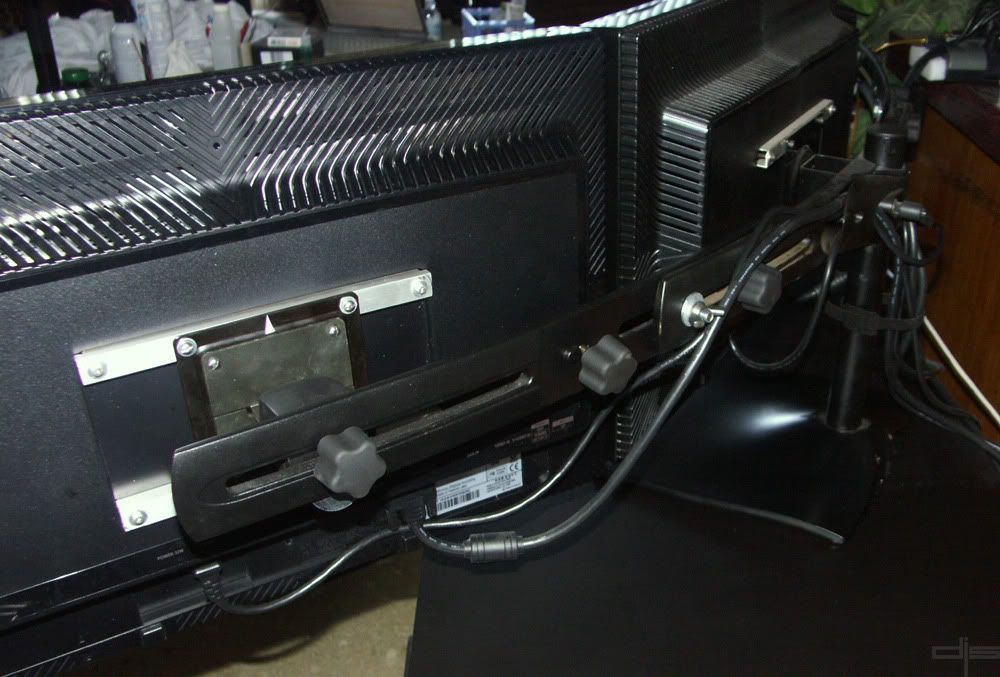
As you can see I was able to extend the arms out far enough that you can probably fit three 30" LCDs. The real modification I did was because I have three Samsung 245T monitors with a back bolt pattern of 200mmx100mm where most standard bolt patterns are 100mmx100mm. If you guys want more info on that just let me know.
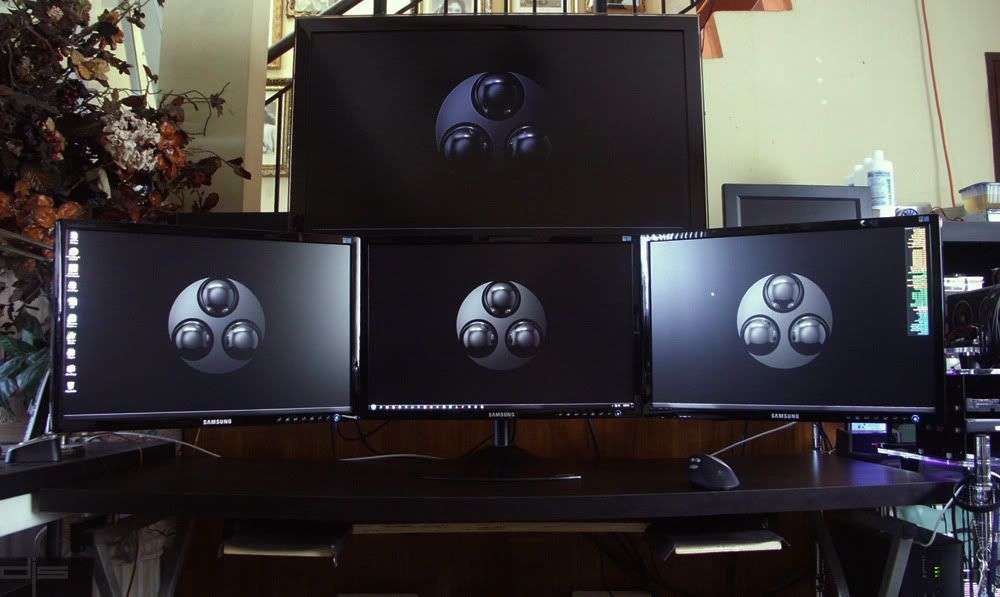
Here are my monsters all ready for some Eyefinity action. My 5870 will be in tomorrow. :shock:
OK then, the adjustment I did was in fact very simple all you really need is a bolt that fits into the slots on the arm (1/2" ID) and a nut to tighten it all down, oh and a few large washers. I found some wing nuts that did the job well. Extend the arm as far as you need to and then screw it down. You can still use the screw and the large lock nut that come with the stand kit but I advise that you don't tighten these down to much you may damage it. Just make sure that the arms are aligned as straight as possible before you do your final bolt down. And remember these arms will be carrying the weight of that monitor so tighten those screws accordingly.
As you can see I was able to extend the arms out far enough that you can probably fit three 30" LCDs. The real modification I did was because I have three Samsung 245T monitors with a back bolt pattern of 200mmx100mm where most standard bolt patterns are 100mmx100mm. If you guys want more info on that just let me know.
Here are my monsters all ready for some Eyefinity action. My 5870 will be in tomorrow. :shock:
-
ViciousXUSMC

- Editors

- Posts: 1497
- Joined: 31 Jul 2006, 14:58
Three 24" LCD/Ergotron DS100 Triple [Confirm]
yay your setup its just like mine with the 3x24 and one big one on the top :D
So looks like normally that one knob would be in the slot but you extended it out more so you just had to replace it with your own bolts.
I like it and its nearly $100 cheaper than the "heavy duty" version of this that advertises 24" monitor support. Thing is I see your bezels meet directly end to end and I really like to have my outside monitors slightly behind the front one to decrease bezel size and bring the screens closer. I guess if I get a mount like this that you cant do that? Nevermind I see those mounts have tilt so it should let me do it.
I'll see how I like the stock mounts on the U2410's and later maybe order a DS100 and do this mod if I need too. I dont need the desk space I would mostly want it so I can raise/tilt all the monitors together rather than being restricted to a straight vertical position like you are when using 3 independent stands so that the monitors meet up.
So looks like normally that one knob would be in the slot but you extended it out more so you just had to replace it with your own bolts.
I like it and its nearly $100 cheaper than the "heavy duty" version of this that advertises 24" monitor support. Thing is I see your bezels meet directly end to end and I really like to have my outside monitors slightly behind the front one to decrease bezel size and bring the screens closer. I guess if I get a mount like this that you cant do that? Nevermind I see those mounts have tilt so it should let me do it.
I'll see how I like the stock mounts on the U2410's and later maybe order a DS100 and do this mod if I need too. I dont need the desk space I would mostly want it so I can raise/tilt all the monitors together rather than being restricted to a straight vertical position like you are when using 3 independent stands so that the monitors meet up.
Three 24" LCD/Ergotron DS100 Triple [Confirm]
If that one has the longer 20"-24"(?) arms, then YES it will work. But if they are the one with the shorter arms like the one I have you may have to extend them just like I did.
My DS100 was a dual screen kit I added the 19" extension arms later. At the time they held these...19"-24"-19".
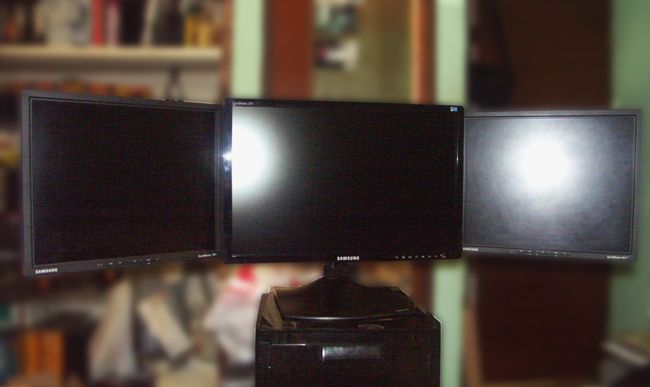
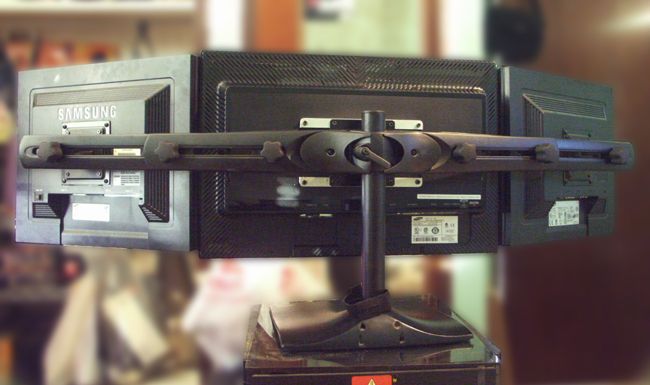
My DS100 was a dual screen kit I added the 19" extension arms later. At the time they held these...19"-24"-19".
-
ViciousXUSMC
- Editors
- Posts: 1497
- Joined: 31 Jul 2006, 14:58
Three 24" LCD/Ergotron DS100 Triple [Confirm]
edited my above post. looks like a good solution and thanks for sharing it, 3x24" is getting more popular now and the only advertised 3X24" mounts were well over $300 in most cases so as long as this holds up well its a good way to save some money. Also the DS100 looks better than the heavy duty one I think

But the heavy duty model probably offers more stability and support as a trade off for its looks.
As for DS100 resources here is what I was able to cook up:
My Provantage Link: http://www.provantage.com/ergotron-33-323-200~7ERGT09A.htm $234 + shipping
Model 33-323-200 - http://www.shoplet.com/Ergotron-DS100-Series-Freestanding-Triple-Monitor-Stand_2L22009/hardware.html
Says 21" monitor but also states max like 20.1" width max, I think most 24" monitors are just at 20" width with thin bezels so it may fit right on there esp if you recess the bezels behind each other.
Here is the cheapest price: http://www.shoplet.com/Ergotron-DS100-Series-Freestanding-Triple-Monitor-Stand_2L22009/hardware.html $214
It has a different model# 33095200
But looking it up it is indeed still a 3x monitor DS100 mount, looks like it was probably just the older version of the one currently for sale.
Here is the ergotron page for it: http://www.ergotron.com/tabid/65/PRDID/16/dnnprintmode/true/language/en-AU/default.aspx?SkinSrc=[G]Skins%2F_default%2FNo+Skin&ContainerSrc=[G]Containers%2F_default%2FNo+Container
And Buy.com is a alternative to Provantage for the newer model its $254 but unlike provantage its free shipping so it could be cheaper - http://www.buy.com/prod/ergotron-ds100-triple-monitor-desk-stand-up-to-93lb-up-to-21-flat/q/loc/111/204890910.html
I know both buy.com & provantage are a part of the bing.com cashback program too, so you can cut 2-3% off the cost.
Here is a nice PDF: http://ergotron.com/Portals/0/literature/dimensionIllustrations/DIM-030-v2.pdf
Says the 33-325-200 (quad monitor mount) can also be used to mount 3x monitors instead up to size 24.5" wide (wide not diagonal, that means probably 3x30" maybe) but that mount is close to $500 so its not cheaper than the heavy duty version of the DS100.
But the heavy duty model probably offers more stability and support as a trade off for its looks.
As for DS100 resources here is what I was able to cook up:
My Provantage Link: http://www.provantage.com/ergotron-33-323-200~7ERGT09A.htm $234 + shipping
Model 33-323-200 - http://www.shoplet.com/Ergotron-DS100-Series-Freestanding-Triple-Monitor-Stand_2L22009/hardware.html
Says 21" monitor but also states max like 20.1" width max, I think most 24" monitors are just at 20" width with thin bezels so it may fit right on there esp if you recess the bezels behind each other.
Here is the cheapest price: http://www.shoplet.com/Ergotron-DS100-Series-Freestanding-Triple-Monitor-Stand_2L22009/hardware.html $214
It has a different model# 33095200
But looking it up it is indeed still a 3x monitor DS100 mount, looks like it was probably just the older version of the one currently for sale.
Here is the ergotron page for it: http://www.ergotron.com/tabid/65/PRDID/16/dnnprintmode/true/language/en-AU/default.aspx?SkinSrc=[G]Skins%2F_default%2FNo+Skin&ContainerSrc=[G]Containers%2F_default%2FNo+Container
And Buy.com is a alternative to Provantage for the newer model its $254 but unlike provantage its free shipping so it could be cheaper - http://www.buy.com/prod/ergotron-ds100-triple-monitor-desk-stand-up-to-93lb-up-to-21-flat/q/loc/111/204890910.html
I know both buy.com & provantage are a part of the bing.com cashback program too, so you can cut 2-3% off the cost.
Here is a nice PDF: http://ergotron.com/Portals/0/literature/dimensionIllustrations/DIM-030-v2.pdf
Says the 33-325-200 (quad monitor mount) can also be used to mount 3x monitors instead up to size 24.5" wide (wide not diagonal, that means probably 3x30" maybe) but that mount is close to $500 so its not cheaper than the heavy duty version of the DS100.
Three 24" LCD/Ergotron DS100 Triple [Confirm]
I'm sure that companies will soon start making stands that will be design to mount three 24" and higher. As everyone can see having a single stand make for a very clean desktop.
I've been seeing these stands around the $250-$300 mark. I think if you find one at a good price grab it cuz I have a feeling and because of Eyefinity capable cards being out now the price might start going up and supplies thinning.
I can only speak on my experience with the Ergotrom DS100 stand but I'm sure more will start to show up the only problem with that is when will these things start showing up commercially.
The only other alternative is fully custom made but that's another story altogether.
I've been seeing these stands around the $250-$300 mark. I think if you find one at a good price grab it cuz I have a feeling and because of Eyefinity capable cards being out now the price might start going up and supplies thinning.
I can only speak on my experience with the Ergotrom DS100 stand but I'm sure more will start to show up the only problem with that is when will these things start showing up commercially.
The only other alternative is fully custom made but that's another story altogether.
Three 24" LCD/Ergotron DS100 Triple [Confirm]
A more detailed shot.
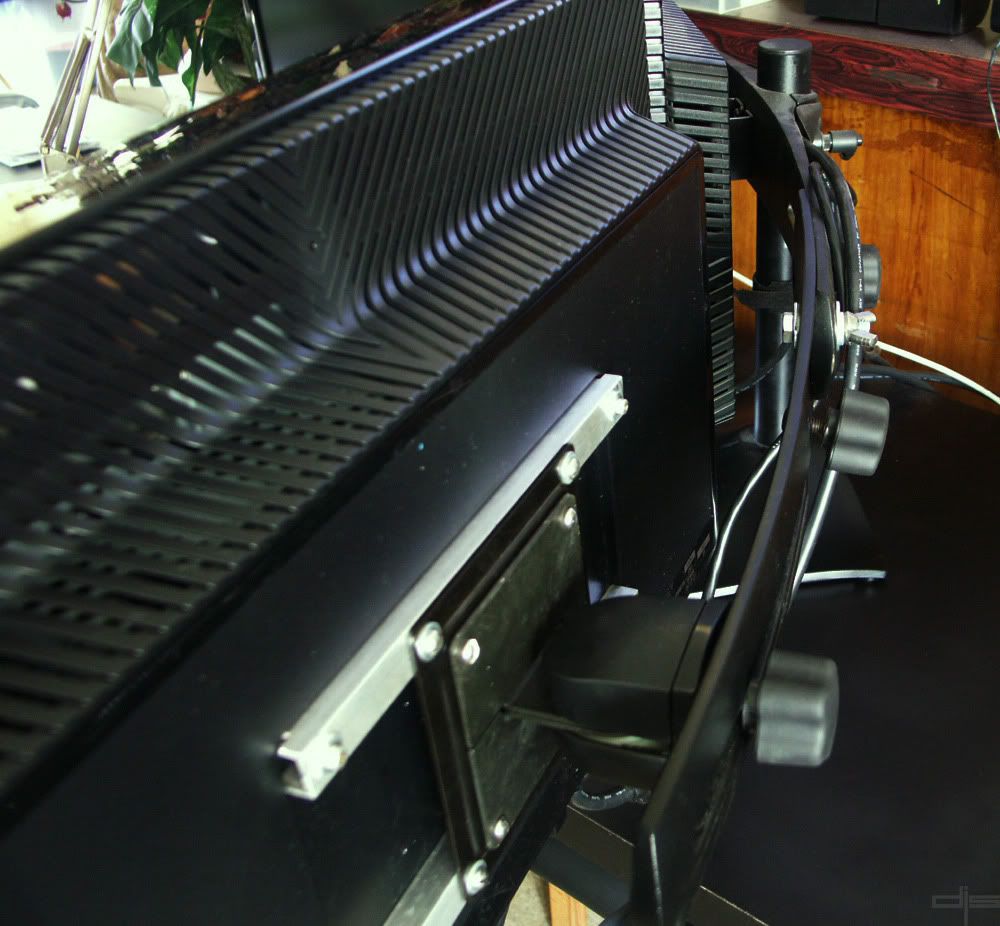
Still has that new monitor smell...I love it. :D
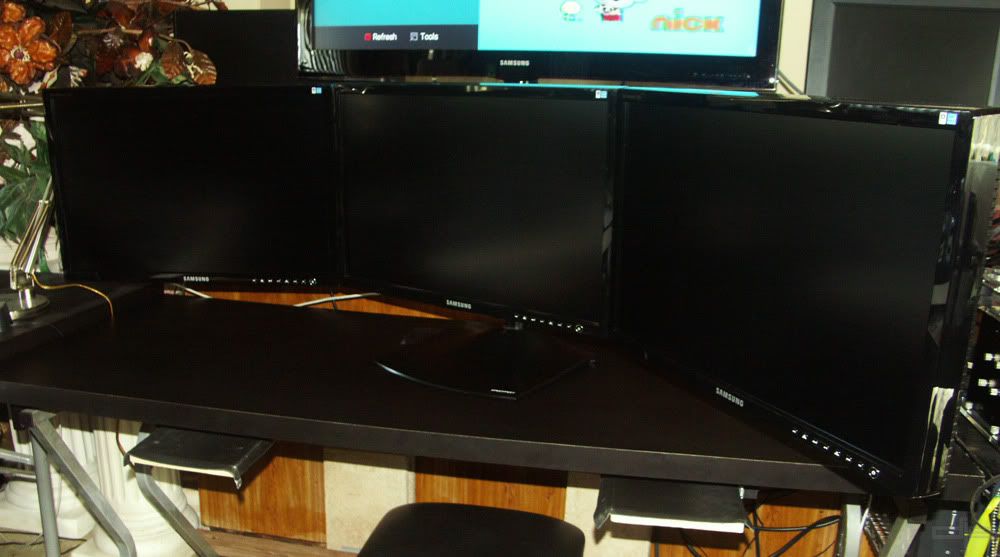
Still has that new monitor smell...I love it. :D
Three 24" LCD/Ergotron DS100 Triple [Confirm]
...Thing is I see your bezels meet directly end to end and I really like to have my outside monitors slightly behind the front one to decrease bezel size and bring the screens closer. I guess if I get a mount like this that you cant do that? Nevermind I see those mounts have tilt so it should let me do it. ...
I can confirm that the DS100 allows your outside monitors bezels to sit behind the center monitors. The clamps holding the monitor to the horizontal beam have a pivot which allows them to be angled inwards or outwards. I had mine setup like that for a while.
@ Scooby Wouldn't it be better if the extensions where moved closer to the center with the monitors mounted at the very outside of the slot. Or is one of the original alignment tabs in the extension preventing this? Having the two bolts, holding the extension to the center bar, spread as far as possible apart would provide a more stable arrangement.
Three 24" LCD/Ergotron DS100 Triple [Confirm]
@NZCoyote, your on the money on that my friend. The clamps holding the monitors can be adjusted to move left/right and swivel but not up or down. To adjust the the level of the two outside LCDs I added a 1/16" thick washer on the bottom section between the clamp and the extension arm. I'll try to take a picture of that soon.
The way I had the extension arms set in that pic was to show that the smaller 19" extension arm can extend far enough to fit up to a 30" LCD. When I finalize my setup I will adjust the LCD clamp to be right at the end of the slot and finally move both outside sections towards the center.
Looks like I need to take a few more pictures...more to gang. :D
The way I had the extension arms set in that pic was to show that the smaller 19" extension arm can extend far enough to fit up to a 30" LCD. When I finalize my setup I will adjust the LCD clamp to be right at the end of the slot and finally move both outside sections towards the center.
Looks like I need to take a few more pictures...more to gang. :D
-
ViciousXUSMC
- Editors
- Posts: 1497
- Joined: 31 Jul 2006, 14:58
Three 24" LCD/Ergotron DS100 Triple [Confirm]
Your making it very tempting to get one of these. I think though I like the idea of it more than really having a need for it.
If I keep the original stands that will give me more stability and spread the weight out more on my desk (and hide the cord mess behind them :D)
If I keep the original stands that will give me more stability and spread the weight out more on my desk (and hide the cord mess behind them :D)
Three 24" LCD/Ergotron DS100 Triple [Confirm]
If you're after the upgrade kit, for your existing DS100, that will allow you to use 3x24" monitors out of the box you need to order the Long Crossbar Extender Kit with part #97-447-200.
This kit will allow you to upgrade a dual monitor DS100 stand (#33-322-200) or triple monitor DS100 stand (#33-323-200). And is the long 24" kit that Scooby talks about in his first post.
This kit will allow you to upgrade a dual monitor DS100 stand (#33-322-200) or triple monitor DS100 stand (#33-323-200). And is the long 24" kit that Scooby talks about in his first post.
Three 24" LCD/Ergotron DS100 Triple [Confirm]
Thanks NZCoyote for posting the part numbers on those items. The only thing is that those kits are hard to fine. I was lucky enough to find them at Mwave and I think they still have the shorter extension (19") kits available.
Three 24" LCD/Ergotron DS100 Triple [Confirm]
Np. I needed the part numbers to explicitly spell out to a local online retailer exactly what I wanted them to special order. (The long extension arms and the 28" central mounting pole.)
I'm more thinking about future upgrades rather than right now i.e. if I buy it now it won't have gone out of production when the next upgrade cycle hits me in a a couple of years. You think you had trouble getting them, try to buy them in New Zealand!!
I'm more thinking about future upgrades rather than right now i.e. if I buy it now it won't have gone out of production when the next upgrade cycle hits me in a a couple of years. You think you had trouble getting them, try to buy them in New Zealand!!
-
ViciousXUSMC
- Editors
- Posts: 1497
- Joined: 31 Jul 2006, 14:58
Three 24" LCD/Ergotron DS100 Triple [Confirm]
Thanks NZCoyote for posting the part numbers on those items. The only thing is that those kits are hard to fine. I was lucky enough to find them at Mwave and I think they still have the shorter extension (19") kits available.
what was your total cost from mwave for the whole kit, not just the longer arm. Or did you have to buy the normal kit with the short arm and then buy the longer arm in addition?
Does the long arm part# come with the brackets and everything?
Three 24" LCD/Ergotron DS100 Triple [Confirm]
@ViciousXUSMC, sorry m8 for the late reply.
I got the DS100 Dual at first never thought I'd go tri. Then when I got the 24" so I ordered the the Short Extension kit as their long one were out of stock.
Current Mwave Prices:
DS100 Triple...$252.91 (in stock)
DS100 Dual....$170.26 (in stock) Note: got cheaper :D
DS100 Long Extension Kit.....$140.12 (out of stock)
DS100 Short Extension Kit...$140.12 (in stock)
All Extention kits well come with a center bracket and that all you would need to make your dual to a triple.
I got the DS100 Dual at first never thought I'd go tri. Then when I got the 24" so I ordered the the Short Extension kit as their long one were out of stock.
Current Mwave Prices:
DS100 Triple...$252.91 (in stock)
DS100 Dual....$170.26 (in stock) Note: got cheaper :D
DS100 Long Extension Kit.....$140.12 (out of stock)
DS100 Short Extension Kit...$140.12 (in stock)
All Extention kits well come with a center bracket and that all you would need to make your dual to a triple.
Three 24" LCD/Ergotron DS100 Triple [Confirm]
@NZCoyote, your on the money on that my friend. The clamps holding the monitors can be adjusted to move left/right and swivel but not up or down. To adjust the the level of the two outside LCDs I added a 1/16" thick washer on the bottom section between the clamp and the extension arm. I'll try to take a picture of that soon.
The way I had the extension arms set in that pic was to show that the smaller 19" extension arm can extend far enough to fit up to a 30" LCD. When I finalize my setup I will adjust the LCD clamp to be right at the end of the slot and finally move both outside sections towards the center.
Looks like I need to take a few more pictures...more to gang. :D
First time poster, long time fan...
Regarding the ability to fit 3x1 30" LCDs in landscape, do you actually think this is possible with the extension arms? If not, would there be enough vertical clearance on the base to mount 3x1 30" in portrait?
Three 24" LCD/Ergotron DS100 Triple [Confirm]
Welcome to the forum harmattan.
If you look at the image below you will notice that I still have a few inches of play on my 19" short extension arm, 2-3/4" to be exact. After looking at it again I can still extend the arm another 1-1/2" more on each side.
So I would say yes on the landscape setup using 3 30" monitors BUT just to be sure can you give me the width of your 30" monitor in inches. That way I can confirm.
The DS100 Dual/Triple comes with a metal tube that measures 2" OD x 14.5" tall. Three 24" in portrait will work. You may have to just buy a 2" metal pipe and cut it to say 17"-18" long and then you can do three 30" in portrait mode...3600x1920! :shock:
I would recommend that when adding three monitors 24" or larger that you secure the stand to your desk. The manufactures did not design the DS100 stand to accommodate three 24" or larger monitors as it gets front heavy. This is just my suggestion and recommendation if you feel that your setup is stable, then great. So proceed with caution.
Scooby :wink:
If you look at the image below you will notice that I still have a few inches of play on my 19" short extension arm, 2-3/4" to be exact. After looking at it again I can still extend the arm another 1-1/2" more on each side.
So I would say yes on the landscape setup using 3 30" monitors BUT just to be sure can you give me the width of your 30" monitor in inches. That way I can confirm.
The DS100 Dual/Triple comes with a metal tube that measures 2" OD x 14.5" tall. Three 24" in portrait will work. You may have to just buy a 2" metal pipe and cut it to say 17"-18" long and then you can do three 30" in portrait mode...3600x1920! :shock:
I would recommend that when adding three monitors 24" or larger that you secure the stand to your desk. The manufactures did not design the DS100 stand to accommodate three 24" or larger monitors as it gets front heavy. This is just my suggestion and recommendation if you feel that your setup is stable, then great. So proceed with caution.
Scooby :wink:
Three 24" LCD/Ergotron DS100 Triple [Confirm]
Thanks for the response scooby
My HP LP3065s measure:
3x 27.2W x 9.5 x 23.2H inches
= 81.6W
If all three 30"s don't fit, I have the option of surrounding one 30" with two 28" monitors which would shave off about 2 inches. In this case, dimensions would be as follows:
1x 27.2W x 9.5 x 23.2H
2x 26.3W x 8.3 x 19.1H
= 78.8W
Was thinking I might need to add a few inches to the stand to put them in portrait... does the 14.5" cylinder detach from the base or is it welded on? If welded, I suppose I could get a smaller 3-4 inch cylinder for an extention and fix it to the top with a fitting.
Thanks for heads up on locking the base down. I'll be sure to bolt it.
My HP LP3065s measure:
3x 27.2W x 9.5 x 23.2H inches
= 81.6W
If all three 30"s don't fit, I have the option of surrounding one 30" with two 28" monitors which would shave off about 2 inches. In this case, dimensions would be as follows:
1x 27.2W x 9.5 x 23.2H
2x 26.3W x 8.3 x 19.1H
= 78.8W
Was thinking I might need to add a few inches to the stand to put them in portrait... does the 14.5" cylinder detach from the base or is it welded on? If welded, I suppose I could get a smaller 3-4 inch cylinder for an extention and fix it to the top with a fitting.
Thanks for heads up on locking the base down. I'll be sure to bolt it.
Three 24" LCD/Ergotron DS100 Triple [Confirm]
...My HP LP3065s measure 3x 27.2W x 9.5 x 23.2H inches...
... does the 14.5" cylinder detach from the base or is it welded on?...
The central mounting pole attaches to the base via a grub screw so can be swapped out for another with a suitable O.D.
The maximum monitor width according to Ergotron for the triple with long crossbar extension, setup how Ergotron designed it, is 24.5" each or 73.5" total. This is for a monitor with a panel thickness of 4" though if it is thicker then the available width is less.
You need to gain approximately an extra 11 inches of crossbar width (total), from tip to tip, to fit the 3x 30" monitors you listed.
You need to gain approximately an extra 9 inches of crossbar width (total), from tip to tip, to fit the 2x 28" and 1x30" monitors you listed.
You should be able to get this extra length using the long crossbar kit and Scooby's modification to the DS100.
I don't know if I'd be happy mounting all that weight on such long levers. As Scooby says I would also recommend clamping the base to your desk to prevent it tipping forward. Currently I've got a strip of aluminum flat bar under the front of the base to rotate the monitors up a bit and move the C.O.G. back a little.
Who is online
Users browsing this forum: No registered users and 12 guests