
So, I've looked over the requirements and waded through the 30 some page Eyefinity thread and while there seems to be Displayport to DVI adapter solutions, I haven't as yet seen the same for HDMI monitors.
Here are 2 adapters I've found:
http://sewelldirect.com/DisplayPort-to-HDMI-Cable-Adapter---10-inches.asp
http://www.ramelectronics.net/computer-parts/computer-cables/monitor-cables/displayport-cables/displayport-to-hdmi-adapter-dport2hdmi/prodPTC00006.html
Any reason these wouldn't work with a 3 HDMI monitor setup, one using the active Displayport adapters I've listed and the other 2 using passive DVI to HDMI adapters?
Displayport to HDMI adapters?
-
BHawthorne

- Insiders

- Posts: 1640
- Joined: 06 May 2006, 12:46
Displayport to HDMI adapters?
The current way is to use the Dell/BizLink active adapter and put a passive DVI-to-HDMI adapter on the back of it. This was shown in a pic as to how they did it at the EyeFinity release. I don't believe AMD has signed off certifying any HDMI active adapters yet for EyeFinity.
So, a shopping list of 2 passive DVI-to-HDMI adapters and 1 active DP-to-DVI adapter (Dell/BizLink).
So, a shopping list of 2 passive DVI-to-HDMI adapters and 1 active DP-to-DVI adapter (Dell/BizLink).
Brad Hawthorne
Product Manager
Nthusim Pty. Ltd. | www.nthusim.com
Product Manager
Nthusim Pty. Ltd. | www.nthusim.com
Displayport to HDMI adapters?
Thank you sir, about what I expected. Actually, the shopping list includes monitors and while one in the running is a Dell 23in Displayport monitor, another is a 23in HDMI, hence the reason for the question. Perhaps by then AMD/ATI will have certified an HDMI active converter, but the ones I listed -seem- to fit the bill.
-
BHawthorne
- Insiders
- Posts: 1640
- Joined: 06 May 2006, 12:46
Displayport to HDMI adapters?
Thank you sir, about what I expected. Actually, the shopping list includes monitors and while one in the running is a Dell 23in Displayport monitor, another is a 23in HDMI, hence the reason for the question. Perhaps by then AMD/ATI will have certified an HDMI active converter, but the ones I listed -seem- to fit the bill.
Those don't look to be active adapters. There is no usb cable powering any active transcoding circuitry in those 2 you linked. Both listing do claim to be active adapters, but I don't think they really are. We've seen similar cases with passive DVI adapters so far that websites have been mislabeling also as active.
It's a case where someone will have to buy one and try it out as noone here has tested one of those particular adapters yet.
Brad Hawthorne
Product Manager
Nthusim Pty. Ltd. | www.nthusim.com
Product Manager
Nthusim Pty. Ltd. | www.nthusim.com
Displayport to HDMI adapters?
Fair enough, understood ... not in a position to be a guinea pig just yet.
The first one in the list looks to be the same as the one sited on the BizLink site.
BizLink offer several adapters, single DVI, Dual Link DVI (which has the USB power cable), HDMI and VGA.
Under the VGA model there is this quote:
"The DisplayPort to VGA cable adapter requires no external power. It is designed to use the power provided through the DisplayPort connection"
I guess I'm just hoping/wishing the same were true for the HDMI adapter because the much cheaper price point for that adapter would be welcome. They don't say the same thing for their HDMI adapter. They do say:
"this cable is engineered using advanced active cable technology for the highest performance and quality"
... and again, the BizLink and Acell adapter in the link -look- identical so I was wondering ... Ultimately, a statement from AMD would be the thing to wait for.
The first one in the list looks to be the same as the one sited on the BizLink site.
BizLink offer several adapters, single DVI, Dual Link DVI (which has the USB power cable), HDMI and VGA.
Under the VGA model there is this quote:
"The DisplayPort to VGA cable adapter requires no external power. It is designed to use the power provided through the DisplayPort connection"
I guess I'm just hoping/wishing the same were true for the HDMI adapter because the much cheaper price point for that adapter would be welcome. They don't say the same thing for their HDMI adapter. They do say:
"this cable is engineered using advanced active cable technology for the highest performance and quality"
... and again, the BizLink and Acell adapter in the link -look- identical so I was wondering ... Ultimately, a statement from AMD would be the thing to wait for.
-
Paradigm Shifter

- Editors

- Posts: 5706
- Joined: 14 Oct 2003, 13:52
Displayport to HDMI adapters?
The adaptor needs to look like:

If it looks like:

It isn't going to work. No matter what they say, to be a proper active adaptor, it needs to have that box and the USB lead (or some other method of power)... like the top pic.
If it looks like:
It isn't going to work. No matter what they say, to be a proper active adaptor, it needs to have that box and the USB lead (or some other method of power)... like the top pic.
Shopping List
Look at the configuration in this picture.
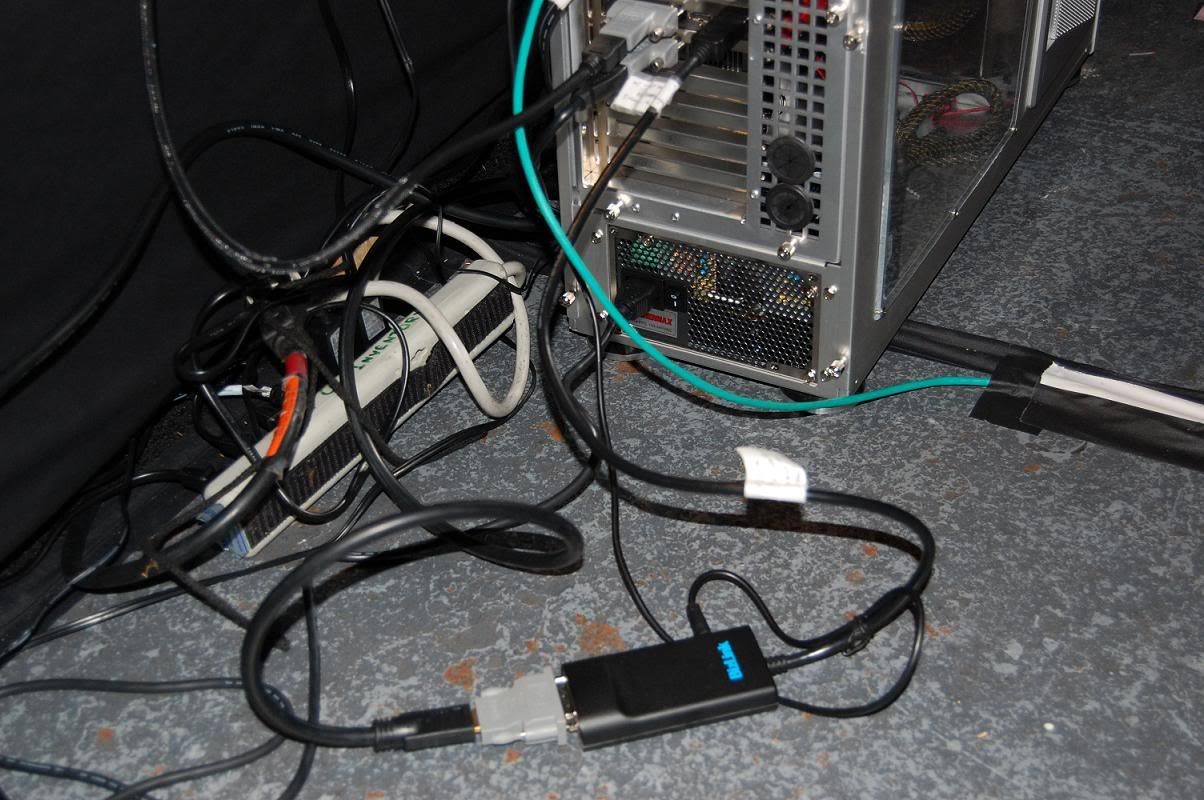
If you are in the USA you can use coupon code, but it ends Sunday 4th(Today!!!): ZTQV568L16CMBH and get 25% off making it 75 bucks down from 100.
http://accessories.us.dell.com/sna/products/Cables/productdetail.aspx?c=us&l=en&s=bsd&cs=04&sku=330-5521
Put a passive dvi to hdmi on the end of the dell adapter. And put 2 more passive dvi to hdmi on the DVI ports of the card and it will work from all the research I've done and I have picked through every bit info on this site and I ordered my Dell adapter last night.
If you are in the USA you can use coupon code, but it ends Sunday 4th(Today!!!): ZTQV568L16CMBH and get 25% off making it 75 bucks down from 100.
http://accessories.us.dell.com/sna/products/Cables/productdetail.aspx?c=us&l=en&s=bsd&cs=04&sku=330-5521
Put a passive dvi to hdmi on the end of the dell adapter. And put 2 more passive dvi to hdmi on the DVI ports of the card and it will work from all the research I've done and I have picked through every bit info on this site and I ordered my Dell adapter last night.
-
BHawthorne
- Insiders
- Posts: 1640
- Joined: 06 May 2006, 12:46
Re: Shopping List
Put a passive dvi to hdmi on the end of the dell adapter. And put 2 more passive dvi to hdmi on the DVI ports of the card and it will work from all the research I've done and I have picked through every bit info on this site and I ordered my Dell adapter last night.
Actually, it's been confirmed you can use 1 dvi, 1 hdmi and 1 dp port out, so it means you'll only need 1 active DP-to-DVI and 2 passive DVI-to-HDMI. Just use the HDMI port out on the card for port 2, instead of the second DVI.
Brad Hawthorne
Product Manager
Nthusim Pty. Ltd. | www.nthusim.com
Product Manager
Nthusim Pty. Ltd. | www.nthusim.com
Re: Shopping List
[quote]Put a passive dvi to hdmi on the end of the dell adapter. And put 2 more passive dvi to hdmi on the DVI ports of the card and it will work from all the research I've done and I have picked through every bit info on this site and I ordered my Dell adapter last night.
Actually, it's been confirmed you can use 1 dvi, 1 hdmi and 1 dp port out, so it means you'll only need 1 active DP-to-DVI and 2 passive DVI-to-HDMI. Just use the HDMI port out on the card for port 2, instead of the second DVI.
Oh! Well that is good.
- Jay
Displayport to HDMI adapters?
Thanks for info man! I purchased my display port from Dell.com today!
-
CtrlCthenV
- Posts: 2
- Joined: 12 Oct 2009, 06:45
Displayport to HDMI adapters?
I live 35 minutes away from the place that Sewell direct lists as their office. I am going to call them tomorrow to see if i can do local pickup for that DP to HDMI adapter and test it when I get home. I will post the results for you guys when I am done.
Help with three 38" screens?
Can someone please explain to me what I'm doing wrong here?
I have three of these monitors:
http://www.tigerdirect.com/applications/searchtools/item-Details.asp?EdpNo=3326540&sku=H94-2801&srkey=iF281D
They have both HDMI and VGA inputs.
I have a Radeon HD 5870 card and this is what I attempted to do:
Monitor 1 -- HDMI from monitor to DisplayPort on video card.
Monitor 2 -- HDMI from monitor to DVI on video card.
Monitor 3 -- HDMI from monitor to DVI2 on video card.
This only gives me 2 of 3 working displays. My next attempt was this:
Monitor 1 -- HDMI from monitor to DisplayPort on video card.
Monitor 2 -- HDMI from monitor to HDMI on video card.
Monitor 3 -- HDMI from monitor to DVI on video card.
That as well only gives me 2 of 3 working displays.
Can someone tell me what I'm doing wrong here? I saw mention of needing an ACTIVE DisplayPort/DVI adapter but I don't think that's my situation.
How can I connect *3* HDMI monitors? What adapters do I need?
Thanks in advance.
I have three of these monitors:
http://www.tigerdirect.com/applications/searchtools/item-Details.asp?EdpNo=3326540&sku=H94-2801&srkey=iF281D
They have both HDMI and VGA inputs.
I have a Radeon HD 5870 card and this is what I attempted to do:
Monitor 1 -- HDMI from monitor to DisplayPort on video card.
Monitor 2 -- HDMI from monitor to DVI on video card.
Monitor 3 -- HDMI from monitor to DVI2 on video card.
This only gives me 2 of 3 working displays. My next attempt was this:
Monitor 1 -- HDMI from monitor to DisplayPort on video card.
Monitor 2 -- HDMI from monitor to HDMI on video card.
Monitor 3 -- HDMI from monitor to DVI on video card.
That as well only gives me 2 of 3 working displays.
Can someone tell me what I'm doing wrong here? I saw mention of needing an ACTIVE DisplayPort/DVI adapter but I don't think that's my situation.
How can I connect *3* HDMI monitors? What adapters do I need?
Thanks in advance.
-
KryptoNyte
- Posts: 108
- Joined: 15 Sep 2006, 22:58
Re: Help with three 38" screens?
You MUST have this adapter for those three screens to function with Eyefinity.
http://accessories.us.dell.com/sna/products/Cables/productdetail.aspx?c=us&l=en&s=bsd&cs=04&sku=330-5521
http://accessories.us.dell.com/sna/products/Cables/productdetail.aspx?c=us&l=en&s=bsd&cs=04&sku=330-5521
Okay...
Okay, so walk me through the process here... I pay $99 and get this adapter you're recommending... and then how do my connections work? Something like this:
Monitor 1 --> HDMI/DVI Cable --> Your Adapter --> Display Port on card
Monitor 2 --> HDMI/DVI Cable --> DVI Port on card
Monitor 3 --> HDMI/DVI Cable --> DVI Port on card
OR...
Monitor 1 --> HDMI/DVI Cable --> Your Adapter --> Display Port on card
Monitor 2 --> HDMI/DVI Cable --> DVI Port on card
Monitor 3 --> HDMI/HDMI Cable --> HDMI Port on card
I don't mind spending the $99 for the adapter but I want to be POSITIVE this is the solution. All three of my monitors are HDMI and all of the cables I have are HDMI to DVI or just straight HDMI/HDMI cables.
If you could clear this up for me that would be great.
Monitor 1 --> HDMI/DVI Cable --> Your Adapter --> Display Port on card
Monitor 2 --> HDMI/DVI Cable --> DVI Port on card
Monitor 3 --> HDMI/DVI Cable --> DVI Port on card
OR...
Monitor 1 --> HDMI/DVI Cable --> Your Adapter --> Display Port on card
Monitor 2 --> HDMI/DVI Cable --> DVI Port on card
Monitor 3 --> HDMI/HDMI Cable --> HDMI Port on card
I don't mind spending the $99 for the adapter but I want to be POSITIVE this is the solution. All three of my monitors are HDMI and all of the cables I have are HDMI to DVI or just straight HDMI/HDMI cables.
If you could clear this up for me that would be great.
-
Mach1.9pants

- Insiders
- Posts: 1512
- Joined: 29 Jul 2007, 05:24
- Location: NZ
Displayport to HDMI adapters?
Yes you are right, the 3 'legacy' connectors (2xDVI and 1xHDMI) have only 2 'clocks' so only 2 will work at once. To get EF you MUST have the 3rd monitor with a DP in or an 'active' adaptor. For the 2 DVI/HDMI any old passive adaptor will work to get it going, really only if you are using VGA or have only HDMI on both those monitors.
Note the active adaptor is to DVI so just plug it into a DVI monitor to save extra adaptors (and points of failure!). Good luck finding one in stock though :)
Note the active adaptor is to DVI so just plug it into a DVI monitor to save extra adaptors (and points of failure!). Good luck finding one in stock though :)
Hmmmm...
I'm not sure if you guys understand my situation here... either that or I'm just not understanding myself (I'mhoping its ME). :-)
I have THREE identical HDMI monitors. Here's a link to the specific HDMI monitors I have:
http://www.tigerdirect.com/applications/searchtools/item-Details.asp?EdpNo=3326540&sku=H94-2801&srkey=iF281D
When I plug these in to my video card I can make all three work... just not at the same time.
For example, if I use an HDMI/Display Port cable and plug the HDMI end into the monitor and DisplayPort end into the video card I can get ONE monitor working fine.
I can get TWO monitors working fine if I use an HDMI/HDMI cable or a HDMI/DVI cable...
But the moment I plug the 3rd monitor in... one of the others "turns off".
Can someone explain to me why the following setup doesn't work:
Monitor1: HDMI on monitor to DisplayPort on card.
Monitor2: HDMI on monitor to HDMI on card.
Monitor3: HDMI on monitor to DVI on card.
Or this setup (doesn't work) either...
Monitor1: HDMI on monitor to DisplayPort on card.
Monitor2: HDMI on monitor to DVI on card.
Monitor3: HDMI on monitor to DVI on card.
Thanks
I have THREE identical HDMI monitors. Here's a link to the specific HDMI monitors I have:
http://www.tigerdirect.com/applications/searchtools/item-Details.asp?EdpNo=3326540&sku=H94-2801&srkey=iF281D
When I plug these in to my video card I can make all three work... just not at the same time.
For example, if I use an HDMI/Display Port cable and plug the HDMI end into the monitor and DisplayPort end into the video card I can get ONE monitor working fine.
I can get TWO monitors working fine if I use an HDMI/HDMI cable or a HDMI/DVI cable...
But the moment I plug the 3rd monitor in... one of the others "turns off".
Can someone explain to me why the following setup doesn't work:
Monitor1: HDMI on monitor to DisplayPort on card.
Monitor2: HDMI on monitor to HDMI on card.
Monitor3: HDMI on monitor to DVI on card.
Or this setup (doesn't work) either...
Monitor1: HDMI on monitor to DisplayPort on card.
Monitor2: HDMI on monitor to DVI on card.
Monitor3: HDMI on monitor to DVI on card.
Thanks
-
Mach1.9pants
- Insiders
- Posts: 1512
- Joined: 29 Jul 2007, 05:24
- Location: NZ
Displayport to HDMI adapters?
To get EyeFinity working you MUST have at least one monitor with a DisplayPort input OR an active (see the sticky thread) adaptor from the 5870 DisplayPort OUT to go to the DVI or HDMI (or VGA) IN on the 3rd monitor.
SO:
5870:
Monitor One: DVI out to: any old connection you want with normal adaptors if necessary (VGA, DVI, HDMI)
Monitor Two: DVI or HDMI out to: any old connection you want with normal adaptors if necessary (VGA, DVI, HDMI)
Monitor Three (the troublesome one!): DisplayPort out to either-
1) DisplayPort IN on monitor (if there is one)
OR
2) Active DP to DVI adaptor to DVI IN on monitor (nb you can use a normal adaptor here to got to HDMI or VGA from the DVI out of the adaptor, if you should so wish...can't see why you would want to though?)
Then you can get Single Large Surface, i.e. EyeFinity, i.e. all three monitors as one big happy display for Windows (Vista or Win7 only, XP not supported)
Does that clear it up? :)
SO:
5870:
Monitor One: DVI out to: any old connection you want with normal adaptors if necessary (VGA, DVI, HDMI)
Monitor Two: DVI or HDMI out to: any old connection you want with normal adaptors if necessary (VGA, DVI, HDMI)
Monitor Three (the troublesome one!): DisplayPort out to either-
1) DisplayPort IN on monitor (if there is one)
OR
2) Active DP to DVI adaptor to DVI IN on monitor (nb you can use a normal adaptor here to got to HDMI or VGA from the DVI out of the adaptor, if you should so wish...can't see why you would want to though?)
Then you can get Single Large Surface, i.e. EyeFinity, i.e. all three monitors as one big happy display for Windows (Vista or Win7 only, XP not supported)
Does that clear it up? :)
Re: Hmmmm...
Can someone explain to me why the following setup doesn't work:Sure. The 5000-series ATI GPUs have only two "legacy" (i.e. DVI, HDMI, VGA) clock generators. For these types of connections a dedicated clock signal is required for images to display on your monitor. The hardware is set up so that these dedicated clock signals can be sent to any output, which is why you can move connections around and have two "legacy" monitors function on any combination of inputs.
As soon as you conenct a third "legacy" monitor, one of the three goes blank, because there are only two clock signals available for use. DisplayPort uses a single clock signal that can be shared amongst all DisplayPort connections, and so discrete clock generators are not required for multiple DP outputs.
The active DP-to-DVI adapter/converter takes a DP signal and actively converts it to a DVI signal, generating a DVI-compatible clock signal at the same time. This is why you need the adapter.
Make sense now?
Re: Displayport to HDMI adapters?
Hello All,
I am setting up a 3-monitor eyefinity gaming system. Asus technical support gave me this web site to help me solve the issue/problem that I am having of finding a DisplayPort to HDMI adapter that will enable all 3 monitors to operate at the same time at the same resolution.
I am posting a few pictures of the adapter that I bought locally at an Apple Inc. store. This adapter DOES NOT work for my application. The reason I am posting this is so that hopefully others will not make the mistake that I made.
The adapter that I bought is a "Mini DisplayPort to Dual-Link DVI Adapter". It includes a male USB port on one end and a female USB port on the other end. So; I believe this USB port is there for convenience rather than providing additional power that is required for a DisplayPort in an Eyefinity setup.
My plan is to purchase the BizLink adapter that is pictured here on this thread. It has a USB male port but no female port; therefore, the male USB side of this adapter must be to supple power.
My system: parts applicable to this thread:
Graphics card: Asus EAH5790 (Radeon)
Monitors: 3 Hanns-G, 28 inch with 2 HDMI inputs (no DVI)
Motherboard: Asus P6X58D Premium LGA 1366, Intel X58
Processor: Intel Core i7-960 Bloomfield, 3.2 GHz, Quad-Core
Great thread, thanks to all.
P.S. I am not sure how to upload an image; my assumption is to use an image hosting service? This is a nuisance, I would prefer a simple upload icon.
I will try to upload 3 images, but I am not sure of my success.


I am setting up a 3-monitor eyefinity gaming system. Asus technical support gave me this web site to help me solve the issue/problem that I am having of finding a DisplayPort to HDMI adapter that will enable all 3 monitors to operate at the same time at the same resolution.
I am posting a few pictures of the adapter that I bought locally at an Apple Inc. store. This adapter DOES NOT work for my application. The reason I am posting this is so that hopefully others will not make the mistake that I made.
The adapter that I bought is a "Mini DisplayPort to Dual-Link DVI Adapter". It includes a male USB port on one end and a female USB port on the other end. So; I believe this USB port is there for convenience rather than providing additional power that is required for a DisplayPort in an Eyefinity setup.
My plan is to purchase the BizLink adapter that is pictured here on this thread. It has a USB male port but no female port; therefore, the male USB side of this adapter must be to supple power.
My system: parts applicable to this thread:
Graphics card: Asus EAH5790 (Radeon)
Monitors: 3 Hanns-G, 28 inch with 2 HDMI inputs (no DVI)
Motherboard: Asus P6X58D Premium LGA 1366, Intel X58
Processor: Intel Core i7-960 Bloomfield, 3.2 GHz, Quad-Core
Great thread, thanks to all.
P.S. I am not sure how to upload an image; my assumption is to use an image hosting service? This is a nuisance, I would prefer a simple upload icon.
I will try to upload 3 images, but I am not sure of my success.
-
KryptoNyte
- Posts: 108
- Joined: 15 Sep 2006, 22:58
Re: Displayport to HDMI adapters?
Strange. I have that exact adapter working with my Asus 5850. And yes, the USB port is required for proper operation, and it was advised by some folks to actually purchase a wall plug with the USB port on it for continuous power (rather than depending on cont. 5V from the computer USB ports).
Of course with the non 5970 cards, we have to have another adapter for mini-displayport to displayport.
Just out of curiousity, I've tried to contact Asus, but it's been over a week now and no response from them (regarding BIOS update). How did you actually get any help from them, they don't really appear to be remotely interested in supporting this hardware?
Of course with the non 5970 cards, we have to have another adapter for mini-displayport to displayport.
Just out of curiousity, I've tried to contact Asus, but it's been over a week now and no response from them (regarding BIOS update). How did you actually get any help from them, they don't really appear to be remotely interested in supporting this hardware?
Who is online
Users browsing this forum: Semrush [Bot] and 3 guests