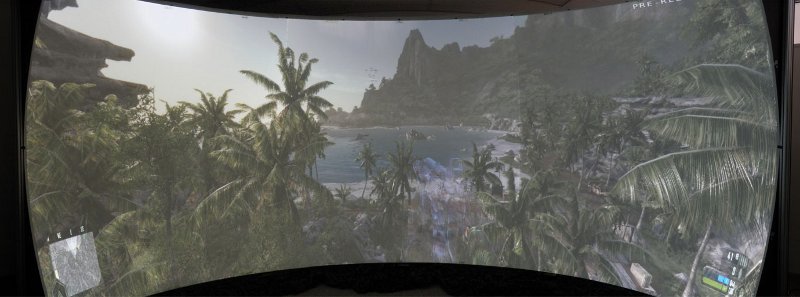
Fisheye (None or optional)

Discussions about getting games to run in a Multi-Mon setup.
Post Reply
Rescator
Posts: 42
Joined: 06 Jul 2008, 20:26

Fisheye (None or optional)

Post by Rescator »

48:10 (5040x1050)


Gah! Why the heck do all these engines have the darn fisheye effect.
Fisheye made sense when there was only 4:3, but with 16:9 or wider it's hardly needed, and if anything there should be a fisheye on/off option for games.
Look at the image above, then look at the one below with a faked "de-fisheye".

As you see the width it narrower, so without the fisheye effect 48:10 could have almost twice as much viewable area.

Depending on the engine/renderer the fisheye effect may even start at the center two pixels, and increasing distortion the closer to the edge of the display it gets.

And in the case of this particular game (singularity), turning off the fisheye would fix all stretching of the HUD etc.
Without the fisheye stretch you'll probably not feel as seasick either (for those who might have that issue),
and you can glance to the sides and not see distorted imagery.

I do not believe that the fisheye effect should be part of the game engine/renderer at all.
If anything the "fisheye" effect should be applied during display by the driver or hardware or the display itself,
I can imagine certain special displays or headgear might benefit from this in cases where the display is perfectly tracked with viewer eye movement.
Normal monitors and headgear with headtracking does not need the fisheye effect.

PS! If anyone know of a game where fisheye can be toggled please post as that would make for a better and more accurate comparison than this quick hackjob!
User avatar
scavvenjahh
Editors
Editors
Posts: 3424
Joined: 06 Mar 2008, 17:20

Re: Fisheye (None or optional)

Post by scavvenjahh »

You seem to believe the fisheye effet is something they add to 3D rendering, but "edge distortion" is present in all games at all aspect ratios; multi-mon simply makes it more obvious.
:arrow: http://www.widescreengamingforum.com/videos/edgedistort.php

To effectively fix this artefact, the game renderer must be able to use 3 cameras (one per screen) instead of one; this is actually possible, with some restrictions, in a couple flight sims (DCS: Black Shark and MS Flight Sim X, I think). Racer_S also attempted to fix the camera frustum in GTA, but I can't find the thread atm...

When developers will have universally acknowledged the all-importance of surround gaming support in games, maybe they'll finally start working on that.
Rescator
Posts: 42
Joined: 06 Jul 2008, 20:26

Re: Fisheye (None or optional)

Post by Rescator »

I'm talking about the artificial "fisheye", there have been games that does not have it or it's minimal/unnoticable.

This does however mean that the game engines must be tweaked, camera positioning must be tweaked, perspective compensation.

Right now pretty much all renderers are landlocked to 4:3 perspective math.
This is why games like rFactor needs three 4:3 cameras.

Now if you look closely on my hacked example above you see that it feels "ok".

Now remember, almost all engines are designed today so that you focal point is on the center pixel(s).
Outside of these center pixels the fisheye starts.
You do not really notice the vertical edge distortion as the circle/eye actually extends above and below the screen, but you do notice the horizontal curving.

What my hackjob above did is show that you can undistort (a not that complicated task as there exist "de-fisheye" plugins for PhotoShop and other software for fisheye photographic camera lenses, and fisheye effect plugins)

If you look at the original screenshot you see that a pixel is stretched across multiple screenpixels,
and my hackresizing reduces this to around 1 pixel per screen pixels. (not exactly, ideally I should have made a routine that logarithmically increased the amount of resize per pixel the farther from the center the pixels are).

Now, if "i" can get the look in the 2nd image by simply chopping up the image in 3, resizing by 50% the left and right 3rds and gluing it together again.
Then trust me, a rendering engine can do this on the fly even.

Depending on what the engine tweaks are (it might be faked by camera fov, distance, perspective tricks etc.),
the engine may or may not need to render the scene two or three times wider than it actually is,
as you can see in my mockup it is about 1 screen less wide than the original.

I'll see if I can fire up OGRE and make a basic concept demo or not, or if I'll have to grab a different engine and do that.
Hopefully I won't have to change the render code just the parameters for a scene and camera perspective and distance.

The issue with the fisheye effect is that it only makes sense on a flat screen where your eyes are fixed to the center.
So if you have a flat screen with eye tracking then fisheye is just fine.

But in all other cases, trying to bend a sphere to a flat surface just does not work.
The simplest way is to simply treat the flat view/screen area as a letter/windowbox into the 3D world of the game,
something I assume that WSGF would be all for as that fit perfectly in the "wider" mantra.

After all, if you look at my mockup you see it's able to show more information without distortion in less width than the original.

But I do agree with you that devs need to universally open their eyes.
In a way they have with sound as they are letting sound engines or the OS remap the audio to whatever audio setup the user have.
In fact Vista and Windows 7 even have automatic speaker calibration support if you have a microphone handy.

Now AMD is at the forefront here with allowing devs to fetch info about bezel and more via the API so that GUI elements do not get cut off, so that's a start although a modest one.

PS! And yes I know that if you try to render a flat view with current engines as they are you run into the "render into infinity" issue, but then again that too is fake as we do not "see" in a sphere anyway so...
Rescator
Posts: 42
Joined: 06 Jul 2008, 20:26

Re: Fisheye (None or optional)

Post by Rescator »

I wonder if a Orthographic Projection based game engine would avoid the fisheye distortion issue?
User avatar
scavvenjahh
Editors
Editors
Posts: 3424
Joined: 06 Mar 2008, 17:20

Re: Fisheye (None or optional)

Post by scavvenjahh »

You obviously know a lot more about this than I ever will :oops:
(I still think Singularity is a bit of an extreme example; first, because it does not support multi-mon natively, and also because of the painfully low FOV the devs decided to go with. If we could just edit the FOV, the fisheye effect wouldn't be so noticeble. Point taken nonetheless.)

Are you saying some universal de-fisheyeing fix could be implemented into say graphics drivers or DirectX libraries ?
User avatar
suiken_2mieu
Insiders
Insiders
Posts: 2351
Joined: 20 Aug 2009, 04:20
Location: Virginia
Contact:

Re: Fisheye (None or optional)

Post by suiken_2mieu »

This is interesting. But because it would have to be a post processing effect, wouldn't it effect text and HUD elements?
Or could this be implemented on the 3D rendering only?

Well actually, the latter could destroy hud that are supposed to be over someone head, or a moving object on screen, or any graphic that is meant to track a 3D object.
So it would have to be a post processing effect that would effect the entire screen. Though honestly, the distortion doesn't bother me. I never really look at my side screens.
System Core: | Intel Core i5-2500K + ASUS P8Z68-V + 16GB Corsair XMS3 DDR3 1333 MHz | Win7 x64 | MSI R7970 Lightning 3GB [1105/1400] |
Display: | 3 x Dell Ultrasharp 3007WFP-HC @ 7680x1600 | Dell u3011 |
Rescator
Posts: 42
Joined: 06 Jul 2008, 20:26

Re: Fisheye (None or optional)

Post by Rescator »

Funny you should mention the HUD and Text.
look at the first original image, the HUD and text is stretched/distorted there.
In my "correct" mockup they look normal again (as they have been un-stretched).

Now don't get me wrong, it's not the perspective projection I have an issue with,
but rather the way it's implemented.
As currently a object or character in front of you have a ok size,
but if you turn so they are seen in the corner/side of the screen they not only are stretched but they actually get bigger, in some cases huge depending on the FOV.

This is obviously wrong. try this, put a soda bottle or a glass on your table, then turn your head so you can barely see it in your peripheral/side view.
It still has around the same shape/size just, out of focus. But it is not warped/anamorphed/stretched and 3-4 times bigger.

So what I'm saying is that games should treat the screen as flat, and the aspect ratio as merely the size of the glass/window into the world.

So there are several variables that is needed:

1. Pixel Width and Height aka resolution, this one is obvious I hope.
2. Aspect Ratio, determines the "shape".
3. GUI/HUD positioning, auto-matic or presets or manually adjustable by player, defaults could be stored by the driver or OS and presented to the games.
4. Viewing Distance and DPI, how far you are from the screen so the view area matches a natural window view, auto/semi-automatic calibration and this should also be manually adjustable, defaults could be stored by the driver or OS and presented to the games, DPI is already available via OS API.
5. Stereoscopic, automatic (single screens or auto-calibrated ones) or manual (for custom screen setups)., defaults could be stored by the driver or OS and presented to the games.
6. Curvature, is the screen flat or curved, if curved, then by how many degrees? automatic (single screens or auto-calibrated ones) or manual (for custom screen setups)., defaults could be stored by the driver or OS and presented to the games.
7. View masks, if the screen(s) are non-rectangular, bezel size etc. automatic (single screens or auto-calibrated ones) or manual (for custom screen setups)., defaults could be stored by the driver or OS and presented to the games.

#1 and #2 is easy and available now, but as WSGF'ers know #1 and in particular #2 is still an issue when it really shouldn't be.
#3 and #7 is finally starting to get tackled, as I mentioned AMD exposing an API so games can fetch bezel area is very cool, Nvidia is lagging behind on this currently though.
#4 should not be that hard, as mentioned DPI is already available from the OS via standard APIs but should have been reported by the display instead really, and some monitors have auto light sensors, I'm not saying they should auto sense how far away you sit, just that you should at least be able to set distance in the OS settings somewhere like you do with DPI.
#5 is kinda messy, AMD is on the right track with a open system, but there are at least two competitors providing a solution, Nvidia do the stereoscopic themselves, I believe AMD should have done the same but called it Open3D and made it a sister project to OpenGL instead. MicroSoft is planning something with Windows 8 on the stereoscopic side of things, could this mean that DirectX 12 is in the works with a standardized stereoscopic (shutterglasses and alternating frames at double the framerate would have to be the minimum requirement IMO).
#6 is kinda related to #7 but neither AMD nor Nvidia supports anything related to this, yet...

PS! Many have no idea their DPI is set wrong, I didn't for a long time. Check yours here http://www.emsai.net/projects/widescreen/dpicalc/

Here is another example, we all know that the earth is a sphere. But we also have all seen world maps like this:


THAT is what I want the rendering engines to do.
Now with a normal viewport you would never really see "everything" like that, you'd basically be looking through a virtual windowbox the shape of your screen,
with perspective projection and zoomed in a lot closer to the action as well, the chances of seeing the world repeat itself in the view would be slim.
(Unless you had a curved screen 360 degrees around you that is... But a curved 180 degree screen wouldn't be so bad and might actually almost "fit" on your desk.)

This means that 45x45 degrees (OGRE engine in this case) would be 1:1 aspect ratio. This means that 8:1 screen would be 360degrees, and a 4:1 screen would be 180
I think that around 120+ (135 degrees would in this case be 3:1 screen) starts to reach the limit before you actually need to have a curved display.
And obviously anything wider than 8:1 would have to be pillarboxed to avoid "repeating the world".
A aspect of 1:8 (vertical) on the other hand is less likely, in fact it's very rare to see anything narrower than 1:1, in a few cases like ad boards and PDA's (which you can usually rotate the view of) there might be 1:2 vertical or similar, but I've never seen anything more than that.

Note! I tried messing around with OGRE, and moving camera and setting vFOV and messing with aspect did teach me a lot, it also frustrated me as the binary build I had available do not expose things like the frustum stuff nor let me mess with perspective transform matrixes and so on, maybe I'll peek at the official source and see how the automatic aspect to hFOV is done as OGRE also suffers heavily from the issue seen in the first screenshot here.

Objects far away should not look several times bigger in the corner of your eye and obviously not that stretched either.
Hmm, maybe Reverse Projection could be a possibility as well? *scratches head*

User avatar
dopefish
Insiders
Insiders
Posts: 1514
Joined: 14 Apr 2007, 02:13

Re: Fisheye (None or optional)

Post by dopefish »

If you want them to do that, you might as well ask them to render the game with multiple frustums. It would eliminate any fisheye and/or distortion effects.

It's hard enough to get support for three monitors as it is let alone have them use multiple frustums or a shader.
Widescreen Fixer - https://www.widescreenfixer.org/

Widescreen Fixer Twitter - https://twitter.com/widescreenfixer
Personal Twitter - https://twitter.com/davidrudie
Rescator
Posts: 42
Joined: 06 Jul 2008, 20:26

Re: Fisheye (None or optional)

Post by Rescator »

Hmm! AMD and Nvidia could expose this through an API,
so that there could be one frustrum per GPU.

The game engine would simply get the details from the API (angle/views etc).
And in the same way the API could expose sepereate screens (they knda do currently with AMD and the bezel info etc.) so that a player could just set up a spread GUI over the screen, kinda how Delphium's does in his tool (GUI on center, or spread to the side monitors).

So I'm sure that devs (or the engine devs rather) would support this if AMD and Nvidia exposed this in a simple way.
But sadly AMD and Nvidia tends to rarely do things the same way with solutions like that. DirectX 12 and OpenGL could unify such an API though so...

BTW! I seem to recall several overhead view games, that has 3D models and characters, kinda isometric but they also allow you to zoom and rotate the camera, and I never recalled seeing the "fisheye" distortion in those kind of games. Shouldn't the same be possible in other 3rd and 1st person games as well?
so this is probably more of a engine issue than game dev issue.

In fact most of the issues WSGF members have are how the game engines handle various aspect ratios, there is only so much fiddling around that game devs want to do to an engine they didn't make.
User avatar
scavvenjahh
Editors
Editors
Posts: 3424
Joined: 06 Mar 2008, 17:20

Re: Fisheye (None or optional)

Post by scavvenjahh »

Hmm! AMD and Nvidia could expose this through an API,
so that there could be one frustrum per GPU.
Well, multi-mon solutions are not based on "one GPU per screen". Nv Surround requires two GPUs, Eyefinity requires one, SoftTH only uses one...

BTW! I seem to recall several overhead view games, that has 3D models and characters, kinda isometric but they also allow you to zoom and rotate the camera, and I never recalled seeing the "fisheye" distortion in those kind of games.
Something like this maybe ? ;)
Now as you know LoL is a 3D game although it's viewed from an overhead camera, so we're getting the fisheye effect here.


In the game.cfg file in "GameDATACFG" if you cange "Full3DModeEnabled=0" to "Full3DModeEnabled=1" you get a 2D look and remove the fisheye effect.
Notice that in the first picture I have already changed this. Also the game tends to change it back so I recommend setting the cfg file to read-only.


Controlling this through a config flag sure looks like an ideal solution...
Rescator
Posts: 42
Joined: 06 Jul 2008, 20:26

Re: Fisheye (None or optional)

Post by Rescator »

:hide
Ok a bit extreme example there. (over 10:1 aspect heh)

But yeah along those lines, obviously the view here is different from a 1st person or 3rd person.
But that is exactly the concept I had in mind yeah.

So imagine that, only with the camera down on ground level and straight ahead instead of overhead and you have exactly what I mean.
Obviously it would be maxed at 360 degree view which in this case if 800=90 then that means 3200x800 for a full view.
Or if you have a screen or screen in a 180 half circle you'd have 1600x800 to wrap the view around you.

So wen you move your eyes to look to the left or right there is no distortion.
This would allow for the natural behavior of "glancing around" which I suspect is what causes some people headaches currently with the distortion in most games.
And... no more messing with FOV to get things to look right. (at least not horizontal FOV)
Any game using this method would have no stretching in the GUI either, and WSGF certification would be very easy.

Thanks scavvenjahh for finding a nice visual example :)
User avatar
Abram
Insiders
Insiders
Posts: 1993
Joined: 21 Mar 2006, 05:01

Re: Fisheye (None or optional)

Post by Abram »

Longest. Page load. Ever.
fuzioninfinity
Insiders
Insiders
Posts: 162
Joined: 18 Oct 2008, 03:58

Re: Fisheye (None or optional)

Post by fuzioninfinity »

Hmm. Really interesting thoughts you have here. I myself have thought about this, and I think I know what your getting at with this "flat" view stuff. I was bored one day in 3D Studio Max and maximized it to all 3 screens, and in an orthographic view I get no distortion on the sides - is this what your referring to?

While this would in fact work, orthographic or isomeric views eliminate the "illusion" of perspective, where objects vanish to points in space. In an isometric view, parallel lines remain parallel and do not vanish to such points, which greatly takes away from that illusion of perspective, effectively making the world you see feel flat and lifeless. Field of view isn't even a factor in an orthographic view (the FOV option actually is actually disabled when working in such a view in 3ds MAX/Maya). I don't really think that would be appropriate for anything besides maybe an RTS, if that. To demonstrate what I mean, I quickly modeled a few boxes and threw some textures on them:

Orthographic:

Perspective:


As you can see, the orthographic view looks very flat and it is hard to decipher the depth of the scene. Infact, if you took the boxes out of the picture that indicated that they the surface they were on was the floor, it's hard to tell if that surface is concave, or convex. It looks both like a box lit from the bottom left, or a room lit from the top right.


Though, in perspective, because of how we interpret perspective drawings/renderings, we can immediately recognize that it is a concave area, with the walls in the back.


I do a lot of perspective drawing, and the edge distortion isn't something that is limited to games or 3d applications, any illusion of depth in on any flat surface, unless it is an isometric view, is going to have edge distortion. Even in a multi-point perspective drawing, as lines grow nearer to the edge of the drawing (and their vanishing points) they skew and distort, becoming wider/shorter than they truly are. And just like multi-monitor gaming, if I have a very wide drawing, and place my vanishing points even further apart, that distorting becomes even more apparent. While they are not exactly the same, a video game is basically just a perspective drawing, at it's most simple levels.

Like dopefish said, the only real way of getting a perspective view without the fisheye, that would imitate things as we see them in life with our own eyes, is with multiple frustums. Even so, one must consider the edge distortion we seen on only one screen; it would look sort of odd as it stretched and then unstretched from monitor to monitor. No doubt, we could probably find a way around that by lowering our FOV to minimize edge distortion seen on single screens, but support like that from developers today is wishful thinking, it can be hard enough to get them to support multi-monitor gaming in it's current state (we have a lobbying section dedicated to it!) and those developers that wave the "not fair!" flag would go bananas if we even mentioned something like that to them.

Though, on a sidenote, one way to sort of get rid of the fisheye is to play with projectors on a curved surface with nthusim, the fisheye looks much more natural in that setup, from the Nthusim site. Though, the hud is pretty distorted.


Makes me wonder if I could use Nthusism to do the same thing with monitors? I guess that would just be doing what you did in that one screen shot, artificially removing the fisheye in realtime, but also making the view slightly less wide. I could deal with that though. Interesting thought..

Another way I suppose that would work, is to well, take a game that was Hor+, and make it Vert-, then pull the camera out to a point that the viewable space vertically is equal to that of the space in a 4:3 screen. Though, I imagine that with such a low FOV it would still feel odd.
User avatar
scavvenjahh
Editors
Editors
Posts: 3424
Joined: 06 Mar 2008, 17:20

Re: Fisheye (None or optional)

Post by scavvenjahh »

On that last picture, isn't the center part a bit squished though ? It's hard to judge a curved surface from a picture, and maybe it's just me, but it looks as if nthusim was "pushing" on both sides of the picture, thus removing some of the fisheye effect on the sides but also affecting the middle. :?
fuzioninfinity
Insiders
Insiders
Posts: 162
Joined: 18 Oct 2008, 03:58

Re: Fisheye (None or optional)

Post by fuzioninfinity »

Hm, I didn't notice that at first, but at second glance you are indeed correct. Having never used the program I'm not sure if thats an unavoidable effect of it, or a result of the projectors on the curved surfaces themselves.
Post Reply

Who is online

Users browsing this forum: No registered users and 12 guests