
Hi
I currently have a HD 5850 http://www.gigabyte.com/products/product-page.aspx?pid=3354#ov.
What I want to do is buy another one and crossfire them together, and run a 3x1 + 1 setup. The triple monitors will go on a sim racing rig and the single will be at a desk, so I will create a different profile for both setup's (I don't need all 4 on at the same time)?
Will this work? plugging 2 monitors plugged into each card or 3 into 1 and the other one its own?
4 Monitor setup
-
suiken_2mieu

- Insiders

- Posts: 2351
- Joined: 20 Aug 2009, 04:20
- Location: Virginia
- Contact:
Re: 4 Monitor setup
You'll have to plug in 3 into 1 and have the other screen off the second card. But it should work just fine.
System Core: | Intel Core i5-2500K + ASUS P8Z68-V + 16GB Corsair XMS3 DDR3 1333 MHz | Win7 x64 | MSI R7970 Lightning 3GB [1105/1400] |
Display: | 3 x Dell Ultrasharp 3007WFP-HC @ 7680x1600 | Dell u3011 |
Display: | 3 x Dell Ultrasharp 3007WFP-HC @ 7680x1600 | Dell u3011 |
Re: 4 Monitor setup
Yes, it will work provided you connect your 4th monitor to your motherboard's onboard video port. I have done exactly as you want to do:
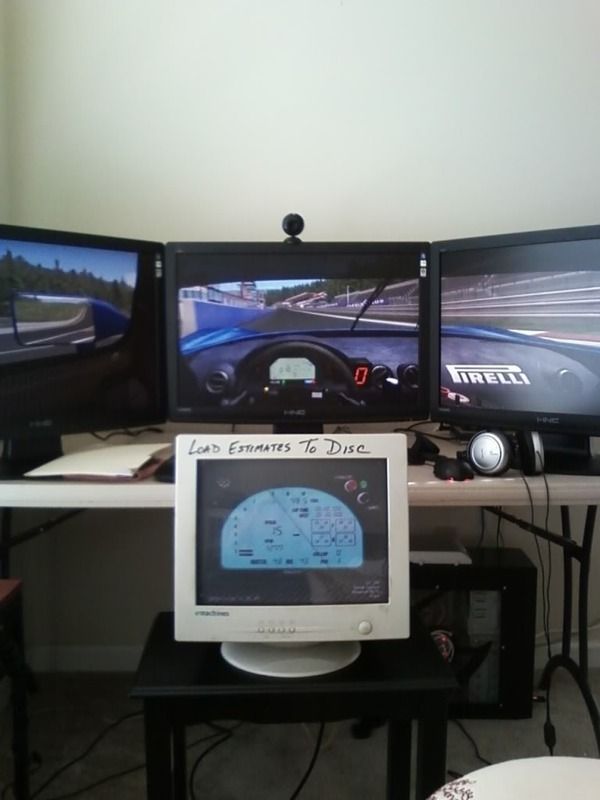
I have an Asus MB and I had to go into the bios and tell it to use the onboard video as the primary display adapter. I then told the CCC to setup my big screens as a group. As you can see in the photo, this setup works well in GTR2. The proggy running on the CRT is Taka's Sim Monitor and it reads data from GTR2 and shunts it to a Motec looking display. This is really some kewl stuff. Maybe you are going this route to?
d
I have an Asus MB and I had to go into the bios and tell it to use the onboard video as the primary display adapter. I then told the CCC to setup my big screens as a group. As you can see in the photo, this setup works well in GTR2. The proggy running on the CRT is Taka's Sim Monitor and it reads data from GTR2 and shunts it to a Motec looking display. This is really some kewl stuff. Maybe you are going this route to?
d
Re: 4 Monitor setup
haha nice :rockout
Thanks guys. I just wanted to know if it would work before i put the money in on another 2 monitors and another video card.
Stuart
Thanks guys. I just wanted to know if it would work before i put the money in on another 2 monitors and another video card.
Stuart
-
fluxetreflux
- Posts: 56
- Joined: 15 Feb 2010, 16:40
Re: 4 Monitor setup
Yes, it will work provided you connect your 4th monitor to your motherboard's onboard video port. I have done exactly as you want to do:
I have an Asus MB and I had to go into the bios and tell it to use the onboard video as the primary display adapter. I then told the CCC to setup my big screens as a group. As you can see in the photo, this setup works well in GTR2. The proggy running on the CRT is Taka's Sim Monitor and it reads data from GTR2 and shunts it to a Motec looking display. This is really some kewl stuff. Maybe you are going this route to?
And if i don't have an integrated display on my board... No way to use the HDMI port ? Did you try this kind of setup ?
Anyway thanks for the tip. Will just grab a new MB with an integrated DVI/HDMI display...
Re: 4 Monitor setup
@flux -
I haven't considered using the HDMI port on my 5770 for the reason that it is already driving three screens in eyefinity, and my CRT is an old school VGA connector. I cannot test to see if your suggestion is viable, but I'd be inclined to think it isn't.
However, there are gobs of super cheap PCI video cards that will work perfectly for a "Utility Panel" setup like mine if your mobo doesn't have integrated graphics. Windows will see the second card and give you the options as normal.
I am considering getting a 7" LCD TV and connecting it to my rig with a Sewell PC2TV converter to run my untility panel. That CRT is too big and bulky for 2010!
d
I haven't considered using the HDMI port on my 5770 for the reason that it is already driving three screens in eyefinity, and my CRT is an old school VGA connector. I cannot test to see if your suggestion is viable, but I'd be inclined to think it isn't.
However, there are gobs of super cheap PCI video cards that will work perfectly for a "Utility Panel" setup like mine if your mobo doesn't have integrated graphics. Windows will see the second card and give you the options as normal.
I am considering getting a 7" LCD TV and connecting it to my rig with a Sewell PC2TV converter to run my untility panel. That CRT is too big and bulky for 2010!
d
-
stangflyer
- Posts: 280
- Joined: 10 May 2009, 19:46
Re: 4 Monitor setup
Look at a tritton usb to vga adapter. I have used one for a year with my 5970. I use it to monitor teamspeak and temp monitoring programs. 40 to 60 bucks depending on the one you get.
Re: 4 Monitor setup
Look at a tritton usb to vga adapter. I have used one for a year with my 5970. I use it to monitor teamspeak and temp monitoring programs. 40 to 60 bucks depending on the one you get.
I suggested that a second video card would be a solution. I don't wish to connect 4 monitors to my 5770. This adapter is a great thing!
http://store.gameshark.com/viewItem.asp?idProduct=4795&idCategory=319
Bravo!
d
Who is online
Users browsing this forum: No registered users and 5 guests