
So, I've been looking to try this out:
http://www.widescreengamingforum.com/node/
Are there any hi-res texture packs available?
Diablo II w/ Custom Res Hack

Re: Diablo II w/ Custom Res Hack
Are there any hi-res texture packs available?
Oddly and sadly I have never seen any. :?
-
Stormwatcher
- Posts: 7
- Joined: 10 Apr 2008, 03:49
Diablo II w/ Custom Res Hack
The download link seems totally dead to me, could someone rehost it, please? Thanks!
Re: Diablo II w/ Custom Res Hack
So, I've been looking to try this out:
http://www.widescreengamingforum.com/node/
Are there any hi-res texture packs available?
I've been using this for a few months. Tested up to 2560x1600. Works fine, but Perspective needs to be off.
-
WidescreenWallaby
- Posts: 32
- Joined: 21 Oct 2006, 19:47
Diablo II w/ Custom Res Hack
How did you get it to work?
When i run d2multires.exe, it runs for a few secs, generates a log file then nothing. It's still running in task manager but using 0% cpu.
I tried running diabloii.exe but going into bnet, it says "cannot identify version etc".
Could you list the steps you took to get it to work?
When i run d2multires.exe, it runs for a few secs, generates a log file then nothing. It's still running in task manager but using 0% cpu.
I tried running diabloii.exe but going into bnet, it says "cannot identify version etc".
Could you list the steps you took to get it to work?
Diablo II w/ Custom Res Hack
I tried running diabloii.exe but going into bnet, it says "cannot identify version etc".
Could you list the steps you took to get it to work?
DO NOT run this on Battle.net.
I'm glad to see that it does not work on bnet, but if it did it would surely get you banned.
This is for singleplayer only. TCP/IP might work as well, but probably only if the other players are running the hack aswell.
-
WidescreenWallaby
- Posts: 32
- Joined: 21 Oct 2006, 19:47
Diablo II w/ Custom Res Hack
99% of the people who play d2 play on bnet... so it's pretty much useless then for most people.
-
skipclarke

- Founder

- Posts: 7358
- Joined: 13 Oct 2003, 05:00
Diablo II w/ Custom Res Hack
Useful for those of us who never finished the single player.
Diablo II w/ Custom Res Hack
Related item, this is parts of forum posts I've posted in many diablo forums. I dearly hope this problem gets fixed.
This mouse "bug" have been confirmed with various people. People who don't notice it are either very insensitive, or is on Linux.
First, let my explain to you my situation.
I cannot enjoy Diablo 2, because my mouse feels choppy and slow in singleplayer. I have singled out this problem due to the 25FPS.
Before you reply, I have:
Changed my mouse
Uninstall/reinstall all drivers
Tweaked with vsync
Tried different glide wrappers
etc.
In short, the problem lies within the game.
For whatever reasons, the input mouse display in D2 singleplayer is really choppy and grounds for annoyance.
The excuse I got was that the animations were made to play at 25FPS on a local game... This argument does not work, since the FPS cap is REMOVED in a SINGLE SESSION TCP/IP multiplayer game!
Yes, if I start a multiplayer game and play by myself, the mouse choppiness/lag is removed!
You are not following the conversation. The game ITSELF is smooth, the animation is smooth, and the game itself is not slow at all. The problem is the MOUSE CURSOR.
Please, try what I just posted:
1) Run D2 singleplayer
2) Load up a map
3) Move your mouse around, get a feel of it
4) Press esc to bring up menu
5) The mouse should feel infinitely smoother and crisp
Keep moving the mouse in a circular motion, while hitting esc every so often. You'll see the difference.
I even made a video of it:
http://www.youtube.com/watch?v=WAC4JfPzCTI
The best example comes in at 40 seconds. If you can't watch the fill video, go to 0:40.
As you can see, the mouse is a lot smoother when the frame rate cap is OFF, in the menu. Some may say the choppy mouse is easily overlooked. I disagree. The choppy mouse conveyed in the video is really annoying, makes specific attacks and using the inventory a pain.
This mouse "bug" have been confirmed with various people. People who don't notice it are either very insensitive, or is on Linux.
Diablo II w/ Custom Res Hack
by using Fraps, i can see that the single player fps is indeed capped at 25 when playing. While opening up options menu, the fps limit is gone (it is 60 now which is my LCD default).
Diablo II w/ Custom Res Hack
Is there a config file it creates somewhere?
The resolutions it lists for my TH2Go fills the box and doesn't show them all.
The largest listed at the bottom is 1920x1200, which works fine, but I want to see if it will do 3840x1024.
EDIT: Nevermind. Fixed it with a little registry editing. ; )
3840x1024
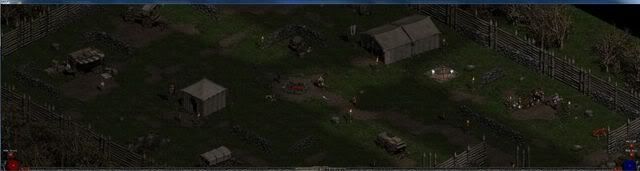
Now if only I could move my health and mana bubbles back toward the center.
The resolutions it lists for my TH2Go fills the box and doesn't show them all.
The largest listed at the bottom is 1920x1200, which works fine, but I want to see if it will do 3840x1024.
EDIT: Nevermind. Fixed it with a little registry editing. ; )
3840x1024
Now if only I could move my health and mana bubbles back toward the center.
Diablo II w/ Custom Res Hack
Hi, I'd like to try this myself.. I've been fooling around with it myself, but I've only been able to get 3840x768 and I'd like to try to max it out for fun, but I can't seem to get the 'enumerated video modes' list down..
which is what I assumed you did, removed a couple so that you were able to scroll down to your the desired resolution.
which is what I assumed you did, removed a couple so that you were able to scroll down to your the desired resolution.
-
skipclarke
- Founder
- Posts: 7358
- Joined: 13 Oct 2003, 05:00
Diablo II w/ Custom Res Hack
EDIT: Nevermind. Fixed it with a little registry editing. ; )
3840x1024
Now if only I could move my health and mana bubbles back toward the center.
Can you share the edit? And the HUD would be the big trick.
Diablo II w/ Custom Res Hack
can anybody say how to edit the registry for 3840x1024 th2g resolution?
Diablo II w/ Custom Res Hack
First you need to update to the lastest version by connecting to battle.net after installing Diablo II and expansion.
Then install the D2MultiRes hack.
In your Desktop Shortcut, add the -w toggle so it will open in window mode.
Run Diablo II and start a game in one of the standard modes. Go to the Video options and see if the resolution you would like is listed. If so, choose it and play to your hearts content.
If the resolution you want is not listed and your table of resolutions is full (20); then exit the game and go to where you have Diablo II installed and view the D2MultiResLog. It will list all the available modes detected when you started Diablo II.
Each is numbered. For example mine looks like this...
...
Added Display Mode: 29: 2400 x 480
Added Display Mode: 30: 3072 x 768
Added Display Mode: 31: 3840 x 1024
Added Display Mode: 32: 5040 x 1050
Added Display Mode: 33: 4320 x 900
I want the 5040 x 1050 resolution so I know that mode is designated as 32.
I go into the registry (NOTE: DO NOT DO THIS IF YOU ARE NOT SURE WHAT IT IS WE ARE DOING HERE. ALTERING YOUR REGISTRY CAN CAUSE HARM TO YOUR OPERATING SYSTEM).
Under the HKEY_CURRENT_USER > Software > Blizzard Entertainment > Diablo II folder, click on and edit the D2RMRes key and change it to a decimal value of the mode that you want (in my case, 32).
Close Regedit and run Diablo II again. The menu screen will continue to be small (800 x 600, I think), but once you start a game...viola! 5040x1050!! For me, anyways.
My next problem is figuring out how to remove the Window title bar as it will not let me move the Title bar above the top of the desktop; in which case I can't see more than half of my belt quick slots.
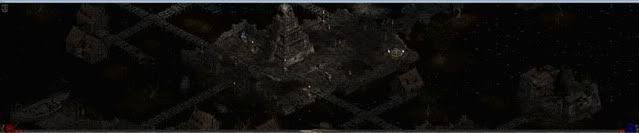
So I've upgraded from 3840x1024, now to get rid of that title bar. I've already decreased my window padding to 1 and my Title Bar font down to 13 (lowest it will go) and switched to a natively small font. Best I can do so far.
If you are still having issues, feel free to private message me.
Then install the D2MultiRes hack.
In your Desktop Shortcut, add the -w toggle so it will open in window mode.
Run Diablo II and start a game in one of the standard modes. Go to the Video options and see if the resolution you would like is listed. If so, choose it and play to your hearts content.
If the resolution you want is not listed and your table of resolutions is full (20); then exit the game and go to where you have Diablo II installed and view the D2MultiResLog. It will list all the available modes detected when you started Diablo II.
Each is numbered. For example mine looks like this...
...
Added Display Mode: 29: 2400 x 480
Added Display Mode: 30: 3072 x 768
Added Display Mode: 31: 3840 x 1024
Added Display Mode: 32: 5040 x 1050
Added Display Mode: 33: 4320 x 900
I want the 5040 x 1050 resolution so I know that mode is designated as 32.
I go into the registry (NOTE: DO NOT DO THIS IF YOU ARE NOT SURE WHAT IT IS WE ARE DOING HERE. ALTERING YOUR REGISTRY CAN CAUSE HARM TO YOUR OPERATING SYSTEM).
Under the HKEY_CURRENT_USER > Software > Blizzard Entertainment > Diablo II folder, click on and edit the D2RMRes key and change it to a decimal value of the mode that you want (in my case, 32).
Close Regedit and run Diablo II again. The menu screen will continue to be small (800 x 600, I think), but once you start a game...viola! 5040x1050!! For me, anyways.
My next problem is figuring out how to remove the Window title bar as it will not let me move the Title bar above the top of the desktop; in which case I can't see more than half of my belt quick slots.
So I've upgraded from 3840x1024, now to get rid of that title bar. I've already decreased my window padding to 1 and my Title Bar font down to 13 (lowest it will go) and switched to a natively small font. Best I can do so far.
If you are still having issues, feel free to private message me.
Diablo II w/ Custom Res Hack
wow excellent, thanks for the info.
Re: Diablo II w/ Custom Res Hack
No longer works with the 1.13c update.
Hopefully we will hear from the d2multires developer after he gets a look at the new dlls.
Hopefully we will hear from the d2multires developer after he gets a look at the new dlls.
Diablo2 D2multires problem
hi I have the D2multires working and all but I ran into an issue.
http://www.widescreengamingforum.com/forum/viewtopic.php?f=31&t=17657&hilit=d2multires
the link above is a person having the same issue but his post replies dont lead to any solution and the post has been locked so I cannot reply to it, hence the new post I am making here.
I have been playing the game on the highest res on the list 1024x1960 or something. when I switched to 1080x1360 my widescreen tv reverted to its own "no signal" screen and at the bottom it tells me the resolution is not supported. I can hear the game in the background since my sound isnt through the tv but instead a reciever and speakers. I can click stuff after hitting esc and hear the menu but i cant seem to click exactly in the right spots to turn it back to a working resolution rofl. sigh...
The game hasnt crashed it just wont come through to my widescreen on this particular char, and i dont know how to change the resolution for the character outside of the game.
Please help I want my level87 necromancer back. :rockout
I can still play other chars but I would like to get this fixed.
In the future if I accidently click the wrong resolution from the list it could do it to other chars.
P.S. If Im posting this in the wrong place Im sorry I am newb to this forum :doh
http://www.widescreengamingforum.com/forum/viewtopic.php?f=31&t=17657&hilit=d2multires
the link above is a person having the same issue but his post replies dont lead to any solution and the post has been locked so I cannot reply to it, hence the new post I am making here.
I have been playing the game on the highest res on the list 1024x1960 or something. when I switched to 1080x1360 my widescreen tv reverted to its own "no signal" screen and at the bottom it tells me the resolution is not supported. I can hear the game in the background since my sound isnt through the tv but instead a reciever and speakers. I can click stuff after hitting esc and hear the menu but i cant seem to click exactly in the right spots to turn it back to a working resolution rofl. sigh...
The game hasnt crashed it just wont come through to my widescreen on this particular char, and i dont know how to change the resolution for the character outside of the game.
Please help I want my level87 necromancer back. :rockout
I can still play other chars but I would like to get this fixed.
In the future if I accidently click the wrong resolution from the list it could do it to other chars.
P.S. If Im posting this in the wrong place Im sorry I am newb to this forum :doh
Re: Diablo2 D2multires problem
The D2MultiRes will not work with the new update, but if you are maintaining the older version (1.12), then it still should work.
See the instructions for setting it up early in this thread.
Also, you might just try adding the -w toggle in the shortcut to run it in windowed mode.
See the instructions for setting it up early in this thread.
Also, you might just try adding the -w toggle in the shortcut to run it in windowed mode.
Re: Diablo II w/ Custom Res Hack
can i please get some help with the issue above
pleeeeeeeeeeeeeeeeeeeeeeeeeeeease
pleeeeeeeeeeeeeeeeeeeeeeeeeeeease
Who is online
Users browsing this forum: No registered users and 19 guests