
I'm sure this has been posted over and over thru the years. I did a search and didn't get too much back that answered my question.
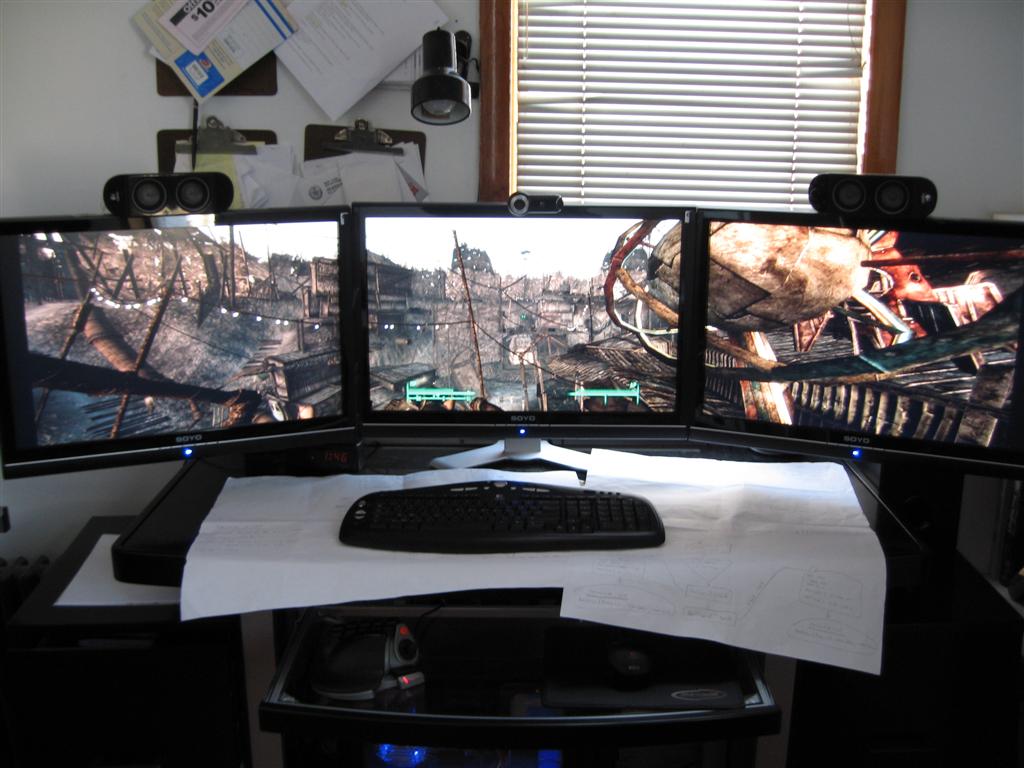
I just put together here my new glass to desk set. It has a lifted glass monitor area. Very nice. Just barely fit my 3 Dell 19" nonWS. In the future I will be looking to move to 22" wides at some point. There is no way they will fit on the top piece. And I really don't want to not use it as i like having the area under the monitors. Plus it looks good, lol...
So, I need a triple monitor stand that will work for my 3 19"s now. Then allow me to use it with 3 22" Wides in the future.
I'm sure im not the first searching for this so I figure i should be able to find something good.
The monitor stand question
-
HowlingBlue
- Posts: 49
- Joined: 26 Dec 2008, 21:45
The monitor stand question
Do you want a stand, or something that will mount on the wall or desk?
The only 2 common triple monitor stands I'm aware of are the Ergotron LX Triple, and the Ergotron DS100 Triple, both of which fit up to 21"...
So, they will work for your current monitors, but not the ones you're planning...
If you want something that will mount on your wall or desk, I really am not sure...
The only 2 common triple monitor stands I'm aware of are the Ergotron LX Triple, and the Ergotron DS100 Triple, both of which fit up to 21"...
So, they will work for your current monitors, but not the ones you're planning...
If you want something that will mount on your wall or desk, I really am not sure...
The monitor stand question
yeah, I checked ergotron... nothing for 22"
I'd prefer a stand, but would consider a wall mount.
I'd prefer a stand, but would consider a wall mount.
The monitor stand question
http://cgi.ebay.com/LCD-Flat-Panel-Monitor-TV-Desk-Arm-Mount-17-19-20-21-22_W0QQitemZ250298404948QQcmdZViewItemQQptZLH_DefaultDomain_0?_trksid=p3286.m20.l1116
I got two of these back in 2006 and they are great.
they are wellbuilt (and heavy though) even though it say it supports up to 22"
I have my 24" in it. it extends can extend out. so even if you desk can't fit 3x 22" theese will make it work because it extends out.
I got two of them left and Right.
[/img]
I got two of these back in 2006 and they are great.
they are wellbuilt (and heavy though) even though it say it supports up to 22"
I have my 24" in it. it extends can extend out. so even if you desk can't fit 3x 22" theese will make it work because it extends out.
I got two of them left and Right.
[/img]
The monitor stand question
Hi Roman,
I've got the Ergotron DS100 Triple Stand and find it pretty awesome although it could use a longer mounting pole or lift stand like the LX.
I've got three 22" Samsung 226Bw's hung on it at the moment, these technically shouldn't fit on it if you pay attention to the specs on the ergotron website. I've currently got the two outer monitors "tucked" in behind the centre monitor. From my curent sitting position this has two poitives and one negative:
Positives - This hides two of the bezel edges,
- This turns the monitors on more of an angle towards me so they are almost perpendicular to view.
Negative - because of the change in depth it sometimes appears screen items aren't lined up, however this is removed if the monitors are set at the correct viewing height. This is only a very minor thing and I do not notice it anymore.
I didn't really have much problem setting it up just needed another set of hands.
I've got the Ergotron DS100 Triple Stand and find it pretty awesome although it could use a longer mounting pole or lift stand like the LX.
I've got three 22" Samsung 226Bw's hung on it at the moment, these technically shouldn't fit on it if you pay attention to the specs on the ergotron website. I've currently got the two outer monitors "tucked" in behind the centre monitor. From my curent sitting position this has two poitives and one negative:
Positives - This hides two of the bezel edges,
- This turns the monitors on more of an angle towards me so they are almost perpendicular to view.
Negative - because of the change in depth it sometimes appears screen items aren't lined up, however this is removed if the monitors are set at the correct viewing height. This is only a very minor thing and I do not notice it anymore.
I didn't really have much problem setting it up just needed another set of hands.
The monitor stand question
Hi Roman,
I've got the Ergotron DS100 Triple Stand and find it pretty awesome although it could use a longer mounting pole or lift stand like the LX.
I've got three 22" Samsung 226Bw's hung on it at the moment, these technically shouldn't fit on it if you pay attention to the specs on the ergotron website. I've currently got the two outer monitors "tucked" in behind the centre monitor. From my curent sitting position this has two poitives and one negative:
Positives - This hides two of the bezel edges,
- This turns the monitors on more of an angle towards me so they are almost perpendicular to view.
Negative - because of the change in depth it sometimes appears screen items aren't lined up, however this is removed if the monitors are set at the correct viewing height. This is only a very minor thing and I do not notice it anymore.
I didn't really have much problem setting it up just needed another set of hands.
For you too fit the 22" do you have to tuck them behind or is that because you wanted it that way?
The monitor stand question
For you too fit the 22" do you have to tuck them behind or is that because you wanted it that way?
They will also fit right next to each other, I just tucked the outside monitors behind the central one to minimize bezel and turn them a couple more degrees towards me.
The 226BW monitors horizontal width is 615mm. The ergotron website lists 508mm as the largest horizontal width that should be able to fit.


The monitor stand question
Do you have to drill holes into the wall for the monitor mounts? I live in an apartment so that would probably be a no-no.
The monitor stand question
Do you have to drill holes into the wall for the monitor mounts? I live in an apartment so that would probably be a no-no.
Only if they are Wall Mounted arms or mounts. The ones we have been discussing are freestanding on your desk.
The monitor stand question
Hey you guys!
I may have found the perfect solution for screens up to 30"!!!
I don´t have any more time for now becauese I have to go to work and I am already late...
But here it is:
Link
I may have found the perfect solution for screens up to 30"!!!
I don´t have any more time for now becauese I have to go to work and I am already late...
But here it is:
Link
The monitor stand question
I received my Ergotron LX Triple a couple of days ago and mounted 3 22" Samsumg 2253LWs on it. The Ergotron LX Triple handled the monitors perfectly. I too have the outer monitors tucked behind the center monitor to save bezel space. Tilt/Pan/UpDown all work as expected.
One person can install all three monitors with a little planning. First, think about how you want to install the monitors. In my case, I knew I wanted to tuck the side monitors under the center monitor to save bezel space. I mounted a spacer with longer screws to the center monitor and shorter thumb screws without spacers on the remaining monitors. Next, I assembled the Ergotron LX Triple and placed it on my desk. I mounted the center monitor with the spacer in the middle of the arm. Tighten the monitor mount enough to hold the monitor but allow it to be moved if needed. Now loosen the arm to lower it. Open the access door and use the 4mm wrench to turn the adjusting screw counter clockwise to loosen the arm tension. No matter which way you face the stand, turn the screw counter clockwise to loosen and clockwise to tighten. Lower the arm. This action lowers the center of gravity of the stand and allows you to mount the side monitors with little risk of tilting the stand. Adjust, align and tighten the monitors to your taste and you're done.
One person can install all three monitors with a little planning. First, think about how you want to install the monitors. In my case, I knew I wanted to tuck the side monitors under the center monitor to save bezel space. I mounted a spacer with longer screws to the center monitor and shorter thumb screws without spacers on the remaining monitors. Next, I assembled the Ergotron LX Triple and placed it on my desk. I mounted the center monitor with the spacer in the middle of the arm. Tighten the monitor mount enough to hold the monitor but allow it to be moved if needed. Now loosen the arm to lower it. Open the access door and use the 4mm wrench to turn the adjusting screw counter clockwise to loosen the arm tension. No matter which way you face the stand, turn the screw counter clockwise to loosen and clockwise to tighten. Lower the arm. This action lowers the center of gravity of the stand and allows you to mount the side monitors with little risk of tilting the stand. Adjust, align and tighten the monitors to your taste and you're done.
The monitor stand question
I was thinking about getting the Ergotron LX Triple to mount 3 KDS K-22B2W given the narrowness of the bezels i was hopeing to butt them side to side (no overlapping). Since a couple of you seem to have experience LX Triple does that seem possible (it seems like the case, I just want to make sure)?
Who is online
Users browsing this forum: Bing [Bot] and 6 guests