The game has an ancient Persian setting, although the exact century is not revealed. In the game, the player assumes the role of the Prince, whose name is not revealed in the game. The Prince is accompanied by a girl named Elika, whom he met after a large sandstorm diverted him from his course and he ended up in a mysterious land. Players traverse many different environments using the Prince's acrobatic abilities to scale walls and even crawl on the ceilings. Throughout the journey, players combat various different enemies as they attempt to cleanse the land of corruption.
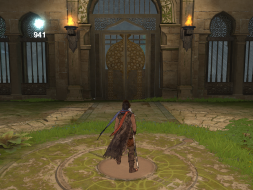
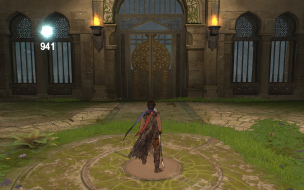
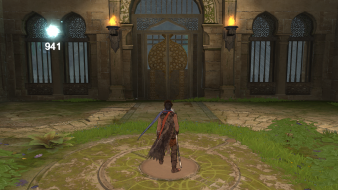
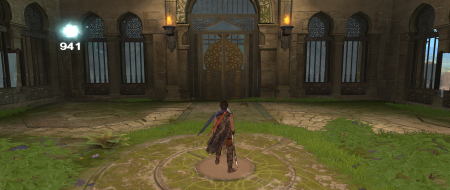
I'm actually not quite sure if what we have here is a case of HUD stretch. For instance, the light seed HUD element only gets bigger because the resolution got bigger, and it stretched both vertically and horizontally. But the health bar for enemies stretches a lot more horizontally than it does vertically.
What do you guys think?
EVGA GeForce GTX 970 SC ACX 2.0 3.5GB | 3 X LG Flatron 24EA53VQ in Nvidia Surround | Optoma HD20
Can you just show a 4:3 screenshot and a 16:10 screenshot that demonstrates HUD behavior? Your "overlay" picture doesn't mean anything to me - I have no clue what I'm looking at there.
Sorry about that. New ones are up. I'm pretty sure that the light seed element on the top left doesn't stretch but I'm pretty sure that the health bar does.
EVGA GeForce GTX 970 SC ACX 2.0 3.5GB | 3 X LG Flatron 24EA53VQ in Nvidia Surround | Optoma HD20
Triplehead does work, but it requires a registry edit solution. While its not that difficult to implement this solution; editing the registry is a touchy topic for many people. More info on that in the PoP thread in the Surround section.
I have texture settings to medium and the "use high resolution textures" box unchecked. To be honest at my resolution I can't tell the difference between medium textures and high. V-synch is disabled to get a frame boost; I do this because this is one of the few games that still manages to look good without V-synch on. Anti-aliasing is at 2x because anything higher than that would kill my framerate. With those settings I'm getting an average of about 35 FPS dipping down to the mid 20's when things get really intense.
EVGA GeForce GTX 970 SC ACX 2.0 3.5GB | 3 X LG Flatron 24EA53VQ in Nvidia Surround | Optoma HD20
From what i can see, it doesn't look like there's any "flawed" HUD stretch... though i do see why you've noted it.
As in it's just trying to do symmetrical pixel behaviour to make the health bar look like it "fits". i.e. same amount of space left on left and right of the health bar.
Game looks interesting though... might have to pick it up post-xmas
Saw this thread and asked to borrow my friend's PC version. Installed it earlier and the 2D element stretch is really annoying. Confirmed working in 1680x1050 and 1440x900.
edit: Silly moustache cursor.
1024x768 (4:3)
1280x720 (16:9)
1440x900 (16:10)
Forgot to take one in 1280x1024, but that one was stretched a bit too. Seems like they forgot the AR for non-4:3 and 16:9 resolutions.
Do you think you could just get a 16:10 shot that demonstrates the 16:10 HUD stretch? Also, the 2D screens stretching in 16:10 should be mentioned under singleplayer anomalies.
Grade: B
Coverage: 99.5%
HUD stretching and 2D screen stretching in 16:10 are blemishes.
The in-game HUD (the enemy heath bar and seed counter), scales not stretches as the size change is uniform. Scaling is not a flaw.
This one is more me just being picky about diction, but the full 2D screens (loading, map) in 16:10 are horizontally squashed versions of the 16:9 screens. Obviously this game was designed for 16:9 first and foremost (which is good by me :D )
The in-game HUD (the enemy heath bar and seed counter), scales not stretches as the size change is uniform. Scaling is not a flaw.
Except when it does not keep the original aspect ratio. Which is what is happening in the non-16:9 widescreen shots.
This one is more me just being picky about diction, but the full 2D screens (loading, map) in 16:10 are horizontally squashed versions of the 16:9 screens.
I actually had this discussion with others here about this a while back. It is basically a six of one situation (Hor compression vs. Vert stretching). Using stretching is more consistent with the site and seems less confusing then telling people the game is overcompensating for an aspect ratio that is not as wide as 16:9.
The in-game HUD (the enemy heath bar and seed counter), scales not stretches as the size change is uniform. Scaling is not a flaw.
Except when it does not keep the original aspect ratio. Which is what is happening in the non-16:9 widescreen shots.
They are in the original aspect ratio. They're uniformed scaled, they are not stretched or compressed out of shape. Here I took MobsterOO7's 4:3 shot, I uniformly resized it to the same width at the 16:9 shot (so the resultant size was 800x600) and pasted it in on the 16:9 shot for comparison. Apart from some minor fuzziness due to the scaling interpolation, you can see they're the same aspect.
Note I am talking specifically about the health bar and seed indicator that appears when in the main 3D portion of the game, not the full 2D screens which obviously are stretched out of aspect.
I actually had this discussion with others here about this a while back. It is basically a six of one situation (Hor compression vs. Vert stretching). Using stretching is more consistent with the site and seems less confusing then telling people the game is overcompensating for an aspect ratio that is not as wide as 16:9.
I just think it's worth making a distinction that the screens were made for 16:9 and it's actually thinner aspects that are incorrect. The connotation of "stretching" is that the screens were designed for 4:3 and are strechted to fit wider screens, this is not the case.