Freelancer

Detailed breakdowns of how games react to widescreen, ultra-wide, 4k and multi-mon
Post Reply
User avatar
Paradigm Shifter
Editors
Editors
Posts: 5706
Joined: 14 Oct 2003, 13:52

Freelancer

Post by Paradigm Shifter »


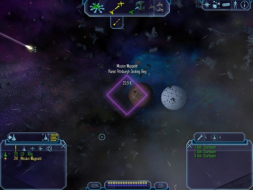
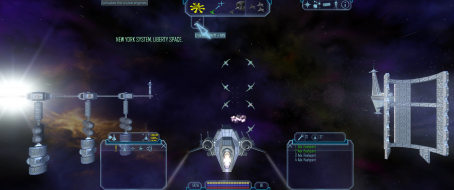
Widescreen Grade: Incomplete
Ultra-Widescreen Grade: Incomplete
Multi-monitor Grade: Unsupported
4k Grade: Incomplete

Read Full Detailed Report - Freelancer

Freelancer is a space trading and combat simulation video game developed by Digital Anvil and published by Microsoft Game Studios. It is a chronological sequel to Digital Anvil's Starlancer, a combat flight simulator released in 2000. The game was initially announced by Chris Roberts in 1999, and following many production schedule mishaps and a buyout of Digital Anvil by Microsoft, it was eventually released in March 2003.


4:3


16:9


21:9


3x1

Last edited by Paradigm Shifter on 23 Jul 2016, 07:09, edited 2 times in total.
Reason: Edit
User avatar
Paradigm Shifter
Editors
Editors
Posts: 5706
Joined: 14 Oct 2003, 13:52

Freelancer [Edit] [Partial] [Hor+]

Post by Paradigm Shifter »

After testing with a different display res: 1280x768, it's not a widescreen issue: it appears to be associated with Windows mishandling the 1400x1050 and 1680x1050 resolutions. :? So there may be light at the end of the tunnel for 1280x768/800 users and others. Just not WSXGA+ users. {sigh} :(

So basically, even with this, it still isn't all that great a fix... :cry:
metabo
Posts: 2
Joined: 07 Dec 2003, 18:00

Freelancer [Edit] [Partial] [Hor+]

Post by metabo »

doesn't work in 1280x800 also, top of the screen gets chopped off too.

:?
User avatar
Paradigm Shifter
Editors
Editors
Posts: 5706
Joined: 14 Oct 2003, 13:52

Freelancer [Edit] [Partial] [Hor+]

Post by Paradigm Shifter »

That sucks. I was hoping that a different res would act differently. *sigh*
metabo
Posts: 2
Joined: 07 Dec 2003, 18:00

Freelancer [Edit] [Partial] [Hor+]

Post by metabo »

sucks indeed. the opening cutscene looked real good(for such an aged game, anyway) and i was happy till it got to the screen where you can make selections. :evil:

damn.
User avatar
Paradigm Shifter
Editors
Editors
Posts: 5706
Joined: 14 Oct 2003, 13:52

Freelancer [Edit] [Partial] [Hor+]

Post by Paradigm Shifter »

Drop this file into your DATA folder inside the Freelancer directory after performing Paradigm Shifter's instructions on setting up the correct resolution. This file corrects the FOV and will show the menu buttons.

http://arunk.speedpost.net/cameras.ini

I have noticed that this might apply to the game only after starting a new game. Autosaves seem particularly affected.

EDIT : It is possible to mod the game to fully utilize the improved horizontal resolution by modifying the ini files inside the DATA folder (particularly those dealing with the HUD). You can decode them using a BINI decompressor available on http://www.lancersreactor.com.

Happy Freelancing!

Thanks to ImmortalZ for a way around. Haven't tested it yet (don't have access to my Freelancer disc at the mo...) but I intend to ASAP.
User avatar
Paradigm Shifter
Editors
Editors
Posts: 5706
Joined: 14 Oct 2003, 13:52

Update

Post by Paradigm Shifter »

Just got a helpful PM from cycopl.

The cameras.ini that you linked to in that thread worked, and the game is totally playable in widescreen after using it.

Playing in 1680x1050, the menus are still a little bit cut off while using the cameras.ini you provided, but I changed the "fovx = 61.504809977813375" to "fovx = 63.504809977813375" and the menus show up perfectly on the screen now while docked and while flying.

There is a little bug when loading a game though, the menus are off the screen and the only visible button is the "go to space" button. If you go into space, it fixes the menus in space, and they're visible once you dock again as well.

I just figured I'd give you this update so other people trying to play Freelancer in widescreen can get it to work properly.


Thanks man! :D
The_cranky_hermit
Insiders
Insiders
Posts: 3010
Joined: 07 Nov 2005, 04:16

Freelancer [Hack] [Vert -]

Post by The_cranky_hermit »

Note: This solution requires you to start a new game after changing some options. A variable is altered in this solution, but if you have saved any games before following this solution, the old variable will be stored in your saved game, and loading the saved game would make the game revert to the old variable. So be warned: in order to use this solution properly, you must start the game all over again.

First, run the game once, set your graphical options as you like them (except the resolution), and then quit.

Now, go to:
My DocumentsMy GamesFreelancer
and edit PerfOptions.ini.

Look for these lines:
[Display]
size= xxxx, xxx
color_bpp= 32
depth_bpp= 24

Change the numbers after "size" to set your resolution.

Next, go to gameDir and edit cameras.ini. It should look like gibberish. This is because the file is compressed. You could download a third party tool and manually decompress it (like I did), or you can take a shortcut and just paste these lines into it:

Code: Select all

[WinCamera]

   fovx = 54.431999
   
   [CockpitCamera]
   fovx = 70
   znear = 2.000000
   
   [ChaseCamera]
   fovx = 70
   
   [DeathCamera]
   fovx = 70


You'll want to change the first FOV value, or the game won't be playable. I recommend 63.36 for 16:10 resolutions and 68.88 for 16:9 resolutions.

Unfortunately, increasing the FOV values doesn't seem to affect standard gameplay, so gameplay is still vert -. But at least the game is now playable (the menu options don't get cut off).


1024x768, fovx = 54.431999


1280x800, fovx = 63.36
Oblivious
Posts: 2
Joined: 17 Jun 2008, 04:25

Freelancer [Edit] [Partial] [Hor+]

Post by Oblivious »

After successfully getting TW PGA06 to work in WS, I searched for a fix for Freelancer, and found the one below, which seems more comprehensive than the fix already listed on this forum.

Note: This fix only works properly after you either
A) Load a game from space. Loading a game from a planet doesn't show the GUI properly, but if you load from space, the GUI on the planet works from there on out. You can then immediately load from a planet save properly. The GUI works fine everywhere after that.

(or)
B) Load from a planet, then click the "launch" button (which is still slightly visible with the missing GUI), and return to planet or just reload the planet save again. The GUI works fine everywhere after that.

I don't know why that is, but it's a minor annoyance, works great after.

This seems to be a [Vert-] fix on the planets, but playing in-game is a [Hor+] fix with the GUI working for both once it's loaded "properly". Yeah it's imperfect, but anyways, here's the info...

-------------------------------------
Fix for widescreen.. copied.
-------------------------------------

To get freelancer working in widescreen in this case 1680x1050 do the following.

1) Go to my documents > my games > freelancer and open prefoptions.ini in notepad. At the bottom it will say [Display] and underneath size= change it to 1680, 1050 or what ever widescreen resolution you use. Note the space in between the 1680, 1050. Now save and exit.

2) Now go to c: > program files > microsoft games > freelancer > DATA . Once there open cameras.ini in notepad

Delete whats there and paste the following.

[WinCamera]
fovx = 63.504809977813375

[CockpitCamera]
fovx = 90
znear = 2.000000

[ChaseCamera]
fovx = 90

[DeathCamera]
fovx = 90

Now save and exit.
(Note, I used 68.887 for the wincamera value for my 16:9 1360x768 resolution)

3) Now go to c: > program files > microsoft games > freelancer > EXE . Once there open freelancer.ini in notepad.

At about the 9th line down it says size change it to size = 1680,1050 ,or what ever resolution you are using.
Now save and exit.

4) Now go c: > program files > microsoft games > freelancer > FONTS .Once there open fonts in to notepad. Now delete all whats there and paste the following.

[TrueType]
nickname = ButtonText
font = Agency FB
fixed_height = 0.038500

[TrueType]
nickname = PageHeader
font = Agency FB
fixed_height = 0.041000

[TrueType]
nickname = SubHeader
font = Agency FB
fixed_height = 0.034500

[TrueType]
nickname = ItemName
font = Agency FB
fixed_height = 0.021000

[TrueType]
nickname = ListText
font = Arial Unicode MS
fixed_height = 0.026000

[TrueType]
nickname = ToolTip
font = Arial Unicode MS
fixed_height = 0.026000

[TrueType]
nickname = Rollover
font = Arial Unicode MS
fixed_height = 0.022000

[TrueType]
nickname = HudSmall
font = Agency FB
fixed_height = 0.026000

[TrueType]
nickname = MissionObjective
font = Agency FB
fixed_height = 0.056000

[TrueType]
nickname = Normal
font = Agency FB
fixed_height = 0.031000

[TrueType]
nickname = NewsMission
font = Agency FB
fixed_height = 0.026000

[TrueType]
nickname = NewsTicker
font = Agency FB
fixed_height = 0.041000

[TrueType]
nickname = PlayerName
font = Arial Unicode MS
fixed_height = 0.021000

[TrueType]
nickname = TradePlayerName
font = Arial Unicode MS
fixed_height = 0.021000

[TrueType]
nickname = DebugText
font = FixedSys
fixed_height = 0.026000

[TrueType]
nickname = ConfirmPlayerText
font = Arial Unicode MS
fixed_height = 0.036000

[TrueType]
nickname = ConfirmText
font = Agency FB
fixed_height = 0.036000

[TrueType]
nickname = NavMap1600
font = Agency FB
fixed_height = 0.015000

[TrueType]
nickname = NavMap1024
font = Agency FB
fixed_height = 0.020000

[TrueType]
nickname = NavMap1280
font = Agency FB
fixed_height = 0.01900

[TrueType]
nickname = NavMap800
font = Agency FB
fixed_height = 0.02300


Now save and exit.

Now in the same folder open rich_fonts in to notepad and delete and paste the following.

[TrueType]
font = 0, Arial Unicode MS, 18
font = 1, Agency FB, 26
font = 2, Arial Unicode MS, 22
font = 3, Agency FB, 24
font = 4, Agency FB, 96
font = 5, Agency FB, 20
font = 6, Agency FB, 30
font = 7, Agency FB, 18

[Style]
name = STYLE_CONSOLE
font = 0
bold = false
italic = false
underline = false
color = 255, 255, 255

[Style]
name = STYLE_DIALOG
font = 1
bold = false
italic = false
underline = false
color = 135, 195, 224

[Style]
name = STYLE_DIALOG_SMALL
font = 5
bold = false
italic = false
underline = false
color = 135, 195, 224

[Style]
name = STYLE_BUTTON
font = 6
bold = false
italic = false
underline = false
color = 135, 195, 224

[Style]
name = STYLE_LOCTABLE
font = 0
bold = false
italic = false
underline = false
color = 135, 195, 224

[Style]
name = STYLE_LOCTABLE_SELECT
font = 0
bold = false
italic = false
underline = false
color = 245, 234, 82

[Style]
name = STYLE_LOCTABLE_INACTIVE
font = 0
bold = false
italic = false
underline = false
color = 182, 182, 182

[Style]
name = STYLE_SMALL_HEADER
font = 5
bold = false
italic = false
underline = false
color = 135, 195, 224

[Style]
name = STYLE_SMALL_HEADER_ACTIVE
font = 5
bold = false
italic = false
underline = false
color = 245, 234, 82

[Style]
name = STYLE_SUBSUBTITLE
font = 1
bold = false
italic = false
underline = false
color = 135, 195, 224

[Style]
name = STYLE_TITLE
font = 3
bold = false
italic = false
underline = false
color = 135, 195, 224
justify = center

[Style]
name = STYLE_ERROR
font = 0
bold = false
italic = false
underline = false
color = 191, 29, 29

[Style]
name = STYLE_NN_AGENCY
font = 5
bold = false
italic = false
underline = false
color = 135, 195, 224

[Style]
name = STYLE_PRIVATE
font = 0
bold = false
italic = false
underline = false
color = 59, 191, 29

[Style]
name = STYLE_CONSOLE_SENDER
font = 2
bold = false
italic = false
underline = false
color = 0, 255, 0


Now save and exit.

Now you are all done any ready to play in 1680x1050 ( best for either 20 or 22" wide). Note the options will state the wrong resolution but it will be in 1680x1050.

Also NOTE , for this to work when u load in to game u must enter in to space once for it to work ie just lift off. Not sure why this is it just is.

Sources:
http://www.gaming-veterans.com/index.php?name=PNphpBB2&file=viewtopic&p=10983
http://www.widescreengamingforum.com/node/

___________
haldolium
Posts: 5
Joined: 11 May 2011, 17:31

Re: Freelancer

Post by haldolium »

Hey!

Is there any chance to get the two information windows at the bottom actually aligned to the sides?

The method is working for me, but I found myself having the info screens minimized all the time since they're rather distracting when they're not at the edge of the screen.
Friteza
Posts: 6
Joined: 27 Aug 2015, 20:11

Re: Freelancer

Post by Friteza »

I'm actually surprised no one on WSGF touched this game for all these years.

:!: All solutions for widescreen (both in the master game list and in this forum) are quite outdated. :!: Hudshift.dll, jflp.dll, cameras.ini and prefoptions.ini changes are bound to be wrong on resolutions other than those depicted in the example (1680x1050).

The solution to every widescreen problem for Freelancer is to download Jason's Freelancer Patch.
It contains BOTH the unofficial freelancer patch 1.4 AND the quickfix. Along with all those it contains the ability to select every widescreen option inside the game's video options. It incorporates all correct HUD placement FOR ALL widescreen options it provides, negating to change anything yourself and also fixes the problematic dropdown of the top bar if you save outside a planet.

You can find this patch at http://adoxa.altervista.org/freelancer/index.html. Install Freelancer, install the official v1.1 patch and then install the JFLP patch and you're good to go.

I REPEAT:
It would be quite helpful to update Freelancer's grade, solution, and resulting images in the game's page in the master game list. At least add the JFLP patch on top of the solution already presented.
Amon Amarth
I Donated
I Donated
Posts: 513
Joined: 18 Jul 2007, 04:19

Re: Freelancer

Post by Amon Amarth »

Friteza wrote:I'm actually surprised no one on WSGF touched this game for all these years.

:!: All solutions for widescreen (both in the master game list and in this forum) are quite outdated. :!: Hudshift.dll, jflp.dll, cameras.ini and prefoptions.ini changes are bound to be wrong on resolutions other than those depicted in the example (1680x1050).

The solution to every widescreen problem for Freelancer is to download Jason's Freelancer Patch.
It contains BOTH the unofficial freelancer patch 1.4 AND the quickfix. Along with all those it contains the ability to select every widescreen option inside the game's video options. It incorporates all correct HUD placement FOR ALL widescreen options it provides, negating to change anything yourself and also fixes the problematic dropdown of the top bar if you save outside a planet.

You can find this patch at http://adoxa.altervista.org/freelancer/index.html. Install Freelancer, install the official v1.1 patch and then install the JFLP patch and you're good to go.

I REPEAT:
It would be quite helpful to update Freelancer's grade, solution, and resulting images in the game's page in the master game list. At least add the JFLP patch on top of the solution already presented.


I believe I attempted this solution (or something similar) a couple of years ago for NV Surround. If I recall correctly, the game would play in 5760x1200, but the 3rd person camera was non-functional, as I was unable to see my own ship, essentially forcing the game to be played in first person. Has this issue been fixed?
Friteza
Posts: 6
Joined: 27 Aug 2015, 20:11

Re: Freelancer

Post by Friteza »

Personally, I tested the game on resolutions (on single monitors) ranging from 1152x768 to 2560x1600 and the HUD, turret view, 3rd person, text and topbar worked flawlessly. Certainly not what the screenshots in this thread OP shows.

I can't tell for NV surround/Eyefinity (haven't got multiple monitors), but if my resolutions have an automatic arrangement on cameras (cameras.ini), interfaces (HUD.ini, buttontextures.ini, etc) and other thinks (maybe managed through the custom .dll that links those fixes together), then I suppose you're good to go.

I'm not a 3rd person flyer myself (prefer to take the seat inside a ship) but i use 3rd person for voyages, mining and transport. I really can't tell if there will be any distortion to the turret/3rd person view, but I can say with certainty the HUD, text, UI, map, gauges, main menu, buttons and comm video with other pilots won't have a problem because now they are aligned correctly to each resolution and not by changing an .ini to work for one (tested with my resolutions).
I can't provide any screenies right now, but I installed Freelancer for a LAN party on 3 laptops and 2 desktops having various widescreen resolutions.

Forgot to say: Using this patch on multiplayer sessions (either vanilla or modded) may be considered cheating and result in bans.. Most mods and servers check for file tampering.
Strata
Posts: 4
Joined: 13 Nov 2015, 17:16

Re: Freelancer

Post by Strata »

Anyone have this game working on 21:9 aspect?

Edit: Got it working with the Discovery Mod

Photo Proof:

Freelancer 21:9
Freelancer 21:9
Freelancer in 21x9.png (4.8 MiB) Viewed 3729 times
Amon Amarth
I Donated
I Donated
Posts: 513
Joined: 18 Jul 2007, 04:19

Re: Freelancer

Post by Amon Amarth »

Strata wrote:Anyone have this game working on 21:9 aspect?

Edit: Got it working with the Discovery Mod

Photo Proof:

Freelancer in 21x9.png


How did you start a regular single player game in discovery mod? Doesn't seem to start the game normally.

Also noticed how the game's cutscenes are stretched/cropped really badly. Anyway to get the game to keep the cutscenes from getting stretched?

Image
Post Reply

Who is online

Users browsing this forum: Google [Bot] and 3 guests