
Star Wars: Empire at War

Detailed breakdowns of how games react to widescreen, ultra-wide, 4k and multi-mon
Post Reply
bigcheda
Posts: 3
Joined: 03 Jan 2006, 08:19

Star Wars: Empire at War

Post by bigcheda »


Widescreen Grade: B
Ultra-Widescreen Grade: Incomplete
Multi-monitor Grade: Unsupported
4k Grade: Incomplete

Read Full Detailed Report - Star Wars: Empire at War

Star Wars: Empire at War is a 2006 real-time strategy (RTS) game developed by Petroglyph Games and published by LucasArts. Set between Episode III and Episode IV, it focuses on the fledgling struggle between the Empire and the Rebels. It uses Petroglyph's game engine Alamo. In October 2006, an expansion entitled Star Wars: Empire at War: Forces of Corruption was released.

There are three game modes: storyline-based Campaign, Galactic Conquest and Skirmish. Battles can take place on a planet (land battle) or above the planet (space battle). Land battles are fought with infantry and ground vehicle units, while space battles are fought with starfighter squadrons and large spacecraft.
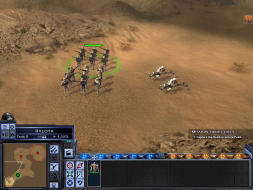


4:3
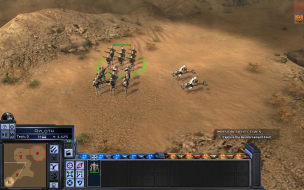

16:10
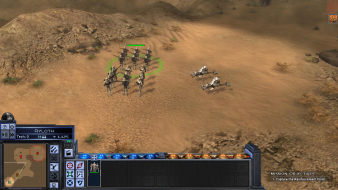

16:9
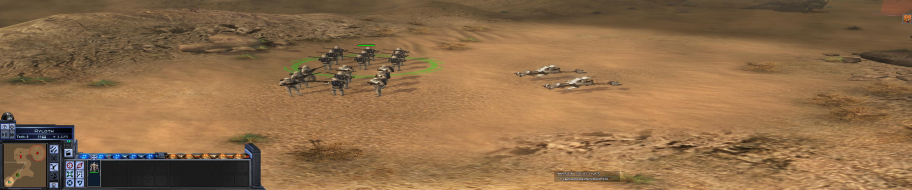

3x1

Last edited by bigcheda on 27 Apr 2014, 07:26, edited 3 times in total.
Reason: Edit
User avatar
Paddy the Wak
Editors
Editors
Posts: 3436
Joined: 27 Jul 2004, 17:42

Solution: Star Wars : Empire at War Demo [Partial]

Post by Paddy the Wak »

A little more info ...

Choose your desired resolution in the Video Options ...
You can also select Widescreen ... although that then cuts down the view ... :cry:

--------------------------------------------------
Click on the thumbnail to see larger shot ...

4:3 Widescreen OFF ... when viewed on a 16:10 screen it looks stretched ... :(


16:10 Widescreen OFF ... looks stretched but you get the whole view at the right res ... :)


4:3 with Widescreen ON ... when viewed on a 16:10 screen it looks slightly squashed in from the sides and it has a cut down view... :(


16:10 with Widescreen ON ... looks slightly squashed in from the sides and it has a cut down view ... :(


My conclusion ... use the 16:10 res Widescreen OFF ... as it gives the most complete view (stretched) and it is better than widescreen ON as that view is cut down and looks slightly squashed in from the sides.
User avatar
skipclarke
Founder
Founder
Posts: 7358
Joined: 13 Oct 2003, 05:00

Solution: Star Wars : Empire at War Demo [Partial]

Post by skipclarke »

So, would that make it Vert - ? I went back in and added the [Partial] tag.
User avatar
Paddy the Wak
Editors
Editors
Posts: 3436
Joined: 27 Jul 2004, 17:42

Solution: Star Wars : Empire at War Demo [Partial]

Post by Paddy the Wak »

It's hard to say as both ways of running the game 16:10 with WS or 16:10 without WS have problems ... [Partial] sounds about right though.

16:10 with WS ... it is [FOV-V] and [FOV-H] ... so it is zoomed in and looks squashed in from the sides ... :? ... I think because the WS option is for 16:9 screens.

16:10 without WS ... has the full view but it looks stretched ... but looks the better of the two options to me.
User avatar
scavvenjahh
Editors
Editors
Posts: 3424
Joined: 06 Mar 2008, 17:20

Star Wars: Empire At War [Patch][Partially Hor+]

Post by scavvenjahh »

We already have some limited info about this game...
Confirmed Game Solutions » Solution: Star Wars : Empire at War Demo [Partial]
Surround & Eyefinity Media » Star Wars: Empire at War + Expansion
...but seeing how older threads are incomplete or outdated, and how ws support in EAW is limited, yet complex, I decided to write a new (and hopefully definitive) solution from scratch.

Method:
The game supports all res's natively, simply select your desired resolution and tick the Widescreen checkbox.
Display settings are saved in the registry under HKCUSoftwarePetroglyphStarWarsProfilesProfile0Player

Screen change:
Land mode: 16:9 is Hor+, all other ARs are 16:9 squished/stretched.
Space mode: 16:9 is vert-, all other ARs are 16:9 squished/stretched.

Current version is 1.05, partial Hor+ solution was introduced in v1.02.

Further details and dead ends:
Some limited modding of the cameras is possible, but will not really improve support. All moddable FOV values refer to a vertical FOV, so all you can do is "dolly out" and make the game look even worse...
To fiddle with the VFOV, open the following file in FinalBIG 0.4+:
C:Program FilesLucasArtsStar Wars Empire at WarGameDataDataConfig.meg (make a backup copy!)
and edit DATAXMLTACTICALCAMERAS.XML

In the registry, there's a WidescreenAspectRatio key in
HKCUSoftwarePetroglyphStarWarsProfilesProfile0Player

but even if some genius can find the right value for 16:10 or Surround, it will only help in land combat mode... The rest will remain Vert-.
Post Reply

Who is online

Users browsing this forum: Semrush [Bot] and 8 guests



