
Ok,
decided to ditch my nvidia GFX cards and move over to ATI.
I need something explaining please.
I currently use the THTG setup via DVIs to 3 24" dell monitors.
Question is someone told me that the 5870 series cards dont have need for the THTG unit?
also they have said the card has only 2 outputs therefore only 2 monitors can be used?...
Is this correct?, do I need my THTG unit?
help! :?
Eyefinity help 3 monitors
-
Dave Baumann
- Posts: 245
- Joined: 13 Sep 2009, 15:53
Eyefinity help 3 monitors
What models are the Dell panels?
-
bubblebobble
- Posts: 9
- Joined: 24 Oct 2009, 13:54
Eyefinity help 3 monitors
hi,
they are dell e248wfp
they are dell e248wfp
Eyefinity help 3 monitors
hi,
they are dell e248wfp
Unfortunatly those monitors only have DVI and VGA connectors. The Eyefinity 5870 (and the 5850, 5700 series) cards have only two DVI connectors, one Displayport connector and one HDMI connector. To get all three monitors running in Eyefinity (which equates roughly to TH2Go) you will need an "Active" Displayport to DVI adapter (about 100.00). If your monitors had native Displayport support (a Displayport..er...port) you would not need the additional 'active' displayport adapter.
I am putting "'s around the word active because the much cheaper passive Displayport to DVI adapters will not work. Read through the threads here, this question is anwered adnauseum and far better than I can with my limited understanding of the electronics involved ;)
Hope this helps
-
alxnet2003
- Posts: 36
- Joined: 23 Oct 2009, 00:49
Re: Eyefinity help 3 monitors
also they have said the card has only 2 outputs therefore only 2 monitors can be used?...
Is this correct?, do I need my THTG unit?
help! :?
The cards out on the market now have three outputs. Unfortunately, one of the outputs MUST use displayport. So you've got two options:
DVI+HDMI+Displayport
DVI+DVI+Displayport
Either case, you need to use the displayport so if your monitor doesn't have it, then you need to get an ACTIVE displayport to dual DVI converter. These are around $100.
Problem is nobody has any in stock. Dell keeps delaying my order and Amazon has a two to four week wait on a similar unit. My solution was to buy the Apple version of it, which seems to be in stock just about everywhere. Problem with this is you also need a mini-displayport female to regular-displayport male adapter. Sounds complicated but this is the only solution that you can buy right now.
-
Greg Ellis
- Posts: 26
- Joined: 14 Nov 2009, 18:11
Eyefinity help 3 monitors
If you don't mind running one of your screens in VGA, the DP to VGA adapters are considerably cheaper than the active DP to Dual Link DVI. $35-40 or so, IIRC.
I've tried this with some Viewsonic 16x10 displays (running two of them via DVI, and the third one on a DP to VGA adapter) and it worked out pretty well.
Converting digital to analog and then back to digital isn't exactly desirable, but the IQ didn't seem to suffer too much.
I've tried this with some Viewsonic 16x10 displays (running two of them via DVI, and the third one on a DP to VGA adapter) and it worked out pretty well.
Converting digital to analog and then back to digital isn't exactly desirable, but the IQ didn't seem to suffer too much.
-
suiken_2mieu

- Insiders

- Posts: 2351
- Joined: 20 Aug 2009, 04:20
- Location: Virginia
- Contact:
Eyefinity help 3 monitors
If you don't mind running one of your screens in VGA, the DP to VGA adapters are considerably cheaper than the active DP to Dual Link DVI. $35-40 or so, IIRC.this wont work as the Displayport port on the 5870 dosn't have the ability to make a timing signal that all other standards require.
I've tried this with some Viewsonic 16x10 displays (running two of them via DVI, and the third one on a DP to VGA adapter) and it worked out pretty well.
Converting digital to analog and then back to digital isn't exactly desirable, but the IQ didn't seem to suffer too much.
System Core: | Intel Core i5-2500K + ASUS P8Z68-V + 16GB Corsair XMS3 DDR3 1333 MHz | Win7 x64 | MSI R7970 Lightning 3GB [1105/1400] |
Display: | 3 x Dell Ultrasharp 3007WFP-HC @ 7680x1600 | Dell u3011 |
Display: | 3 x Dell Ultrasharp 3007WFP-HC @ 7680x1600 | Dell u3011 |
-
Greg Ellis
- Posts: 26
- Joined: 14 Nov 2009, 18:11
Eyefinity help 3 monitors
this wont work as the Displayport port on the 5870 dosn't have the ability to make a timing signal that all other standards require.
Actually it works just fine.
All of the DP to VGA adapters contain active circuitry - they have to, since the signals are completely incompatible otherwise.
Some are probably better quality than others, some may be better at passing EDID info from the screen back to the graphics adapter, but they all have the basic guts required to make this go.
You'll notice that the DP to VGA adapters cost about $35-40 too - that's quite a lot more than you would spend for a passive DP to DVI adapter (the kind that doesn't work for this purpose).
-
BHawthorne

- Insiders
- Posts: 1640
- Joined: 06 May 2006, 12:46
Eyefinity help 3 monitors
[quote]this wont work as the Displayport port on the 5870 dosn't have the ability to make a timing signal that all other standards require.
Actually it works just fine.
All of the DP to VGA adapters contain active circuitry - they have to, since the signals are completely incompatible otherwise.
Some are probably better quality than others, some may be better at passing EDID info from the screen back to the graphics adapter, but they all have the basic guts required to make this go.
You'll notice that the DP to VGA adapters cost about $35-40 too - that's quite a lot more than you would spend for a passive DP to DVI adapter (the kind that doesn't work for this purpose).
Do you know this by experience and can show us pictures of it running or are you just guessing it will work without real world experimentation? Just guessing is what caused all the original passive DP adapter fiasco.
Brad Hawthorne
Product Manager
Nthusim Pty. Ltd. | www.nthusim.com
Product Manager
Nthusim Pty. Ltd. | www.nthusim.com
-
Greg Ellis
- Posts: 26
- Joined: 14 Nov 2009, 18:11
Eyefinity help 3 monitors
Do you know this by experience and can show us pictures of it running or are you just guessing it will work without real world experimentation? Just guessing is what caused all the original passive DP adapter fiasco.
Yes, by experience; I'm not guessing.
I can't speak to the quality of all of the brands of adapter - there is likely a considerable range of quality and functionality out there, as I mentioned already.
It's not what I would call an ideal solution, but it certainly opens the door to those who don't mind running VGA.
Heck, you even could run three CRT's if you really wanted to - the DVI outs on the 5xxx boards should be able to drive a CRT through a standard DVI-I to VGA adapter. Some of the board vendors might even include those in the box. I've never tried CRT's, though. Only panels. And never 3 x VGA, only 2 x DVI + 1 x VGA. 5040x1050 in total.
Sorry, it never occurred to me to take pictures.
If I happen to get that system put back together with the same screens, I'll shoot a few pics and post them. Right now it's running 2 x DVI and 1 x DP on Dell 2408's.
-
BHawthorne
- Insiders
- Posts: 1640
- Joined: 06 May 2006, 12:46
Eyefinity help 3 monitors
[quote]Do you know this by experience and can show us pictures of it running or are you just guessing it will work without real world experimentation? Just guessing is what caused all the original passive DP adapter fiasco.
Yes, by experience; I'm not guessing.
I can't speak to the quality of all of the brands of adapter - there is likely a considerable range of quality and functionality out there, as I mentioned already.
It's not what I would call an ideal solution, but it certainly opens the door to those who don't mind running VGA.
Heck, you even could run three CRT's if you really wanted to - the DVI outs on the 5xxx boards should be able to drive a CRT through a standard DVI-I to VGA adapter. Some of the board vendors might even include those in the box. I've never tried CRT's, though. Only panels. And never 3 x VGA, only 2 x DVI + 1 x VGA. 5040x1050 in total.
Sorry, it never occurred to me to take pictures.
If I happen to get that system put back together with the same screens, I'll shoot a few pics and post them. Right now it's running 2 x DVI and 1 x DP on Dell 2408's.
So, you have an actual physical DP to analog VGA adapter and a 5000-series card and can show us? Forgive my cynical nature but I only trust pictures, not talk. A bunch of people got screwed over by the passive adapter fiasco with the same line of talk. Only pictures proved otherwise. Besides I'd like to see it visually documented so people will know how to hook it up and what the adapters look like that they should be looking for. :wink:
Brad Hawthorne
Product Manager
Nthusim Pty. Ltd. | www.nthusim.com
Product Manager
Nthusim Pty. Ltd. | www.nthusim.com
-
Greg Ellis
- Posts: 26
- Joined: 14 Nov 2009, 18:11
Eyefinity help 3 monitors
Yes, I really do. Gimme some time to track down the camera and all the bits and pieces for this. Any particular game you want to see on the screens?
-
BHawthorne
- Insiders
- Posts: 1640
- Joined: 06 May 2006, 12:46
Eyefinity help 3 monitors
Yes, I really do. Gimme some time to track down the camera and all the bits and pieces for this. Any particular game you want to see on the screens?
Thanks, it'll be helpful to document for VGA connections. I don't think it's been documented at all here or in the working adapters thread. I have no preference in games, just seeing that it works would be great.
Brad Hawthorne
Product Manager
Nthusim Pty. Ltd. | www.nthusim.com
Product Manager
Nthusim Pty. Ltd. | www.nthusim.com
Eyefinity help 3 monitors
If you don't mind running one of your screens in VGA, the DP to VGA adapters are considerably cheaper than the active DP to Dual Link DVI. $35-40 or so, IIRC.
I've tried this with some Viewsonic 16x10 displays (running two of them via DVI, and the third one on a DP to VGA adapter) and it worked out pretty well.
Converting digital to analog and then back to digital isn't exactly desirable, but the IQ didn't seem to suffer too much.
Hi Greg,
This is great news. So am I right in thinking that I can get my two VGA LCDs and one HDMI/DVI LCD hooked up using this method?
Also do you have experience of running the LCDs indifferent resolutions when just in Extended Desktop mode? Can the ATI card handle that?
Cheers,
Menno
-
TexasTango
- Posts: 30
- Joined: 24 Nov 2009, 19:08
Displayport to VGA Adapter Works with 3 Monitor Eyefinity
[quote]Yes, I really do. Gimme some time to track down the camera and all the bits and pieces for this. Any particular game you want to see on the screens?
Thanks, it'll be helpful to document for VGA connections. I don't think it's been documented at all here or in the working adapters thread. I have no preference in games, just seeing that it works would be great.
I'd like to confirm that the displayport to VGA adapter does work.
Apparently it is active without the need for the additional USB power.
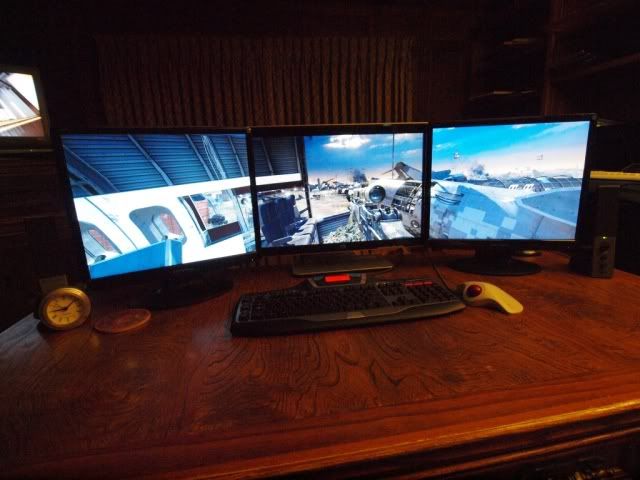
I have a 22" widescreen, flanked by two square 19" (pic taken with wide-angle lens, so makes the 19" monitors look widescreen, but they're not).
The resolution is 3840x1024.
When I first hooked it up, I connected the displayport/VGA adapter to one of the 19", and it did not work. When hooked to the 22", it does.
I bought the adapter from Directron. I live close to Houston, so walked in and picked it up. I was skeptical, but for less than $23, I gave it a shot.
Hope this helps.
This is the adapter:
http://www.directron.com/apdpvga.html
Here's my setup:
-
Greg Ellis
- Posts: 26
- Joined: 14 Nov 2009, 18:11
Eyefinity help 3 monitors
Hi Greg,
This is great news. So am I right in thinking that I can get my two VGA LCDs and one HDMI/DVI LCD hooked up using this method?
Sure, that should work. I'd hookup the DVI monitor to one of the DVI jacks; use a DVI-I-to-VGA adapter on the other, and pick up a a DP to VGA dongle for your third screen.
I've heard some issues with resolution limits on some of the DP to VGA adapters, so I'm really not sure what to recommend. The one I tried is long gone now - very popular item in my circle, now that folks realize what is possible with that. I'm hoping to get another shortly.
Also do you have experience of running the LCDs indifferent resolutions when just in Extended Desktop mode? Can the ATI card handle that?
Sure; pretty much any card can do that, AFAIK.
Eyefinity help 3 monitors
Thanks, that is exactly what I was hoping to do. I already have a DVI-to-VGA connector, and have just ordered a DP-to-VGA one from Ebay as I'min the UK and that seems the cheapest place.
The Ebay one has a similar spec as the one TexasTango ordered. Odd that the 19" screen connection didnt work, but the 22" did.
I'll report back when I receive my gear.
Cheers,
Menno
The Ebay one has a similar spec as the one TexasTango ordered. Odd that the 19" screen connection didnt work, but the 22" did.
I'll report back when I receive my gear.
Cheers,
Menno
-
TexasTango
- Posts: 30
- Joined: 24 Nov 2009, 19:08
Eyefinity help 3 monitors
.... The Ebay one has a similar spec as the one TexasTango ordered. Odd that the 19" screen connection didnt work, but the 22" did. ....
Rock and roll!
What happened when you hooked the adapter to one of the side screens?
Did Windows or the CCC see the monitor at all?
I couldn't remember what it said exactly, so I switched the cables back.
Yes, in CCC "Desktop and Displays", all three monitors will show up with a "1" - Duplicated.
However, if connected to the VGA input of the 19", and you try and expand to 3 monitors, you get this error message from CCC:
"Displayport Link Failure"
"The system detected a link failure and cannot set the requested resolution and refresh rate on your displayport display.
Your display might not support the requested resolution or there may be an issue with the cable connecting the disply to your computer."
Remember, it works perfectly if the displayport/VGA adapter is connected to the VGA input of the 22" higher resolution monitor.
Who is online
Users browsing this forum: No registered users and 5 guests