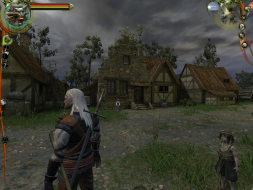
Set in a world created by best-selling Polish author Andrzej Sapkowski, The Witcher combines spectacular action and an intriguing storyline. You are aWitcher, a warrior who has been trained to fight since childhood, subjected to mutations and trials that have transformed you. You earn a living killing monsters, and are a member of a brotherhood founded long ago to protect people from werewolves, the undead, and a host of other beasts. The game uses advanced graphics and physics systems for a high-powered blend of brutal action, complex RPG options and character configuration, and sweeping storytelling.The game uses the latest Aurora engine from Bioware (Neverwinter Nights).
Hello everyone (thanks for the very informative forum)
The Witcher works great on TH2Go (in game) but I dont seem to be able to see the films and animations anymore (I see only a small portion, or nothing at all and I can only hear the dialogs)...
Is there something I am missing, a setting or a tweak that could make this work in TH2Go?
We all wish it was that simple. Unfortunately this flaw is with the game engine and until either racer or dopefish have a look we will be waiting on the games developing studio; who will probably never fix it because they already released a huge patch for it last year.
EVGA GeForce GTX 970 SC ACX 2.0 3.5GB | 3 X LG Flatron 24EA53VQ in Nvidia Surround | Optoma HD20
Hi guys, I just started playing this game on an Eyefinity setup. Everything seems to work fine except for the cut scenes. I still get sound and subtitles, but the animation freeze at the first frame. The game returns to normal once the cut scene is over. I think it's similar or same as the problem JEFX is having. Anyone have a fix?
Just wanted to share a workaround I found. Setting the Lighting Quality to "Low" allows the cut-scenes to play correctly. Not ideal, but better than no cut-scenes.
So, if the cut-scenes were still fubarred on the portrait setup, then it wouldn't be an aspect ratio issue, unless it just doesn't like anything except perfect 16:9 or 16:10 for widescreen (since 3x1-P is damn close to 16:9.5). It must be a super-high res issue.
Can you try rotating your panels and testing this solution in 3x1-L?
So, if the cut-scenes were still fubarred on the portrait setup, then it wouldn't be an aspect ratio issue, unless it just doesn't like anything except perfect 16:9 or 16:10 for widescreen (since 3x1-P is damn close to 16:9.5). It must be a super-high res issue.
Can you try rotating your panels and testing this solution in 3x1-L?
From what I read on various forums, the only two workarounds that consistently work are to lower Lighting Quality to "Low", or to run in a 16:9 (not 16:10) aspect ratio. 3x Portrait is 15:8 unfortunately. I tried various resolutions available to me (down to 1800x800), and got the same problem.
I can't do landscape because I literally don't have the space for it. But