


Its a blast to play Far Cry 2 and many other games on triplehead using the Nvidia 3D Vision Discover, the weapons and trees seem to be actually "leaving" the screen, the immersion is simply amazing, is anyone else enjoying this "mix" ? 8)
http://www.nvidia.com/object/3D_Vision_Discover_Main.html
Triplehead2Go + Nvidia 3D Discover - anyone ?
-
atledreier
- Posts: 40
- Joined: 24 Jul 2007, 06:47
Triplehead2Go + Nvidia 3D Discover - anyone ?
I had the eDimensional shutter glasses a while back. Too bad the drivers suck and you need VGA. it was really cool when it worked.
Triplehead2Go + Nvidia 3D Discover - anyone ?
I have some eDimensional glasses as well. The effect is neat but more often then not lots of graphics just don't work well with it, especially any game that uses 2d elements for huds and etc mixed in with the 3d.
I've read these eDimensional glasses work with some dlp projectors but I'm not trying it with mine till I know for sure I don't risk damaging the projector.
I've read these eDimensional glasses work with some dlp projectors but I'm not trying it with mine till I know for sure I don't risk damaging the projector.
Triplehead2Go + Nvidia 3D Discover - anyone ?
I can't get it working with triple-wide resolutions, the OSD just tells me it doesn't have enough video RAM to apply the effect and switches it off.
Triplehead2Go + Nvidia 3D Discover - anyone ?
wtf don't u need 120hz to run this 3d thing that nvidia uses?
how can u use it with triplehead?
please explain
thanks
how can u use it with triplehead?
please explain
thanks
-
atledreier
- Posts: 40
- Joined: 24 Jul 2007, 06:47
Triplehead2Go + Nvidia 3D Discover - anyone ?
you don't NEED it, but it gets better. The framerate is split between the viewpoints, so you effectively have 28,5Hz refresh.
Triplehead2Go + Nvidia 3D Discover - anyone ?
you don't NEED it, but it gets better. The framerate is split between the viewpoints, so you effectively have 28,5Hz refresh.
Yes, and in fact its not that good after all, lol i got a bit tired of the effect. :lol:
Triplehead2Go + Nvidia 3D Discover - anyone ?
why does it say only works on 120 hz lcds then?
so ur telling me i can run this 3d thing with a pair of cheap red/green glasses with my gtx 260+ and on triplehead?
if so i'm gonna get a cheap pair of 3d glasses...
thanks
so ur telling me i can run this 3d thing with a pair of cheap red/green glasses with my gtx 260+ and on triplehead?
if so i'm gonna get a cheap pair of 3d glasses...
thanks
Triplehead2Go + Nvidia 3D Discover - anyone ?
why does it say only works on 120 hz lcds then?
so ur telling me i can run this 3d thing with a pair of cheap red/green glasses with my gtx 260+ and on triplehead?
if so i'm gonna get a cheap pair of 3d glasses...
thanks
Yes, you can, since you have a nvidia GPU, youll need some glasses like these (blue/red):
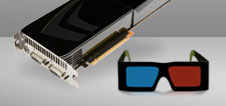
Also 186.18 driver or higher (im running 190.56 here).
Triplehead2Go + Nvidia 3D Discover - anyone ?
would this do?
http://cgi.ebay.com/New-one-Pairs-Red-Blue-3D-Glasses-3-D-Plastic-Framed_W0QQitemZ260464658874QQcmdZViewItemQQptZUK_Health_Beauty_VisionGlasses_Lenses_SM?hash=item3ca4e749ba&_trksid=p3911.c0.m14#ht_2527wt_1165
or is that too cheap? lol!
i remember when i use to have those 3d glasses to view pics and you couldn't really see any other colours because of the blur/red glasses?
http://cgi.ebay.com/New-one-Pairs-Red-Blue-3D-Glasses-3-D-Plastic-Framed_W0QQitemZ260464658874QQcmdZViewItemQQptZUK_Health_Beauty_VisionGlasses_Lenses_SM?hash=item3ca4e749ba&_trksid=p3911.c0.m14#ht_2527wt_1165
or is that too cheap? lol!
i remember when i use to have those 3d glasses to view pics and you couldn't really see any other colours because of the blur/red glasses?
Triplehead2Go + Nvidia 3D Discover - anyone ?
Red/Cyan glasses work on anything. LCD Shutter Glasses need a 120Hz monitor, but offer a highly superior viewing experience.
If you're going to try out anaglyph stereo 3D, you'll want Red/Cyan glasses. The glasses you've linked are Red/Blue.
If you're going to try out anaglyph stereo 3D, you'll want Red/Cyan glasses. The glasses you've linked are Red/Blue.
Triplehead2Go + Nvidia 3D Discover - anyone ?
with a little registry editing you can use red/blue, red/cyan, heck even blue/amber like those superbowl things, someone posted that in relations to left4dead some time ago.
doesn't really matter though, they're all crap in the colors department.
as for the 'true 3d' vision bs, it's as headache inducing as every other lcd shutter glasses have been since years when they were first tried (in the voodoo days I believe) no matter how 'new and revolutionary' nvidia tries to pass em as.
doesn't really matter though, they're all crap in the colors department.
as for the 'true 3d' vision bs, it's as headache inducing as every other lcd shutter glasses have been since years when they were first tried (in the voodoo days I believe) no matter how 'new and revolutionary' nvidia tries to pass em as.
Triplehead2Go + Nvidia 3D Discover - anyone ?
with a little registry editing you can use red/blue, red/cyan, heck even blue/amber like those superbowl things, someone posted that in relations to left4dead some time ago.
doesn't really matter though, they're all crap in the colors department
You missed the point I was trying to make there. Sure, you can use other types of anaglyph glasses, but Red/Cyan glasses are the lesser of all evils for general usage. They'll also work out-of-the-box with Nvidia's 3D stereo driver, no registry tweaks required.
Now, that said, you can get even better color reproduction out of a really good pair of Ochre/Blue (sometimes called Amber/Blue) glasses. These require a dark environment, and that your eyes have adjusted to them, however.
...as for the 'true 3d' vision bs, it's as headache inducing as every other lcd shutter glasses have been since years when they were first tried (in the voodoo days I believe) no matter how 'new and revolutionary' nvidia tries to pass em as.
I don't see how it's BS, as it does indeed work. Sounds like you're just sensitive to the 60Hz (effective) refresh rate generated by the glasses; it's also possible you've set stereo separation too wide and it's causing eyestrain, resulting in headaches.
Triplehead2Go + Nvidia 3D Discover - anyone ?
[quote]with a little registry editing you can use red/blue, red/cyan, heck even blue/amber like those superbowl things, someone posted that in relations to left4dead some time ago.
doesn't really matter though, they're all crap in the colors department
You missed the point I was trying to make there. Sure, you can use other types of anaglyph glasses, but Red/Cyan glasses are the lesser of all evils for general usage. They'll also work out-of-the-box with Nvidia's 3D stereo driver, no registry tweaks required.
Now, that said, you can get even better color reproduction out of a really good pair of Ochre/Blue (sometimes called Amber/Blue) glasses. These require a dark environment, and that your eyes have adjusted to them, however.
...as for the 'true 3d' vision bs, it's as headache inducing as every other lcd shutter glasses have been since years when they were first tried (in the voodoo days I believe) no matter how 'new and revolutionary' nvidia tries to pass em as.
I don't see how it's BS, as it does indeed work. Sounds like you're just sensitive to the 60Hz (effective) refresh rate generated by the glasses; it's also possible you've set stereo separation too wide and it's causing eyestrain, resulting in headaches.
Seems you miss my point as well. Pointless to try to explain the first one, but the second one: it's bs because to use nvidia's 3d vision you have to get glasses and a new monitor. As long as the user has to change display hardware, may as well go with passive polarized glasses that have results beyond anything shutter glasses can achieve.
Honestly I just can't stand a company that wraps an old tech in a shiny new wrapper and keeps boasting how new and exciting it is.
Triplehead2Go + Nvidia 3D Discover - anyone ?
There is another S3D solution that's compatible with the DTH2Go and not too expensive: 3 Zalman 19" Trimons (horizontally interlaced + polarized glasses) and a little tweaking.
However you shouldn't move around too much in front of the screens and shouldn't have a problem with those "old-school tv" horizontal black lines.
It works at least for all racing sims (iRacing, LFS, rFactor, GTL, RBR, nKPro, GTR2, N2K3+GTP). Even got it working at 75Hz (but only up to 182.50 - hints for current driver versions welcome).
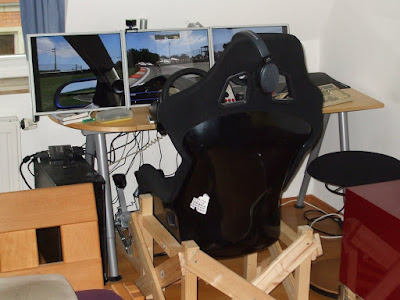
DTH2Go 3D
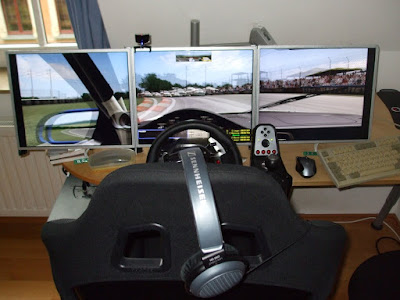
DTH2Go S3D
However you shouldn't move around too much in front of the screens and shouldn't have a problem with those "old-school tv" horizontal black lines.
It works at least for all racing sims (iRacing, LFS, rFactor, GTL, RBR, nKPro, GTR2, N2K3+GTP). Even got it working at 75Hz (but only up to 182.50 - hints for current driver versions welcome).
DTH2Go 3D
DTH2Go S3D
-
cybereality

- I Donated

- Posts: 68
- Joined: 08 Sep 2009, 04:05
Triplehead2Go + Nvidia 3D Discover - anyone ?
Very nice bmlacme. I am actually specing out parts for building a triple screen 3D solution but with the 22" Zalman model. I already had one Zalman and it looks great, now I just need another 2 plus all the gear needed to support the triple monitors. If I can get this working I think it will be an incredibly immersive experience. Stereo 3D on just one screen is sick enough, so 3 screens will be insane.
Also, if you guys want to try this with your existing TH setup you totally can for little to no cost. All you need is a cheap pair of anaglyph glasses and the iz3d driver ( http://www.iz3d.com/t-dcdriver.aspx ). That driver will work on ATI cards or Nvidia under XP/Vista. I recommend getting these glasses: http://www.3dstereo.com/viewmaster/gla-pvu.html . Its not going to give you the same experience as a true 3D monitor like with the Nvidia 3D Vision, but it will be maybe 40% of the experience for a fraction of the cost.
Also, if you guys want to try this with your existing TH setup you totally can for little to no cost. All you need is a cheap pair of anaglyph glasses and the iz3d driver ( http://www.iz3d.com/t-dcdriver.aspx ). That driver will work on ATI cards or Nvidia under XP/Vista. I recommend getting these glasses: http://www.3dstereo.com/viewmaster/gla-pvu.html . Its not going to give you the same experience as a true 3D monitor like with the Nvidia 3D Vision, but it will be maybe 40% of the experience for a fraction of the cost.
check my blog: cybereality.com
Who is online
Users browsing this forum: No registered users and 6 guests