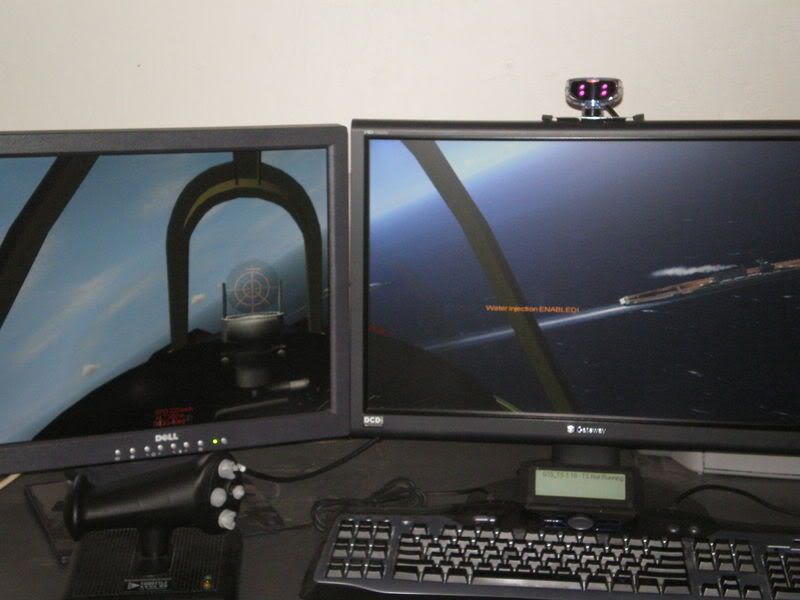
First off this whole site is AMAZING with tons of information that has helped me beyond words - thanks to all...
I am working on a set up for three screens for surrond gaming with IL2. I am an avid sim pilot and just love the sense of speed the extra screens provide - I have seen this done with Microsofts Flight Sim to great success. I have run some test with an extra monitor so I know I can get this to work. I am working with a 22" widescreen ( I am looking at getting two more) chained together through my two ATI video cards, all DVI inputs. Now my test was with my 22" widescreen and a standard 19" LCD so results were mixed, but I got the game to run pretty good. I guess the meat of the question is - has anyone run three screens with IL2 and what resolution were you using. The problem I am up against is that the resolutions with two screens (best was 2048x768) still have you too close to the instruments and I am affraid that a third screen will increase this problem as the image stretches. Any suggestions would be greatly appriciated before I start burning up my cash reserves...
Your ATi cards are going to restrict your resolution with the TH2G ... read this it is about compatibility and the resolutions ... ATi does not do so well ... (chart at the bottom) ... http://www.matrox.com/graphics/en/gxm/support/th2go/compatibility.php
Also read this it is about about widescreens and the TH2G ... http://www.widescreengamingforum.com/forum/viewtopic.php?t=10112
...very nice shot: can you post a screen that we may see all three monitor?
He doesn't have three.
If you read his post you will see that at the moment he only has one screen ... the two screens were just a test he did ... :wink:
Talking of reading things ... from the Profile Page ...
BTW ... from the Profile Page ...
Signature:
Use this block of text to display your system specs. There is a 512 character limit. Please no images.
Please keep the text (colored text is fine) between sizes 9 and 11 (using BB Code). Run your specs horizontally (rather than vertically), and limit to four lines at normal forum width.
One problem I can see is that those look like widescreen monitors. You are going to want 4:3 aspect ratio monitors if you go with a triple screen setup. Otherwise the image is going to be distorted.
I have IL2:FB and it presents a whole range of resolutions for selection, including 3x1024x768 and 3072x768, but *always* reverts to 3x800x600x32 on my system...
Not sure why I cant select higher, my hardware is certainly capable, but its still ownage++ :)
Not exctly sure what problem your seeing with the instruments? Seems fine from here...
I have a similar issue with FSX, the TH2G and 3 19" Monitors work flawlessly in both sims but it does seem to push you towards the front of the cockpit restricting your view of the guages, even if fully zoomed out.
I would like to find a fix for this, it could be something as simple as being able to edit a config file to provide a more pulled back view while in virtual cockpit views but that's beyond me.
The way I see it, I guess I'm gonna have to buy a TrackIR 4 Pro now :)
I have played with the zoom from within the sim and zoomed all the way out while in the VC but I still can't seem to get back far enough. I have a few FS nuts as friends and will be asking them if I can manually edit some .cfg file to allow a greater level of zoom.
The problem you described sounds like a typical "vert-" artifact. The game keeps constant horizontal FOV and with your dual screen setup this means you get less vertical visibility because of the increased aspect ratio. There are only two thing that can combat this: increasing the horizontal FOV (which should automatically increase your vertical visibility as well) or moving the camera further away from the cockpit panel.
Both of these solutions have their limits. You cannot increase the horizontal FOV more than 180 degrees and you cannot move the camera behind your virtual seat.
You are right with your assumption, adding the third screen is going to make your vertical FOV even smaller if the game doesn't allow you to change FOV value.
is that a TrackIR and thrustmaster HOTAS joystick? if you have already burnt money on those, go the whole hog and get a triple head, I think you will find that games manage the 3 * resolution more easily than you would expect. save money on monitors by picking up some old CRTs on ebay