Detailed breakdowns of how games react to widescreen, ultra-wide, 4k and multi-mon
Tanuki
Posts: 2866 Joined: 07 Jul 2007, 23:55
Post
by Tanuki 08 Jan 2009, 09:57
Widescreen Grade: B Multi-monitor Grade: Unsupported Read Full Detailed Report - World of Goo 2D puzzler that involves using drops of goo to build bridges and structures to help the goo escape form the world.
Last edited by
Tanuki on 23 May 2013, 21:10, edited 2 times in total.
Reason: Edit
Tanuki
Posts: 2866 Joined: 07 Jul 2007, 23:55
Post
by Tanuki 09 Jan 2009, 00:46
what does it fix about widescreen?
You can finish a level. The game would break in certain aspects and resolutions before the patch.
The game itself does all its resolution changing through the text file. It was originally only 800x600. Not bad considering the origins of the game.
The_cranky_hermit
Insiders
Posts: 3010 Joined: 07 Nov 2005, 04:16
Post
by The_cranky_hermit 09 Jan 2009, 06:01
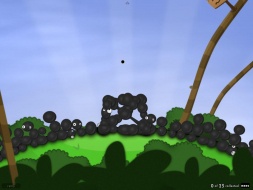
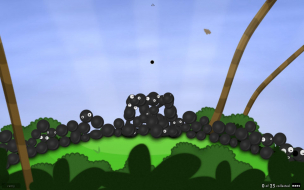
Composite picture time:
You get more hor + than vert -, mainly because you don't lose much from the bottom.
==Multiplayer support==
By "minor multiplayer elements" are you just referring to the World of Goo Corporation leaderboard? Or is there more to it than that?
Grade: B
CCE: 100%
.ini solution and vert - cut-scenes are blemishes.
Tanuki
Posts: 2866 Joined: 07 Jul 2007, 23:55
Post
by Tanuki 09 Jan 2009, 06:09
By "minor multiplayer elements" are you just referring to the World of Goo Corporation leaderboard? Or is there more to it than that?
That and the towers you can see in the background in the corporation mode. So, yes.
skipclarke
Founder
Posts: 7358 Joined: 13 Oct 2003, 05:00
Post
by skipclarke 09 Jan 2009, 07:03
what does it fix about widescreen?
Thanks for the update. I tried the demo, but didn't worry with a DR once I saw it only supported 800x600.
scavvenjahh
Editors
Posts: 3424 Joined: 06 Mar 2008, 17:20
Post
by scavvenjahh 15 Oct 2009, 11:48
You can press Alt+Enter to switch to windowed mode. The game will then always start in windowed mode, unless you hit Alt+Enter again. 8)
The_cranky_hermit
Insiders
Posts: 3010 Joined: 07 Nov 2005, 04:16
Post
by The_cranky_hermit 15 Oct 2009, 15:50
That's strange. I've never heard of a game which supported arbitrary resolutions through .ini... but had an aspect ratio limit. I doublechecked this myself - the widest I could get it to run was 1920x1050.
Tanuki
Posts: 2866 Joined: 07 Jul 2007, 23:55
Post
by Tanuki 15 Oct 2009, 18:35
That's strange. I've never heard of a game which supported arbitrary resolutions through .ini... but had an aspect ratio limit. I doublechecked this myself - the widest I could get it to run was 1920x1050.
A lot of the levels are just not wide enough to show anything for wider aspect ratios. I imagine that played a factor in this.
balver
Posts: 2 Joined: 08 Oct 2009, 20:59
Post
by balver 18 May 2011, 20:51
Not everything is OK. In the main menu the text is truncated - at least for Steam version, see
link .
Users browsing this forum: Google [Bot] , Semrush [Bot] and 10 guests