Fate

Detailed breakdowns of how games react to widescreen, ultra-wide, 4k and multi-mon
Post Reply
joehonkie
Posts: 5
Joined: 03 Nov 2006, 20:16

Fate

Post by joehonkie »


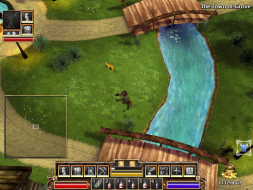
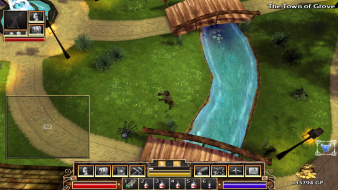
Widescreen Grade: B
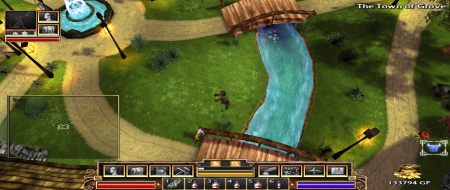
Ultra-Widescreen Grade: B
Multi-monitor Grade: B
4k Grade: Incomplete

Read Full Detailed Report - Fate

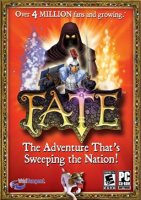
FATE is a single-player hack and slash action role-play game from WildTangent. Gameplay centers around a massive dungeon.


4:3


16:10


16:9


21:9


3x1

Last edited by joehonkie on 23 Apr 2014, 19:11, edited 8 times in total.
Reason: Edit
User avatar
DaFox
Posts: 2356
Joined: 14 Nov 2006, 15:48

FATE: Detailed Report

Post by DaFox »

Could you please test more widescreen resolutions, Right now I dont think thats a B, C+ at the most.
The_cranky_hermit
Insiders
Insiders
Posts: 3010
Joined: 07 Nov 2005, 04:16

FATE: Detailed Report

Post by The_cranky_hermit »

==Supported Resolutions==

Please list these resolutions as "untested":
1280x720, 1280x800, 1440x900, 1920x1080, 1920x1200

If you have an nVidia card, you should be able to add the first three resolutions to your drivers by following this tutorial.

==Aspect Ratio Support==

We need shots comparing 16:9 and 16:10.


==Grading==

Calculated grade: C+
Potential grade: B

Major unresolved issues:
Does the game support 1280x720 or 1920x1080?

Minor unresolved issues:
Does the game support 1280x800, 1440x900, and 1920x1200?

Summary of widescreen-related flaws:
.ini solution
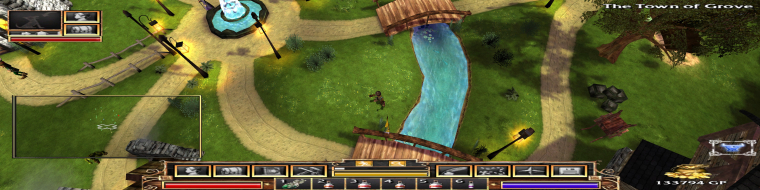
Stretched HUD, menus, and subscreens
Stretched intro images

joehonkie
Posts: 5
Joined: 03 Nov 2006, 20:16

FATE: Detailed Report

Post by joehonkie »

Updated. I'll see if I can test the other resolutions at some point in the near future.

EDIT: Looks like those first two are in the Vista driver by default.
joehonkie
Posts: 5
Joined: 03 Nov 2006, 20:16

FATE: Detailed Report

Post by joehonkie »

Ok, did everything I could. The current Nvidia Vista driver won't let me add unlisted resolutions, so I couldn't do anything that I haven't already.

EDIT: Should I be upgrading that to a B-? I'm new at this.
The_cranky_hermit
Insiders
Insiders
Posts: 3010
Joined: 07 Nov 2005, 04:16

FATE: Detailed Report

Post by The_cranky_hermit »

**UPDATE**

The grading curve was updated today (this doesn't happen often). The new grade is a B.

==Grading==

Calculated grade: B

Major unresolved issues:
None.

Minor unresolved issues:
None.

Summary of widescreen-related flaws:
.ini solution
Stretched HUD, menus, and subscreens

Cranky's coverage estimate: 99.5%
joehonkie
Posts: 5
Joined: 03 Nov 2006, 20:16

FATE: Detailed Report

Post by joehonkie »

I had to update my .htaccess due to some image leeching from my webserver. Sorry if anyone got an ugly message out of that. I have corrected the issue.
User avatar
ViciousXUSMC
Editors
Editors
Posts: 1497
Joined: 31 Jul 2006, 14:58

FATE: Detailed Report

Post by ViciousXUSMC »

Thanks for the report, due to this I think I may have to play this game now. Looks like a good way to pass time when I dont feel like shooting people in the head in BF2142, and its just somthing diffrent.

Got the game today, wanna add I found a high res texture upgrade for the game that also includes higher quality sounds. Then a bonus for the game that adds new items/enemies.

I wish it had a darker bloody type atmosphere :/ but its a pretty good game and exactly what I expected it to be. Actually my only complaint isnt the graphics or lack of blood or anything, but just severe lack of character customization. You get like 6 faces and 6 hair types and thats it.
ViciousXUSMC on the Web - YouTube :: FaceBook :: Website
Necrochain
Posts: 2
Joined: 21 Aug 2008, 18:30

FOV

Post by Necrochain »

Sorry to bring this back, but if you look further in the config.dat, you can edit the FOV

Code: Select all

FARCLIP:256

   FOV:45
   VERSION:1.22


change that to 55 for 1680 x 1050
User avatar
skipclarke
Founder
Founder
Posts: 7358
Joined: 13 Oct 2003, 05:00

FATE: Detailed Report

Post by skipclarke »

The game already performed in Hor+, in widescreen. Not sure if there would be a need to add a custom FOV. Maybe if it didn't support TH2Go properly.
Necrochain
Posts: 2
Joined: 21 Aug 2008, 18:30

FATE: Detailed Report

Post by Necrochain »

It adjusts "stretched images" to fit the resolution.
User avatar
skipclarke
Founder
Founder
Posts: 7358
Joined: 13 Oct 2003, 05:00

FATE: Detailed Report

Post by skipclarke »

So, it fixes the HUD? Can you post some pics?
Ergonpandilus
Posts: 132
Joined: 26 Mar 2008, 23:27

Notebook

Post by Ergonpandilus »

Also works with 1024x600 (WSVGA), popular mini notebook resolution.

And same method works with the new version, Fate: Undiscovered Realms, too.
agof
Posts: 1
Joined: 21 Apr 2014, 01:22

Re: Fate

Post by agof »

well it kinda works and easily, but interface stretched

http://cloud-3.steampowered.com/ugc/577 ... sizedimage
Post Reply

Who is online

Users browsing this forum: DuckDuckGo [Bot] and 3 guests